Table of Contents for
Magento 2 - Build World-Class online stores
 Magento 2 - Build World-Class online stores
Published by
Packt Publishing, 2017
Magento 2 - Build World-Class online stores
Published by
Packt Publishing, 2017
- Cover
- Table of Contents
- Magento 2 - Build World-Class online stores
- Magento 2 - Build World-Class online stores
- Credits
- Preface
- 1. Module 1
- 1. Magento Fundamentals
- XAMPP installation
- Magento
- Summary
- 2. Magento 2.0 Features
- An introduction to the Magento order management system
- Magento 2.0 command-line configuration
- The command-line utility
- Summary
- 3. Working with Search Engine Optimization
- Store configuration
- SEO and searching
- SEO catalog configuration
- Google Analytics tracking code
- Optimizing Magento pages
- Summary
- 4. Magento 2.0 Theme Development – the Developers' Holy Grail
- Magento 2.0 theme structure
- The Magento Luma theme
- Magento theme inheritance
- CMS blocks and pages
- Custom variables
- Creating a basic Magento 2.0 theme
- Summary
- 5. Creating a Responsive Magento 2.0 Theme
- Composer – the PHP dependency manager
- Building the CompStore theme
- CSS preprocessing with LESS
- Applying new CSS to the CompStore theme
- Creating the CompStore logo
- Applying the theme
- Creating CompStore content
- Customizing Magento 2.0 templates
- Summary
- 6. Write Magento 2.0 Extensions – a Great Place to Go
- Using the Zend framework
- Magento 2.0 extension structure
- Developing your first Magento extension
- The Twitter REST API
- The TweetsAbout module structure
- Using TwitterOAuth to authenticate our extension
- Developing the module
- Summary
- 7. Go Mobile with Magento 2.0!
- Adjusting the CompStore theme for mobile devices
- The Magento 2.0 responsive design
- The Magento UI
- Implementing a new CSS mixin media query
- Adjusting tweets about extensions for mobile devices
- Summary
- 8. Speeding up Your Magento 2.0
- Indexing and caching Magento
- Indexing and re-indexing data
- The Magento cron job
- Caching
- Fine-tuning the Magento hosting server
- Selecting the right Magento hosting service
- Apache web server deflation
- Enabling the expires header
- Minifying scripts
- Summary
- 9. Improving Your Magento Skills
- Magento knowledge center
- Improving your Magento skills
- Summary
- 2. Module 2
- 1. Magento 2 System Tools
- Installing Magento 2 sample data via GUI
- Installing Magento 2 sample data via the command line
- Managing Magento 2 indexes via the command line
- Managing Magento 2 cache via the command line
- Managing Magento 2 backup via the command line
- Managing Magento 2 set mode (MAGE_MODE)
- Transferring your Magento 1 database to Magento 2
- 2. Enabling Performance in Magento 2
- Configuring Redis for backend cache
- Configuring Memcached for session caching
- Configuring Varnish as the Full Page Cache
- Configuring Magento 2 with CloudFlare
- Configuring optimized images in Magento 2
- Configuring Magento 2 with HTTP/2
- Configuring Magento 2 performance testing
- 3. Creating Catalogs and Categories
- Create a Root Catalog
- Create subcategories
- Manage attribute sets
- Create products
- Manage products in a catalog grid
- 4. Managing Your Store
- Creating shipping and tax rules
- Managing customer groups
- Configuring inventories
- Configuring currency rates
- Managing advanced pricing
- 5. Creating Magento 2 Extensions – the Basics
- Initializing extension basics
- Working with database models
- Creating tables using setup scripts
- Creating a web route and controller to display data
- Creating system configuration fields
- Creating a backend data grid
- Creating a backend form to add/edit data
- 6. Creating Magento 2 Extensions – Advanced
- Using dependency injection to pass classes to your own class
- Modifying functions with the use of plugins – Interception
- Creating your own XML module configuration file
- Creating your own product type
- Working with service layers/contracts
- Creating a Magento CLI command option
- 3. Module 3
- 1. Planning for Magento
- Technical considerations
- Global-Website-Store methodology
- Planning for multiple stores
- Summary
- 2. Managing Products
- Managing products the customer focused way
- Creating products
- Managing inventory
- Pricing tools
- Autosettings
- Related products, up-sells, and cross-sells
- Importing products
- Summary
- 3. Designs and Themes
- The concept of theme inheritance
- Default installation of design packages and themes
- Installing third-party themes
- Inline translations
- Working with theme variants
- Customizing themes
- Customizing layouts
- Summary
- 4. Configuring to Sell
- Payment methods
- Shipping methods
- Managing taxes
- Transactional e-mails
- Summary
- 5. Managing Non-Product Content
- Summary
- 6. Marketing Tools
- Promotions
- Newsletters
- Using sitemaps
- Optimizing for search engines
- Summary
- 7. Extending Magento
- The new Magento module architecture
- Extending Magento functionality with Magento plugins
- Building your own extensions
- Summary
- 8. Optimizing Magento
- Indexing and caching
- Caching in Magento 2 – not just FPC
- Tuning your server for speed
- Summary
- 9. Advanced Techniques
- Version control
- Magento cron
- Backing up your database
- Upgrading Magento
- Summary
- 10. Pre-Launch Checklist
- System configurations
- Design configurations
- Search engine optimization
- Sales configurations
- Product configurations
- Maintenance configurations
- Summary
- Index
Today's search engines have started measuring rendering times — the time it takes for a web page to download, including graphics and other files — as part of their ranking algorithms. In the past, we used to concentrate on download speed because so many users were connected to the Internet with slow, dial-up connections. With the proliferation of broadband speeds, most developers eased up on this goal, opting to include more flash animations, larger graphics, and complex JavaScripts. Now, we're moving back to the beginning in order to satisfy Google, Yahoo!, and Bing.
With Magento's complex MVC architecture and database structure, you can have the most efficient front-end design possible, yet still experience very slow download speeds as Magento works to build the pages and query the database. Therefore, to create a site with the lowest download speed, we need to take advantage of two important tools: indexing and caching. Each contributes its own benefit to your goal of speeding up the page generation process.
As your Magento installation grows with products, customers, and orders, database lookups can become slower as the MySQL database has to look among a greater number of records to find the ones it needs. Magento uses a number of indexing tables which provide faster lookups by pre-organizing the data records. However, as your site grows, so do these index tables.
In our discussion on EAV, we talked about flattening the categories and products. In essence, when Magento is asked to index categories and products, it pulls in all the various related EAV data for each and creates records in special tables that contain all the related data in one record. In other words, instead of doing lookups among as many as 50 tables to display all the information on a product, Magento looks to only a handful of tables, thereby gathering the necessary information more quickly.
The speed difference when using a flat catalog versus a non-flat catalog is unnoticeable for low-traffic sites, as MySQL can adequately handle requests very, very well. However, as your site grows in traffic, you will notice a wider speed differential. Additionally, if your store hosts thousands of products, you'll certainly appreciate the added speed a flat catalog will give your site.
The trade-off is that reindexing a site with lots of products and/or categories can take a long time if you choose to use a flat catalog. For that reason, we generally keep the flattening feature turned off when we populate a new site with products. However, once we go live, we almost always turn on the flat feature to give our sites the fastest possible rendering possible, even if the initial site traffic is low.
As we saw in the previous figure, if you make changes to your site, Magento will notify you that you need to reindex your site. To do this, you need to perform the following steps:
- Go to System | Index Management in your Magento backend.
- Select the indexes that say REINDEX REQUIRED.
- Select Reindex Data in the dropdown menu at the top right of the screen.
- Click on Submit.
Once completed, you will see these indexes with a status of READY.
While indexing can help speed up database lookups by pre-organizing the data for faster lookups, caching does virtually the same thing for the HTML page components that make up the front-end experience. Caching stores completed pages or parts of pages so that website visitors will be provided with faster downloads.
In a nutshell, caching works like this (see the following chart, also):
- Site visitor requests a page from your site.
- Magento first checks to see if the request can already be fulfilled from a cached file.
- If no cached file exists, or if the cached data is deemed to be old, Magento rebuilds the actual file.
- Magento stores a new copy of the file in the cache.
- Then, the file is sent to the visitor's browser.
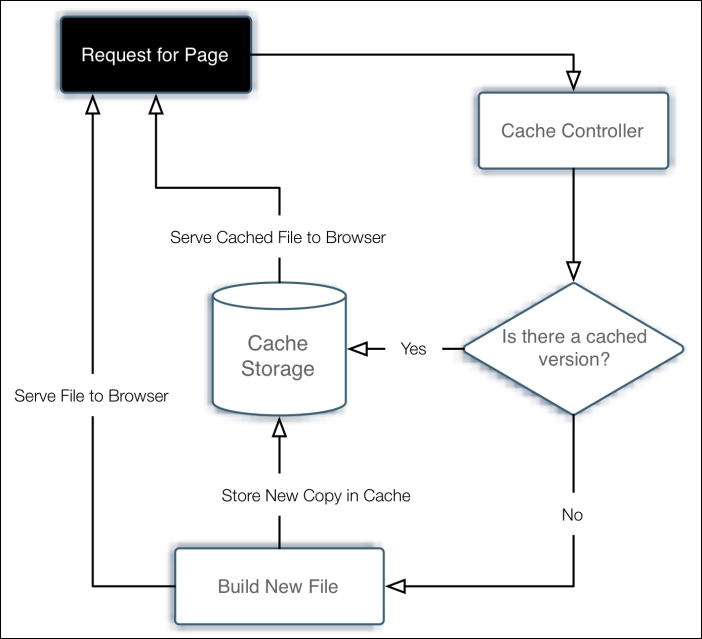
Caching in Magento is accomplished in a couple of ways: with core components, such as modules and layouts, and through whole page caching, which stores entire page outputs.
Every time a page is accessed by a visitor, various modules, layouts, product images, and more are cached or stored for easy retrieval within the /var/cache directory of your Magento installation. If you explore this directory on your server, you'll see thousands of files with strange names. These are the actual pieces of cached data that are delivered to visitors to your site.
Whole page caching is just as the name implies: the caching of an entire web page. Imagine the speed boost if Magento did not have to build a new page by assembling dozens of layout and module components, cached or otherwise!
I've run some tests of sites with and without caching turned on. In almost all of our tests, caching improved download speeds by approximately 25%-40%, depending on the overall load on the server. The heavier the load, the more the benefit since the server is naturally slower in building new pages versus serving cached pages.
This increase in speed, while perhaps not as noticeable to your site visitors, can have a huge impact on how search engines rank your site.
While caching does help speed up page delivery, it does take a bit of management on your part. Caching is controllable in two areas of your backend:
- Go to Store | Configuration | System.
- Expand the External Full Page Cache Settings.
- Select Yes for Enable External Cache.
- Click on Save Config.
Then, you need to set your core cache settings:
- Go to System | Cache Management.
- Click Select All over the first column.
- Select Enable in the upper right menu.
- Click on Submit.
Note
Unfortunately, some extensions are not properly designed to participate in Magento's caching system. If you experience problems in how certain content blocks are rendered, you may want to leave the Blocks HTML output cache disabled. While this prevents content blocks from being cached, it may be your best remedy if you have a third-party extension which you're really fond of.