Table of Contents for
Magento 2 - Build World-Class online stores
 Magento 2 - Build World-Class online stores
Published by
Packt Publishing, 2017
Magento 2 - Build World-Class online stores
Published by
Packt Publishing, 2017
- Cover
- Table of Contents
- Magento 2 - Build World-Class online stores
- Magento 2 - Build World-Class online stores
- Credits
- Preface
- 1. Module 1
- 1. Magento Fundamentals
- XAMPP installation
- Magento
- Summary
- 2. Magento 2.0 Features
- An introduction to the Magento order management system
- Magento 2.0 command-line configuration
- The command-line utility
- Summary
- 3. Working with Search Engine Optimization
- Store configuration
- SEO and searching
- SEO catalog configuration
- Google Analytics tracking code
- Optimizing Magento pages
- Summary
- 4. Magento 2.0 Theme Development – the Developers' Holy Grail
- Magento 2.0 theme structure
- The Magento Luma theme
- Magento theme inheritance
- CMS blocks and pages
- Custom variables
- Creating a basic Magento 2.0 theme
- Summary
- 5. Creating a Responsive Magento 2.0 Theme
- Composer – the PHP dependency manager
- Building the CompStore theme
- CSS preprocessing with LESS
- Applying new CSS to the CompStore theme
- Creating the CompStore logo
- Applying the theme
- Creating CompStore content
- Customizing Magento 2.0 templates
- Summary
- 6. Write Magento 2.0 Extensions – a Great Place to Go
- Using the Zend framework
- Magento 2.0 extension structure
- Developing your first Magento extension
- The Twitter REST API
- The TweetsAbout module structure
- Using TwitterOAuth to authenticate our extension
- Developing the module
- Summary
- 7. Go Mobile with Magento 2.0!
- Adjusting the CompStore theme for mobile devices
- The Magento 2.0 responsive design
- The Magento UI
- Implementing a new CSS mixin media query
- Adjusting tweets about extensions for mobile devices
- Summary
- 8. Speeding up Your Magento 2.0
- Indexing and caching Magento
- Indexing and re-indexing data
- The Magento cron job
- Caching
- Fine-tuning the Magento hosting server
- Selecting the right Magento hosting service
- Apache web server deflation
- Enabling the expires header
- Minifying scripts
- Summary
- 9. Improving Your Magento Skills
- Magento knowledge center
- Improving your Magento skills
- Summary
- 2. Module 2
- 1. Magento 2 System Tools
- Installing Magento 2 sample data via GUI
- Installing Magento 2 sample data via the command line
- Managing Magento 2 indexes via the command line
- Managing Magento 2 cache via the command line
- Managing Magento 2 backup via the command line
- Managing Magento 2 set mode (MAGE_MODE)
- Transferring your Magento 1 database to Magento 2
- 2. Enabling Performance in Magento 2
- Configuring Redis for backend cache
- Configuring Memcached for session caching
- Configuring Varnish as the Full Page Cache
- Configuring Magento 2 with CloudFlare
- Configuring optimized images in Magento 2
- Configuring Magento 2 with HTTP/2
- Configuring Magento 2 performance testing
- 3. Creating Catalogs and Categories
- Create a Root Catalog
- Create subcategories
- Manage attribute sets
- Create products
- Manage products in a catalog grid
- 4. Managing Your Store
- Creating shipping and tax rules
- Managing customer groups
- Configuring inventories
- Configuring currency rates
- Managing advanced pricing
- 5. Creating Magento 2 Extensions – the Basics
- Initializing extension basics
- Working with database models
- Creating tables using setup scripts
- Creating a web route and controller to display data
- Creating system configuration fields
- Creating a backend data grid
- Creating a backend form to add/edit data
- 6. Creating Magento 2 Extensions – Advanced
- Using dependency injection to pass classes to your own class
- Modifying functions with the use of plugins – Interception
- Creating your own XML module configuration file
- Creating your own product type
- Working with service layers/contracts
- Creating a Magento CLI command option
- 3. Module 3
- 1. Planning for Magento
- Technical considerations
- Global-Website-Store methodology
- Planning for multiple stores
- Summary
- 2. Managing Products
- Managing products the customer focused way
- Creating products
- Managing inventory
- Pricing tools
- Autosettings
- Related products, up-sells, and cross-sells
- Importing products
- Summary
- 3. Designs and Themes
- The concept of theme inheritance
- Default installation of design packages and themes
- Installing third-party themes
- Inline translations
- Working with theme variants
- Customizing themes
- Customizing layouts
- Summary
- 4. Configuring to Sell
- Payment methods
- Shipping methods
- Managing taxes
- Transactional e-mails
- Summary
- 5. Managing Non-Product Content
- Summary
- 6. Marketing Tools
- Promotions
- Newsletters
- Using sitemaps
- Optimizing for search engines
- Summary
- 7. Extending Magento
- The new Magento module architecture
- Extending Magento functionality with Magento plugins
- Building your own extensions
- Summary
- 8. Optimizing Magento
- Indexing and caching
- Caching in Magento 2 – not just FPC
- Tuning your server for speed
- Summary
- 9. Advanced Techniques
- Version control
- Magento cron
- Backing up your database
- Upgrading Magento
- Summary
- 10. Pre-Launch Checklist
- System configurations
- Design configurations
- Search engine optimization
- Sales configurations
- Product configurations
- Maintenance configurations
- Summary
- Index
How you utilize GWS in your particular case depends on the purpose of your Magento installation. With GWS, you have an enormous number of configuration possibilities to explore. That said, your configuration planning would generally fall within three major categories: multiple domains, multiple businesses, and multiple languages. Of course, in the real world, a Magento installation may include aspects of all three.
It's becoming more popular in e-commerce to create multiple storefronts selling the same or similar products, each having a different domain name, branding design, and content. In this way, merchants can extend their marketing by appealing to different market segments, not just having one website trying to satisfy all consumers.
For example, let's assume you want to sell shoes online. You have a great distribution source where you can source all kinds of shoes, from dress to casual, running to flip-flops. While you can certainly have a comprehensive, "all types available" online shoe store, you might elect to secure different domain names focused on different segments of the shoe market. www.runningshoes4you.com would cater to joggers, while www.highheelsemporium.com features designer-quality dress shoes for women.
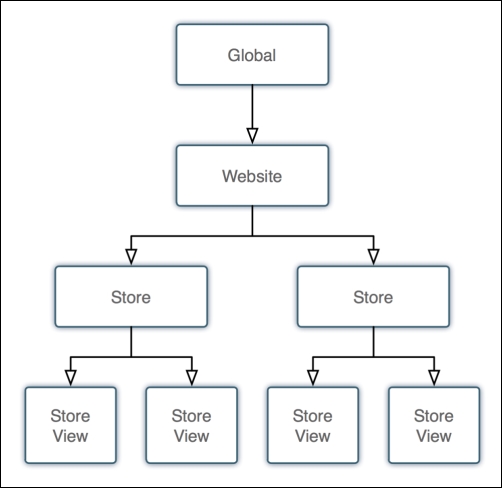
In Magento, you would create one website but create at least two stores, one for each of your domains. You might also create a third as an overall retail store for all your shoes. Each store could either share the same product catalog or each have its own separate catalog. By having all stores assigned to the same website, you have the ability to control certain configurations that apply to all stores. For example, if all the stores belong to the same retailer, as in this example, all would offer the same payment methods, such as PayPal.com or Authorize.Net. Most likely, the shipping methods you offer would be the same as well as your policies for returns and shipping.
In short, if all the domains belong to the same retail business, it may make sense to have one website with multiple stores, rather than to create entire website-store hierarchies for each product-focused domain. As you can see in the following diagram, this makes for a slimmer, more manageable structure:
In contrast, if your installation will be used to manage multiple businesses, you will need to create multiple websites. The reason for this is that actual, separate business entities will have separate payment system accounts (for example, PayPal, credit card merchant accounts, shipping), and therefore need to be able to segregate these between different websites.
To extend our example, let's assume your shoe retailer also owns a sideline business selling women's sportswear. This other business exists under a separate legal entity (for example, corporation, partnership), and therefore has different bank accounts, distributors, and customers. With Magento, you should create separate websites for each, even if they are to share certain products.
For instance, the sportswear site might also feature women's casual shoes, which are also offered by the shoe website. The same product can be assigned to multiple product catalogs (and therefore different stores) even if the catalogs belong to separate businesses. And somehow, through a complex database architecture, Magento succeeds in keeping all this straight for you. Amazing.
Even among some of Magento's top competitors in the open source e-commerce arena, very few provide the ability to create multiple language views of a website. Multiple language views are not simple matters for several reasons:
- All site content, including links, instructions, error messages, and so on must be translated to the intended language.
- The platform must seamlessly provide multiple language selection and, if possible, intelligently provide the appropriate language to the website visitor based on their geographical location.
- Multiple languages can also infer the need to provide product prices in multiple currencies. Conversion rates vary almost minute-by-minute. Daily swings in conversion rates can affect profitability if the amounts shown online are not updated.
Magento has several tools to help you create multiple languages and currencies for retailers wanting to sell globally (or just provide multiple languages to users within a single country). It all begins with creating multiple views for a given store.
In our example, our running shoe website needs to be available in both English and French, so you would create two views within the running shoe store, one for each language. In your Magento-powered website, you can easily include a small drop-down selector which allows a visitor to choose their preferred language based on the views you have created.
In fact, in most Magento theme designs, this dropdown is automatic whenever there are multiple views created for any given store.
Tip
Another interesting use of multiple views could be to segment your customer market within a store. For example, if you wanted your shoe store to have a different overall look for men versus women versus children, you could create multiple views for each customer segment, and then allow the visitor to choose their desired view.