Table of Contents for
Magento 2 - Build World-Class online stores
 Magento 2 - Build World-Class online stores
Published by
Packt Publishing, 2017
Magento 2 - Build World-Class online stores
Published by
Packt Publishing, 2017
- Cover
- Table of Contents
- Magento 2 - Build World-Class online stores
- Magento 2 - Build World-Class online stores
- Credits
- Preface
- 1. Module 1
- 1. Magento Fundamentals
- XAMPP installation
- Magento
- Summary
- 2. Magento 2.0 Features
- An introduction to the Magento order management system
- Magento 2.0 command-line configuration
- The command-line utility
- Summary
- 3. Working with Search Engine Optimization
- Store configuration
- SEO and searching
- SEO catalog configuration
- Google Analytics tracking code
- Optimizing Magento pages
- Summary
- 4. Magento 2.0 Theme Development – the Developers' Holy Grail
- Magento 2.0 theme structure
- The Magento Luma theme
- Magento theme inheritance
- CMS blocks and pages
- Custom variables
- Creating a basic Magento 2.0 theme
- Summary
- 5. Creating a Responsive Magento 2.0 Theme
- Composer – the PHP dependency manager
- Building the CompStore theme
- CSS preprocessing with LESS
- Applying new CSS to the CompStore theme
- Creating the CompStore logo
- Applying the theme
- Creating CompStore content
- Customizing Magento 2.0 templates
- Summary
- 6. Write Magento 2.0 Extensions – a Great Place to Go
- Using the Zend framework
- Magento 2.0 extension structure
- Developing your first Magento extension
- The Twitter REST API
- The TweetsAbout module structure
- Using TwitterOAuth to authenticate our extension
- Developing the module
- Summary
- 7. Go Mobile with Magento 2.0!
- Adjusting the CompStore theme for mobile devices
- The Magento 2.0 responsive design
- The Magento UI
- Implementing a new CSS mixin media query
- Adjusting tweets about extensions for mobile devices
- Summary
- 8. Speeding up Your Magento 2.0
- Indexing and caching Magento
- Indexing and re-indexing data
- The Magento cron job
- Caching
- Fine-tuning the Magento hosting server
- Selecting the right Magento hosting service
- Apache web server deflation
- Enabling the expires header
- Minifying scripts
- Summary
- 9. Improving Your Magento Skills
- Magento knowledge center
- Improving your Magento skills
- Summary
- 2. Module 2
- 1. Magento 2 System Tools
- Installing Magento 2 sample data via GUI
- Installing Magento 2 sample data via the command line
- Managing Magento 2 indexes via the command line
- Managing Magento 2 cache via the command line
- Managing Magento 2 backup via the command line
- Managing Magento 2 set mode (MAGE_MODE)
- Transferring your Magento 1 database to Magento 2
- 2. Enabling Performance in Magento 2
- Configuring Redis for backend cache
- Configuring Memcached for session caching
- Configuring Varnish as the Full Page Cache
- Configuring Magento 2 with CloudFlare
- Configuring optimized images in Magento 2
- Configuring Magento 2 with HTTP/2
- Configuring Magento 2 performance testing
- 3. Creating Catalogs and Categories
- Create a Root Catalog
- Create subcategories
- Manage attribute sets
- Create products
- Manage products in a catalog grid
- 4. Managing Your Store
- Creating shipping and tax rules
- Managing customer groups
- Configuring inventories
- Configuring currency rates
- Managing advanced pricing
- 5. Creating Magento 2 Extensions – the Basics
- Initializing extension basics
- Working with database models
- Creating tables using setup scripts
- Creating a web route and controller to display data
- Creating system configuration fields
- Creating a backend data grid
- Creating a backend form to add/edit data
- 6. Creating Magento 2 Extensions – Advanced
- Using dependency injection to pass classes to your own class
- Modifying functions with the use of plugins – Interception
- Creating your own XML module configuration file
- Creating your own product type
- Working with service layers/contracts
- Creating a Magento CLI command option
- 3. Module 3
- 1. Planning for Magento
- Technical considerations
- Global-Website-Store methodology
- Planning for multiple stores
- Summary
- 2. Managing Products
- Managing products the customer focused way
- Creating products
- Managing inventory
- Pricing tools
- Autosettings
- Related products, up-sells, and cross-sells
- Importing products
- Summary
- 3. Designs and Themes
- The concept of theme inheritance
- Default installation of design packages and themes
- Installing third-party themes
- Inline translations
- Working with theme variants
- Customizing themes
- Customizing layouts
- Summary
- 4. Configuring to Sell
- Payment methods
- Shipping methods
- Managing taxes
- Transactional e-mails
- Summary
- 5. Managing Non-Product Content
- Summary
- 6. Marketing Tools
- Promotions
- Newsletters
- Using sitemaps
- Optimizing for search engines
- Summary
- 7. Extending Magento
- The new Magento module architecture
- Extending Magento functionality with Magento plugins
- Building your own extensions
- Summary
- 8. Optimizing Magento
- Indexing and caching
- Caching in Magento 2 – not just FPC
- Tuning your server for speed
- Summary
- 9. Advanced Techniques
- Version control
- Magento cron
- Backing up your database
- Upgrading Magento
- Summary
- 10. Pre-Launch Checklist
- System configurations
- Design configurations
- Search engine optimization
- Sales configurations
- Product configurations
- Maintenance configurations
- Summary
- Index
Every product has a unique DNA; some, such as shoes, could have different colors, brands, and sizes, while a snowboard could have weight, length, torsion, manufacturer, and style.
Setting up a website with all the attributes does not make sense. Depending on the products you sell, you should create attributes specific to each website.
When creating products for your website, attributes are the key element and need to be thought through. What and how many attributes do you need? And how many values do you need? These are all types of question that could have a great impact on your website; and don't forget performance. Creating an attribute such as color and having 100,000 of different key values stored will not improve your overall speed and user experience. Always think things through.
After creating the attributes, we combine them in attribute sets, which can be picked when starting to create a product. Some attributes can be used more than once, while others are unique to one product or attribute set.
To step through this recipe, you will use a Droplet created in Chapter 1, Magento 2 System Tools, at DigitalOcean (https://www.digitalocean.com/). We will be using an NGINX, PHP-FPM, Composer-based setup with Magento 2 preinstalled. No other prerequisites are required.
For the purpose of this recipe, let's assume that we need to create product attributes and sets. The following steps will guide you through them:
- First, log in to the backend of Magento 2 and go to Stores | Products.
Since we are using a vanilla setup, only system attributes and one attribute set are installed. Now click on Add New Attribute and commit the following data in the Properties tab:
Attribute Properties
Default label
shoe_sizeCatalog Input Type for Store Owners
Drop-down
Values Required
No
Manage Options (values of your attribute)
English
Admin
French
German
4
4
35
35
4.5
4.5
35
35
5
5
35-36
35-36
5.5
5.5
36
36
6
6
36-37
36-37
6.5
6.5
37
37
7
7
37-38
37-38
7.5
7.5
38
38
8
8
38-39
38-39
8.5
8.5
39
39
Advanced Attribute Properties
Scope
Global
Unique Value
No
Add to Column Options
Yes
Use in Filer Options
Yes
Continue the rest of the chart accordingly (http://www.shoesizingcharts.com).
- Click on Save and Continue Edit now and continue on the Manage Labels tab with the following information:
Manage Titles (Size, Color, and so on)
English
French
German
Size
Taille
Größe
- Click on Save and Continue Edit now and continue on the Storefront Properties tab with the following information:
Storefront Properties
Use in Search
No
Comparable in Storefront
No
Use in Layered Navigation
Filterable (with result)
Use in Search Result Layered Navigation
No
Position
0
Use for Promo Rule Conditions
No
Allow HTML Tags on Storefront
Yes
Visible on Catalog Pages on Storefront
Yes
Used in Product Listing
No
Used for Sorting in Product Listing
No
- Click on Save Attribute now and clear the cache. Depending on whether you set up index management accordingly through the Magento 2
cronjob, it will automatically update the newly created attribute. - The configuration for the additional
shoe_type,width,color,gender, andoccasionattributes can be downloaded at https://github.com/mage2cookbook/chapter4. - After creating all of the attributes, we combine them in an attribute set called
Shoes. Go to Stores | Attribute Set, click Add Attribute Set, and commit the following data:Edit Attribute Set Name
Name
ShoesBased On
Default - Now click in the Groups section, click on the Add New button, and commit the group name called Shoes.
- The newly created group is now located at the bottom of the list. You may need to scroll down before you see it. It is possible to drag and drop the group higher up in the list.
- Now drag and drop the created
shoe_size,shoe_type,width,color,gender, andoccasionattributes in the group and save the configuration. Thecronjobnotice is automatically updated, depending on your settings. - Congratulations, you just finished creating attributes and attribute sets in Magento 2. These can be seen in the following screenshot:
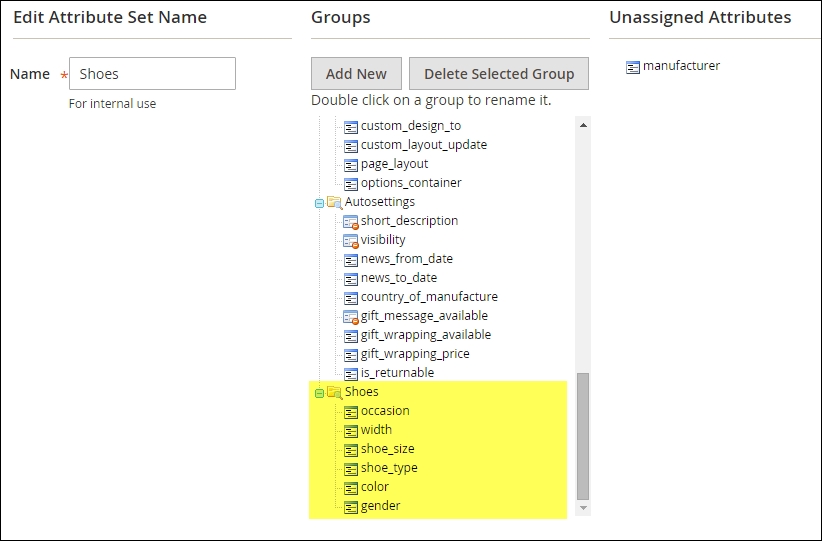
Let's recap and find out what we did throughout this recipe. In steps 1 through 10, we created attributes that will be used in an attribute set. The attributes and sets are the fundamentals for every website.
In steps 1 through 5, we created multiple attributes to define all details about the shoes and clothes we would like to sell. Some attributes are later used as configurable values on the frontend while others only indicate the gender or occasion.
In steps 6 through 9, we connect the attributes to the related attribute set. Thus, when creating a product, all the correct elements are available.
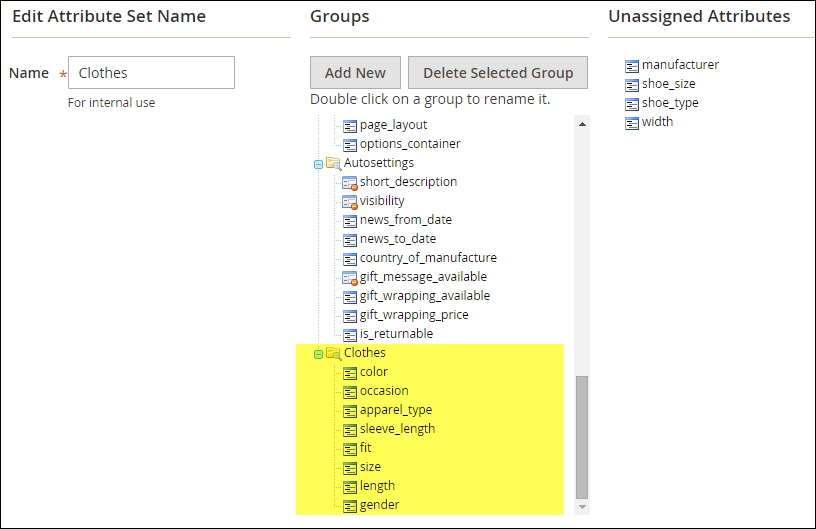
After creating the Shoe attribute set, continue by creating an attribute set for Clothes.
Use the following attributes to create the set: color, occasion, apparel_type, sleeve_length, fit, size, length, and gender.
Follow the same steps we performed before to create a new attribute set. You may reuse the color, occasion, and
gender attributes. Details of all the attributes can be found here: https://github.com/mage2cookbook/chapter4#clothes-set.
The following screenshot shows the Clothes attribute set: