Table of Contents for
Magento 2 - Build World-Class online stores
 Magento 2 - Build World-Class online stores
Published by
Packt Publishing, 2017
Magento 2 - Build World-Class online stores
Published by
Packt Publishing, 2017
- Cover
- Table of Contents
- Magento 2 - Build World-Class online stores
- Magento 2 - Build World-Class online stores
- Credits
- Preface
- 1. Module 1
- 1. Magento Fundamentals
- XAMPP installation
- Magento
- Summary
- 2. Magento 2.0 Features
- An introduction to the Magento order management system
- Magento 2.0 command-line configuration
- The command-line utility
- Summary
- 3. Working with Search Engine Optimization
- Store configuration
- SEO and searching
- SEO catalog configuration
- Google Analytics tracking code
- Optimizing Magento pages
- Summary
- 4. Magento 2.0 Theme Development – the Developers' Holy Grail
- Magento 2.0 theme structure
- The Magento Luma theme
- Magento theme inheritance
- CMS blocks and pages
- Custom variables
- Creating a basic Magento 2.0 theme
- Summary
- 5. Creating a Responsive Magento 2.0 Theme
- Composer – the PHP dependency manager
- Building the CompStore theme
- CSS preprocessing with LESS
- Applying new CSS to the CompStore theme
- Creating the CompStore logo
- Applying the theme
- Creating CompStore content
- Customizing Magento 2.0 templates
- Summary
- 6. Write Magento 2.0 Extensions – a Great Place to Go
- Using the Zend framework
- Magento 2.0 extension structure
- Developing your first Magento extension
- The Twitter REST API
- The TweetsAbout module structure
- Using TwitterOAuth to authenticate our extension
- Developing the module
- Summary
- 7. Go Mobile with Magento 2.0!
- Adjusting the CompStore theme for mobile devices
- The Magento 2.0 responsive design
- The Magento UI
- Implementing a new CSS mixin media query
- Adjusting tweets about extensions for mobile devices
- Summary
- 8. Speeding up Your Magento 2.0
- Indexing and caching Magento
- Indexing and re-indexing data
- The Magento cron job
- Caching
- Fine-tuning the Magento hosting server
- Selecting the right Magento hosting service
- Apache web server deflation
- Enabling the expires header
- Minifying scripts
- Summary
- 9. Improving Your Magento Skills
- Magento knowledge center
- Improving your Magento skills
- Summary
- 2. Module 2
- 1. Magento 2 System Tools
- Installing Magento 2 sample data via GUI
- Installing Magento 2 sample data via the command line
- Managing Magento 2 indexes via the command line
- Managing Magento 2 cache via the command line
- Managing Magento 2 backup via the command line
- Managing Magento 2 set mode (MAGE_MODE)
- Transferring your Magento 1 database to Magento 2
- 2. Enabling Performance in Magento 2
- Configuring Redis for backend cache
- Configuring Memcached for session caching
- Configuring Varnish as the Full Page Cache
- Configuring Magento 2 with CloudFlare
- Configuring optimized images in Magento 2
- Configuring Magento 2 with HTTP/2
- Configuring Magento 2 performance testing
- 3. Creating Catalogs and Categories
- Create a Root Catalog
- Create subcategories
- Manage attribute sets
- Create products
- Manage products in a catalog grid
- 4. Managing Your Store
- Creating shipping and tax rules
- Managing customer groups
- Configuring inventories
- Configuring currency rates
- Managing advanced pricing
- 5. Creating Magento 2 Extensions – the Basics
- Initializing extension basics
- Working with database models
- Creating tables using setup scripts
- Creating a web route and controller to display data
- Creating system configuration fields
- Creating a backend data grid
- Creating a backend form to add/edit data
- 6. Creating Magento 2 Extensions – Advanced
- Using dependency injection to pass classes to your own class
- Modifying functions with the use of plugins – Interception
- Creating your own XML module configuration file
- Creating your own product type
- Working with service layers/contracts
- Creating a Magento CLI command option
- 3. Module 3
- 1. Planning for Magento
- Technical considerations
- Global-Website-Store methodology
- Planning for multiple stores
- Summary
- 2. Managing Products
- Managing products the customer focused way
- Creating products
- Managing inventory
- Pricing tools
- Autosettings
- Related products, up-sells, and cross-sells
- Importing products
- Summary
- 3. Designs and Themes
- The concept of theme inheritance
- Default installation of design packages and themes
- Installing third-party themes
- Inline translations
- Working with theme variants
- Customizing themes
- Customizing layouts
- Summary
- 4. Configuring to Sell
- Payment methods
- Shipping methods
- Managing taxes
- Transactional e-mails
- Summary
- 5. Managing Non-Product Content
- Summary
- 6. Marketing Tools
- Promotions
- Newsletters
- Using sitemaps
- Optimizing for search engines
- Summary
- 7. Extending Magento
- The new Magento module architecture
- Extending Magento functionality with Magento plugins
- Building your own extensions
- Summary
- 8. Optimizing Magento
- Indexing and caching
- Caching in Magento 2 – not just FPC
- Tuning your server for speed
- Summary
- 9. Advanced Techniques
- Version control
- Magento cron
- Backing up your database
- Upgrading Magento
- Summary
- 10. Pre-Launch Checklist
- System configurations
- Design configurations
- Search engine optimization
- Sales configurations
- Product configurations
- Maintenance configurations
- Summary
- Index
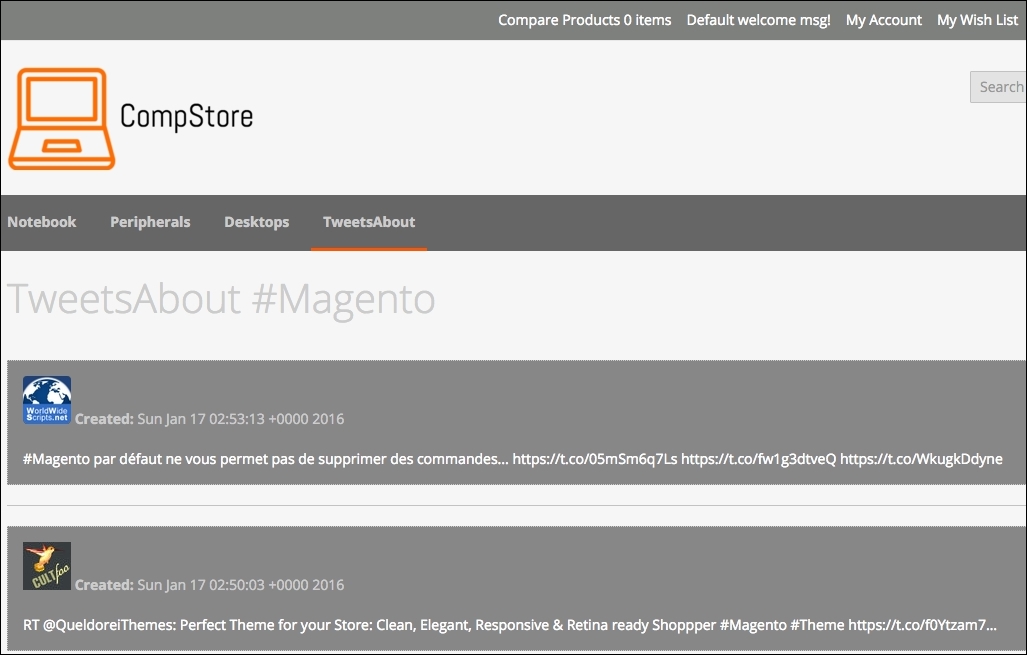
The extension that we created in Chapter 6, Write Magento 2.0 Extensions – a Great Place to Go, tweets about extension and has the following appearance:
Let's improve the CSS extension rules to turn it into a mobile-friendly one.
Using Chrome DevTools or Responsive Web Designer Tester, select an Apple iPhone 5—portrait device to test our code optimization.
Open the module.less file available under the packt/app/code/Packt/TweetsAbout/view/frontend/web/css/source directory and add the following code:
/*Tweets About Style*/

@media (min-width: 960px){
#wrapper {
width: 90%;
max-width: 1100px;
min-width: 800px;
margin: 50px auto;
  }

  #columns {
    -webkit-column-count: 3;
    -webkit-column-gap: 10px;
    -webkit-column-fill: auto;
    -moz-column-count: 3;
    -moz-column-gap: 10px;
    -moz-column-fill: auto;
    column-count: 3;
    column-gap: 15px;
    column-fill: auto;
  }
}

.tweet {
    display: inline-block;
    background: #FEFEFE;
    border: 2px solid #FAFAFA;
    box-shadow: 0 1px 2px rgba(34, 25, 25, 0.4);
    margin: 0 2px 15px;
    -webkit-column-break-inside: avoid;
    -moz-column-break-inside: avoid;
    column-break-inside: avoid;
    padding: 15px;
    padding-bottom: 5px;
    background: -webkit-linear-gradient(45deg, #FFF, #F9F9F9);
    opacity: 1;

    -webkit-transition: all .2s ease;
    -moz-transition: all .2s ease;
    -o-transition: all .2s ease;
    transition: all .2s ease;
}

.tweetimg {
    width: 15%;
    display:block;
    float:left;
    margin: 0px 5px 0px 0px;
}

.tweet p {
    font: 12px/18px Arial, sans-serif;
    color: #333;
    margin: 0;
}

#columns:hover .img:not(:hover) {
    opacity: 0.4;
}
After saving the module.less file, change the tweets.phtml code available under packt/app/code/Packt/TweetsAbout/view/frontend/templates, change the file with this new code, and save it, as follows:
<?php
  $tweets = $block->searchTweets();
?>

<div id="wrapper">
  <div id="columns">
    <?php foreach ($tweets as $tweet){ ?>
      <div class="tweet">
        <p>
          <a href="https://twitter.com/intent/user?user_id=<?php echo $tweet->user->id; ?>" target="_blank">
            <img src="<?php echo $tweets->user->profile_image_url; ?>" alt="profile">
            <?php echo $tweet->user->name; ?>
          </a>
          <br />
          Created: <?php echo $tweets->created_at; ?>
          <br /><br />
          <a href="<?php echo isset($tweet->entities->urls[0]->url) ? $tweet->entities->urls[0]->url : "#"; ?>" target="_blank"><?php echo $tweet->text;?></a>
            <?php echo $tweets->text;?>
          </a>
        </p>
      </div>
    <?php } ?>
  </div>
</div>
To deploy the module update, follow this recipe:
- Open the terminal or command prompt.
- Access the
packt/bindirectory. - Then, run the
php magento module:enable --clear-static-content Packt_TweetsAboutcommand. - Run the
php magento setup:upgradecommand. - Next, run the
php magento setup:static-content:deploycommand. - In some cases, it is necessary to give
writepermissions again to the directories (varandpub).
Now, test the tweets about extension by accessing http://localhost/packt/tweetsabout to see the new responsive look, as shown in the following screenshot:
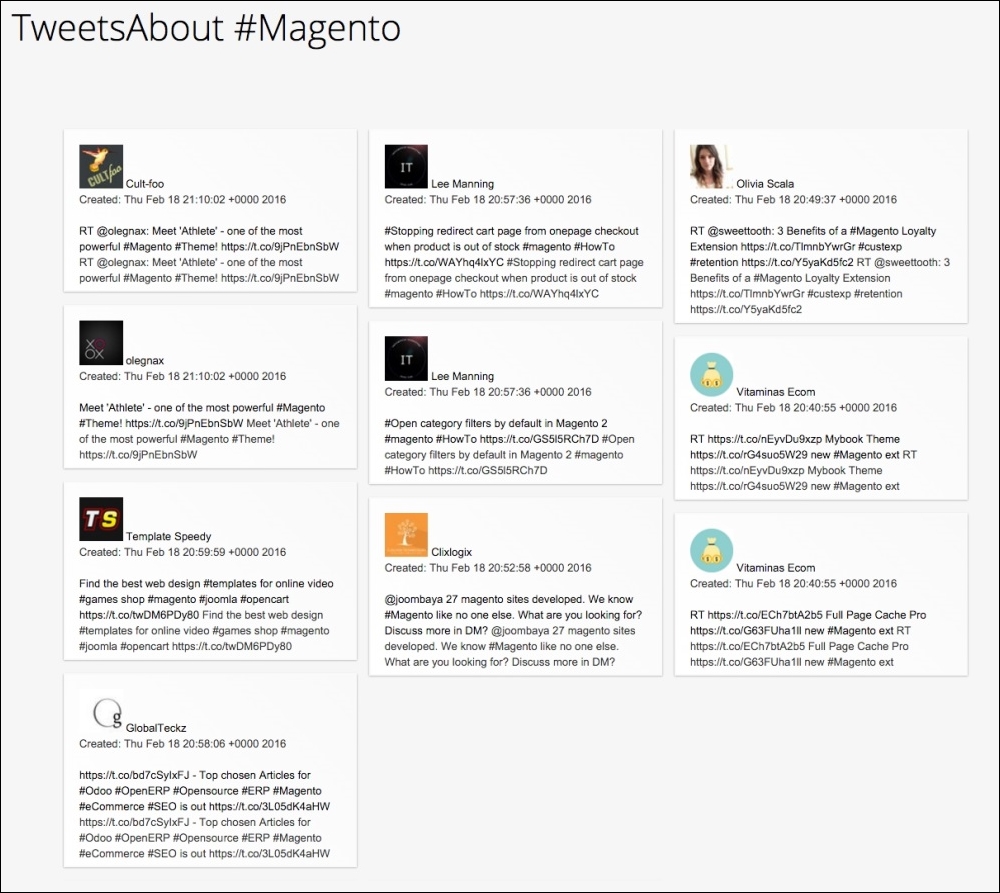
If you activate DevTools and choose an iPhone 5 device, you will see a result similar to the following screenshot: