Table of Contents for
Magento 2 - Build World-Class online stores
 Magento 2 - Build World-Class online stores
Published by
Packt Publishing, 2017
Magento 2 - Build World-Class online stores
Published by
Packt Publishing, 2017
- Cover
- Table of Contents
- Magento 2 - Build World-Class online stores
- Magento 2 - Build World-Class online stores
- Credits
- Preface
- 1. Module 1
- 1. Magento Fundamentals
- XAMPP installation
- Magento
- Summary
- 2. Magento 2.0 Features
- An introduction to the Magento order management system
- Magento 2.0 command-line configuration
- The command-line utility
- Summary
- 3. Working with Search Engine Optimization
- Store configuration
- SEO and searching
- SEO catalog configuration
- Google Analytics tracking code
- Optimizing Magento pages
- Summary
- 4. Magento 2.0 Theme Development – the Developers' Holy Grail
- Magento 2.0 theme structure
- The Magento Luma theme
- Magento theme inheritance
- CMS blocks and pages
- Custom variables
- Creating a basic Magento 2.0 theme
- Summary
- 5. Creating a Responsive Magento 2.0 Theme
- Composer – the PHP dependency manager
- Building the CompStore theme
- CSS preprocessing with LESS
- Applying new CSS to the CompStore theme
- Creating the CompStore logo
- Applying the theme
- Creating CompStore content
- Customizing Magento 2.0 templates
- Summary
- 6. Write Magento 2.0 Extensions – a Great Place to Go
- Using the Zend framework
- Magento 2.0 extension structure
- Developing your first Magento extension
- The Twitter REST API
- The TweetsAbout module structure
- Using TwitterOAuth to authenticate our extension
- Developing the module
- Summary
- 7. Go Mobile with Magento 2.0!
- Adjusting the CompStore theme for mobile devices
- The Magento 2.0 responsive design
- The Magento UI
- Implementing a new CSS mixin media query
- Adjusting tweets about extensions for mobile devices
- Summary
- 8. Speeding up Your Magento 2.0
- Indexing and caching Magento
- Indexing and re-indexing data
- The Magento cron job
- Caching
- Fine-tuning the Magento hosting server
- Selecting the right Magento hosting service
- Apache web server deflation
- Enabling the expires header
- Minifying scripts
- Summary
- 9. Improving Your Magento Skills
- Magento knowledge center
- Improving your Magento skills
- Summary
- 2. Module 2
- 1. Magento 2 System Tools
- Installing Magento 2 sample data via GUI
- Installing Magento 2 sample data via the command line
- Managing Magento 2 indexes via the command line
- Managing Magento 2 cache via the command line
- Managing Magento 2 backup via the command line
- Managing Magento 2 set mode (MAGE_MODE)
- Transferring your Magento 1 database to Magento 2
- 2. Enabling Performance in Magento 2
- Configuring Redis for backend cache
- Configuring Memcached for session caching
- Configuring Varnish as the Full Page Cache
- Configuring Magento 2 with CloudFlare
- Configuring optimized images in Magento 2
- Configuring Magento 2 with HTTP/2
- Configuring Magento 2 performance testing
- 3. Creating Catalogs and Categories
- Create a Root Catalog
- Create subcategories
- Manage attribute sets
- Create products
- Manage products in a catalog grid
- 4. Managing Your Store
- Creating shipping and tax rules
- Managing customer groups
- Configuring inventories
- Configuring currency rates
- Managing advanced pricing
- 5. Creating Magento 2 Extensions – the Basics
- Initializing extension basics
- Working with database models
- Creating tables using setup scripts
- Creating a web route and controller to display data
- Creating system configuration fields
- Creating a backend data grid
- Creating a backend form to add/edit data
- 6. Creating Magento 2 Extensions – Advanced
- Using dependency injection to pass classes to your own class
- Modifying functions with the use of plugins – Interception
- Creating your own XML module configuration file
- Creating your own product type
- Working with service layers/contracts
- Creating a Magento CLI command option
- 3. Module 3
- 1. Planning for Magento
- Technical considerations
- Global-Website-Store methodology
- Planning for multiple stores
- Summary
- 2. Managing Products
- Managing products the customer focused way
- Creating products
- Managing inventory
- Pricing tools
- Autosettings
- Related products, up-sells, and cross-sells
- Importing products
- Summary
- 3. Designs and Themes
- The concept of theme inheritance
- Default installation of design packages and themes
- Installing third-party themes
- Inline translations
- Working with theme variants
- Customizing themes
- Customizing layouts
- Summary
- 4. Configuring to Sell
- Payment methods
- Shipping methods
- Managing taxes
- Transactional e-mails
- Summary
- 5. Managing Non-Product Content
- Summary
- 6. Marketing Tools
- Promotions
- Newsletters
- Using sitemaps
- Optimizing for search engines
- Summary
- 7. Extending Magento
- The new Magento module architecture
- Extending Magento functionality with Magento plugins
- Building your own extensions
- Summary
- 8. Optimizing Magento
- Indexing and caching
- Caching in Magento 2 – not just FPC
- Tuning your server for speed
- Summary
- 9. Advanced Techniques
- Version control
- Magento cron
- Backing up your database
- Upgrading Magento
- Summary
- 10. Pre-Launch Checklist
- System configurations
- Design configurations
- Search engine optimization
- Sales configurations
- Product configurations
- Maintenance configurations
- Summary
- Index
Search Engine Optimization, or SEO, is both important and often misunderstood. There's probably as much misinformation on the Internet about SEO as there is good, solid advice.
While we don't have the opportunity or space to go into great detail about SEO in this book, we can help you establish good practices that can reap great rewards in terms of increasing your search engine visibility and helping online shoppers know what you're offering.
Meta fields are data that are stored in the HTML code of a web page. Customers can't see this code, as it's not displayed by the browser, but search engines can see this data (in fact, they can see everything under the hood). Google, Bing, and others use this meta data in conjunction with many other analyzed items on your page to determine how to present your site to search users, including rank and content.
It begins with a basic understanding of how search engines use meta fields, particularly Google, since Google will provide you with most of your search engine referred traffic.
Take a look at this Google search result:
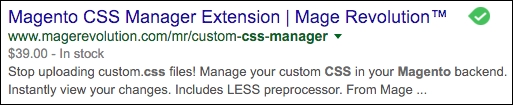
The title, Magento CSS Manager Extension | Mage Revolution™ is taken from the Title field of the product page, unless a value is used in the Meta Title field of the product in Magento. If so, Google would use the Meta Title value instead.
The URL of the page is, of course, the actual link to the product page. The use of canonical URLs is important, as it gives Google one link to the product, even though, as in this case, the product is also accessible by going to http://www.magerevolution.com/mr/magento-content-management-extensions/custom-css-manager. Without the use of canonical URLs, Google would see this as two different pages, each with the exact same content. Google is known to penalize sites that contain duplicate content by decreasing their rank position.
Finally, the description part of the listing comes first from any existing Meta Description field. If none exists, Google attempts to construct a meaningful description from the content of the page. By using a Meta Description field, you can control how the product is described in search engines.
We talked about the use of Product Fields Auto-Generation: the use of variables to automatically construct meta values for your products. While that is certainly a fast way of populating meta fields in products, it's also important to attend to meta fields for CMS pages and categories. There may also be certain products for which you want to insert special titles and descriptions to enhance their search engine presentation.
Tip
Do not under-value the efforts you take to improve your site SEO. So much of your traffic will come from search engines. But also be aware of SEO scams and bogus offers from so-called SEO experts. If anyone says they can guarantee you first page position, they are scammers. No one can guarantee first page search results. That position comes from careful attention to your meta information, product and page content, and really knowing your customers and your products. There are no shortcuts, but there are best practices. If you do need help in managing your SEO, shop around for reputable firms. Visit SEO-related forums and groups and ask others who are successful with SEO for recommendations. Never pay anyone who simply contacts you by unsolicited email. You'll just end up wasting your money with no credible result. And finally, use someone familiar with Magento's SEO features. We've seen several sites compromised by so-called SEO "experts" who tried hard-coding SEO features.
As you prepare your site for launch — and beyond launch — take time to address each important SEO feature in Magento:
- Meta title fields: Enter a title no longer than 50-60 characters. Any more will be truncated when displayed in search results. Including your company name is nice but not critical; the customer is looking for a specific product. Use your company name on the home page meta title and they'll find you if searching for your brand. If customers shop by SKU, include the SKU or part number in the title.
- Meta description fields: Describe your product in 150 characters or less. Use action verbs and strong adjectives: "Save 20% on Yoga gear today! Top quality, 100% guarantee and free shipping" or "Premium 48 inch Yoga ball. Great durability, hypoallergenic material. Guaranteed. Free shipping."
- Meta keywords: Meta keywords are no longer given any ranking weight by search engines. However, it doesn't hurt to include at least the name of the product as a clue to search engines.
- Canonical URLs: Make sure to activate Canonical Link Meta Tags under Stores | Configuration | Catalog | Catalog | Search Engine Optimization. This will reduce any potential duplicate content penalties.
- XML Sitemap: Configure and activate your XML sitemap in Stores | Configuration | Catalog | XML Sitemap. Search engines use this to learn the hierarchy of your site and to make sure they visit all pages in your store. Don't forget to change Enable Submission to Robots.txt to Yes.
- Category and product descriptions: Don't be shy about describing your products. Use 300 words or more to really sell your product. Category descriptions can also help by informing the search engines about your categories, noting brands offered, and generally inspiring customers to carefully consider your product offerings.
Note
Magento 2 also includes a number of SEO features, such as rich snippets. These are hidden data that provides Google et al with specific information about your products in a format that they understand. Price, availability, SKU, and more are easily read by search engines regardless of how this information is or is not presented to your customers.