Table of Contents for
Magento 2 - Build World-Class online stores
 Magento 2 - Build World-Class online stores
Published by
Packt Publishing, 2017
Magento 2 - Build World-Class online stores
Published by
Packt Publishing, 2017
- Cover
- Table of Contents
- Magento 2 - Build World-Class online stores
- Magento 2 - Build World-Class online stores
- Credits
- Preface
- 1. Module 1
- 1. Magento Fundamentals
- XAMPP installation
- Magento
- Summary
- 2. Magento 2.0 Features
- An introduction to the Magento order management system
- Magento 2.0 command-line configuration
- The command-line utility
- Summary
- 3. Working with Search Engine Optimization
- Store configuration
- SEO and searching
- SEO catalog configuration
- Google Analytics tracking code
- Optimizing Magento pages
- Summary
- 4. Magento 2.0 Theme Development – the Developers' Holy Grail
- Magento 2.0 theme structure
- The Magento Luma theme
- Magento theme inheritance
- CMS blocks and pages
- Custom variables
- Creating a basic Magento 2.0 theme
- Summary
- 5. Creating a Responsive Magento 2.0 Theme
- Composer – the PHP dependency manager
- Building the CompStore theme
- CSS preprocessing with LESS
- Applying new CSS to the CompStore theme
- Creating the CompStore logo
- Applying the theme
- Creating CompStore content
- Customizing Magento 2.0 templates
- Summary
- 6. Write Magento 2.0 Extensions – a Great Place to Go
- Using the Zend framework
- Magento 2.0 extension structure
- Developing your first Magento extension
- The Twitter REST API
- The TweetsAbout module structure
- Using TwitterOAuth to authenticate our extension
- Developing the module
- Summary
- 7. Go Mobile with Magento 2.0!
- Adjusting the CompStore theme for mobile devices
- The Magento 2.0 responsive design
- The Magento UI
- Implementing a new CSS mixin media query
- Adjusting tweets about extensions for mobile devices
- Summary
- 8. Speeding up Your Magento 2.0
- Indexing and caching Magento
- Indexing and re-indexing data
- The Magento cron job
- Caching
- Fine-tuning the Magento hosting server
- Selecting the right Magento hosting service
- Apache web server deflation
- Enabling the expires header
- Minifying scripts
- Summary
- 9. Improving Your Magento Skills
- Magento knowledge center
- Improving your Magento skills
- Summary
- 2. Module 2
- 1. Magento 2 System Tools
- Installing Magento 2 sample data via GUI
- Installing Magento 2 sample data via the command line
- Managing Magento 2 indexes via the command line
- Managing Magento 2 cache via the command line
- Managing Magento 2 backup via the command line
- Managing Magento 2 set mode (MAGE_MODE)
- Transferring your Magento 1 database to Magento 2
- 2. Enabling Performance in Magento 2
- Configuring Redis for backend cache
- Configuring Memcached for session caching
- Configuring Varnish as the Full Page Cache
- Configuring Magento 2 with CloudFlare
- Configuring optimized images in Magento 2
- Configuring Magento 2 with HTTP/2
- Configuring Magento 2 performance testing
- 3. Creating Catalogs and Categories
- Create a Root Catalog
- Create subcategories
- Manage attribute sets
- Create products
- Manage products in a catalog grid
- 4. Managing Your Store
- Creating shipping and tax rules
- Managing customer groups
- Configuring inventories
- Configuring currency rates
- Managing advanced pricing
- 5. Creating Magento 2 Extensions – the Basics
- Initializing extension basics
- Working with database models
- Creating tables using setup scripts
- Creating a web route and controller to display data
- Creating system configuration fields
- Creating a backend data grid
- Creating a backend form to add/edit data
- 6. Creating Magento 2 Extensions – Advanced
- Using dependency injection to pass classes to your own class
- Modifying functions with the use of plugins – Interception
- Creating your own XML module configuration file
- Creating your own product type
- Working with service layers/contracts
- Creating a Magento CLI command option
- 3. Module 3
- 1. Planning for Magento
- Technical considerations
- Global-Website-Store methodology
- Planning for multiple stores
- Summary
- 2. Managing Products
- Managing products the customer focused way
- Creating products
- Managing inventory
- Pricing tools
- Autosettings
- Related products, up-sells, and cross-sells
- Importing products
- Summary
- 3. Designs and Themes
- The concept of theme inheritance
- Default installation of design packages and themes
- Installing third-party themes
- Inline translations
- Working with theme variants
- Customizing themes
- Customizing layouts
- Summary
- 4. Configuring to Sell
- Payment methods
- Shipping methods
- Managing taxes
- Transactional e-mails
- Summary
- 5. Managing Non-Product Content
- Summary
- 6. Marketing Tools
- Promotions
- Newsletters
- Using sitemaps
- Optimizing for search engines
- Summary
- 7. Extending Magento
- The new Magento module architecture
- Extending Magento functionality with Magento plugins
- Building your own extensions
- Summary
- 8. Optimizing Magento
- Indexing and caching
- Caching in Magento 2 – not just FPC
- Tuning your server for speed
- Summary
- 9. Advanced Techniques
- Version control
- Magento cron
- Backing up your database
- Upgrading Magento
- Summary
- 10. Pre-Launch Checklist
- System configurations
- Design configurations
- Search engine optimization
- Sales configurations
- Product configurations
- Maintenance configurations
- Summary
- Index
Selling online, as with brick-and-mortar retailing, is more than simply having products to offer to customers. Buyers make purchases based on many things apart from the item itself. Customers want to understand the purpose of the retailer and have confidence that the seller is legitimate, safe, and honest. Corporations have spent billions over the years creating this understanding among their active and potential customers, through logos, design, copy, and service. Creating this understanding is called branding.
For an online store, branding is very important. However, unlike the offline shopper who drives to a store, parks, and enters the store to spend several minutes shopping; an online shopper may click to your online store, spend a few seconds to determine if they wish to remain, and leave to visit another website. Therefore, your store's brand—it's graphics, copy and function—must address the following in a matter of seconds:
- Does this online store have what I'm looking for? Can I easily find what they sell?
- Do I trust this seller if I've never heard of them before?
- Does the retailer make it easy for me to shop and purchase?
- Does it appear that the store owner is interested in helping me buy?
Magento gives you, or your client, the functional tools and systems to provide a powerfully rich shopping experience for your customers. It cannot, however, provide the branding aspects relating to design. You have to craft the outward appearance that will communicate to the potential buyer feelings of convenience, product selection, and security.
In this chapter, we will teach you:
- The Magento theme structure
- How to install third-party themes
- Creative translations
- Using theme variants
- How to customize themes to create your own unique look and feel
- Building theme packages
In Chapter 2, Managing Products, we discussed the Global-Website-Store, or GWS, methodology. As we have learned, Magento allows you to customize many store aspects at some, or all, of the GWS levels.
The same holds true for themes. You can specify the look and feel of your stores at the Global, Website, or Store View levels (themes can be applied for individual Store Views relating to a store) by assigning a specific theme.
In Magento, a group of related themes is referred to as a design package. Design packages contain files that control various functional elements common among the themes within the package. By default, Magento Community installs one design package with two themes.
Themes within a design package contain the various elements that determine the look and feel of the site: layout files, templates, CSS, images, and JavaScript. Each design package must have at least one theme, but can contain other theme variants. You can include any number of theme variants within a design package and use them, for example, for seasonal purposes (such as holidays or back-to-school).
The following graphic shows the relationship between design packages and themes:
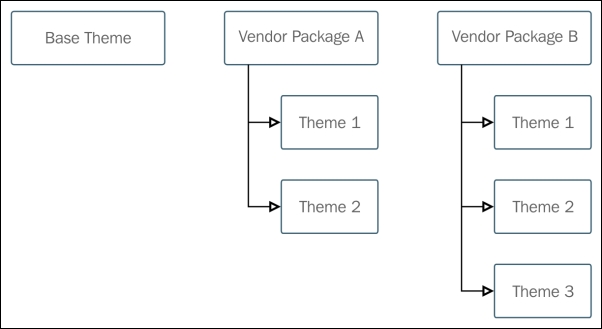
A design package and theme can be specified at the Global, Website, or Store levels.
Note
Most Magento users will use the same design package for a website and all descendant stores. Usually, related stores within a website business share very similar functional elements, as well as similar style features. This is not mandatory; you're free to specify a completely different design package and theme for each store view within your website hierarchy.
A design package and theme can also be specified based on a per browser basis at the global and website level, by providing a User-Agent Exception. In the following example, the string for the Firefox browser is provided:
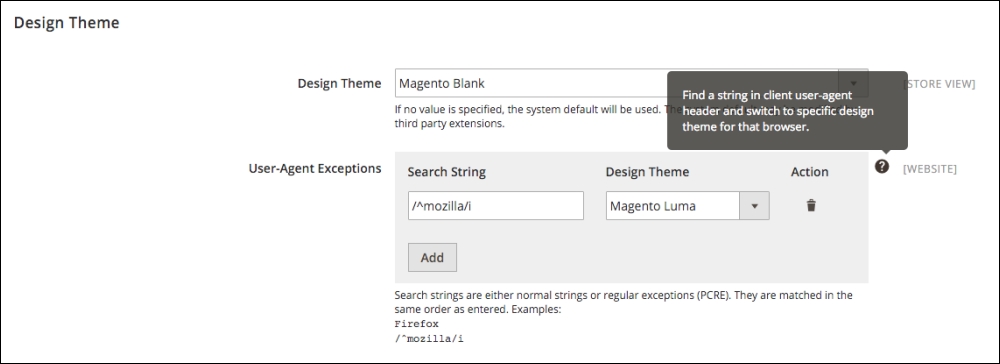
Note
To be certain about the string used in the User-Agent Header, you can check http://whatsmyua.com/ from the browser in question. This site will provide a very specific string you can use for the Search String field.
Magento 2 is a departure from Magento 1.x in that the skin directory used in Magento 1.x is absent, and the structure has been simplified. All files have been consolidated into one location, stored under the /app directory. Additionally, the layout and template directories from Magento 1.x have moved. Now, every module has its own layout and template directories in which you can access all template, layout, JS, and CSS/Less files.
Let's take a closer look at the new structure of a theme for Magento 2.0. The theme directory will typically include the files and directories visible in the following image:
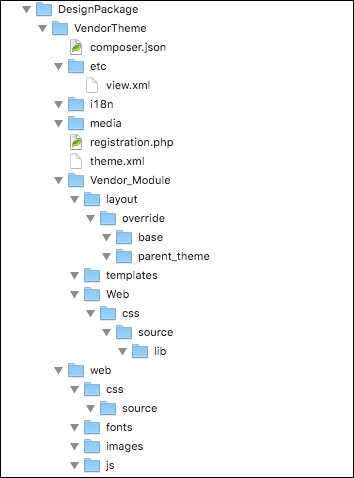
The theme directory
Note
You may notice that in some default Magento 2.x builds, some themes are found in the vendor/ directory. This indicates that a theme has been added via a composer dependency. We'll cover packaging your theme via composer later in the chapter. While Magento does check the vendor/ directory for themes, you should never add a theme directly to this directory. When creating a new theme, always start in the app/design/frontend/ directory.
In the new theme structure for Magento 2, all of the files related to design are in the preceding layout, under the VendorTheme directory. To clarify this new layout, we've provided a brief description of the role of each of the files and directories here:
/composer.json: This file is not a required file, but you'll use it to describe the dependencies your theme has and metadata for your theme. This file is essentially for use if you intend your theme to be acomposerpackage./etc/view.xml: This file is required for a theme, but only if it doesn't already exist in a parent theme. We'll review parent themes later in this chapter as well. It includes information about product images and thumbnails./i18n: This directory includes CSV translation files./media: The/mediadirectory contains a theme thumbnail, typically a screenshot of the theme that serves as a preview of the theme when it's being installed in the admin. This directory is required./registration.php: This file is required; it registers your theme within the system./theme.xml: Also mandatory, thetheme.xmlfile declares the theme as a system component. It contains information about the theme like the theme name, the parent theme name, and so on.
/Vendor_Module: This directory is the parent for module specific styles, and the naming convention is important. Magento will use it to determine which module it needs to apply the styles, layouts and templates to. If the module being overridden was theCatalogmodule, the directory would beMagento_Catalog. It is only required for modules that are being overridden./Vendor_Module/layout: This directory contains files that extend or establish module layouts. Layout files are XML that determines the position of blocks and containers on any given Magento page. We'll go into additional detail around layout files and the elements in them in the customizing themes section of this chapter./Vendor_Module/layout/override/base: Files in this directory specifically override the default layouts for the module in question./Vendor_Module/layout/override/parent_theme: Layout files in this directory specifically override the parent theme layouts for the module specified.
/Vendor_Module/templates: This directory contains template files that override either default or parent templates in place for this module. If there are custom templates for this module, they're stored in this directory as well. We'll review template files in greater detail in the customizing themes section.
/web: This directory contains static files that can be loaded directly from the frontend. For example, if you wanted to reference a specific image, you could include it here, and you would be able to refer to it in a template file./web/css/source: This is the location where Less CSS configuration files for the theme are stored. Less is a CSS pre-processor that allows for variables and functions, making CSS for the theme more maintainable and extensible./web/css/source/lib: This directory contains files that extend or establish module layouts. Layout files are XML that determine the position of blocks and containers on any given Magento page. We'll go into additional detail around layout files and the elements in them in the using themes to create your own look and feel section of this chapter.
/web/fonts: This contains fonts specific to this theme. Everything in thewebdirectory is static, so this folder is simply here for organizational purposes./web/images: This directory stores images specific to this theme./web/js: This location contains JavaScript specific to this theme. We'll talk more about how to insert JavaScript into a template in the using themes to create your own look and feel section.