Table of Contents for
Magento 2 - Build World-Class online stores
 Magento 2 - Build World-Class online stores
Published by
Packt Publishing, 2017
Magento 2 - Build World-Class online stores
Published by
Packt Publishing, 2017
- Cover
- Table of Contents
- Magento 2 - Build World-Class online stores
- Magento 2 - Build World-Class online stores
- Credits
- Preface
- 1. Module 1
- 1. Magento Fundamentals
- XAMPP installation
- Magento
- Summary
- 2. Magento 2.0 Features
- An introduction to the Magento order management system
- Magento 2.0 command-line configuration
- The command-line utility
- Summary
- 3. Working with Search Engine Optimization
- Store configuration
- SEO and searching
- SEO catalog configuration
- Google Analytics tracking code
- Optimizing Magento pages
- Summary
- 4. Magento 2.0 Theme Development – the Developers' Holy Grail
- Magento 2.0 theme structure
- The Magento Luma theme
- Magento theme inheritance
- CMS blocks and pages
- Custom variables
- Creating a basic Magento 2.0 theme
- Summary
- 5. Creating a Responsive Magento 2.0 Theme
- Composer – the PHP dependency manager
- Building the CompStore theme
- CSS preprocessing with LESS
- Applying new CSS to the CompStore theme
- Creating the CompStore logo
- Applying the theme
- Creating CompStore content
- Customizing Magento 2.0 templates
- Summary
- 6. Write Magento 2.0 Extensions – a Great Place to Go
- Using the Zend framework
- Magento 2.0 extension structure
- Developing your first Magento extension
- The Twitter REST API
- The TweetsAbout module structure
- Using TwitterOAuth to authenticate our extension
- Developing the module
- Summary
- 7. Go Mobile with Magento 2.0!
- Adjusting the CompStore theme for mobile devices
- The Magento 2.0 responsive design
- The Magento UI
- Implementing a new CSS mixin media query
- Adjusting tweets about extensions for mobile devices
- Summary
- 8. Speeding up Your Magento 2.0
- Indexing and caching Magento
- Indexing and re-indexing data
- The Magento cron job
- Caching
- Fine-tuning the Magento hosting server
- Selecting the right Magento hosting service
- Apache web server deflation
- Enabling the expires header
- Minifying scripts
- Summary
- 9. Improving Your Magento Skills
- Magento knowledge center
- Improving your Magento skills
- Summary
- 2. Module 2
- 1. Magento 2 System Tools
- Installing Magento 2 sample data via GUI
- Installing Magento 2 sample data via the command line
- Managing Magento 2 indexes via the command line
- Managing Magento 2 cache via the command line
- Managing Magento 2 backup via the command line
- Managing Magento 2 set mode (MAGE_MODE)
- Transferring your Magento 1 database to Magento 2
- 2. Enabling Performance in Magento 2
- Configuring Redis for backend cache
- Configuring Memcached for session caching
- Configuring Varnish as the Full Page Cache
- Configuring Magento 2 with CloudFlare
- Configuring optimized images in Magento 2
- Configuring Magento 2 with HTTP/2
- Configuring Magento 2 performance testing
- 3. Creating Catalogs and Categories
- Create a Root Catalog
- Create subcategories
- Manage attribute sets
- Create products
- Manage products in a catalog grid
- 4. Managing Your Store
- Creating shipping and tax rules
- Managing customer groups
- Configuring inventories
- Configuring currency rates
- Managing advanced pricing
- 5. Creating Magento 2 Extensions – the Basics
- Initializing extension basics
- Working with database models
- Creating tables using setup scripts
- Creating a web route and controller to display data
- Creating system configuration fields
- Creating a backend data grid
- Creating a backend form to add/edit data
- 6. Creating Magento 2 Extensions – Advanced
- Using dependency injection to pass classes to your own class
- Modifying functions with the use of plugins – Interception
- Creating your own XML module configuration file
- Creating your own product type
- Working with service layers/contracts
- Creating a Magento CLI command option
- 3. Module 3
- 1. Planning for Magento
- Technical considerations
- Global-Website-Store methodology
- Planning for multiple stores
- Summary
- 2. Managing Products
- Managing products the customer focused way
- Creating products
- Managing inventory
- Pricing tools
- Autosettings
- Related products, up-sells, and cross-sells
- Importing products
- Summary
- 3. Designs and Themes
- The concept of theme inheritance
- Default installation of design packages and themes
- Installing third-party themes
- Inline translations
- Working with theme variants
- Customizing themes
- Customizing layouts
- Summary
- 4. Configuring to Sell
- Payment methods
- Shipping methods
- Managing taxes
- Transactional e-mails
- Summary
- 5. Managing Non-Product Content
- Summary
- 6. Marketing Tools
- Promotions
- Newsletters
- Using sitemaps
- Optimizing for search engines
- Summary
- 7. Extending Magento
- The new Magento module architecture
- Extending Magento functionality with Magento plugins
- Building your own extensions
- Summary
- 8. Optimizing Magento
- Indexing and caching
- Caching in Magento 2 – not just FPC
- Tuning your server for speed
- Summary
- 9. Advanced Techniques
- Version control
- Magento cron
- Backing up your database
- Upgrading Magento
- Summary
- 10. Pre-Launch Checklist
- System configurations
- Design configurations
- Search engine optimization
- Sales configurations
- Product configurations
- Maintenance configurations
- Summary
- Index
As you've no doubt realized by now, Magento 2 is a very powerful e-commerce platform. From its robust product management suite to its virtually unlimited extendability, Magento packs a lot into one open source platform.
From our work within its files, we have learned that Magento combines a great number of separate files and data tables to present any page to online visitors. By its very nature, the MVC architecture of Magento puts a good deal of overhead on any web server. In the beginning, the complexity of Magento discouraged some developers because of the demands the platform placed on hosting servers.
However, over time Magento's developers have worked hard to improve overall performance, and Magento 2 represents a milestone in that regard. Magento 2 is indeed faster than before, even when taking faster servers into account.
That said, for Magento to perform at the highest levels of performance, there are areas with which you should become familiar. Specifically:
- The Magento EAV methodology
- Indexing and caching
- Server tuning configurations
After all, a faster website improves the customer's experience and helps improve your rankings with search engines.
Most databases for open source platforms are quite simple in comparison to Magento's. For instance, in the past, when one designed e-commerce systems from scratch, it was likely that a simple relational model would suffice: one table for products that would contain all the key information relating to that product, such as price, available quantity, description, weight, and so on. The challenge with this traditional approach was that if we needed to add a new product attribute, such as height, that field would have to be added to the product table, thereby making previous versions incompatible and complicating any upgrade path.
In order for Magento to be a truly scalable platform, its developers utilize an Entity, Attribute and Value (EAV), or Sparse Matrix, architecture. This database structure adds a great deal of complexity to the Magento data model to be sure, but its advantage is its ability to allow an unlimited number of attributes to be added to any core item, such as products, categories, customers, addresses, and more. Today's Magento installs an initial 296 data tables, many of which are related to EAV.
EAV allows developers (and you) the ability to extend any entity's attributes without changing any of the data tables. Let's break down EAV to understand how this works.
Note
As you go through this chapter, you may want to take an actual look at the tables of your Magento installation. With most hosting providers, you are provided phpAdmin as a tool for exploring and manipulating your database. If not, you can use any number of available tools, including the free MySQL Workbench (http://www.mysql.com/products/workbench/). See your hosting provider for information on how to directly access your database.
Products, categories, customers, customer addresses, ratings, and reviews are all entities in the Magento data scheme. Each entity has its own entity record in one of the following tables:
catalog_product_entitycatalog_category_entitycustomer_entitycustomer_address_entityrating_entityreview_entityeav_entity(stores product attribute entities)
Each of these entity tables stores very basic information about the entity. For instance, let's take a look at the columns of the catalog_product_entity table:
entity_identity_type_idattribute_set_idtype_idskuhas_optionsrequired_optionscreated_atupdated_at
These are the only columns required to define any product in the database. Notice that the name, description, and price of the product are not included in this table.
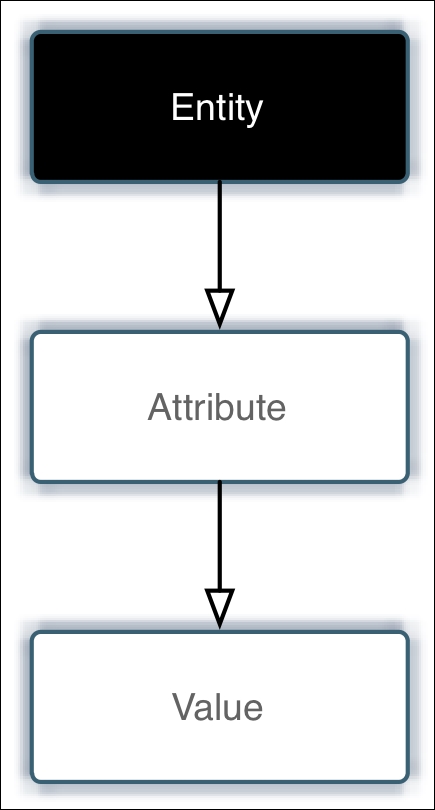
Attributes are the names of various items that belong to an entity. For instance, a product has attributes of price, description, and quantity. Attribute tables don't store the actual value of the item, only its name and its relationship to the entity. That's where value comes in.
If you're following the bouncing ball so far, you now can surmise that value is the actual data of the attribute. So, if we use a simple graphic such as shown in the following figure, we can visualize the entire EAV relationship.
Let's look at how this works in practice for a product. The product entity is stored in the catalog_product_entity table, as described before. To bring together all the information related to a product, we have to pull in all the various attributes (and their values) connected to the product.
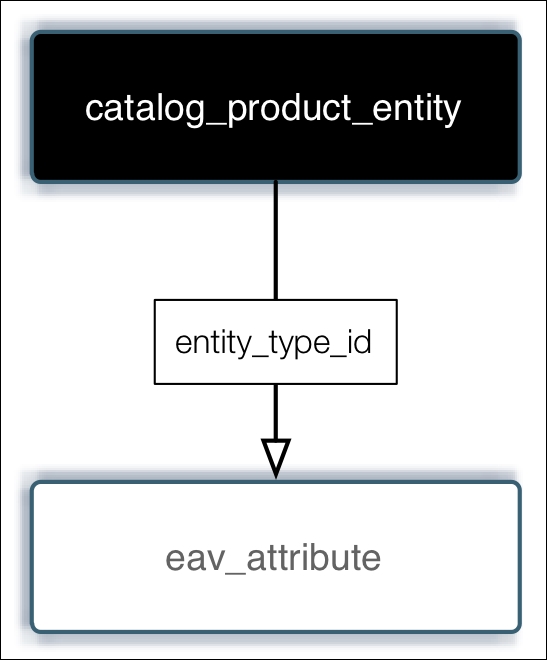
To do that, we look into the eav_attribute table. This table connects all attributes to their respective entities. One column in this table is called entity_type_id. This column relates to the entity_type_id column in the catalog_product_entity table, as shown in the following figure:
Once the associated attribute for an entity (in this example, a product) is determined, Magento next works to associate the actual value for the attribute. Here's where it gets a bit complicated, but fun!
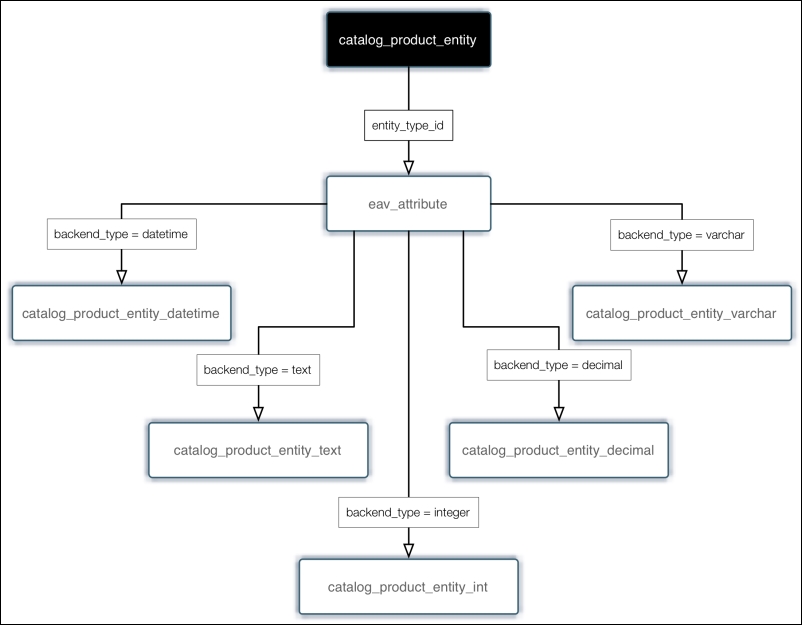
For each attribute, Magento stores a type for the associated value. In other words, is the value a decimal value (such as price), a text value (for example, description), and so on. These are stored in the eav_attribute table in a column named backend_type. For each type, Magento has a corresponding table whose name ends in the particular type. The following are the value tables for product entities:
catalog_product_entity_datetimecatalog_product_entity_decimalcatalog_product_entity_intcatalog_product_entity_textcatalog_product_entity_varchar
If a lookup of a product's attribute shows a type of decimal, then the associated value would be found in the catalog_product_entity_decimal table. The following figure illustrates this basic relationship:
If you take a look at the Magento data tables, you'll now begin to understand the relationship between various entities, attributes, and values.
EAV is a key feature of Magento that allows developers to extend the platform without changing its core data structure. Imagine that you want to add new functionality that depends on a new product attribute - you could simply add that attribute into the system without adding a single new column to any table!
Unfortunately, there is a trade-off: performance. As you can see, in order to pull in all the information for a product — such as for a product detail page — Magento has to do a lot of calls to a lot of tables within the database. These lookups take time and server resources.
Fortunately, Magento's developers are still a step ahead of us.
Long ago, developers realized that while EAV was a cool way to build extendability into Magento, it added a major hit in performance. All the lookups, particularly for busy sites, can really slow down response times. MySQL, the database used for Magento, is a single-threaded database, meaning it can only handle one operation at a time.
The solution was to take all the various relationships and pre-compile them into other tables. In essence, Magento could do its lookups using fewer tables (and therefore fewer SQL statements) in order to get the same data.
If you look again at the data tables, you'll see a number of tables with index or flat in the name. These tables combine the EAV relationships into one table.
In order to take advantage of this feature for categories and products (sales orders are automatically flattened):
- Log into your Magento backend.
- Go to Stores | Configuration | Catalog.
- Click to expand Storefront.
- Select Yes for both Use Flat Catalog Category and Use Flat Catalog Product.
- Click on Save Config.
After saving, you should get a notice at the top of your Admin page, like the following screenshot:
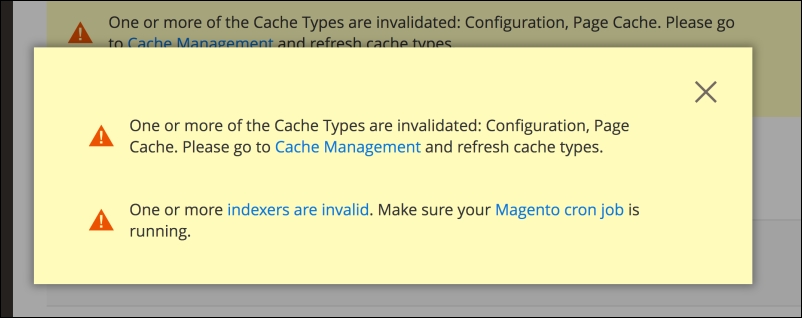
One of the things you will have to do as you add or update products and categories is to reindex your site. We'll discuss indexing in more depth in the next section.