
- In the modules folder of your Drupal site, create a folder named mymodule.
- In the mymodule folder, create a mymodule.info.yml, containing the following code:
name: My module
description: Custom module that uses a form alter
type: module
core: 8.x
- Next, create a mymodule.module file in your module's directory:
<?php

/**
 * @file
 * Custom module that alters forms.
 */
- Add the mymodule_form_system_site_information_settings_alter() hook. The form ID can be found by viewing the form's class and reviewing the getFormId method:
/**
 * Implements hook_form_FORM_ID_alter().
 */
function  mymodule_form_system_site_information_settings_alter(&$form, \Drupal\Core\Form\FormStateInterface $form_state) {
  // Code to alter form or form state here
}
Drupal will call this hook and pass the current form array and its form state object. The form array is passed by reference, allowing our hook to modify the array without returning any values. This is why the $form parameter has the ampersand (&) before it. In PHP, all objects are passed by reference, which is why we have no ampersand (&) before $form_state.
When calling a class in a normal file, such as the module file, you will need to either use the fully qualified class name or add a use statement at the beginning of the file. In this example, we can add \Drupal\Core\Form\FormStateInterface.
- Next, we add our telephone field to the form so that it can be displayed and saved:
/**
 * Implements hook_form_FORM_ID_alter().
 */
function  mymodule_form_system_site_information_settings_alter(&$form, \Drupal\Core\Form\FormStateInterface $form_state) {
  $form['site_phone'] = [
    '#type' => 'tel',
    '#title' => t('Site phone'),
    '#default_value' => Drupal::config('system.site')->get('phone'),
  ];
}
We retrieve the current phone value from system.site so that it can be modified if already set.
- Go to the Extend page and install the module My module that we created.
- Note the Basic site settings form under Configuration, and test setting the site telephone number:
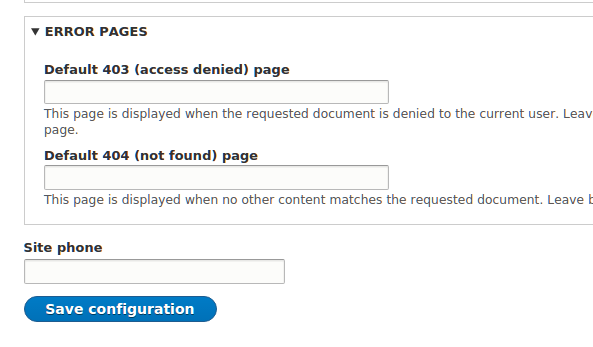
- We then need to add a submit handler in order to save the configuration for our new field. We will need to add a submit handler to the form and a submit handler callback:
/**
 * Implements hook_form_FORM_ID_alter().
 */
function  mymodule_form_system_site_information_settings_alter(&$form, \Drupal\Core\Form\FormStateInterface $form_state) {
  $form['site_phone'] = [
   '#type' => 'tel',
   '#title' => t('Site phone'),
   '#default_value' => Drupal::config('system.site')->get('phone'),
  ];
  $form['#submit'][] = 'mymodule_system_site_information_phone_submit';
}

/**
 * Form callback to save site_phone
 * @param array $form
 * @param \Drupal\Core\Form\FormStateInterface $form_state
*/
function mymodule_system_site_information_phone_submit(array &$form,  \Drupal\Core\Form\FormStateInterface $form_state) {
  $config = Drupal::configFactory()->getEditable('system.site');
  $config
  ->set('phone', $form_state->getValue('site_phone'))
  ->save();
}
The $form['#submit'] modification adds our callback to the form's submit handlers. This allows our module to interact with the form once it has been submitted.
The mymodule_system_site_information_phone_submit callback is passed the form array and form state. We load the current configuration factory to receive the configuration that can be edited. We then load system.site and save phone based on the value from the form state.
- Submit the form, and verify that the data has been saved.