
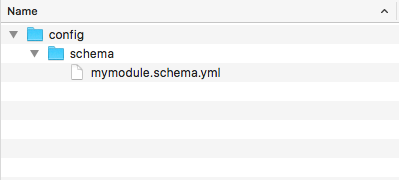
- In our module's base directory, let's create a config directory with a schema subdirectory. In the subdirectory, create a file named mymodule.schema.yml that will hold your configuration entity's schema:
- In our mymodule.schema.yml, add a definition to mymodule.announcement.*: to provide our label and message storage:
# Schema for the configuration files of the Site Announcement.

mymodule.announcement.*:
  type: config_entity
  label: 'Site announcement'
  mapping:
    id:
      type: string
      label: 'ID'
    label:
      type: label
      label: 'Label'
    message:
      type: text
      label: 'Text'
We will define the configuration entity's namespace as an announcement, which we will provide to Drupal in the entity's annotation block. We will then tell Drupal that this is a config_entity and provide a label for the schema.
Using the mapping array, we will provide the attributes that make up our entity and the data that will be stored.
- Create an Entity directory in our module's src folder. First, we will create an interface for our entity by creating a SiteAnnouncementInterface.php file. The SiteAnnouncementInterface interface will extend the \Drupal\Core\Config\Entity\ConfigEntityInterface:
<?php

namespace Drupal\mymodule\Entity;

use Drupal\Core\Config\Entity\ConfigEntityInterface;

interface SiteAnnouncementInterface extends ConfigEntityInterface {

  /**
   * Gets the message value.
   *
   * @return string
   */
  public function getMessage();

}
This will be implemented by our entity, and will provide the method requirements. It is best practice to provide an interface for entities. This allows you to provide the required methods if another developer extends your entity or if you are doing advanced testing and need to mock an object. We also provide a method to return our custom attribute.
- Let's create SiteAnnouncement.php in our src/Entity directory. This file will contain the SiteAnnouncement class, which extends \Drupal\Core\Config\Entity\ConfigEntityBase and implements our entity's interface:
<?php

namespace Drupal\mymodule\Entity;

use Drupal\Core\Config\Entity\ConfigEntityBase;

class SiteAnnouncement extends ConfigEntityBase implements SiteAnnouncementInterface {

  /**
   * The announcement's message.
   *
   * @var string
   */
  protected $message;

  /**
   * {@inheritdoc}
   */
  public function getMessage() {
    return $this->message;
  }

}
In the preceding code, we added the message property defined in our schema as a class property. Our method defined in the entity's interface is used to return that value and interact with our configuration entity.
- Entities use annotation documentation blocks. We will start our annotation block by providing the entity's ID, label, configuration prefix, and configuration export key names:
<?php

namespace Drupal\mymodule\Entity;

use Drupal\Core\Config\Entity\ConfigEntityBase;

/**
 * @ConfigEntityType(
 *   id ="announcement",
 *   label = @Translation("Site Announcement"),
 *   config_prefix = "announcement",
 *   entity_keys = {
 *     "id" = "id",
 *     "label" = "label"
 *   },
 *   config_export = {
 *     "id",
 *     "label",
 *     "message",
 *   }
 * )
 */
class SiteAnnouncement extends ConfigEntityBase implements SiteAnnouncementInterface {

  /**
   * The announcement's message.
   *
   * @var string
   */
  protected $message;

  /**
   * {@inheritdoc}
   */
  public function getMessage() {
    return $this->message;
  }

}
The annotation document block tells Drupal that this is an instance of the ConfigEntityType plugin. The id is the internal machine name identifier for the entity type, and the label is its human-readable version. The config_prefix matches how we defined our schema with mymodule.announcement. The entity keys definition tells Drupal the attributes that represent our identifiers and labels.
When specifying config_export, we are telling the configuration management system what properties are exportable when exporting our entity.
- Next, we will add handlers to our entity's annotation. We will define the class that will display the available entity entries and forms to work with our entity:
/**
 * @ConfigEntityType(
 *   id ="announcement",
 *   label = @Translation("Site Announcement"),
 *   handlers = {
 *     "list_builder" = "Drupal\mymodule\SiteAnnouncementListBuilder",
 *     "form" = {
 *       "default" = "Drupal\mymodule\SiteAnnouncementForm",
 *       "add" = "Drupal\mymodule\SiteAnnouncementForm",
 *       "edit" = "Drupal\mymodule\SiteAnnouncementForm",
 *       "delete" = "Drupal\Core\Entity\EntityDeleteForm"
 *     }
 *   },
 *   config_prefix = "announcement",
 *   entity_keys = {
 *     "id" = "id",
 *     "label" = "label"
 *   },
 *   config_export = {
 *     "id",
 *     "label",
 *     "message",
 *   }
 * )
 */
The handlers array specifies classes that provide the interaction functionality with our entity. The list_builder class will be created to show you a table of our entities. The form array provides classes for forms to be used when creating, editing, or deleting our configuration entity.
- Lastly, for our entity's annotation, we will need to define routes for our delete, edit, and collection (list) pages. Drupal will automatically build the routes based on our annotation:
/**
 * @ConfigEntityType(
 *   id ="announcement",
 *   label = @Translation("Site Announcement"),
 *   handlers = {
 *     "list_builder" = "Drupal\mymodule\SiteAnnouncementListBuilder",
 *     "form" = {
 *       "default" = "Drupal\mymodule\SiteAnnouncementForm",
 *       "add" = "Drupal\mymodule\SiteAnnouncementForm",
 *       "edit" = "Drupal\mymodule\SiteAnnouncementForm",
 *       "delete" = "Drupal\Core\Entity\EntityDeleteForm"
 *     }
 *   },
 *   config_prefix = "announcement",
 *   entity_keys = {
 *     "id" = "id",
 *     "label" = "label"
 *   },
 *   links = {
 *     "delete-form" = "/admin/config/system/site-announcements/manage/{announcement}/delete",
 *     "edit-form" = "/admin/config/system/site-announcements/manage/{announcement}",
 *     "collection" = "/admin/config/system/site-announcements",
 *   },
 *   config_export = {
 *     "id",
 *     "label",
 *     "message",
 *   }
 * )
 */
There is a routing service for entities that will automatically provide Drupal a route with the proper controllers based on this annotation.
- Create the SiteAnnouncementListBuilder class defined in our list_builder handler by creating a SiteAnnouncementListBuilder.php file in the module's src directory and extending the
\Drupal\Core\Config\Entity\ConfigEntityListBuilder:
<?php

namespace Drupal\mymodule;

use Drupal\Core\Config\Entity\ConfigEntityListBuilder;
use Drupal\mymodule\Entity\SiteAnnouncementInterface;

class SiteAnnouncementListBuilder extends ConfigEntityListBuilder {

  /**
   * {@inheritdoc}
   */
  public function buildHeader() {
    $header['label'] = t('Label');
    return $header + parent::buildHeader();
  }

  /**
   * {@inheritdoc}
   */
  public function buildRow(SiteAnnouncementInterface $entity) {
    $row['label'] = $entity->label();
    return $row + parent::buildRow($entity);
  }
}
In our list builder handler, we override the buildHeader and builderRow methods so that we can add our configuration entity's properties to the table.
- Now, we will need to create an entity form, as defined in our form handler array, to handle our add and edit functionalities. Create SiteAnnouncementForm.php in the src directory to provide the SiteAnnouncementForm class that extends the \Drupal\Core\Entity\EntityForm class:
<?php

namespace Drupal\mymodule;

use Drupal\Component\Utility\Unicode;
use Drupal\Core\Entity\EntityForm;
use Drupal\Core\Form\FormStateInterface;
use Drupal\Core\Language\LanguageInterface;

class SiteAnnouncementForm extends EntityForm {
  /**
   * {@inheritdoc}
   */
  public function form(array $form, FormStateInterface $form_state) {
    $form = parent::form($form, $form_state);

    $form['label'] = [
      '#type' => 'textfield',
      '#title' => t('Label'),
      '#required' => TRUE,
      '#default_value' => $entity->label(),
    ];
    $form['message'] = [
      '#type' => 'textarea',
      '#title' => t('Message'),
      '#required' => TRUE,
      '#default_value' => $entity->getMessage(),
    ];

    return $form;
  }

  /**
   * {@inheritdoc}
   */
  public function save(array $form, FormStateInterface $form_state) {
    $entity = $this->entity;
    $is_new = !$entity->getOriginalId();

    if ($is_new) {
      // Configuration entities need an ID manually set.
      $machine_name = \Drupal::transliteration()
        ->transliterate($entity->label(), LanguageInterface::LANGCODE_DEFAULT, '_');
      $entity->set('id', Unicode::strtolower($machine_name));

      drupal_set_message(t('The %label announcement has been created.', array('%label' => $entity->label())));
    }
    else {
      drupal_set_message(t('Updated the %label announcement.', array('%label' => $entity->label())));
    }

    $entity->save();

    // Redirect to edit form so we can populate colors.
    $form_state->setRedirectUrl($this->entity->toUrl('collection'));
  }
}
We override the form method to add Form API elements to our label and message properties. We also override the save method to provide user messages about the changes that are made. We utilize the entity's toUrl method to redirect it to the collection (list) page. We use the transliteration service to generate a machine name based on the label for our entity's identifier.
- Next, we will create a mymodule.links.action.yml file in our module's directory. This will allow us to define action links on a route. We will be adding an Add announcement link to our entity's add form on its collection route:
announcement.add:
  route_name: entity.announcement.add_form
  title: 'Add announcement'
  appears_on:
    - entity.announcement.collection
This will instruct Drupal to render the entity.announcement.add_form link on the specified routes in the appears_on value.
- To have our site announcement's accessible from the main administrative pages, we will need to create a mymodule.links.menu.yml file in our module's directory:
mymodule.site_announcements:
  title: 'Site announcements'
  parent: system.admin_config_system
  description: 'Manage site announcements.'
  route_name: entity.announcement.collection
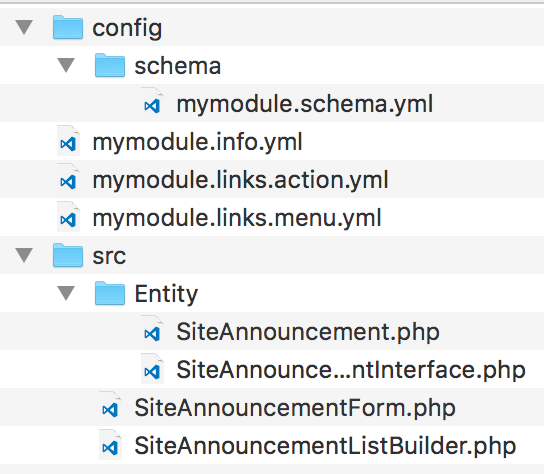
- Our module structure should look like the following screenshot:
- Install the module and check out the Configuration page. You can now manage the Site Announcement entries from the Site Announcement link.