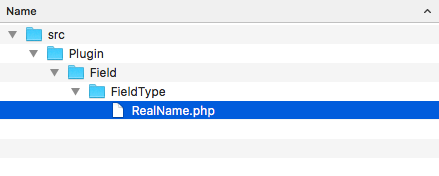
- We will need to create the src/Plugin/Field/FieldType directory in the module's base location. The Field module discovers field types in the Plugin\Field\FieldType namespace.
- We will create a RealName.php file in the newly created directory so that we can define the RealName class. This will provide our realname field for the first and last names:
- The RealName class will extend the \Drupal\Core\Field\FieldItemBase class:
<?php

namespace Drupal\mymodule\Plugin\Field\FieldType;

use Drupal\Core\Field\FieldItemBase;
use Drupal\Core\Field\FieldStorageDefinitionInterface;
use Drupal\Core\TypedData\DataDefinition;

class RealName extends FieldItemBase {

}
The \Drupal\Core\Field\FieldItemBase satisfies methods defined by inherited interfaces, except for schema and propertyDefinitions.
- Field types are annotated plugins. Annotated plugins use documentation blocks to provide details of the plugin. We will provide the field type's identifier, label, description, category, and default widget and formatter:
<?php

namespace Drupal\mymodule\Plugin\Field\FieldType;

use Drupal\Core\Field\FieldItemBase;
use Drupal\Core\Field\FieldStorageDefinitionInterface;
use Drupal\Core\TypedData\DataDefinition;

/**
 * Plugin implementation of the 'realname' field type.
 *
 * @FieldType(
 *   id = "realname",
 *   label = @Translation("Real name"),
 *   description = @Translation("This field stores a first and last name."),
 *   category = @Translation("General"),
 *   default_widget = "string_textfield",
 *   default_formatter = "string"
 * )
 */

class RealName extends FieldItemBase {

}
The @FieldType tells Drupal that this is a FieldType plugin. The following properties are defined:
- Id: This is the plugin's machine name
- Label: This is the human-readable name for the field
- description: This is the human-readable description of the field
- category: This is the category where the field shows up in the user interface
- default_widget: This is the default form widget to be used for editing
- default_formatter: This is the default formatter with which you can display the field
- The RealName class needs to implement the schema method defined in the
\Drupal\Core\Field\FieldItemInterface. This returns an array of the database API schema information. Add the following method to your class:
/**
 * {@inheritdoc}
 */
public static function schema(\Drupal\Core\Field\FieldStorageDefinitionInterface $field_definition) {
  return [
    'columns' => [
      'first_name' => [
        'description' => 'First name.',
        'type' => 'varchar',
        'length' => '255',
        'not null' => TRUE,
        'default' => '',
      ],
      'last_name' => [
        'description' => 'Last name.',
        'type' => 'varchar',
        'length' => '255',
        'not null' => TRUE,
        'default' => '',
      ],
    ],
    'indexes' => [
       'first_name' => ['first_name'],
       'last_name' => ['last_name'],
    ],
  ];
}
The schema method defines the columns in the field's data table. We will define a column to hold the first_name and last_name values.
- We will also need to implement the propertySchema method to satisfy \Drupal\Core\TypedData\ComplexDataDefinitionInterface. This returns a typed definition of the values defined in the schema method. Add the following method to your class:
/**
 * {@inheritdoc}
 */
public static function propertyDefinitions(\Drupal\Core\Field\FieldStorageDefinitionInterface $field_definition) {
  $properties['first_name'] = \Drupal\Core\TypedData\DataDefinition::create('string')
->setLabel(t('First name'));
  $properties['last_name'] = \Drupal\Core\TypedData\DataDefinition::create('string')
->setLabel(t('Last name'));
  return $properties;
}
This method returns an array that is keyed with the same column names provided in schema. It returns a typed data definition to handle the field type's values.
- Install your module, if it has not yet been installed, by going to the Extend page. If you have already installed your module, go to the Performance page and rebuild Drupal's caches.
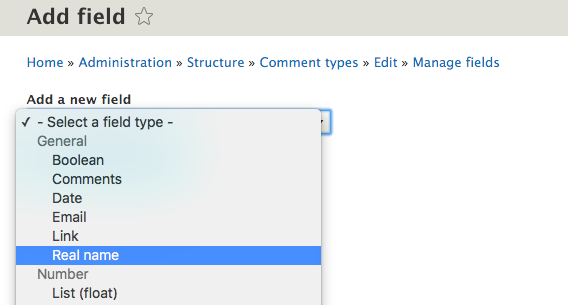
- The field will now appear on the field type management screen. To use it, go to Structure and then to Comment Types. You can now go to Manage Fields and click on Add field to add a real name entry for your comments: