
- In your module's directory, create a config directory, and then create a directory inside it named install.
- Create a file named drupalform.schema.yml . This file will tell Drupal about the configuration item that we want to save.
- Add the following configuration schema definition to drupalform.schema.yml:
  drupalform.company:
    type: config_object
    label: 'Drupal form settings'
    mapping:
      company_name:
        type: string
        label: 'A company name'
This tells Drupal that we have the configuration with the name drupalform.company, and it has a valid option of company_name. We will cover this in more detail in Chapter 9, Configuration Management - Deploying in Drupal 8.
- Next, edit the module's src/Form/ExampleForm.php file. Replace the FormBase use statement to use the ConfigFormBase class:
<?php

namespace Drupal\drupalform\Form;

use Drupal\Core\Form\ConfigFormBase;
use Drupal\Core\Form\FormStateInterface;
- Update the ExampleForm class to extend ConfigFormBase instead, to harness its existing methods and provided code:
<?php

namespace Drupal\drupalform\Form;

use Drupal\Core\Form\ConfigFormBase;
use Drupal\Core\Form\FormStateInterface;

class ExampleForm extends ConfigFormBase {
...
}
This allows us to reuse methods from the ConfigFormBase class and write less about our own implementation.
- For ExampleForm to implement ConfigFormBase, the getEditableConfigNames method needs to be implemented to satisfy the \Drupal\Core\Form\ConfigBaseTrait trait. This method can be added anywhere in the class:
<?php

namespace Drupal\drupalform\Form;

use Drupal\Core\Form\ConfigFormBase;
use Drupal\Core\Form\FormStateInterface;

class ExampleForm extends ConfigFormBase {
...
  /**
   * {@inheritdoc}
   */
  protected function getEditableConfigNames() {
    return ['drupalform.company'];
  }
...
}
This function defines the configuration names, which will be editable by the form. This brings all the attributes under the drupalform.company object to be editable when accessed through the form with the config method provided by ConfigFormBaseTrait.
- We will remove the submit form element ($form['submit']) and update the buildForm method to return data from the parent's method rather than from $form itself. We will also need to add a #default_value option to company_name so that it uses an existing value the next time our form is loaded:
/**
 * {@inheritdoc}
 */
public function buildForm(array $form, FormStateInterface $form_state) {
  $form['company_name'] = [
    '#type' => 'textfield',
    '#title' => $this->t('Company name'),
    '#default_value' => $this->config('drupalform.company')->get('company_name'),
  ];
  return parent::buildForm($form, $form_state);
}
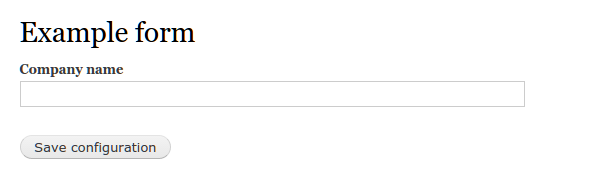
The ConfigFormBase class implements the buildForm method to provide a reusable submit button. It also unifies the presentation across Drupal configuration forms:
- The ConfigFormBase provides a configuration factory method. We will add a default_value property to our element with the currently saved item:
/**
 * {@inheritdoc}
 */
public function buildForm(array $form, FormStateInterface $form_state) {
  $form['company_name'] = [
    '#type' => 'textfield',
    '#title' => $this->t('Company name'),
    '#default_value' => $this->config('drupalform.company')->get('name'),
  ];
  return parent::buildForm($form, $form_state);
}
The #default_value key is added to the element's definition. It invokes the config method provided by ConfigFormBaseTrait to load our configuration group and access a specific configuration value.
- The final step is to save the configuration in the submitForm method. Add the following method to your class:
/**
 * {@inheritdoc}
 */
public function submitForm(array &$form, FormStateInterface $form_state) {
  parent::submitForm($form, $form_state);
  $this->config('drupalform.company')->set('name', $form_state->getValue('company_name'));
}
The config method is invoked by specifying our configuration group. We will then use the set method to define the name as the value of the company name text field.
- Your form class should resemble the following when complete:
<?php

namespace Drupal\drupalform\Form;

use Drupal\Core\Form\ConfigFormBase;
use Drupal\Core\Form\FormStateInterface;

class ExampleForm extends ConfigFormBase {

  /**
   * {@inheritdoc}
   */
  protected function getEditableConfigNames() {
      return ['drupalform.company'];
  }

  /**
   * {@inheritdoc}
   */
  public function getFormId() {
    return 'drupalform_example_form';
  }

  /**
   * {@inheritdoc}
   */
  public function buildForm(array $form, FormStateInterface $form_state) {
    $form['company_name'] = array(
      '#type' => 'textfield',
      '#title' => t('Company name'),
      '#default_value' => $this->config('drupalform.company')->get('name'),
    );
    return parent::buildForm($form, $form_state);
  }

  /**
   * {@inheritdoc}
   */
  public function validateForm(array &$form, FormStateInterface $form_state) {
    if (!$form_state->isValueEmpty('company_name')) {
      if (strlen($form_state->getValue('company_name')) <= 5) {
        $form_state->setErrorByName('company_name', t('Company name is less than 5 characters'));
      }
    }
  }
  /**
   * {@inheritdoc}
   */
  public function submitForm(array &$form, FormStateInterface $form_state) {
    parent::submitForm($form, $form_state);
    $this->config('drupalform.company')->set('name', $form_state->getValue('company_name'));
  }
}
- When you edit your form and click on the Submit button, the value that you entered in the Company name field will now be saved in the configuration.