- Create an src folder in your module directory. In this directory, create a Form directory, which will hold the class that defines your form.
- Next, create a file called ExampleForm.php in your module's src/Form directory.
- We will edit the ExampleForm.php file and add the proper PHP namespace, classes used, and the class itself:
<?php

namespace Drupal\drupalform\Form;

use Drupal\Core\Form\FormBase;
use Drupal\Core\Form\FormStateInterface;

class ExampleForm extends FormBase {

}
The namespace defines the class in your module's Form directory. The autoloader will now look at the drupalform module path and load the ExampleForm class from the src/Form directory.
The use statement allows us to use just the class name when referencing FormBase, and, in the next steps, FormStateInterface. Otherwise, we would be forced to use the fully qualified namespace path for each class whenever it is used.
- The \Drupal\Core\Form\FormBase is an abstract class and requires us to implement four remaining interface methods: getFormId, buildForm, validateForm, and submitForm. The latter two will be covered in the following recipes; however, we will need to define the method stubs:
class ExampleForm extends FormBase {

  /**
   * {@inheritdoc}
   */
  public function getFormId() {
    return 'drupalform_example_form';
  }

  /**
   * {@inheritdoc}
   */
  public function buildForm(array $form, FormStateInterface $form_state) {
     // Return array of Form API elements.
  }

  /**
   * {@inheritdoc}
   */
  public function validateForm(array &$form,  FormStateInterface $form_state) {
    // Validation covered in later recipe, required to satisfy interface.
  }

  /**
   * {@inheritdoc}
   */
  public function submitForm(array &$form,  FormStateInterface $form_state) {
    // Validation covered in later recipe, required to satisfy interface.
  }
}
This code flushes out the initial class definition from the preceding step. FormBase provides utility methods and does not satisfy the interface requirements for FormStateInterface. We define those here, as they are unique across each form definition.
The getFormId method returns a unique string to identify the form, for example, site_information. You may encounter some forms that append _form to the end of their form ID. This is not required, and it is just a naming convention often found in previous versions of Drupal.
- The buildForm method will be invoked to return Form API elements that are rendered to the end user. We will add a simple text field to ask for a company name and a submit button:
/**
 * {@inheritdoc}
 */
public function buildForm(array $form, FormStateInterface $form_state) {
  $form['company_name'] = [
    '#type' => 'textfield',
    '#title' => $this->t('Company name'),
  ];
  $form['submit'] = [
    '#type' => 'submit',
    '#value' => $this->t('Save'),
  ];
  return $form;
}
We added a form element definition to the form array. Form elements are defined with a minimum of a type to specify what the element is and a title to act as the label. The title uses the t method to ensure that it is translatable.
Adding a submit button is done by providing an element with the type submit.
- To access the form, we will create drupalform.routing.yml in the module's folder. A route entry will be created to instruct Drupal to use \Drupal\Core\Form\FormBuilder to create and display our form:
drupalform.form:
  path: '/drupal-example-form'
  defaults:
    _title: 'Example form'
    _form: '\Drupal\drupalform\Form\ExampleForm'
  requirements:
    _access: 'TRUE'
In Drupal, all routes have a name, and this example defines it as drupalform.form. Routes then define a path attribute and override default variables. This route definition has altered the route's title, specified it as a form, and given the fully qualified namespace path to this form's class.
Routes need to be passed a requirements property with specifications, or else the route will be denied access.
- Go to the Extend page and install the Drupal form example module that we created.
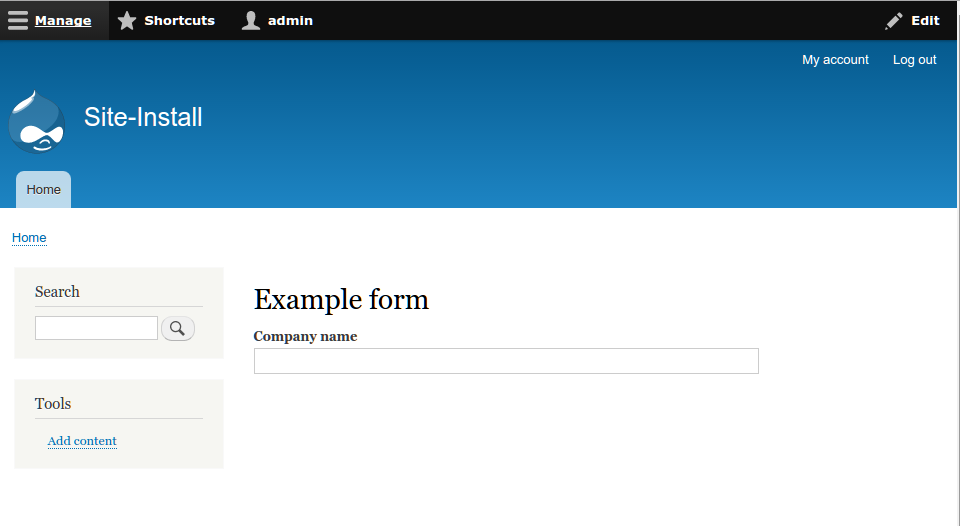
- Go to /drupal-example-form, and the form should be now visible, as shown in the following screenshot: