Twitter, as with every other third-party service, uses OAuth to handle authentication and requires an authentication key to write software using their API. It's their service, so you have to play by their rules, of course.
To register a new application with Twitter, go to https://apps.twitter.com/. Then you click on the Create New App button. Since we haven't deployed the Notes application to a regular server and, more importantly, there isn't a valid domain name for the application, we have to give Twitter the configuration required for testing on our local laptop.
Every service offering OAuth2 authentication has an administrative backend for registering new applications. The common purpose is to describe the application to the service so that the service can correctly recognize the application when requests are made using the authentication tokens. The normal situation is that the application is deployed to a regular server, and is accessed through a domain name such as MyNotes.info. We've done neither as of this moment.
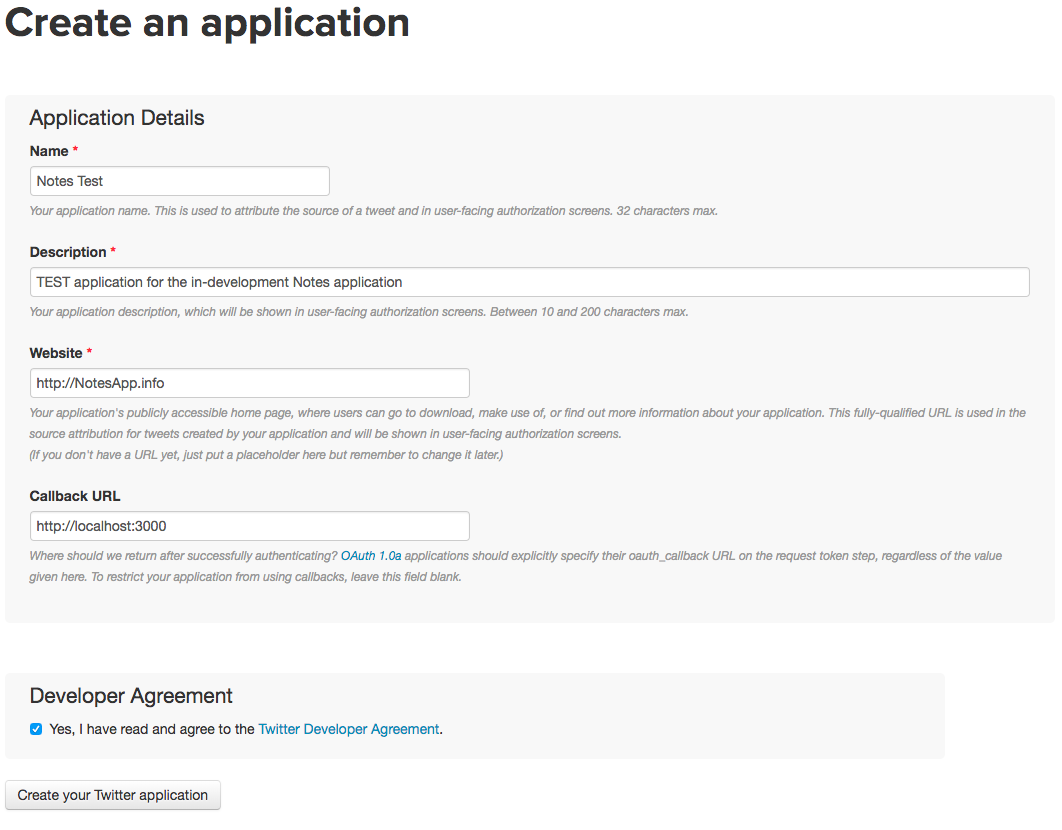
At the time of writing, there are four pieces of information requested by the Twitter sign-up process:
- Name: This is the application name, and it can be anything you like. It would be good form to use test in the name in case Twitter's staff decide to do some validation.
- Description: Descriptive phrase, and again it can be anything you like. Again, it would be good form to, at this time, describe it as a test application.
- Website: This would be your desired domain name. Here, the help text helpfully suggests If you don't have a URL yet, just put a placeholder here but remember to change it later.
- Callback URL: This is the URL to return to after successful authentication. Since we don't have a public URL to supply, this is where we specify a value referring to your laptop. It's been found that http://localhost:3000 works just fine. macOS users have another option because of the .local domain name, which is automatically assigned to their laptop. All along, we could have used a URL similar to this to access the Notes application at http://MacBook-Pro-2.local:3000/.
It was found by attempting this procedure with different services that Facebook (and other) services are not lenient about test applications hosted on laptops. At least Twitter is keen for developers to configure a test application on their laptop. Passport's other OAuth-based strategies will work similarly enough to Twitter, so the knowledge we're gaining will transfer to those other authentication strategies.
The last thing to notice is the extremely sensitive nature of the authentication keys. It's bad form to check these into a source code repository or otherwise put them in a place where anybody can access the key.
Twitter does change the signup page from time to time, but it should look something like the following: