
Once deployed to the web, each service becomes available to an enormous number of consumers. They will not only use it to get data but also to insert new data. At some point of time, this will inevitably lead to a large amount of data being available in the database. To keep the service user-friendly and maintain a reasonable response time, we need to take care of providing big data in reasonable portions, assuring that it does not need to return a few hundred thousand items when the /catalog URI is requested.
Web data consumers are used to having various pagination and filtering capabilities. Earlier in this chapter, we implemented the findIfindItemsByAttribute() function, which enabled filtering by any of the attributes of an item Now, it's time to introduce pagination capabilities to enable navigation within the resultset with the help of a URI parameter.
The mongoose.js models can make use of different plugin modules to provide additional functionality on top of them. Such a plugin module is mongoose-paginate. The Express framework also provides a piece of pagination middleware named express-paginate. It provides out-of-the-box linking and navigation with Mongoose's result pages:
- Before starting to develop the pagination mechanism, we should install these two useful modules:
npm install -g -s express-paginate
npm install -g -s mongoose-paginate
- The next step will to be to create instances of the express-paginate middleware in our application:
expressPaginate = require('express-paginate');
- Initialize the pagination middleware in the application by calling its middleware() function. Its parameters specify a default limit and a maximum limit of results per page:
app.use(expressPaginate.middleware(limit, maxLimit);
- Then, provide the mongoose-pagination instance as a plugin to the CatalogItem schema before creating a model. Here's how the item.js module will export that along with the model:
var mongoose = require('mongoose');
var mongoosePaginate = require('mongoose-paginate');
var Schema = mongoose.Schema;

mongoose.connect('mongodb://localhost/catalog');

var itemSchema = new Schema ({
    "itemId" : {type: String, index: {unique: true}},
    "itemName": String,
    "price": Number,
    "currency" : String,
    "categories": [String]
});
console.log('paginate');
itemSchema.plugin(mongoosePaginate);
var CatalogItem = mongoose.model('Item', itemSchema);

module.exports = {CatalogItem : CatalogItem, connection : mongoose.connection};
- Finally, call the paginate() function of the model to fetch the requested entries in a paginated manner:
CatalogItem.paginate({}, {page:request.query.page, limit:request.query.limit},
    function (error, result){
        if(error) {
            console.log(error);
            response.writeHead('500',
               {'Content-Type' : 'text/plain'});
            response.end('Internal Server Error');
         } else {
           response.json(result);
         }
});
The first parameter is the filter that Mongoose should use for its query. The second parameter is an object specifying which page is requested and the entries per page. The third parameter is a callback-handler function, providing the result and any available error information via its parameters:
- error: This specifies whether the query was executed successfully
- result: This is the retrieved data from the database
The express-paginate middleware enables seamless integration of the mongoose-paginate module in the web environment by enriching the request and response objects of an Express handler function.
The request objects get two new attributes: query.limit, which tells the middleware the number of entries on the page, and query.page, which specifies the requested page. Note that the middleware will ignore values of query.limit that are larger than the maxLimit value specified at the middleware's initialization. This prevents the consumer from overriding the maximum limit and gives you total control over your application.
Here's the implementation of the paginate function in the second version of the catalog module:
exports.paginate = function(model, request, response) {
    var pageSize = request.query.limit;
    var page = request.query.page;
    if (pageSize === undefined) {
        pageSize = 100;
    }
    if (page === undefined) {
        page = 1;
    }

    model.paginate({}, {page:page, limit:pageSize},
            function (error, result){
                if(error) {
                    console.log(error);
                    response.writeHead('500',
                        {'Content-Type' : 'text/plain'});
                    response.end('Internal Server Error');
                }
                else {
                    response.json(result);
                }
            });
}
The following is the response from querying a dataset containing 11 items with a limit of five items per page:
{
  "docs": [
    {
      "_id": "5a4c004b0eed73835833cc9a",
      "itemId": "1",
      "itemName": "Sports Watch 1",
      "price": 100,
      "currency": "EUR",
      "__v": 0,
      "categories": [
        "Watches",
        "Sports Watches"
      ]
    },
    {
      "_id": "5a4c0b7aad0ebbce584593ee",
      "itemId": "2",
      "itemName": "Sports Watch 2",
      "price": 100,
      "currency": "USD",
      "__v": 0,
      "categories": [
        "Sports Watches"
      ]
    },
    {
      "_id": "5a64d7ecfa1b585142008017",
      "itemId": "3",
      "itemName": "Sports Watch 3",
      "price": 100,
      "currency": "USD",
      "__v": 0,
      "categories": [
        "Watches",
        "Sports Watches"
      ]
    },
    {
      "_id": "5a64d9a59f4dc4e34329b80f",
      "itemId": "8",
      "itemName": "Sports Watch 4",
      "price": 100,
      "currency": "EUR",
      "__v": 0,
      "categories": [
        "Watches",
        "Sports Watches"
      ]
    },
    {
      "_id": "5a64da377d25d96e44c9c273",
      "itemId": "9",
      "itemName": "Sports Watch 5",
      "price": 100,
      "currency": "USD",
      "__v": 0,
      "categories": [
        "Watches",
        "Sports Watches"
      ]
    }
  ],
  "total": 11,
  "limit": "5",
  "page": "1",
  "pages": 3
}
The docs attribute contains all the items that are part of the results. Its size is the same as the selected limit value. The pages attribute provides the total number of pages; in the example here, its value is 3, as 11 items are accommodated in three pages, each containing five items. The Total attribute gives us the total number of items.
The final step to enable pagination is to modify the /v2/ route to start making use of the newly created function:
  router.get('/v2/', function(request, response) {
    var getParams = url.parse(request.url, true).query;
    if (getParams['page'] !=null) {
      catalogV2.paginate(model.CatalogItem, request, response);
    } else {
      var key = Object.keys(getParams)[0];
      var value = getParams[key];
      catalogV2.findItemsByAttribute(key, value, response);
    }
});
We will use the HTTP 302 Found status for the default route, /catalog. In this way, all incoming requests will be redirected to /v2/:
router.get('/', function(request, response) {
  console.log('Redirecting to v2');
  response.writeHead(302, {'Location' : '/catalog/v2/'});
  response.end('Version 2 is is available at /catalog/v2/: ');
});
Using an appropriate status code for redirection here is vital to the life cycle of any RESTful web service. Returning 302 Found, followed by a redirection, ensures that the consumer of the API will always have its latest version available at that location. Furthermore, it is also a good practice from the development point of view to use redirection instead of code duplication here.
When you are between two versions, you should always consider using the HTTP 301 Moved Permanently status to show where the previous version has been moved and the HTTP 302 Found status to show the actual URI of the current version.
Now, getting back to pagination, as the requested page and the limit number are provided as GET parameters and we don't want to mix that up with the filtering capabilities, there is an explicit check for them. Pagination will be used only when either the page or the limit GET parameters, are available in the request. Otherwise, searching will be carried out.
Initially, we set the maximum limit of 100 results and a default limit of 10, so, before trying the new pagination functionality, ensure that you insert more items than the default limit into the database. This will make the test results more obvious.
Now, let's give it a try. Requesting /catalog?limit=3 will result in returning a list containing only two items, as shown:
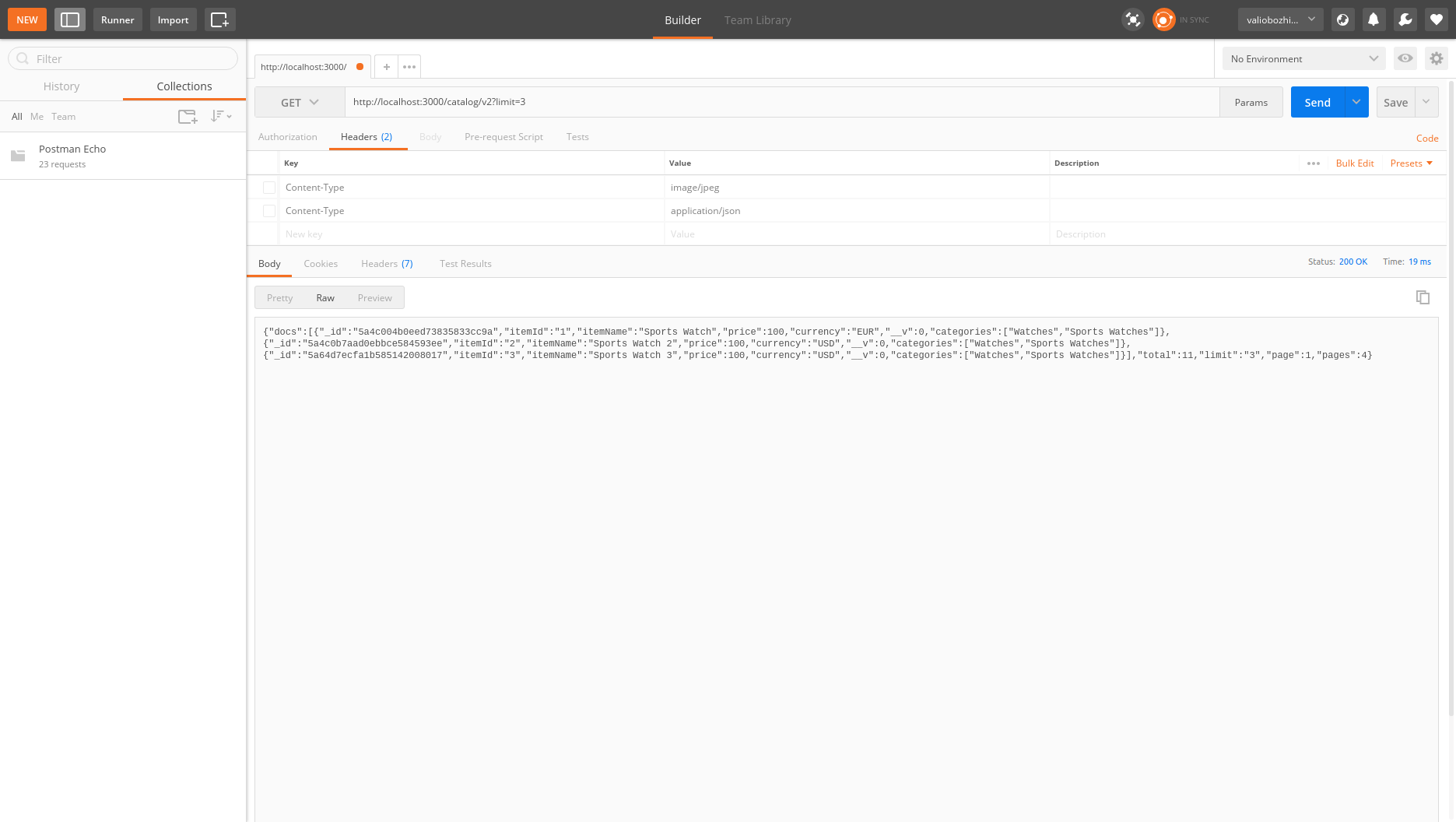
As you can see from the example, the total number of pages is four. The total number of items is stored in the database 11. Since we didn't specify a page parameter in the request, the pagination implicitly returned the first page. To navigate to the next page, simply add &page=2 to the URI.
Also, try changing the limit attribute, requesting /catalog/v2?limit=4. This will return the first four items, and the response will show that the total number of pages is three.