
The Express team has done a decent job of making sure Express applications look okay out of the gate. Our Notes application won't win any design awards, but at least it isn't ugly. There's a lot of ways to improve it, now that the basic application is running. Let's take a quick look at theming an Express application. In Chapter 6, Implementing the Mobile-First Paradigm, we'll take a deeper dive, focusing on that all-important goal of addressing the mobile market.
If you're running the Notes application using the recommended method, npm start, a nice log of activity is being printed in your console window. One of those is the following:
GET /stylesheets/style.css 304 0.702 ms - -
This is due to this line of code that we put in layout.hbs:
<link rel='stylesheet' href='/stylesheets/style.css' />
This file was autogenerated for us by the Express Generator at the outset and dropped inside the public directory. The public directory is managed by the Express static file server, using this line in app.js:
app.use(express.static(path.join(__dirname, 'public')));
Let's open public/stylesheets/style.css and take a look:
body {
  padding: 50px;
  font: 14px "Lucida Grande", Helvetica, Arial, sans-serif;
}

a {
  color: #00B7FF;
}
Something that leaps out is that the application content has a lot of white space at the top and left-hand sides of the screen. The reason is that body tags have the padding: 50px style. Changing it is quick business.
Since there is no caching in the Express static file server, we can simply edit the CSS file and reload the page, and the CSS will be reloaded as well. It's possible to turn on cache-control headers and ETags generation, as you would do for a production website. Look in the online Express documentation for details.
It involves a little bit of work:
body {
  padding: 5px;
  ..
}
..
header {
    background: #eeeeee;
    padding: 5px;
}
As a result, we'll have this:
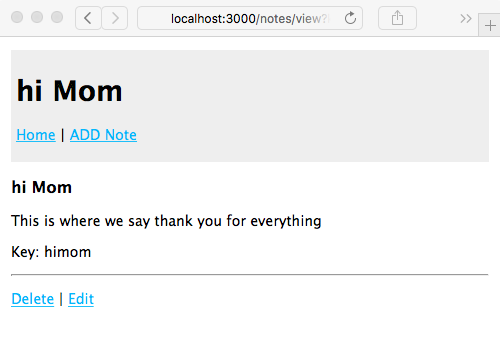
We're not going to win any design awards with this either, but there's the beginning of some branding and theming possibilities.
Generally speaking, the way we've structured the page templates, applying a site-wide theme is just a matter of adding appropriate code to layout.hbs along with appropriate stylesheets and other assets. Many of the modern theming frameworks, such as Twitter's Bootstrap, serve up CSS and JavaScript files out of a CDN server, making it incredibly easy to incorporate into a site design.
For jQuery, refer to http://jquery.com/download/.
Google's Hosted Libraries service provides a long list of libraries, hosted on Google's CDN infrastructure. Refer to https://developers.google.com/speed/libraries/.
While it's straightforward to use third-party CDNs to host these assets, it's safer to host them yourself. Not only do you take responsibility for bandwidth consumption of your application, but you're certain of not being affected by any outages of third-party services. As reliable as Google might be, their service can go down, and if that means jQuery and Bootstrap doesn't load, your customer will think your site is broken. But if those files are loaded from the same server as your application, the reliability of delivering those files will exactly equal the reliability of your application.
In Chapter 6, Implementing the Mobile-First Paradigm, we will look at a simple method to add those front-end libraries to your application.