
We've already defined a few basic versioning rules in Chapter 13, Building a Typical Web API. Let's apply them to the MongoDB database-aware module we implemented in the previous chapter. Our starting point would be to enable the current consumers of the API to continue using the same version on a different URL. This will keep them backward-compatible until they adopt and successfully test the new version.
Keeping a REST API stable is not a question of only moving one endpoint from one URI to another. It makes no sense to perform redirection and afterward have an API that behaves differently. Thus, we need to ensure that the behavior of the moved endpoint stays the same. To ensure that we don't change the previously implemented behavior, let's move the current behavior from the catalog.js module to a new module by renaming the file to catalogV1.js. Then, make a copy of it to the catalogV2.js module, where we will introduce all new functionality; but before doing that, we have to reroute Version 1 from /, /{categoryId}, /{itemId} to /v1, /v1/{categoryId}, /v1/{itemId}:
const express = require('express');
const router = express.Router();

const catalogV1 = require('../modules/catalogV1');
const model = require('../model/item.js');

router.get('/v1/', function(request, response, next) {
  catalogV1.findAllItems(response);
});

router.get('/v1/item/:itemId', function(request, response, next) {
  console.log(request.url + ' : querying for ' + request.params.itemId);
  catalogV1.findItemById(request.params.itemId, response);
});

router.get('/v1/:categoryId', function(request, response, next) {
  console.log(request.url + ' : querying for ' + request.params.categoryId);
  catalogV1.findItemsByCategory(request.params.categoryId, response);
});

router.post('/v1/', function(request, response, next) {
  catalogV1.saveItem(request, response);
});

router.put('/v1/', function(request, response, next) {
  catalogV1.saveItem(request, response);
});

router.delete('/v1/item/:itemId', function(request, response, next) {
  catalogV1.remove(request, response);
});

router.get('/', function(request, response) {
  console.log('Redirecting to v1');
  response.writeHead(301, {'Location' : '/catalog/v1/'});
  response.end('Version 1 is moved to /catalog/v1/: ');
});

module.exports = router;
Since Version 2 of our API is not yet implemented, executing a GET request against / will result in receiving a 301 Moved Permanently HTTP status, which will then redirect to /v1/. This will notify our consumers that the API is evolving and that they will soon need to decide whether to continue using Version 1 by explicitly requesting its new URI or prepare for adopting Version 2.
Go ahead and give it a try! Start the modified node application and, from Postman, make a GET request to http://localhost:3000/catalog:
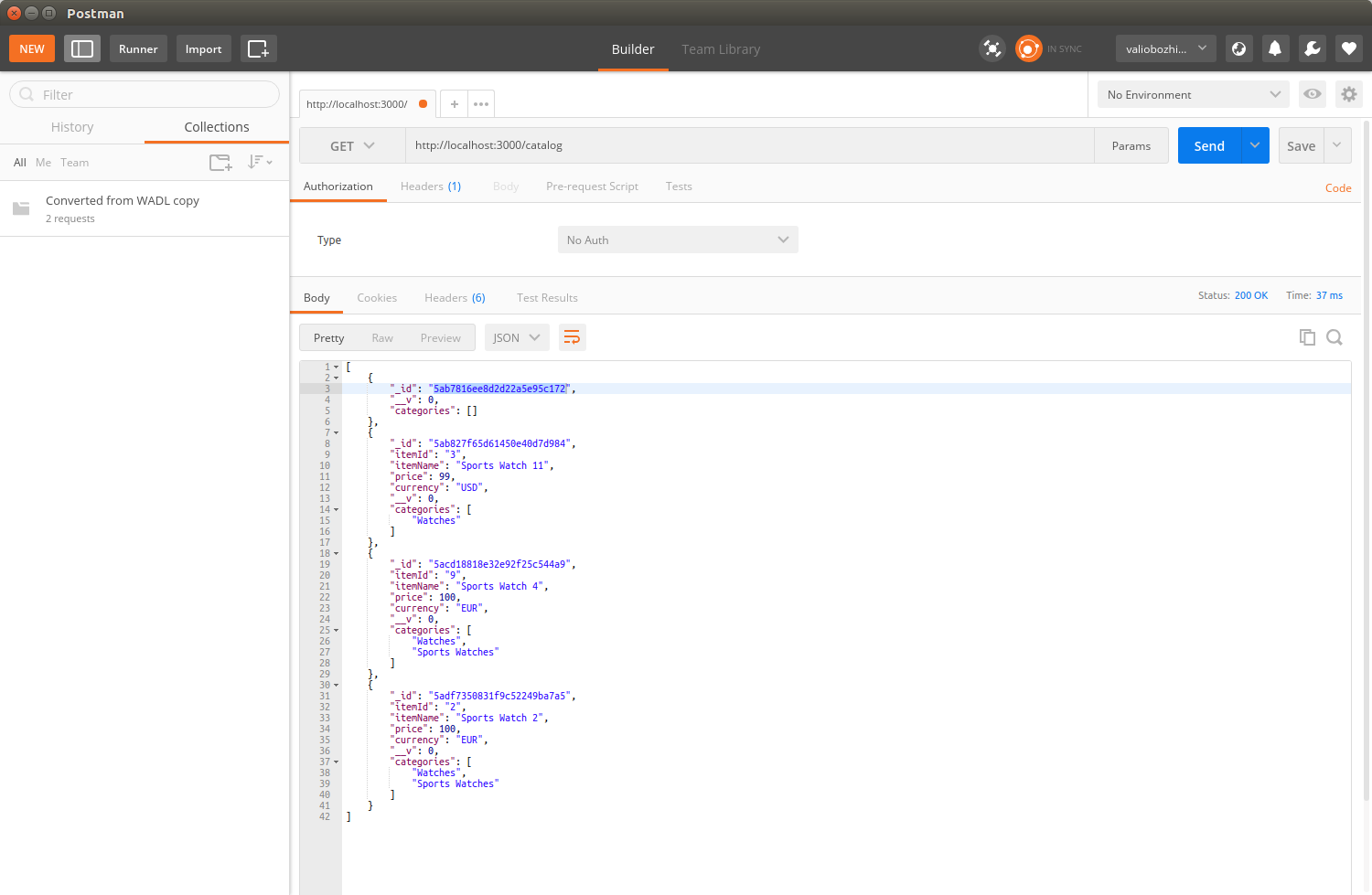
You will see that your request is redirected to the newly routed location at http://localhost:3000/catalog/v1.
Now that we have finalized Version 1 of the catalog, it's time to think of further extensions that we can add in Version 2. Currently, the catalog service supports listing of all items in a category and fetching an item by its ID. It's about time to take full advantage of MongoDB, being a document-oriented database, and implement a function that will enable our API consumer to query for items based on any of their attributes. For instance, list all items for a specific category with an attribute that matches a query parameter, such as price or color, or search by item name. RESTful services usually expose document-oriented data. However, their usage is not limited to documents only. In the next chapter, we will extend the catalog in a way that it also stores binary data—an image that can be linked to each item. For that purpose, we will use a MongoDB binary format called Binary JSON (BSON) in the Working with arbitrary data section in Chapter 16, Implementing a Full Fledged RESTful Service.
Getting back to the searching extension, we've already used the Mongoose.js model's find() and findOne() functions. So far, we used them to provide the name of the document attribute to be searched with, statically, in our JavaScript code. However, this filtering parameter of find() is just a JSON object where the key is the document attribute and the value is the attribute's value to be used in the query. Here is the first new function we will add to Version 2. It queries MongoDB by an arbitrary attribute and its value:
exports.findItemsByAttribute = function (key, value, response) {
      var filter = {};
      filter[key] = value;
      CatalogItem.find(filter, function(error, result) {
          if (error) {
              console.error(error);
              response.writeHead(500, contentTypePlainText);
              response.end('Internal server error');
              return;
          } else {
              if (!result) {
                  if (response != null) {
                     response.writeHead(200, contentTypeJson);
                     response.end({});
                  }
                  return;
              }
              if (response != null){
                  response.setHeader('Content-Type', 'application/json');
                  response.send(result);
              }
          }
      });
    }
This function calls find on the model with the provided attribute and value as parameters. We will bind this function to the router's /v2/item/ GET handler.
At the end, our aim is to have /v2/item/?currency=USD that returns only records for items that are sold in USD currency, as indicated by the value of the passed GET parameter. That way, if we modify the model with additional attributes, such as color and size, we can query for all items having the same color or any other attribute that an item can have.
We will keep the old behavior of returning a list of all available items when no parameters are provided within the query string, but we will also parse the query string for the first provided GET parameter and use it as a filter in the findItemsByAttribute() function:
router.get('/v2/items', function(request, response) {
    var getParams = url.parse(request.url, true).query;
    if (Object.keys(getParams).length == 0) {
      catalogV2.findAllItems(response);
    } else {
      var key = Object.keys(getParams)[0];
      var value = getParams[key];
      catalogV2.findItemsByAttribute(key, value, response);
    }
});
Perhaps the most interesting part in this function is the URL parsing. As you can see, we keep using the same old strategy to check whether any GET parameters are supplied. We parse the URL in order to get the query string, and then we use the built-in Object.keys function to check whether the parsed key/value list contains elements. If it does, we take the first element and extract its value. Both the key and the value are passed to the findByAttribute function.