Cross-site HTTP requests are requests that refer to resources to be loaded from a domain different from the one that initially requested them. In our case, we started the client from our filesystem, and it requested resources from a network address. This is considered a potential Cross-site scripting request, which, according to the W3C recommendation at http://w3.org/cors/TR/cors, should be carefully handled. This means that if an external resource is requested, the domain where it is requested from—its Origin—should be explicitly specified in a header, as long as an external resource loading is not allowed in general. This mechanism prevents Cross-Side Scripting (XSS) attacks, and it is based on HTTP headers.
The following HTTP request headers specify how external resources should be handled on the client side:
- Origin defines where the request originated from
- Access-Control-Request-Method defines the HTTP method that was used to request the resource
- Access-Control-Request-Header defines any headers that will be allowed in combination with the external resource request
On the server side, the following headers indicate whether a response is eligible for a CORS-enabled client request:
- Access-Control-Allow-Origin: This header either, if exists, specifies that the requester's host is allowed by repeating it, or it could specify that all remote origins are allowed by returning a wildcard: '*'
- Access-Control-Allow-Methods: This header specifies the HTTP methods that the server would allow from cross-side's domain
- Access-Control-Allow-Headers: This header specifies the HTTP headers that the server would allow from cross-side's domain
There are some more Access-Control-* headers that can be used for further granularity when incoming XSS requests are to be served, or not, based on credentials and request's max-age, but basically, the most important ones are for the allowed origin, allowed methods, and allowed headers.
There is a node module that handles CORS configuration at server side; it is installed by npm install -g cors and is easily enabled in our application via a middleware module. Simply use it in all the exposed routes by passing it to the application:
app.use(cors());
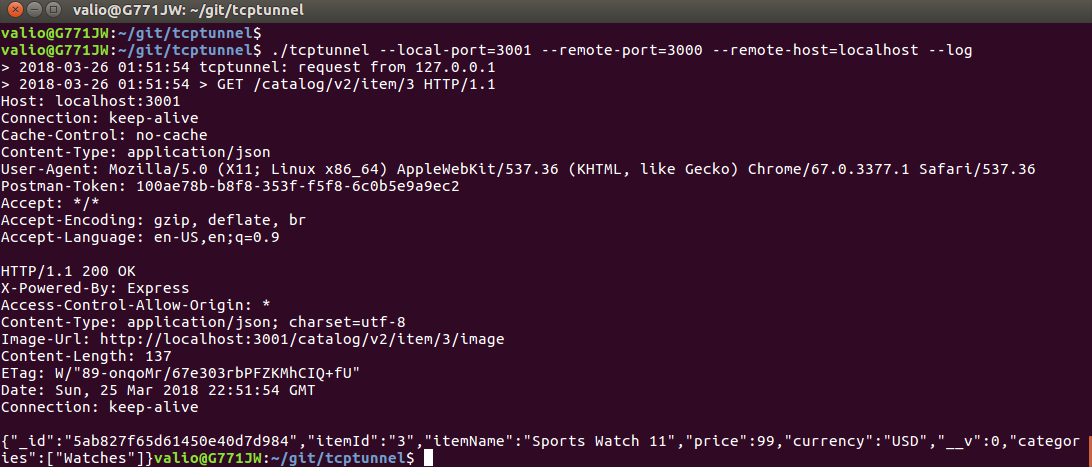
Use the tunnel after you enabled the cors middleware to see that the server would now gracefully handle requests from different origins by serving the "Access-Control-Allow-Origin' header set to '*'":