
MongoDB utilizes BSON (Binary JSON) as the primary data format. It is a binary format that stores key/value pairs in a single entity called document. For example, a sample JSON, {"hello":"world"}, becomes \x16\x00\x00\x00\x02hello\x00\x06\x00\x00\x00world\x00\x00 when encoded in BSON.
BSON stores data rather than literals. For instance, if an image is to be part of the document, it will not have to be converted to a base64-encoded string; instead, it will be directly stored as binary data, unlike plain JSON, which will usually represent such data as base64-encoded bytes, but that is obviously not the most efficient way.
Mongoose schemas enable storing binary content in the BSON format via the schema type—buffer. It stores binary content (image, ZIP archive, and so on) up to 16 MB. The reason behind the relatively small storage capacity is to prevent excessive usage of memory and bandwidth during transmission.
The GridFS specification addresses this limitation of BSON and enables you to work with data larger than 16 MB. GridFS divides data into chunks stored as separate document entries. Each chunk, by default, has a size of up to 255 KB. When data is requested from the data store, the GridFS driver retrieves all the required chunks and returns them in an assembled order, as if they had never been divided. Not only does this mechanism allow storage of data larger than 16 MB, it also enables consumers to retrieve data in portions so that it doesn't have to be loaded completely into the memory. Thus, the specification implicitly enables streaming support.
GridFS actually offers more—it supports storing metadata for the given binary data, for example, its format, a filename, size, and so on. The metadata is stored in a separate file and is available for more complex queries. There is a very usable Node.js module called gridfs-stream. It enables easy streaming of data in and out of MongoDB, as on all other modules it is installed as an npm package. So, let's install it globally and see how it is used; we will also use the -s option to ensure that the dependencies in the project's package.json are updated:
npm install -g -s gridfs-stream
To create a Grid instance, you are required to have a connection opened to the database:
const mongoose = require('mongoose')
const Grid = require('gridfs-stream');

mongoose.connect('mongodb://localhost/catalog');
var connection = mongoose.connection;
var gfs = Grid(connection.db, mongoose.mongo);
Reading and writing into the stream is done through the createReadStream() and createWriteStream() functions. Each piece of data streamed into the database must have an ObjectId attribute set. The ObjectId identifies binary data entry uniquely, just as it would have identified any other document in MongoDB; using this ObjectId, we can find or delete it from the MongoDB collection by this identifier.
Let's extend the catalog service with functions for fetching, adding, and deleting an image assigned to an item. For simplicity, the service will support a single image per item, so there will be a single function responsible for adding an image. It will overwrite an existing image each time it is invoked, so an appropriate name for it is saveImage:
exports.saveImage = function(gfs, request, response) {

    var writeStream = gfs.createWriteStream({
            filename : request.params.itemId,
            mode : 'w'
        });

        writeStream.on('error', function(error) {
            response.send('500', 'Internal Server Error');
            console.log(error);
            return;
        })

        writeStream.on('close', function() {
            readImage(gfs, request, response);
        });

    request.pipe(writeStream);
}
As you can see, all we need to do to flush the data in MongoDB is to create a GridFS write stream instance. It requires some options that provide the ObjectId of the MongoDB entry and some additional metadata, such as a title as well as the writing mode. Then, we simply call the pipe function of the request. Piping will result in flushing the data from the request to the write stream, and, in this way, it will be safely stored in MongoDB. Once stored, the close event associated with the writeStream will occur, and this is when our function reads back whatever it has stored in the database and returns that image in the HTTP response.
Retrieving an image is done the other way around—a readStream is created with options, and the value of the _id parameter should be the ObjectId of the arbitrary data, optional file name, and read mode:
function readImage(gfs, request, response) {

  var imageStream = gfs.createReadStream({
      filename : request.params.itemId,
      mode : 'r'
  });

  imageStream.on('error', function(error) {
    console.log(error);
    response.send('404', 'Not found');
    return;
  });

  response.setHeader('Content-Type', 'image/jpeg');
  imageStream.pipe(response);
}
Before piping the read stream to the response, the appropriate Content-Type header has to be set so that the arbitrary data can be presented to the client with an appropriate image media type, image/jpeg, in our case.
Finally, we export from our module a function for fetching the image back from MongoDB. We will use that function to bind it to the express route that reads the image from the database:
exports.getImage = function(gfs, itemId, response) {
     readImage(gfs, itemId, response);
};
Deleting arbitrary data from MongoDB is also straightforward. You have to delete the entry from two internal MongoDB collections, the fs.files, where all the files are kept, and from the fs.files.chunks:
exports.deleteImage = function(gfs, mongodb, itemId, response) {
  console.log('Deleting image for itemId:' + itemId);

    var options = {
            filename : itemId,
    };

    var chunks = mongodb.collection('fs.files.chunks');
    chunks.remove(options, function (error, image) {
        if (error) {
            console.log(error);
            response.send('500', 'Internal Server Error');
            return;
       } else {
           console.log('Successfully deleted image for item: ' + itemId);
       }
    });

    var files = mongodb.collection('fs.files');
    files.remove(options, function (error, image) {
        if (error) {
            console.log(error);
            response.send('500', 'Internal Server Error');
            return;
        }

        if (image === null) {
            response.send('404', 'Not found');
            return;
        } else {
           console.log('Successfully deleted image for primary item: ' + itemId);
           response.json({'deleted': true});
        }
    });
}
Let's bind the new functionality to the appropriate item route and test it:
router.get('/v2/item/:itemId/image',
  function(request, response){
    var gfs = Grid(model.connection.db, mongoose.mongo);
    catalogV2.getImage(gfs, request, response);
});

router.get('/item/:itemId/image',
  function(request, response){
    var gfs = Grid(model.connection.db, mongoose.mongo);
    catalogV2.getImage(gfs, request, response);
});

router.post('/v2/item/:itemId/image',
  function(request, response){
    var gfs = Grid(model.connection.db, mongoose.mongo);
    catalogV2.saveImage(gfs, request, response);
});

router.post('/item/:itemId/image',
  function(request, response){
    var gfs = Grid(model.connection.db, mongoose.mongo);
    catalogV2.saveImage(gfs, request.params.itemId, response);
});

router.put('/v2/item/:itemId/image',
  function(request, response){
    var gfs = Grid(model.connection.db, mongoose.mongo);
    catalogV2.saveImage (gfs, request.params.itemId, response);
});

router.put('/item/:itemId/image',
function(request, response){
  var gfs = Grid(model.connection.db, mongoose.mongo);
  catalogV2.saveImage(gfs, request.params.itemId, response);
});

router.delete('/v2/item/:itemId/image',
function(request, response){
  var gfs = Grid(model.connection.db, mongoose.mongo);
  catalogV2.deleteImage(gfs, model.connection,
  request.params.itemId, response);
});

router.delete('/item/:itemId/image',
function(request, response){
  var gfs = Grid(model.connection.db, mongoose.mongo);
  catalogV2.deleteImage(gfs, model.connection,  request.params.itemId, response);
});
Let's start Postman and post an image to an existing item, assuming that we have an item with ID 14 /catalog/v2/item/14/image:
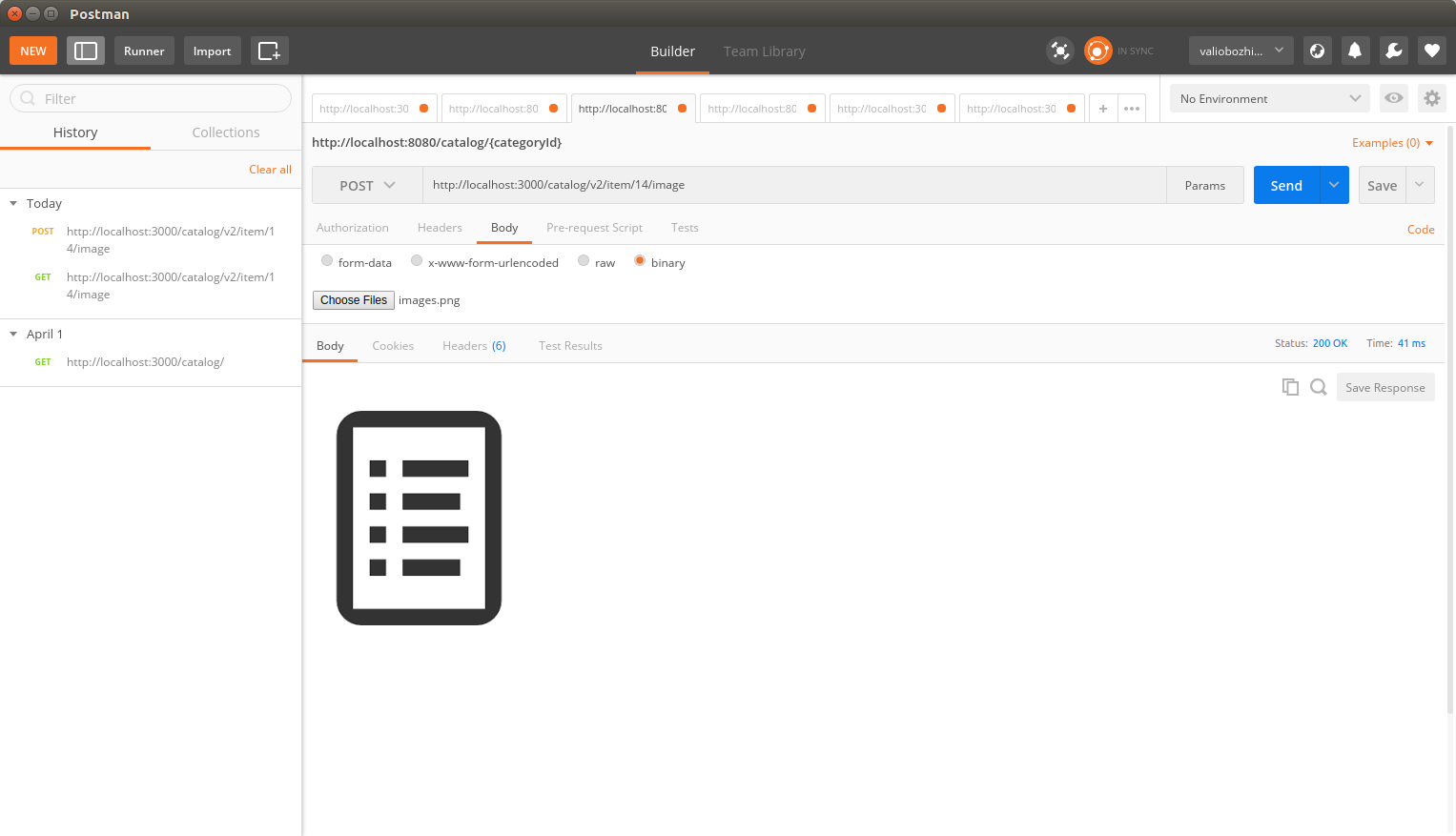
After the request is processed, the binary data is stored in the grid datastore and the image is returned in the response.