
Sometimes the interaction between the client and the server fails, and the reason for such failures often requires analysis; otherwise, their root cause stays unknown. We spotted that our client application does not load and thus doesn't display data for an existing item. Let's try to investigate the root cause for that by setting up an http tunnel between the client and the server. This will be a kind of MiM (man-in-the-middle)-based investigation, as we will listen to one port and redirect the incoming request to another, to see whether the server returns correct responses or its pipe gets broken somewhere in the middle. There are various TCP tunnels available out there; I have been using a simple open source one available on GitHub at https://github.com/vakuum/tcptunnel. Its author also maintains a separate website where you can download prebuilt binaries for the most common operating system; they are available at http://www.vakuumverpackt.de/tcptunnel/.
After you have built or downloaded a copy of the tunnel, start it as follows:
./tcptunnel --local-port=3001 --remote-port=3000 --remote-host=localhost --log
This will start the application listening on port 3001 and will forward each incoming request to location port 3000; the --log option specifies that all the data flow passing the tunnel should be logged in the console. Finally, modify HTML pages to use port 3001 instead of 3000, and let's see what the tunnel would show us after firing new GET request for the item with id 3, this time on port 3001: http://localhost:3001/catalog/v2/item/3:
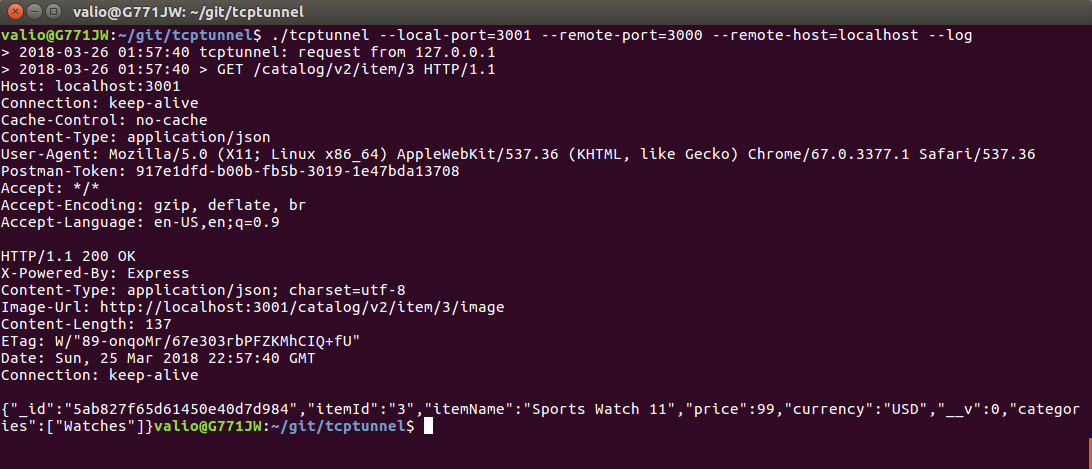
Surprisingly, the tunnel shows that the server responds normally with 200 OK and a relevant payload. So it seems as if the problem is not on the server side.
Well, since the error is obviously not on the server side, let's try to investigate deeper what has happened on the client side. Nowadays, all popular browsers have so-called web developer tools. They provide access to http logs, dynamically-rendered code, the DOM three of the HTML document, and so on. Let's invoke our RESTful GET operation with Mozillas Firefox and see what its web console will log about our request. Open the Mozilla Firefox menu and select Web Developer, and then select Browser Console:
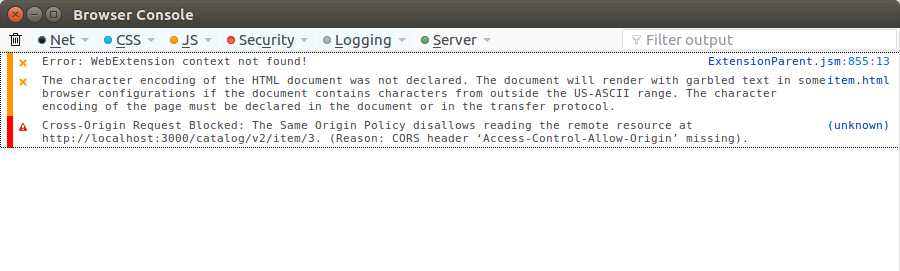
Aha! Seems like we found it: Cross-Origin Request Blocked: The Same Origin Policy disallows reading the remove resource at....
This error is blocking the server-side response at client level. In the next section, we will see what this actually means.