
Now, let's look at creating notes. Because the application doesn't have a route configured for the /notes/add URL, we must add one. To do that, we need a controller for the notes.
In app.js, make the following changes.
Comment out these lines:
// var users = require('./routes/users');
..
// app.use('/users', users);
At this stage, the Notes application does not support users, and these routes are not required. That will change in a future chapter.
What we really need to do is add code for the notes controller:
// const users = require('./routes/users');
const notes  = require('./routes/notes');
..
// app.use('/users', users);
app.use('/notes', notes);
Now, we'll add a Controller module containing the notes router. Create a file named routes/notes.js, with this content:
const util = require('util');
const express = require('express');
const router = express.Router();
const notes = require('../models/notes-memory');

// Add Note.
router.get('/add', (req, res, next) => {
    res.render('noteedit', {
        title: "Add a Note",
        docreate: true,
        notekey: "", note: undefined
    });
});

module.exports = router;
The resulting /notes/add URL corresponds to the link in partials/header.hbs.
In the views directory, add a template named noteedit.hbs, containing the following:
<form method='POST' action='/notes/save'>
<input type='hidden' name='docreate' value='<%=
                  docreate ? "create" : "update"%>'>
<p>Key:
{{#if docreate }}
    <input type='text' name='notekey' value=''/>
{{else}}
    {{#if note }}{{notekey}}{{/if}}
    <input type='hidden' name='notekey'
         value='{{#if note }}{{notekey}}{{/if}}'/>
{{/if}}
</p>
<p>Title: <input type='text' name='title'
        value='{{#if note }}{{note.title}}{{/if}}' /></p>
<br/><textarea rows=5 cols=40 name='body' >
    {{#if note }}{{note.body}}{{/if}}
    </textarea>
<br/><input type='submit' value='Submit' />
</form>
We'll be reusing this template to support both editing notes and creating new ones.
Notice that the note and notekey objects passed to the template are empty in this case. The template detects this condition and ensures the input areas are empty. Additionally, a flag, docreate, is passed in so that the form records whether it is being used to create or update a note. At this point, we're adding a new note, so no note object exists. The template code is being written defensively to not throw errors.
This template is a form that will POST its data to the /notes/save URL. If you were to run the application at this time, it would give you an error message because no route is configured for that URL.
To support the /notes/save URL, add this to routes/notes.js:
// Save Note (update)
router.post('/save', async (req, res, next) => {
    var note;
    if (req.body.docreate === "create") {
        note = await notes.create(req.body.notekey,
                req.body.title, req.body.body);
    } else {
        note = await notes.update(req.body.notekey,
                req.body.title, req.body.body);
    }
    res.redirect('/notes/view?key='+ req.body.notekey);
});
Because this URL will also be used for both creating and updating notes, it needs to detect the docreate flag and call the appropriate model operation.
The model returns a Promise for both notes.create and notes.update. Of course, we must call the corresponding Model function based on the docreate flag.
This is a POST operation handler. Because of the bodyParser middleware, the form data is added to the req.body object. The fields attached to req.body correspond directly to elements in the HTML form.
Now, we can run the application again and use the Add a Note form:
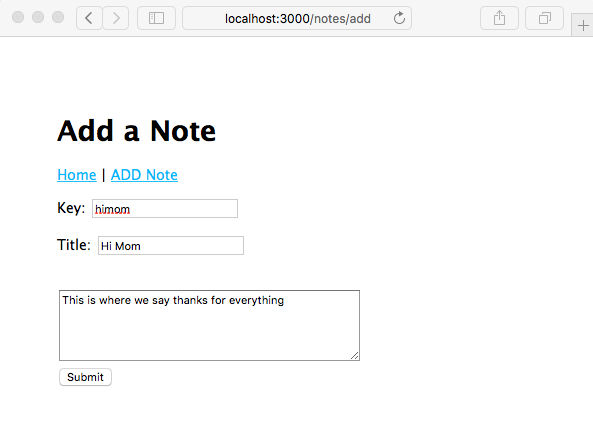
But upon clicking on the Submit button, we get an error message. There isn't anything, yet, implementing the /notes/view URL.
You can modify the URL in the location box to revisit http://localhost:3000, and you'll see something like the following screenshot on the home page:
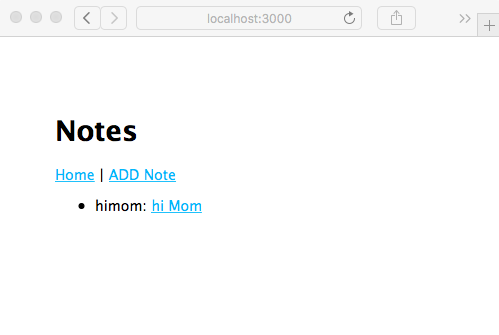
The note is actually there; we just need to implement /notes/view. Let's get on with that.