
The very first thing a project usually starts with is a definition of the operations the API will expose. According to the REST principles, an operation is exposed by an HTTP method and a URI. The action performed by each operation should not contradict the natural meaning of its HTTP method. The following table specifies the operations of our API in detail:
| Method | URI | Description |
| GET | /category | Retrieves all available categories in the catalog. |
| GET | /category/{category-id}/ | Retrieves all the items available under a specific category. |
| GET | /category/{category-id}/{item-id} | Retrieves an item by its ID under a specific category. |
| POST | /category |
Creates a new category; if it exists, it will update it. |
| POST | /category/{category-id}/ |
Creates a new item in a specified category. If the item exists, it will update it. |
| PUT | /category/{category-id} | Updates a category. |
| PUT | /category/{category-id}/{item-id} | Updates an item in a specified category. |
| DELETE | /category/{category-id} | Deletes an existing category. |
| DELETE | /category/{category-id}/{item-id} | Deletes an item in a specified category. |
The second step is to choose an appropriate format for our catalog application's data. JSON objects are natively supported by JavaScript. They are easy to extend during the evolution of an application and are consumable by almost any platform available. Thus, the JSON format seems to be our logical choice for us. Here is the JSON representation of an item, and category objects that will be used throughout this book:
{
    "itemId": "item-identifier-1",
    "itemName": "Sports Watch",
    "category": "Watches",
    "categoryId": 1,
    "price": 150,
    "currency": "EUR"
}

{
    "categoryName" : "Watches",
    "categoryId" : "1",
    "itemsCount" : 100,
    "items" : [{
            "itemId" : "item-identifier-1",
            "itemName":"Sports Watch",
            "price": 150,
            "currency" : "EUR"
     }]
}
So far, our API has defined a set of operations and the data format to be used. The next step is to implement a module that will export functions serving each of the operations in the route.
To begin with, let's create a new Node.js Express project. Select a directory where your projects will be stored and from your shell Terminal, execute express chapter3. If you are using Windows, you will need to install the express-generator module before generating the project. The express-generator will create your an initial express project layout in the selected directory. This layout provides the default project structure for you, ensuring that your Express project follows the standard project structure. It makes your project easier to navigate.
The next step is to import the project into the Atom IDE. Right-click anywhere in the Projects tab and select Add project folder then select the directory Express generated for you.
As you can see, Express has done some background work for us and has created a starting point for our application: app.js. It has also created the package.json file for us. Let's take a look at each of these files, starting with package.json:
{
  "name": "chapter3",
  "version": "1.0.0",
  "description": "",
  "main": "app.js",
  "scripts": {
    "test": "test"
  },
  "author": "",
  "license": "ISC",
  "dependencies": {
 "dependencies": {
    "body-parser": "~1.13.2",
    "cookie-parser": "~1.3.5",
    "debug": "~2.2.0",
    "express": "~4.16.1",
    "jade": "~1.11.0",
    "morgan": "~1.6.1",
    "serve-favicon": "~2.3.0"

  }
}
As we created a blank Node.js Express project, we initially have dependencies only to the Express framework, some middleware modules such as morgan, body-parser, and cookie-parser, and the Jade template language. Jade is a straightforward template language used to produce HTML code inside templates. If you are interested in it, you can find out more about it at http://www.jade-lang.com.
The current version of the Express framework at the time of writing is 4.16.1; to update it, execute npm install express@4.16.1 --save from the chapter3 directory. This command will update the dependency of the application to the desired version. The --save option will update and save the new version of the dependency in the project's package.json file.
We will come to what middleware modules are a bit later in the chapter.
For now, we will ignore the content of the public and view directories as it is not relevant to our RESTful service. They contain the auto-generated stylesheets and template files that might be helpful, if we decide to develop a web-based consumer of the services at a later stage.
We've already mentioned that the Express project created a starting point for our web application in app.js. Let's take a deeper look at it:
var express = require('express');
var path = require('path');
var favicon = require('serve-favicon');
var logger = require('morgan');
var cookieParser = require('cookie-parser');
var bodyParser = require('body-parser');

var routes = require('./routes/index');
var users = require('./routes/users');

var app = express();

// view engine setup
app.set('views', path.join(__dirname, 'views'));
app.set('view engine', 'jade');

// uncomment after placing your favicon in /public
//app.use(favicon(path.join(__dirname, 'public', 'favicon.ico')));
app.use(logger('dev'));
app.use(bodyParser.json());
app.use(bodyParser.urlencoded({ extended: false }));
app.use(cookieParser());
app.use(express.static(path.join(__dirname, 'public')));

app.use('/', routes);
app.use('/users', users);

// catch 404 and forward to error handler
app.use(function(req, res, next) {
  var err = new Error('Not Found');
  err.status = 404;
  next(err);
});

// error handlers

// development error handler
// will print stacktrace
if (app.get('env') === 'development') {
  app.use(function(err, req, res, next) {
    res.status(err.status || 500);
    res.render('error', {
      message: err.message,
      error: err
    });
  });
}

// production error handler
// no stacktraces leaked to user
app.use(function(err, req, res, next) {
  res.status(err.status || 500);
  res.render('error', {
    message: err.message,
    error: {}
  });
});


module.exports = app;
Obviously, the Express generator has done a lot for us as it has instantiated the Express framework and has assigned a complete development environment around it. It has done the following:
- Configured the middleware to be used in our application, body-parser, the default router, as well as error handler middleware for our development environment
- Injected a logger instance of the morgan middleware module
- Configured the Jade template, as it has been selected as the default template for our application
- Configured the default URI that our Express application will be listening to, / and /users, and created dummy handle functions for them
You will have to install all the modules used in app.js in order to start the generated application successfully. Also, make sure you update the dependencies of your package.json file using the --save option after installing them.
The Express generator also created a starting script for the application. It is under the bin/www directory of your project and looks like the following snippet:
#!/usr/bin/env node

/**
 * Module dependencies.
 */

var app = require('../app');
var debug = require('debug')('chapter3:server');
var http = require('http');

/**
 * Get port from environment and store in Express.
 */

var port = normalizePort(process.env.PORT || '3000');
app.set('port', port);

/**
 * Create HTTP server.
 */

var server = http.createServer(app);

/**
 * Listen on provided port, on all network interfaces.
 */

server.listen(port);
server.on('error', onError);
server.on('listening', onListening);

/**
 * Normalize a port into a number, string, or false.
 */

function normalizePort(val) {
  var port = parseInt(val, 10);

  if (isNaN(port)) {
    // named pipe
    return val;
  }

  if (port >= 0) {
    // port number
    return port;
  }

  return false;
}

/**
 * Event listener for HTTP server "error" event.
 */

function onError(error) {
  if (error.syscall !== 'listen') {
    throw error;
  }

  var bind = typeof port === 'string'
    ? 'Pipe ' + port
    : 'Port ' + port;

  // handle specific listen errors with friendly messages
  switch (error.code) {
    case 'EACCES':
      console.error(bind + ' requires elevated privileges');
      process.exit(1);
      break;
    case 'EADDRINUSE':
      console.error(bind + ' is already in use');
      process.exit(1);
      break;
    default:
      throw error;
  }
}

/**
 * Event listener for HTTP server "listening" event.
 */

function onListening() {
  var addr = server.address();
  var bind = typeof addr === 'string'
    ? 'pipe ' + addr
    : 'port ' + addr.port;
  debug('Listening on ' + bind);
}
To start the application, execute node bin/www; this will execute the script above and will start the Node.js application. So requesting http://localhost:3000 in your browser will result in calling the default GET handler, which gives a warm welcome response:
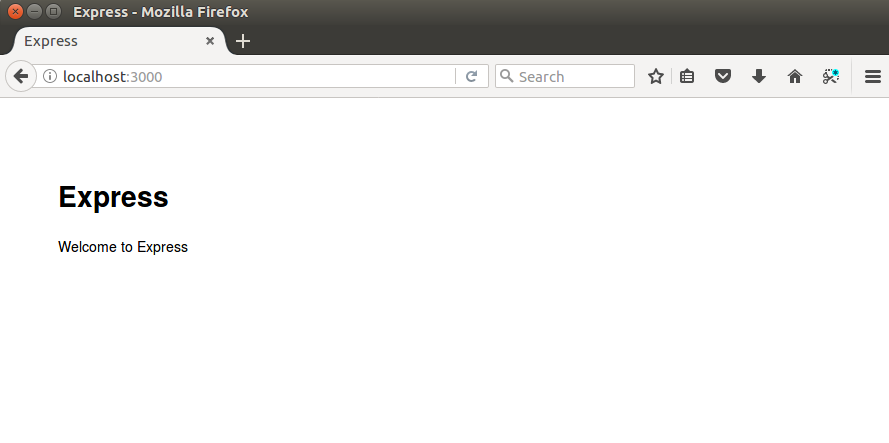
The generator created a dummy routes/users.js; it exposes a route linked to a dummy module available at the /users location. Requesting it will result in calling the list function of the user's route, which outputs a static response: respond with a resource.
Our application will not be using a template language and style sheets, so let's get rid of the lines that set the views and view engine properties in the application configuration. In addition, we will be implementing our own routes. Thus, we don't need the binding of the / and /users URIs for our app, neither do we need the user module; instead, we will utilize a catalog module and from a route:
var express = require('express');
var path = require('path');
var favicon = require('serve-favicon');
var logger = require('morgan');
var cookieParser = require('cookie-parser');
var bodyParser = require('body-parser');

var routes = require('./routes/index');
var catalog = require('./routes/catalog')
var app = express();

//uncomment after placing your favicon in /public
//app.use(favicon(path.join(__dirname, 'public', 'favicon.ico')));
app.use(logger('dev'));
app.use(bodyParser.json());
app.use(bodyParser.urlencoded({ extended: false }));
app.use(cookieParser());
app.use(express.static(path.join(__dirname, 'public')));

app.use('/', routes);
app.use('/catalog', catalog);


// catch 404 and forward to error handler
app.use(function(req, res, next) {
  var err = new Error('Not Found');
  err.status = 404;
  next(err);
});

//development error handler will print stacktrace
if (app.get('env') === 'development') {
  app.use(function(err, req, res, next) {
    res.status(err.status || 500);
    res.render('error', {
      message: err.message,
      error: err
    });
  });
}

// production error handler no stacktraces leaked to user
app.use(function(err, req, res, next) {
  res.status(err.status || 500);
  res.render('error', {
    message: err.message,
    error: {}
  });
});

module.exports = app;
So after this cleanup, our application looks a lot cleaner and we are ready to move forward.
Here are the basic rules that apply to the middleware chain:
- A middleware function has the following signature: function (request, response, next).
- Middleware functions are executed in the exact order in which they have been added to the application chain. This means that if you want your middleware function to be called before a specific route, you need to add it before declaring the route.
- Middleware functions use their third parameter, next, as a function to indicate that they have completed their work and to exit. When the next() parameter of the last function in the chain has been called, the chained execution is completed and the request and the response objects reach the defined handlers, in the state set by the middleware.
Now that we know what a middleware function is, let's clarify what the currently used middleware functions provide our application with. The body-parser middleware is the Express framework built in a parser. It parses the request body and populates the request object after the middleware execution finishes, that is, it provides JSON payload handling.
Now it is time to move on and implement our user module that will be mapped to our URIs. The module will be named modules/catalog.js:
var fs = require('fs');

function readCatalogSync() {
   var file = './data/catalog.json';
   if (fs.existsSync(file)) {
     var content = fs.readFileSync(file);
     var catalog = JSON.parse(content);
     return catalog;
   }
   return undefined;
 }

exports.findItems = function(categoryId) {
  console.log('Returning all items for categoryId: ' + categoryId);
  var catalog = readCatalogSync();
  if (catalog) {
    var items = [];
    for (var index in catalog.catalog) {
        if (catalog.catalog[index].categoryId === categoryId) {
          var category = catalog.catalog[index];
          for (var itemIndex in category.items) {
            items.push(category.items[itemIndex]);
          }
        }
    }
    return items;
  }
  return undefined;
}

exports.findItem = function(categoryId, itemId) {
  console.log('Looking for item with id' + itemId);
  var catalog = readCatalogSync();
  if (catalog) {
    for (var index in catalog.catalog) {
        if (catalog.catalog[index].categoryId === categoryId) {
          var category = catalog.catalog[index];
          for (var itemIndex in category.items) {
            if (category.items[itemIndex].itemId === itemId) {
              return category.items[itemIndex];
            }
          }
        }
    }
  }
  return undefined;
}

exports.findCategoryies = function() {
  console.log('Returning all categories');
  var catalog = readCatalogSync();
  if (catalog) {
    var categories = [];
    for (var index in catalog.catalog) {
        var category = {};
        category["categoryId"] = catalog.catalog[index].categoryId;
        category["categoryName"] = catalog.catalog[index].categoryName;

        categories.push(category);
    }
    return categories;
  }
  return [];
}
The catalog module is built around the catalog.json file, stored in the data directory. The content of the source file is read synchronously using the File System module, fs, within the readCatalogSync function. The File System module provides multiple useful filesystem operations such as functions for creating, renaming, or deleting files or directories; truncating; linking; chmod functions; as well as synchronous and asynchronous file access for reading and writing data. In our sample application, we aim to use the most straightforward approach, so we implement functions that read the catalog.json file by utilizing the readFileSync function of the File System module. It returns the content of a file as a string, within a synchronous call. All other functions of the module are exported and can be used to query the content of the source file, based on different criteria.
The catalog module exports the following functions:
- findCategories: This returns an array of JSON objects containing all the categories in the catalog.json file
- findItems (categoryId): This returns an array JSON objects representing all the items in a given category
- findItem(categoryId, itemId): This returns a JSON object representing a single item in a given category
Now that we have three complete functions, let's see how to bind them to our Express application.