
The Fibonacci numbers are the integer sequence: 0, 1, 1, 2, 3, 5, 8, 13, 21, 34, ...
Each entry in the list is the sum of the previous two entries in the list. The sequence was invented in 1202 by Leonardo of Pisa, who was also known as Fibonacci. One method to calculate entries in the Fibonacci sequence is the recursive algorithm we showed earlier. We will create an Express application that uses the Fibonacci implementation and then explore several methods to mitigate performance problems in computationally intensive algorithms.
Let's start with the blank application we created in the previous step. We had you name that application Fibonacci for a reason. We were thinking ahead.
In app.js, make the following changes to the top portion of the file:
const express = require('express');
const hbs = require('hbs');
const path = require('path');
const favicon = require('serve-favicon');
const logger = require('morgan');
const cookieParser = require('cookie-parser');
const bodyParser = require('body-parser');

const index = require('./routes/index');
const fibonacci = require('./routes/fibonacci');

const app = express();

// view engine setup
app.set('views', path.join(__dirname, 'views'));
app.set('view engine', 'hbs');
hbs.registerPartials(path.join(__dirname, 'partials'));

// uncomment after placing your favicon in /public
//app.use(favicon(path.join(__dirname, 'public', 'favicon.ico')));
app.use(logger('dev'));
app.use(bodyParser.json());
app.use(bodyParser.urlencoded({ extended: false }));
app.use(cookieParser());
app.use(express.static(path.join(__dirname, 'public')));

app.use('/', index);
app.use('/fibonacci', fibonacci);
Most of this is what express-generator gave us. The var statements have been changed to const, for that little teensy bit of extra comfort. We explicitly imported the hbs module so we could do some configuration. And we imported a router module for Fibonacci, which we'll see in a minute.
For the Fibonacci application, we don't need to support users, and therefore deleted that routing module. The fibonacci module, which we'll show next, serves to query a number for which we'll calculate the Fibonacci number.
In the top-level directory, create a file, math.js, containing this extremely simplistic Fibonacci implementation:
exports.fibonacci = function(n) {
    if (n === 0) return 0;
    else if (n === 1 || n === 2) return 1;
    else return exports.fibonacci(n-1) + exports.fibonacci(n-2);
};
In the views directory, look at the file named layout.hbs which express-generator created:
<!DOCTYPE html>
<html>
  <head>
    <title>{{title}}</title>
    <link rel='stylesheet' href='/stylesheets/style.css' />
  </head>
  <body>
    {{{body}}}
  </body>
</html>
This file contains the structure we'll use for HTML pages. Going by the Handlebars syntax, we see that {{title}} appears within the HTML title tag. It means when we call res.render, we should supply a title attribute. The {{{body}}} tag is where the view template content lands.
Change views/index.hbs to just contain the following:
<h1>{{title}}</h1>
{{> navbar}}
This serves as the front page of our application. It will be inserted in place of {{{body}}} in layout.hbs. The marker, {{> navbar}}, refers to a partial named navbar. Earlier, we configured a directory named partials to hold partials. Now let's create a file, partials/navbar.html, containing:
<div class='navbar'>
<p><a href='/'>home</a> | <a href='/fibonacci'>Fibonacci's</a></p>
</div>
This will serve as a navigation bar that's included on every page.
Create a file, views/fibonacci.hbs, containing the following code:
<h1>{{title}}</h1>
{{> navbar}}
{{#if fiboval}}
  <p>Fibonacci for {{fibonum}} is {{fiboval}}</p>
  <hr/>
{{/if}}
<p>Enter a number to see its' Fibonacci number</p>
<form name='fibonacci' action='/fibonacci' method='get'>
<input type='text' name='fibonum' />
<input type='submit' value='Submit' />
</form>
In the routes directory, delete the user.js module. It is generated by the Express framework, but we will not use it in this application.
In routes/index.js, change the router function to the following:
/* GET home page. */
router.get('/', function(req, res, next) {
  res.render('index', { title: "Welcome to the Fibonacci Calculator" });
});
The anonymous object passed to res.render contains the data values we provide to the layout and view templates.
Then, finally, in the routes directory, create a file named fibonacci.js containing the following code:
const express = require('express');
const router = express.Router();

const math = require('../math');
router.get('/', function(req, res, next) {
  if (req.query.fibonum) {
    // Calculate directly in this server
    res.render('fibonacci', {
      title: "Calculate Fibonacci numbers",
      fibonum: req.query.fibonum,
      fiboval: math.fibonacci(req.query.fibonum)
    });
  } else {
    res.render('fibonacci', {
      title: "Calculate Fibonacci numbers",
      fiboval: undefined
    });
  }
});

module.exports = router;
The package.json is already set up so we can use npm start to run the script and always have debugging messages enabled. And now we're ready to do so:
$ npm start

> fibonacci@0.0.0 start /Users/david/chap04/fibonacci
> DEBUG=fibonacci:* node ./bin/www

fibonacci:server Listening on port 3000 +0ms
As it suggests, you can visit http://localhost:3000/ and see what we have:
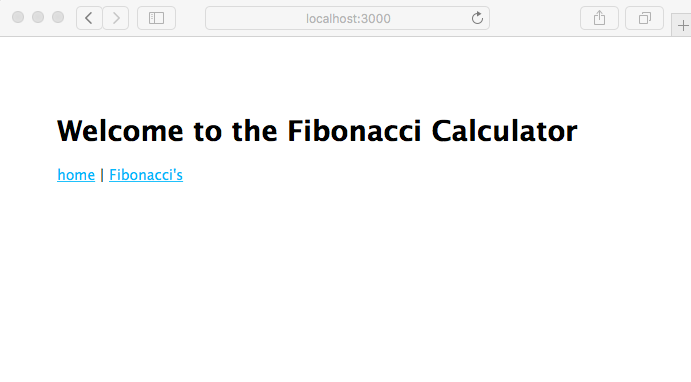
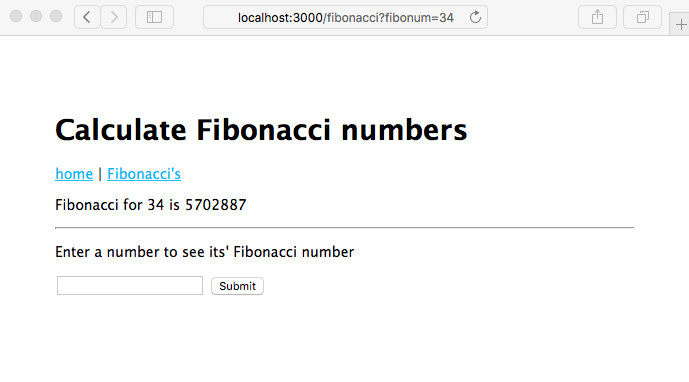
This page is rendered from the views/index.hbs template. Simply click on the Fibonacci's link to go to the next page, which is of course rendered from the views/fibonacci.hbs template. On that page, you'll be able to enter a number, click on the Submit button, and get an answer (hint: pick a number below 40 if you want your answer in a reasonable amount of time):
Let's walk through the application to discuss how it works.
There are two routes in app.js: the route for /, which is handled by routes/index.js, and the route for /fibonacci, which is handled by routes/fibonacci.js.
The res.render function renders the named template using the provided data values and emits the result as an HTTP response. For the home page of this application, the rendering code (routes/index.js) and template (views/index.hbs) aren't much, and it is on the Fibonacci page where all the action is happening.
The views/fibonacci.hbs template contains a form in which the user enters a number. Because it is a GET form, when the user clicks on the Submit button, the browser will issue an HTTP GET on the /fibonacci URL. What distinguishes one GET on /fibonacci from another is whether the URL contains a query parameter named fibonum. When the user first enters the page, there is no fibonum and hence nothing to calculate. After the user has entered a number and clicked on Submit, there is a fibonum and something to calculate.
Express automatically parses the query parameters, making them available as req.query. That means routes/fibonacci.js can quickly check whether there is a fibonum. If there is, it calls the fibonacci function to calculate the value.
Earlier, we asked you to enter a number less than 40. Go ahead and enter a larger number, such as 50, but go take a coffee break because this is going to take a while to calculate. Or proceed on to reading the next section where we start to discuss use of computationally intensive code.