
Now, let's look at how to implement the /notes/destroy URL to delete notes.
To routes/notes.js, add the following router function:
// Ask to Delete note (destroy)
router.get('/destroy', async (req, res, next) => {
    var note = await notes.read(req.query.key);
    res.render('notedestroy', {
        title: note ? note.title : "",
        notekey: req.query.key, note: note
    });
});
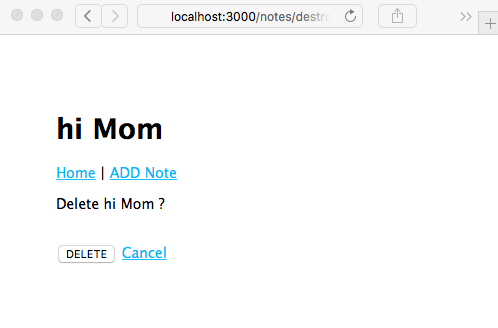
Destroying a note is a significant step if only because there's no trash can to retrieve it from if we make a mistake. Therefore, we want to ask the user whether they're sure they want to delete that note. In this case, we retrieve the note and then render the following page, displaying a question to ensure they do want to delete the note.
To the views directory, add a notedestroy.hbs template:
<form method='POST' action='/notes/destroy/confirm'>
<input type='hidden' name='notekey' value='{{#if note}}{{notekey}}{{/if}}'>
<p>Delete {{note.title}}?</p>
<br/><input type='submit' value='DELETE' />
<a href="/notes/view?key={{#if note}}{{notekey}}{{/if}}">Cancel</a>
</form>
This is a simple form, asking the user to confirm by clicking on the button. The Cancel link just sends them back to the /notes/view page. Clicking on the Submit button generates a POST request on the /notes/destroy/confirm URL.
That URL needs a request handler. Add this code to routes/notes.js:
// Really destroy note (destroy)
router.post('/destroy/confirm', async (req, res, next) => {
    await notes.destroy(req.body.notekey);
    res.redirect('/');
});
This calls the notes.destroy function in the model. If it succeeds, the browser is redirected to the home page. If not, an error message is shown to the user. Rerunning the application, we can now view it in action:
Now that everything is working in the application, you can click on any button or link and keep all the notes you want.