
Publicly available information in the web easily becomes the subject of different types of cyber attacks. Often it is not enough just to keep the so-called "bad guys" out. Sometimes, they won't bother gaining authentication at all and may prefer to carry out a man-in-the-middle (MiM) attack, pretending to be the final receiver of a message and sniffing the communication channel that transmits the data—or, even worse, altering the data while it flows.
Being a text-based protocol, HTTP transfers data in a human-readable format, which makes it an easy victim of MiM attacks. Unless transferred in an encrypted format, all the catalog data of our service is vulnerable to MiM attacks. In this section, we will switch our transport from an insecure HTTP protocol to the secure HTTPS protocol.
HTTPS is secured by asymmetric cryptography, also known as public-key encryption. It is based on a pair of keys that are mathematically related. The key used for encryption is called public key, and the key used for decryption is called private key. The idea is to freely provide the encryption key to partners who have to send encrypted messages and to perform decryption with the private key.
A typical public-key encryption communication scenario between two parties, A and B, will be the following:
-
Party A composes a message, encrypts it with Party B's public key, and sends it
-
Party B decrypts the message with its own private key and processes it
-
Party B composes a response message, encrypts it with Party A's public key, and then sends it
-
Party A decrypts the response message with its own private key
Now that we know how public-key encryption works, let's go through a sample of HTTPS client-server communication, as shown in this diagram:
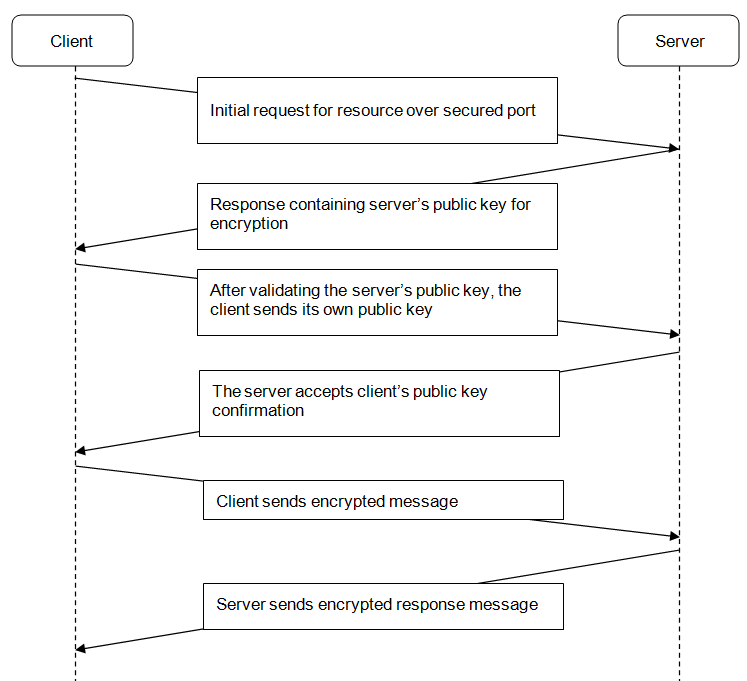
The client sends an initial request against an SSL-secured endpoint. The server responds to that request by sending its public key to be used for encrypting further incoming requests. Then, the client has to check the validity and verify the identity of the received key. After successful verification of the server's public key, the client has to send its own public key back to the server. Finally, after the key exchange procedure is complete, the two parties can start communicating securely.
HTTPS relies on trust; thus, it is vital to have a reliable way of checking whether a specific public key belongs to a specific server. Public keys are exchanged within an X.509 certificate, which has a hierarchical structure. This structure enables clients to check whether a given certificate has been generated from a trusted root certificate. Clients should trust only certificates that have been issued by a known certificate authority (CA).
Before switching our service to use the HTTPS transport, we need a public/private key pair. Since we are not a certificate authority, we will have to use OpenSSL tooling to generate test keys for us.
OpenSSL is available for download at http://www.openssl.org/, where source code distributions are available for all popular operating systems. OpenSSL can be installed as follows:
-
Binary distribution is available for download for Windows, and Debian and Ubuntu users can make use of the packaged distribution by executing the following:
sudo apt-get install openssl
-
Now let's generate a test key/value pair with OpenSSL:
opensslreq -x509 -nodes -days 365 -newkey rsa:2048-keyoutcatalog.pem -out catalog.crt
OpenSSL will prompt some details required for generating the certificate, such as country code, city, and fully qualified domain name. Afterward, it will generate a private key in the catalog.pem file and a public key certificate that will be valid for a year in the catalog.crt file. We will be using these newly generated files, so copy them into a new subdirectory, called ssl, in the catalog data service directory.
Now we have everything needed to modify our service to use HTTPS:
-
First, we need to switch and use the HTTPS module instead of HTTP and specify the port that we want to use to enable HTTPS communication:
var https = require('https');
var app = express();
app.set('port', process.env.PORT || 3443);
-
Then, we have to read the private key from the catalog.cem file and the certificate from catalog.crt into an array:
var options = {key : fs.readFileSync('./ssl/catalog.pem'),
                cert : fs.readFileSync('./ssl/catalog.crt')
};
-
Finally, we pass the array containing the key pair to the HTTPS instance when creating the server and start listening through the specified port:
https.createServer(options, app).listen(app.get('port'));
That's all you need to do to enable HTTPS for an Express-based application. Save your changes and give it a try by requesting https://localhost:3443/catalog/v2 in a browser. You will be shown a warning message informing you that the server you are connecting to is using a certificate that is not issued by a trusted certificate authority. That's normal, as we generated the certificate on our own, and we are not a CA for sure, so just ignore that warning.