
In the notes directory, create a file named Dockerfile containing the following:
FROM node:10

ENV DEBUG="notes:*,messages:*"
ENV SEQUELIZE_CONNECT="models/sequelize-docker-mysql.yaml"
ENV NOTES_MODEL="sequelize"
ENV USER_SERVICE_URL="http://userauth:3333"
ENV PORT="3000"
ENV NOTES_SESSIONS_DIR="/sessions"
# ENV TWITTER_CONSUMER_KEY="..."
# ENV TWITTER_CONSUMER_SECRET="..."
# Use this line when the Twitter Callback URL
# has to be other than localhost:3000
# ENV TWITTER_CALLBACK_HOST=http://45.55.37.74:3000

RUN mkdir -p /notesapp /notesapp/minty /notesapp/partials /notesapp/public /notesapp/routes /notesapp/theme /notesapp/views
COPY minty/ /notesapp/minty/
COPY models/*.mjs models/sequelize-docker-mysql.yaml /notesapp/models/
COPY partials/ /notesapp/partials/
COPY public/ /notesapp/public/
COPY routes/ /notesapp/routes/
COPY theme/ /notesapp/theme/
COPY views/ /notesapp/views/
COPY app.mjs package.json /notesapp/

WORKDIR /notesapp
RUN apt-get update -y \
    && apt-get -y install curl python build-essential git ca-certificates \
    && npm install --unsafe-perm

# Uncomment to build the theme directory
# WORKDIR /notesapp/theme
# RUN npm run download && npm run build && npm run clean

WORKDIR /notesapp

VOLUME /sessions
EXPOSE 3000
CMD node --experimental-modules ./app
This is similar to the Dockerfile we used for the authentication service. We're using the environment variables from notes/package.json, plus a new one, and there's a couple of new tricks involved here, so let's take a look.
The most obvious change is the number of COPY commands. The Notes application is a lot more involved given the number of subdirectories full of files that must be installed. We start by creating the top-level directories of the Notes application deployment tree. Then, one by one, we copy each subdirectory into its corresponding subdirectory in the container filesystem.
In a COPY command, the trailing slash on the destination directory is important. Why? Because the documentation says that the trailing slash is important.
The big question is: Why use multiple COPY commands such as this? This would have been trivially simple:
COPY . /notesapp
But, it is important to avoid copying the node_modules directory into the container. The container node_modules must be built inside the container, because the container operating system is almost certainly different to the host operating system. Any native code modules must be built for the correct operating system. That constraint led to the question of concisely copying specific files to the destination.
We've developed a process to build a Bootstrap 4 theme, which we developed in Chapter 6, Implementing the Mobile-First Paradigm. If you have a Bootstrap 4 theme to build, simply uncomment the corresponding lines in the Dockerfile. Those lines move the working directory to /notesapp/theme and then run the scripts to build the theme. A new script is required in theme/package.json to remove the theme/node_modules directory after the theme has been built:
 "scripts": {
    ...
    "clean": "rm -rf bootstrap-4.0.0/node_modules"
    ...
}
We also have a new SEQUELIZE_CONNECT file. Create models/sequelize-docker-mysql.yaml containing the following:
dbname: notes
username: notes
password: notes12345
params:
    host: db-notes
    port: 3306
    dialect: mysql
This will access a database server on the db-notes domain name using the named database, username, and password.
Notice that the USER_SERVICE_URL variable no longer accesses the authentication service at localhost, but at userauth. The userauth domain name is currently only advertised by the DNS server on AuthNet, but the Notes service is on FrontNet. This means we'll have to connect the userauth container to the FrontNet bridge network so that its name is known there as well. We'll get to that in a minute.
In Chapter 8, Multiuser Authentication the Microservice Way we discussed the need to protect the API keys supplied by Twitter.
We didn't want to commit the keys in the source code, but they have to go somewhere. Placeholders are in the Dockerfile for specifying TWITTER_CONSUMER_KEY and TWITTER_CONSUMER_SECRET.
The value for TWITTER_CALLBACK_HOST needs to reflect where Notes is deployed. Right now, it is still on your laptop, but by the end of the chapter, it will be deployed to the server, and, at that time, it will need the IP address or domain name of the server.
A new variable is NOTES_SESSIONS_DIR and the matching VOLUME declaration. If we were to run multiple Notes instances, they could share session data by sharing this volume.
Supporting the NOTES_SESSIONS_DIR variable requires one change in app.mjs:
const sessionStore  = new FileStore({
    path: process.env.NOTES_SESSIONS_DIR ?
          process.env.NOTES_SESSIONS_DIR : "sessions"
});
Instead of a hardcoded directory name, we can use an environment variable to define the location where session data is stored. Alternatively, there are sessionStore implementations for various servers such as REDIS, enabling session data sharing between containers on separate host systems.
In notes/package.json, add these scripts:
"scripts": {
    ...
    "docker": "node --experimental-modules ./app",
    "docker-build": "docker build -t node-web-development/notes ."
    ...
}
As for the authentication server, this lets us build the container and then, within the container, we can run the service.
Now we can build the container image:
$ npm run docker-build

> notes@0.0.0 docker-build /Users/david/chap10/notes
> docker build -t node-web-development/notes .

Sending build context to Docker daemon 76.27MB
Step 1/22 : FROM node:9.5
 ---> a696309517c6
Step 2/22 : ENV DEBUG="notes:*,messages:*"
 ---> Using cache
 ---> 8628ecad9fa4
Next, in the frontnet directory, create a file named startserver.sh, or, on Windows, startserver.ps1:
docker run -it --name notes --net=frontnet -p 3000:3000 node-web-development/notesUnlike the authentication service, the Notes application container must export a port to the public. Otherwise, the public will never be able to enjoy this wonderful creation we're building. The -p option is how we instruct Docker to expose a port.
The first number is a TCP port number published from the container, and the second number is the TCP port inside the container. Generally speaking, this option maps a port inside the container to one reachable by the public.
Then run it as follows:
$ sh -x startserver.sh
+ docker run -it --name notes --net=frontnet -p 3000:3000 node-web-development/notes
(node:6) ExperimentalWarning: The ESM module loader is experimental.
  notes:debug-INDEX Listening on port 3000 +0ms
On Windows, run .\startserver.ps1.
At this point, we can connect our browser to http://localhost:3000 and start using the Notes application. But we'll quickly run into a problem:
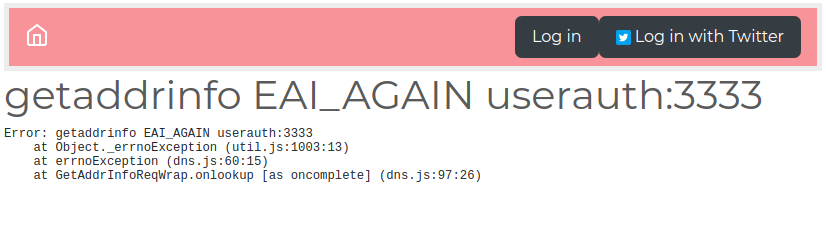
The user experience team is going to scream about this ugly error message, so put it on your backlog to generate a prettier error screen. For example, a flock of birds pulling a whale out of the ocean is popular.
This error means that Notes cannot access anything at the host named userauth. That host does exist, because the container is running, but it's not on frontnet, and is not reachable from the notes container. Namely:
$ docker exec -it notes bash
root@125a196c3fd5:/notesapp# ping userauth
ping: unknown host
root@125a196c3fd5:/notesapp# ping db-notes
PING db-notes (172.19.0.2): 56 data bytes
64 bytes from 172.19.0.2: icmp_seq=0 ttl=64 time=0.136 ms
^C--- db-notes ping statistics ---
1 packets transmitted, 1 packets received, 0% packet loss
round-trip min/avg/max/stddev = 0.136/0.136/0.136/0.000 ms
root@125a196c3fd5:/notesapp#
If you inspect FrontNet and AuthNet, you'll see the containers attached to each do not overlap:
$ docker network inspect frontnet
$ docker network inspect authnet
In the architecture diagram at the beginning of the chapter, we showed a connection between the notes and userauth containers. The connection is required so notes can authenticate its users. But that connection does not exist, yet.
Unfortunately, a simple change to startserver.sh (startserver.ps1) does not work:
docker run -it --name notes --net=authnet --net=frontnet -p 3000:3000 node-web-development/notes
While it is conceptually simple to specify multiple --net options when starting a container, Docker does not support this. It silently accepts the command as shown, but only connects the container to the last network mentioned in the options. Instead, Docker requires that you take a second step to attach the container to a second network:
$ docker network connect authnet notes
With no other change, the Notes application will now allow you to log in and start adding and editing notes.
There is a glaring architecture question staring at us. Do we connect the userauth service to frontnet, or do we connect the notes service to authnet? To verify that either direction solves the problem, run these commands:
$ docker network disconnect authnet notes
$ docker network connect frontnet userauth
The first time around, we connected notes to authnet, then we disconnected it from authnet, and then connected userauth to frontnet. That means we tried both combinations and, as expected, in both cases notes and userauth were able to communicate.
This is a question for security experts since the consideration is the attack vectors available to any intruders. Suppose Notes has a security hole allowing an invader to gain access. How do we limit what is reachable via that hole?
The primary observation is that by connecting notes to authnet, notes not only has access to userauth, but also to db-userauth:
$ docker network disconnect frontnet userauth
$ docker network connect authnet notes
$ docker exec -it notes bash
root@7fce818e9a4d:/notesapp# ping userauth
PING userauth (172.18.0.3): 56 data bytes
64 bytes from 172.18.0.3: icmp_seq=0 ttl=64 time=0.103 ms
^C--- userauth ping statistics ---
1 packets transmitted, 1 packets received, 0% packet loss
round-trip min/avg/max/stddev = 0.103/0.103/0.103/0.000 ms
root@7fce818e9a4d:/notesapp# ping db-userauth
PING db-userauth (172.18.0.2): 56 data bytes
64 bytes from 172.18.0.2: icmp_seq=0 ttl=64 time=0.201 ms
^C--- db-userauth ping statistics ---
1 packets transmitted, 1 packets received, 0% packet loss
round-trip min/avg/max/stddev = 0.201/0.201/0.201/0.000 ms
root@7fce818e9a4d:/notesapp#
This sequence reconnects notes to authnet, and demonstrates the ability to access both the userauth and db-userauth containers. Therefore, a successful invader could access the db-userauth database, a result we wanted to prevent. Our diagram at the beginning showed no such connection between notes and db-userauth.
Given that our goal for using Docker was to limit the attack vectors, we have a clear distinction between the two container/network connection setups. Attaching userauth to frontnet limits the number of containers that can access db-userauth. For an intruder to access the user information database, they must first break into notes, and then break into userauth. Unless, that is, our amateur attempt at a security audit is flawed.