
Now that we've got ourselves a running application, you'll have played around a bit and created, read, updated, and deleted many notes.
Suppose for a moment this isn't a toy application, but one that is interesting enough to draw a million users a day. Serving a high load typically means adding servers, load balancers, and many other things. A core part is to have multiple instances of the application running at the same time to spread the load.
Let's see what happens when you run multiple instances of the Notes application at the same time.
The first thing is to make sure the instances are on different ports. In bin/www, you'll see that setting the PORT environment variable controls the port being used. If the PORT variable is not set, it defaults to http://localhost:3000, or what we've been using all along.
Let's open up package.json and add these lines to the scripts section:
"scripts": {
    "start": "DEBUG=notes:* node ./bin/www",
    "server1": "DEBUG=notes:* PORT=3001 node ./bin/www",
    "server2": "DEBUG=notes:* PORT=3002 node ./bin/www" },
The server1 script runs on PORT 3001, while the server2 script runs on PORT 3002. Isn't it nice to have all this documented in one place?
Then, in one command window, run this:
$ npm run server1

> notes@0.0.0 server1 /Users/David/chap05/notes
> DEBUG=notes:* PORT=3001 node ./bin/www

  notes:server Listening on port 3001 +0ms
In another command window, run this:
$ npm run server2

> notes@0.0.0 server2 /Users/David/chap05/notes
> DEBUG=notes:* PORT=3002 node ./bin/www

  notes:server Listening on port 3002 +0ms
This gives us two instances of the Notes application. Use two browser windows to visit http://localhost:3001 and http://localhost:3002. Enter a couple of notes, and you might see something like this:
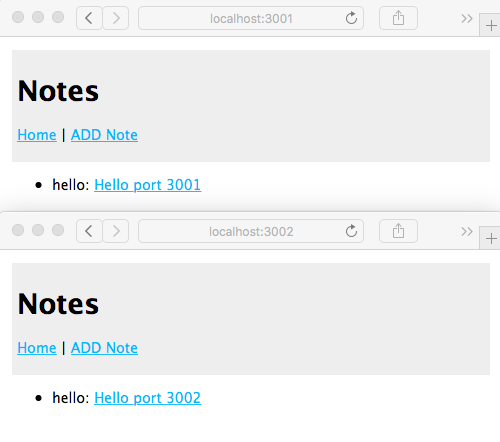
After editing and adding some notes, your two browser windows could look like the preceding screenshot. The two instances do not share the same data pool. Each is instead running in its own process and memory space. You add a note in one, and it does not show in the other screen.
Additionally, because the model code does not persist data anywhere, the notes are not saved. You might have written the greatest Node.js programming book of all time, but as soon as the application server restarts, it's gone.
Typically, you run multiple instances of an application to scale performance. That's the old throw more servers at it trick. For this to work, the data of course must be shared, and each instance must access the same data source. Typically, this involves a database. And when it comes to user identity information, it might even entail armed guards.
Hold on—we'll get to database implementation shortly. Before that, we'll cover mobile-first development.