If all this is too complicated for you, several websites provide pre-built Bootstrap themes, or else simplified tools to generate a Bootstrap build. To get our feet wet, let's download a theme from Bootswatch (https://bootswatch.com/). This is both a collection of free and open source themes and a build system for generating custom Bootstrap themes (https://github.com/thomaspark/bootswatch/).
Let's use the Minty theme from Bootswatch to explore the needed changes. You can download the theme from the website or add the following to the scripts section of package.json:
"dl-minty": "mkdir -p minty && npm run dl-minty-css && npm run dl-minty-min-css",
"dl-minty-css": "wget https://bootswatch.com/4/minty/bootstrap.css -O minty/bootstrap.css",
"dl-minty-min-css": "wget https://bootswatch.com/4/minty/bootstrap.min.css -O minty/bootstrap.min.css"
This will download the prebuilt CSS files for our chosen theme. In passing, notice that the Bootswatch website offers _variables.scss and _bootswatch.scss files which should be usable with a workflow similar to what we implemented in the previous section. The GitHub repository matching the Bootswatch website has a complete build procedure for building custom themes.
Perform the download:
$ npm run dl-minty

> notes@0.0.0 dl-minty /Users/David/chap06/notes
> mkdir -p minty && npm run dl-minty-css && npm run dl-minty-min-css

> notes@0.0.0 dl-minty-css /Users/David/chap06/notes
> wget https://bootswatch.com/4/minty/bootstrap.css -O minty/bootstrap.css

> notes@0.0.0 dl-minty-min-css /Users/David/chap06/notes
> wget https://bootswatch.com/4/minty/bootstrap.min.css -O minty/bootstrap.min.css
In app.js we will need to change the Bootstrap mounts to separately mount the JavaScript and CSS files. Use the following:
// app.use('/assets/vendor/bootstrap', express.static(
// path.join(__dirname, 'node_modules', 'bootstrap', 'dist')));
// app.use('/assets/vendor/bootstrap', express.static(
// path.join(__dirname, 'theme', 'bootstrap-4.0.0', 'dist')));
app.use('/assets/vendor/bootstrap/js', express.static(
  path.join(__dirname, 'node_modules', 'bootstrap', 'dist', 'js')));
app.use('/assets/vendor/bootstrap/css', express.static(
  path.join(__dirname, 'minty')));
Instead of one mount for /vendor/bootstrap, we now have two mounts for each of the subdirectories. Simply make the /vendor/bootstrap/css mount point to a directory containing the CSS files you downloaded from the theme provider.
Because Minty is a light-colored theme, the buttons need to use the dark style. We had earlier changed the buttons to use a light style because of the dark background. We must now switch from btn-outline-light back to btn-outline-dark. In partials/header.hbs, the color scheme requires a change to the navbar content:
<div class="collapse navbar-collapse" id="navbarSupportedContent">
 <span class="navbar-text text-dark col">{{ title }}</span>
 <a class="nav-item nav-link btn btn-dark col-auto" href='/notes/add'>ADD Note</a>
</div>
We selected text-dark and btn-dark classes to provide some contrast against the background.
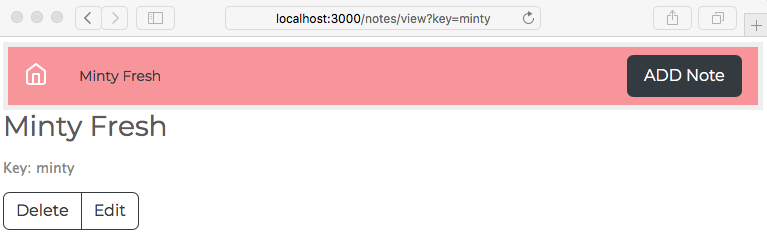
Re-run the application and you'll see something like this: