
In this section, we'll take a look at how ICMP is useful to network engineers and what some of the different types of ICMP are and what they mean.
The first thing we will do is create some ICMP packets. For that we will create a ping request, which is a type of ICMP.
So, let's go ahead and start the capture, and we'll go ahead and ping Google again:
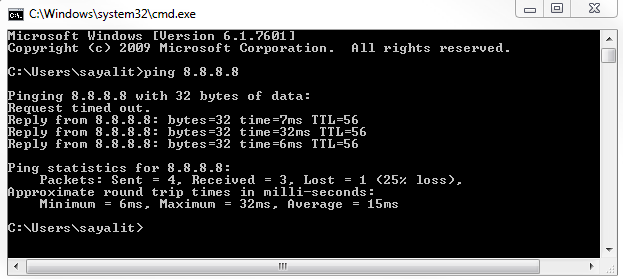
Each one of the replies is a series of ICMP requests and responses.
Stop the capture and we'll apply an icmp display filter:
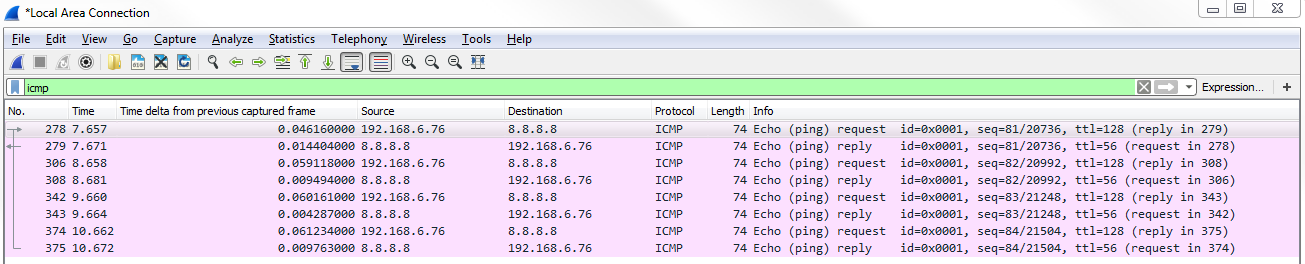
As shown in the preceding screenshot, these are all of my ICMP packets that have been sent and received, and we can see that we have multiple requests and replies. This coincides with the four replies that we saw in the command line.
If we dive into the header, by going down to the very bottom in the packet details—that is, to Internet Control Message Protocol, we can see that we have Type and Code:
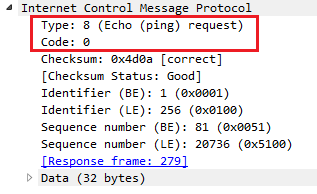
Type and Code are the two important parts within ICMP. We see we have Type 8: (Echo (ping) request). Then, in the next packet we have Type: 0 (Echo (ping) reply). The Type and Code give us information about what's going on in the network. Now, this is a very simple example of requesting a poll of a device and a response from a device to see if it's alive. It's basically like ringing the doorbell of a device to see if it's there.
There are other types and codes within ICMP that are useful to our devices on our network and are also useful to us as engineers. A very simple example is an echo request and you can reply to see if something is accessible and if it's being allowed by the device, such as firewalls; they may be blocking the request, but it's a very useful thing. We also have other types and code we can look at.
If you go to the ICMP page on Wikipedia (https://en.wikipedia.org/wiki/Internet_Control_Message_Protocol), we can scroll down and take a look at all of these types and code. You can see that there are a number of different types, and there's code within each type.
You can see that there's type 8 - Echo Request, used to ping; and type 0 - Echo Reply. But we have these additional types that are here as well, such as type 3 - Destination Unreachable:
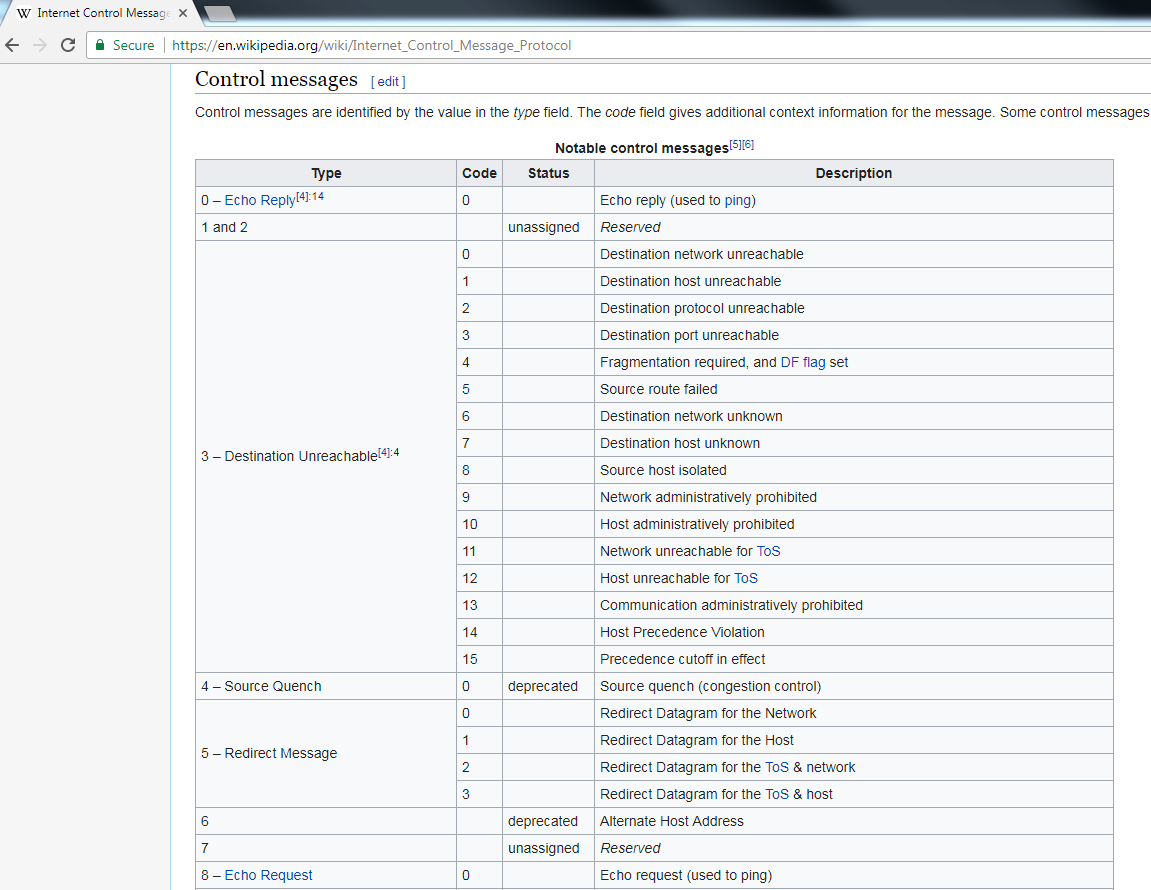
A router may send an ICMP packet back to a device, letting it know that it's unable to access a certain network or host for it. You can see all the different types that it has to describe to the requesting device why it can't reach the specific resource that it's trying to get to.
The other common types are router advertisement and router solicitation. These allow hosts to request and receive a router to access a specific network. Additionally, we have type 11 - Time Exceeded. Remember when we were talking about the TTL and how it starts at a certain number, such as 60 or 128 or something like that, and it will then decrement as it goes through the different routers throughout a network and across the internet? When a router receives a packet with a TTL of 1, it will discard it and at the same time generate an ICMP packet and send it back to the original source device, letting it know that the TTL was exceeded and that it needed to discard it. It will do so with type 11 and code 0.
We can see an example of this in the following screenshot:
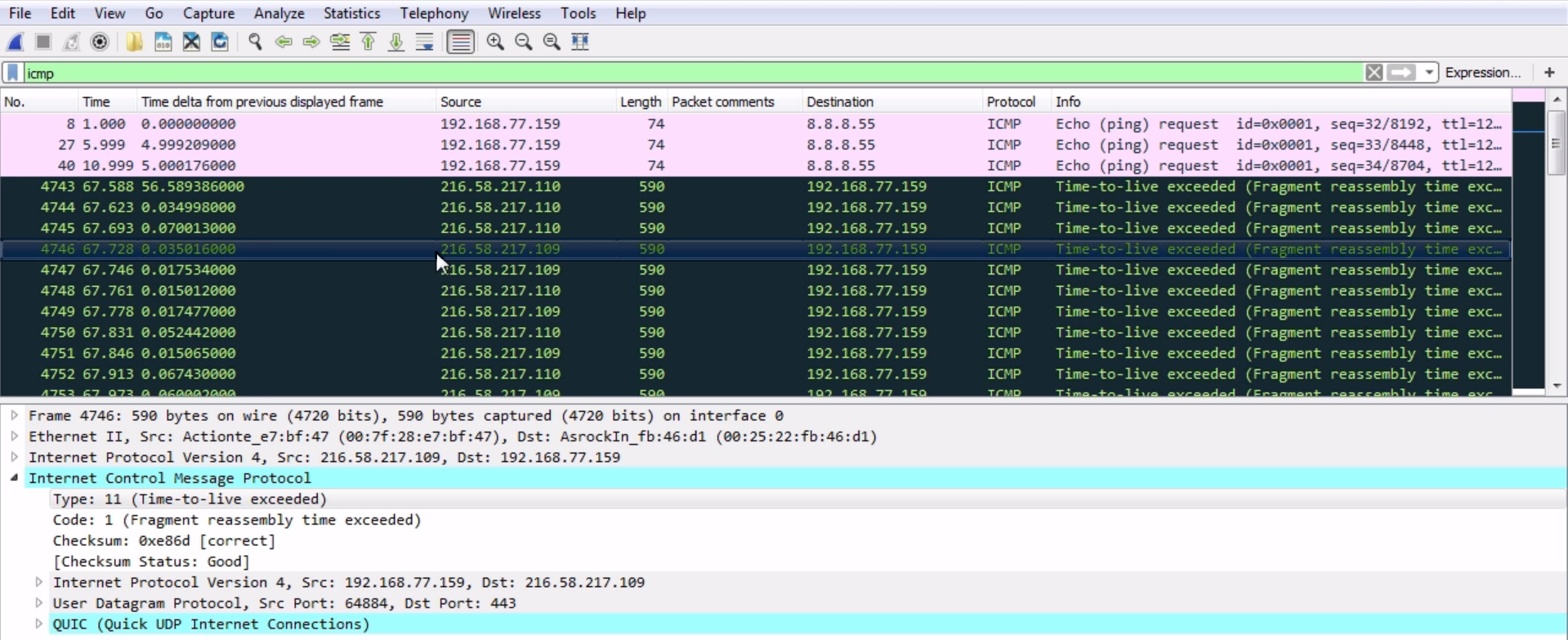
The black packets are highlighted by default in Wireshark. All of them have their TTL exceeded. So there are TTLs that, when they were out on the internet, ran out. They got stuck in a loop or something like that and the router that discarded it sent back a message to me letting me know that my packets have been discarded—they did not make it to their destination.
Now, these packets are a little bit different in that they're fragments. We saw that the other one was a code 0 and the packet shown in preceding screenshot is a code 1, but it's the same idea. It's sent back a type 11 to us to let us know that the TTL was exceeded for that packet. This is actually how traceroute works. It uses ICMP packets with different TTLs in order to figure out what routers are in the path from a source to a destination.