
Table of Contents for
Mastering Wireshark 2

Version ebook / Retour

Cover image for bash Cookbook, 2nd Edition Mastering Wireshark 2 by Andrew Crouthamel Published by Packt Publishing, 2018
  1. Mastering Wireshark 2
  2. Title Page
  3. Copyright and Credits
  4. Mastering Wireshark 2
  5. Packt Upsell
  6. Why subscribe?
  7. PacktPub.com
  8. Contributor
  9. About the author
  10. Packt is searching for authors like you
  11. Table of Contents
  12. Preface
  13. Who this book is for
  14. What this book covers
  15. To get the most out of this book
  16. Download the color images
  17. Conventions used
  18. Get in touch
  19. Reviews
  20. Installing Wireshark 2
  21. Installation and setup
  22. Installing Wireshark on Windows
  23. Installing Wireshark on macOS
  24. Installing Wireshark on Linux
  25. Summary
  26. Getting Started with Wireshark
  27. What's new in Wireshark 2?
  28. Capturing traffic
  29. How to capture traffic
  30. Saving and exporting packets
  31. Annotating and printing packets
  32. Remote capture setup
  33. Prerequisites
  34. Remote capture usage
  35. Summary
  36. Filtering Traffic
  37. Berkeley Packet Filter (BPF) syntax
  38. Capturing filters
  39. Displaying filters
  40. Following streams
  41. Advanced filtering
  42. Summary
  43. Customizing Wireshark
  44. Preferences
  45. Appearance
  46. Layout
  47. Columns
  48. Fonts and colors
  49. Capture
  50. Filter buttons
  51. Name resolution
  52. Protocols
  53. Statistics
  54. Advanced
  55. Profiles
  56. Colorizing traffic
  57. Examples of colorizing traffic
  58. Example 1
  59. Example 2
  60. Summary
  61. Statistics
  62. TCP/IP overview
  63. Time values and summaries
  64. Trace file statistics
  65. Resolved addresses
  66. Protocol hierarchy
  67. Conversations
  68. Endpoints
  69. Packet lengths
  70. I/O graph
  71. Load distribution
  72. DNS statistics
  73. Flow graph
  74. Expert system usage
  75. Summary
  76. Introductory Analysis
  77. DNS analysis
  78. An example for DNS request failure
  79. ARP analysis
  80. An example for ARP request failure
  81. IPv4 and IPv6 analysis
  82. ICMP analysis
  83. Using traceroute
  84. Summary
  85. Network Protocol Analysis
  86. UDP analysis
  87. TCP analysis I
  88. TCP analysis II
  89. Graph I/O rates and TCP trends
  90. Throughput
  91. I/O graph
  92. Summary
  93. Application Protocol Analysis I
  94. DHCP analysis
  95. HTTP analysis I
  96. HTTP analysis II
  97. FTP analysis
  98. Summary
  99. Application Protocol Analysis II
  100. Email analysis
  101. POP and SMTP
  102. 802.11 analysis
  103. VoIP analysis
  104. VoIP playback
  105. Summary
  106. Command-Line Tools
  107. Running Wireshark from a command line
  108. Running tshark
  109. Running tcpdump
  110. Running dumpcap
  111. Summary
  112. A Troubleshooting Scenario
  113. Wireshark plugins
  114. Lua programming
  115. Determining where to capture
  116. Capturing scenario traffic
  117. Diagnosing scenario traffic
  118. Summary
  119. Other Books You May Enjoy
  120. Leave a review - let other readers know what you think

Example 2

Now, in the second example, we'll take a look at NS. Let's say, you have some sort of problem in your network where certain DNS responses are coming back if they can't find any sort of records in your DNS server for a resource, whether it's a web page or a local server; whatever it is, it's not finding the DNS entries. We can apply a coloring rule that will vibrantly show us whenever there's a DNS response that it cannot find a record.

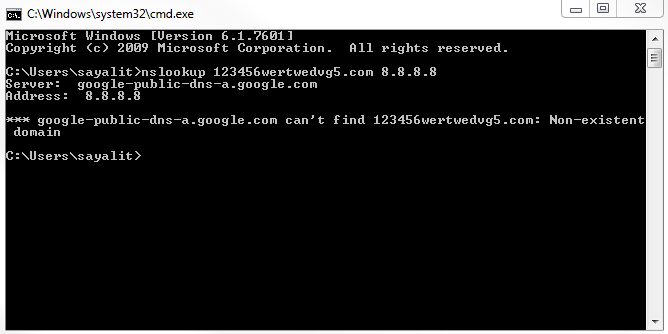
Let's go ahead and create a new capture, and I'm going to look up some random web page that doesn't exist, and we'll use DNS off of Google. We will get a message that it doesn't exist:
So we're going to stop our capture, and we'll see nothing really pops out. There would be some red stuff there from some TCP resets and some black ones, but nothing else. It's all TCP traffic and DNS. Let's go ahead and create a coloring rule:

  1. Make a new coloring rule by clicking on View | Coloring Rules...; we'll call it DNS No Records.
  1. In the filter information, we'll enter dns.flags.rcode, which is for the response code. If the response code equals 3, it means there's no record:
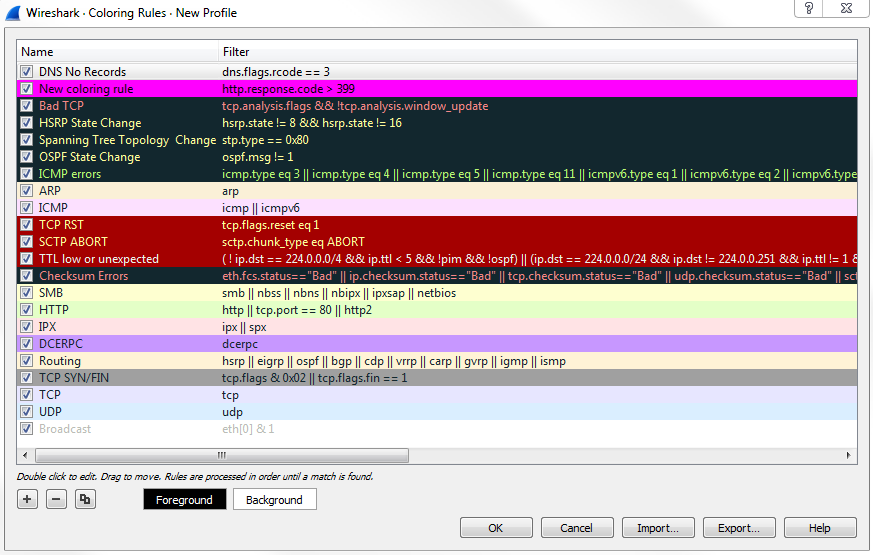
  1. We will select the Foreground as black and Background as yellow.

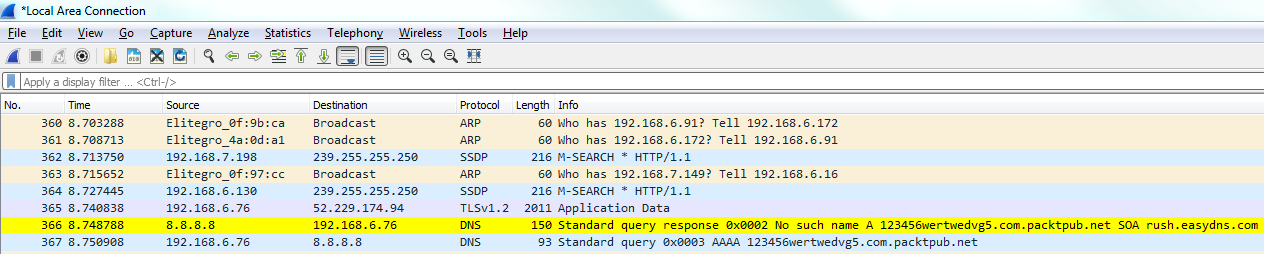
Now, let's go ahead and scroll through our packet capture and see if we can find this response code error. We can see our Standard querie response 0×0002 No such name A record, and then the random gibberish that we entered in. And then of course it's also responding for IPv6. The AAAA, the quad A record, is for IPv6, as well:
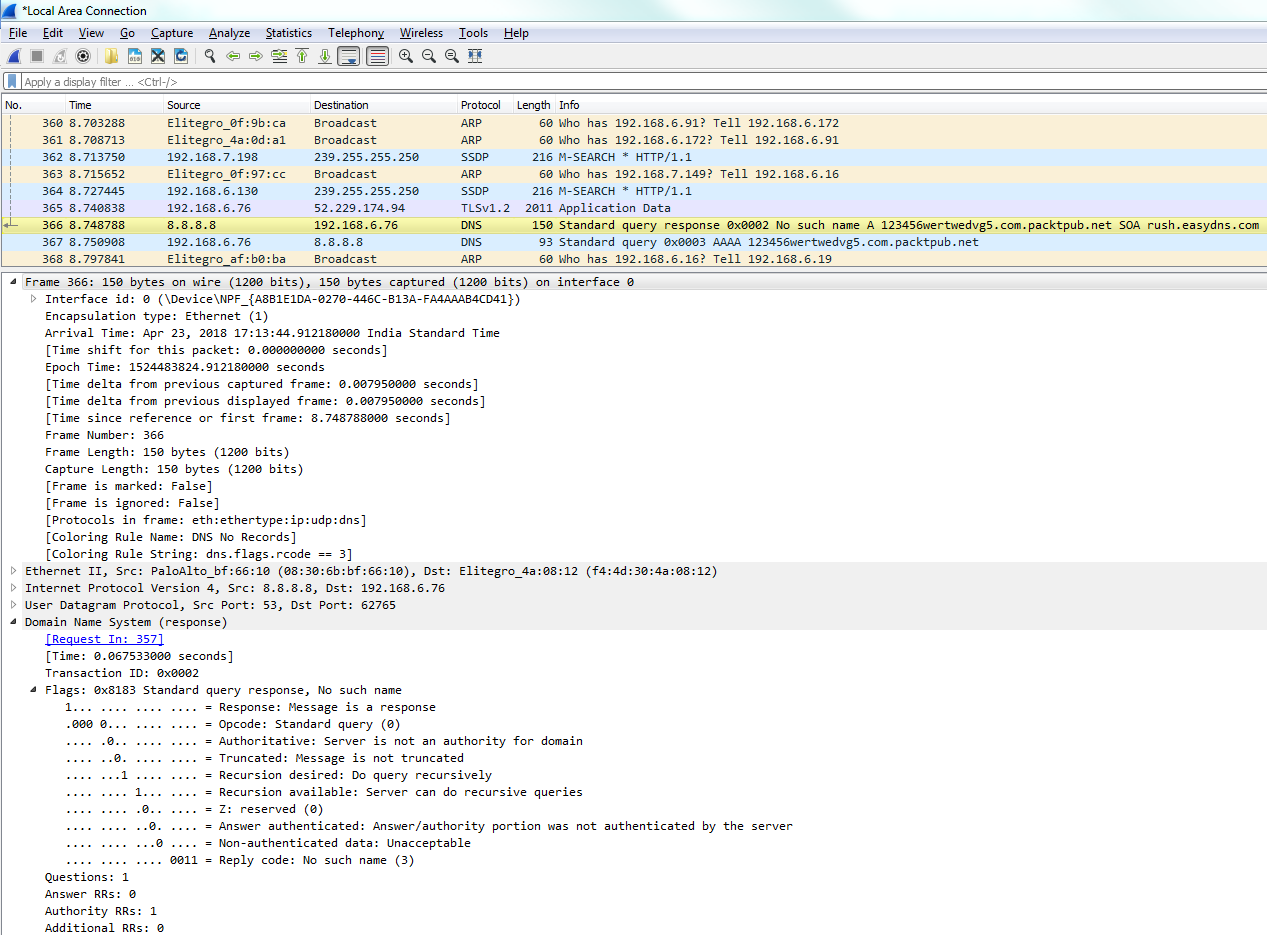
If you take a look in our frame information at the bottom, there's our coloring rule: DNS No Records. There's a string that it's using, and if we dig into the DNS information, you look at the flags and it will say Reply code: No such name (3). That's the value of 3 that we just filtered on:
You can see how applying coloring rules can be very helpful to someone who's doing network analysis and protocol analysis because it makes it very easy to pick out from a large packet capture wherever there's a problem.