Table of Contents for
Your Code as a Crime Scene
 Your Code as a Crime Scene
Published by
Pragmatic Bookshelf, 2015
Your Code as a Crime Scene
Published by
Pragmatic Bookshelf, 2015
- Title Page
- Your Code as a Crime Scene
- Your Code as a Crime Scene
- For the Best Reading Experience...
- Table of Contents
- Early praise for Your Code as a Crime Scene
- Foreword by Michael Feathers
- Acknowledgments
- Chapter 1: Welcome!
- About This Book
- Optimize for Understanding
- How to Read This Book
- Toward a New Approach
- Get Your Investigative Tools
- Part 1: Evolving Software
- Chapter 2: Code as a Crime Scene
- Meet the Problems of Scale
- Get a Crash Course in Offender Profiling
- Profiling the Ripper
- Apply Geographical Offender Profiling to Code
- Learn from the Spatial Movement of Programmers
- Find Your Own Hotspots
- Chapter 3: Creating an Offender Profile
- Mining Evolutionary Data
- Automated Mining with Code Maat
- Add the Complexity Dimension
- Merge Complexity and Effort
- Limitations of the Hotspot Criteria
- Use Hotspots as a Guide
- Dig Deeper
- Chapter 4: Analyze Hotspots in Large-Scale Systems
- Analyze a Large Codebase
- Visualize Hotspots
- Explore the Visualization
- Study the Distribution of Hotspots
- Differentiate Between True Problems and False Positives
- Chapter 5: Judge Hotspots with the Power of Names
- Know the Cognitive Advantages of Good Names
- Investigate a Hotspot by Its Name
- Understand the Limitations of Heuristics
- Chapter 6: Calculate Complexity Trends from Your Code’s Shape
- Complexity by the Visual Shape of Programs
- Learn About the Negative Space in Code
- Analyze Complexity Trends in Hotspots
- Evaluate the Growth Patterns
- From Individual Hotspots to Architectures
- Part 2: Dissect Your Architecture
- Chapter 7: Treat Your Code As a Cooperative Witness
- Know How Your Brain Deceives You
- Learn the Modus Operandi of a Code Change
- Use Temporal Coupling to Reduce Bias
- Prepare to Analyze Temporal Coupling
- Chapter 8: Detect Architectural Decay
- Support Your Redesigns with Data
- Analyze Temporal Coupling
- Catch Architectural Decay
- React to Structural Trends
- Scale to System Architectures
- Chapter 9: Build a Safety Net for Your Architecture
- Know What’s in an Architecture
- Analyze the Evolution on a System Level
- Differentiate Between the Level of Tests
- Create a Safety Net for Your Automated Tests
- Know the Costs of Automation Gone Wrong
- Chapter 10: Use Beauty as a Guiding Principle
- Learn Why Attractiveness Matters
- Write Beautiful Code
- Avoid Surprises in Your Architecture
- Analyze Layered Architectures
- Find Surprising Change Patterns
- Expand Your Analyses
- Part 3: Master the Social Aspects of Code
- Chapter 11: Norms, Groups, and False Serial Killers
- Learn Why the Right People Don’t Speak Up
- Understand Pluralistic Ignorance
- Witness Groupthink in Action
- Discover Your Team’s Modus Operandi
- Mine Organizational Metrics from Code
- Chapter 12: Discover Organizational Metrics in Your Codebase
- Let’s Work in the Communication Business
- Find the Social Problems of Scale
- Measure Temporal Coupling over Organizational Boundaries
- Evaluate Communication Costs
- Take It Step by Step
- Chapter 13: Build a Knowledge Map of Your System
- Know Your Knowledge Distribution
- Grow Your Mental Maps
- Investigate Knowledge in the Scala Repository
- Visualize Knowledge Loss
- Get More Details with Code Churn
- Chapter 14: Dive Deeper with Code Churn
- Cure the Disease, Not the Symptoms
- Discover Your Process Loss from Code
- Investigate the Disposal Sites of Killers and Code
- Predict Defects
- Time to Move On
- Chapter 15: Toward the Future
- Let Your Questions Guide Your Analysis
- Take Other Approaches
- Let’s Look into the Future
- Write to Evolve
- Appendix 1: Refactoring Hotspots
- Refactor Guided by Names
- Bibliography
- You May Be Interested In…
Discover Your Team’s Modus Operandi
Remember the geographical offender-profiling techniques you learned back in Learn Geographical Profiling of Crimes? One of the challenges with profiling is linking a series of crimes to the same offender. Sometimes there’s DNA evidence or witnesses. When there’s not, the police have to rely on the offender’s modus operandi.
A modus operandi is like a criminal signature. For example, the gentleman bandit you read about in Meet the Innocent Robber, was characterized by his polite manners and concern for his victims.
Software teams have their unique modus operandi, too. If you manage to uncover it, it will help you understand how the team works. It will not be perfect and precise information, but it can guide your discussions and decisions by opening new perspectives. Here’s one trick for that.
Use Commit Messages as a Discussion Basis
Some years ago, I worked on a project that was running late. On the surface, everything looked fine. We were four teams, and everyone was kept busy. Yet the project didn’t make any real progress in terms of completed features. Soon, the overtime bell began to ring.
Luckily, there was a skilled leader on one of teams. He decided to find out the root cause of what was holding the developers back. I opted in to provide some data as a basis for the discussions. Here’s the type of data we used:
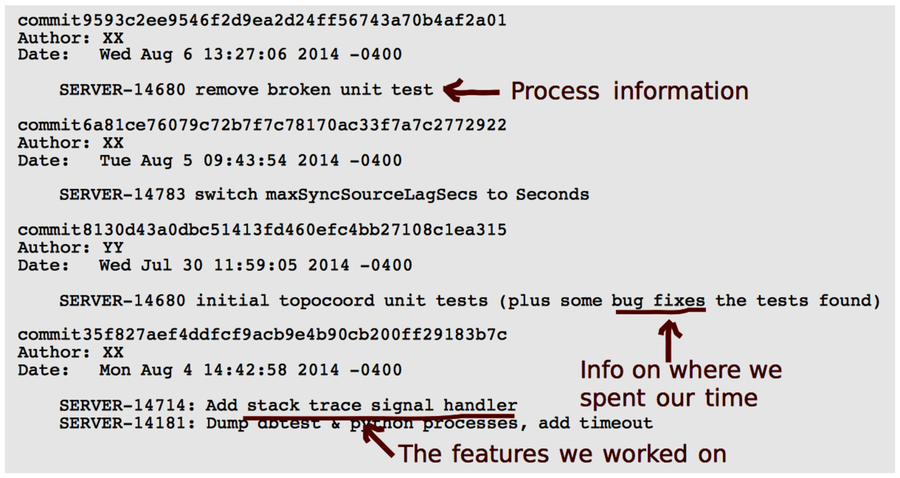
Until now, we have focused our techniques around the code you’re changing. But a version-control log has more information. Every time you commit a change, you provide social information.
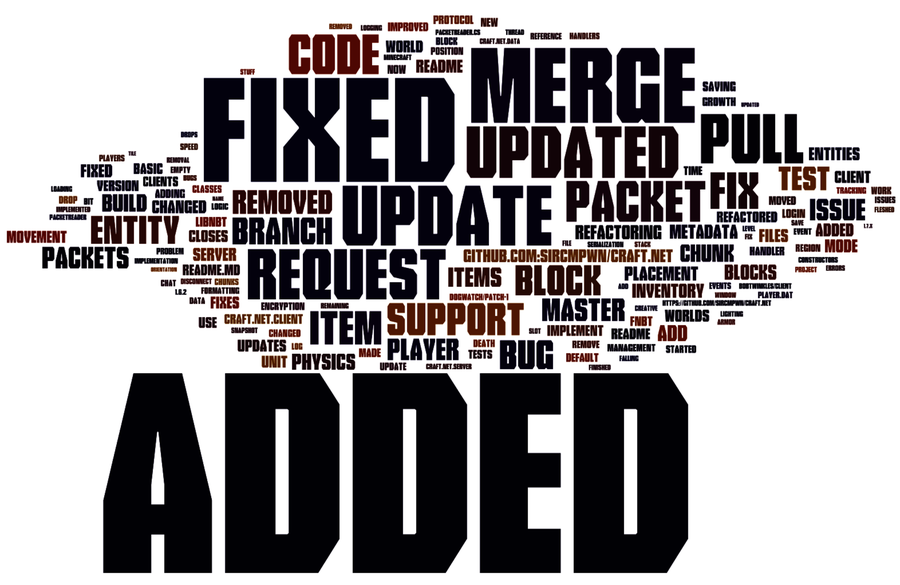
Have a look at the word cloud. It’s created from the commit messages in the Craft.Net repository by the following command:
| | prompt> git log --pretty=format:'%s' |
| | Merge pull request #218 from NSDex/master |
| | Don't add empty 'extra' fields to chat msg JSON |
| | Fix Program.cs |
| | Revert "Merge pull request #215 from JBou/master" |
| | ... |
The command extracts all commit messages. You have several simple alternatives to visualize them. The one was created by pasting the messages into Wordle.[31]
If we look at the commit cloud, we see that certain terms dominate. What you’ll learn right now is by no means scientific, but it’s a useful heuristic: the words that stand out tell you where you spend your time. For the Craft.Net team, it seems that they get a lot of features in, as indicated by the word “Added,” but they also spend time on “Fixing” code.
On the project I told you about—the one that was running late and no one knew why—the word cloud had two prominent words. One of them highlighted a supporting feature of less importance where we surprisingly spent a lot of time. The second one pointed to the automated tests. It turned out the teams were spending a significant portion of their workdays maintaining and updating tests. This finding was verified by the techniques you learned in Chapter 9, Build a Safety Net for Your Architecture. We could then focus improvements on dealing with the situation.
What story does your own version-control log tell?
Commit Messages Tell a Story
Commit clouds are a good basis for discussion around our process and daily work. The clouds present a distilled version of our team’s daily code-centered activities. What we get is a different perspective on our development that stimulates discussions.
What we want to see in a commit cloud is words from our domain. What we don’t want to see is words that indicate quality problems in code or in our process. When you find those indications, you want to drill deeper.
But commit messages have even more to offer; A new line of research proposes that commit messages tell something about the team itself. A team of researchers found this out by analyzing commit messages in different open-source projects with respect to their emotional content. The study compared the expressed emotions to factors such as the programming language used, the team location, and the day of the week. (See Sentiment analysis of commit comments in GitHub [GAL14].)
Among other findings, the results of the study point to Java programmers expressing the most negative feelings, and distributed teams the most positive.
The study is a fun read. But there’s a serious topic underpinning it. Emotions play a large role in our daily lives. They’re strong motivators that influence our behavior on a profound level, often without making us consciously aware of why we react the way we do. Our emotions mediate our creativity, teamwork, and productivity. As such, it’s surprising that we don’t pay more attention to them. Studies like this are a step in an important direction.
Data Doesn’t Replace Communication | |
|---|---|

| Given all fascinating analyses, it’s easy to drown in technical solutions to social problems. Just remember that no matter how many innovative data analyses we have, there’s no replacement for actually talking to the rest of the team and taking an active role in the daily work. The methods in this chapter just help you ask the right questions. |