Table of Contents for
Your Code as a Crime Scene
 Your Code as a Crime Scene
Published by
Pragmatic Bookshelf, 2015
Your Code as a Crime Scene
Published by
Pragmatic Bookshelf, 2015
- Title Page
- Your Code as a Crime Scene
- Your Code as a Crime Scene
- For the Best Reading Experience...
- Table of Contents
- Early praise for Your Code as a Crime Scene
- Foreword by Michael Feathers
- Acknowledgments
- Chapter 1: Welcome!
- About This Book
- Optimize for Understanding
- How to Read This Book
- Toward a New Approach
- Get Your Investigative Tools
- Part 1: Evolving Software
- Chapter 2: Code as a Crime Scene
- Meet the Problems of Scale
- Get a Crash Course in Offender Profiling
- Profiling the Ripper
- Apply Geographical Offender Profiling to Code
- Learn from the Spatial Movement of Programmers
- Find Your Own Hotspots
- Chapter 3: Creating an Offender Profile
- Mining Evolutionary Data
- Automated Mining with Code Maat
- Add the Complexity Dimension
- Merge Complexity and Effort
- Limitations of the Hotspot Criteria
- Use Hotspots as a Guide
- Dig Deeper
- Chapter 4: Analyze Hotspots in Large-Scale Systems
- Analyze a Large Codebase
- Visualize Hotspots
- Explore the Visualization
- Study the Distribution of Hotspots
- Differentiate Between True Problems and False Positives
- Chapter 5: Judge Hotspots with the Power of Names
- Know the Cognitive Advantages of Good Names
- Investigate a Hotspot by Its Name
- Understand the Limitations of Heuristics
- Chapter 6: Calculate Complexity Trends from Your Code’s Shape
- Complexity by the Visual Shape of Programs
- Learn About the Negative Space in Code
- Analyze Complexity Trends in Hotspots
- Evaluate the Growth Patterns
- From Individual Hotspots to Architectures
- Part 2: Dissect Your Architecture
- Chapter 7: Treat Your Code As a Cooperative Witness
- Know How Your Brain Deceives You
- Learn the Modus Operandi of a Code Change
- Use Temporal Coupling to Reduce Bias
- Prepare to Analyze Temporal Coupling
- Chapter 8: Detect Architectural Decay
- Support Your Redesigns with Data
- Analyze Temporal Coupling
- Catch Architectural Decay
- React to Structural Trends
- Scale to System Architectures
- Chapter 9: Build a Safety Net for Your Architecture
- Know What’s in an Architecture
- Analyze the Evolution on a System Level
- Differentiate Between the Level of Tests
- Create a Safety Net for Your Automated Tests
- Know the Costs of Automation Gone Wrong
- Chapter 10: Use Beauty as a Guiding Principle
- Learn Why Attractiveness Matters
- Write Beautiful Code
- Avoid Surprises in Your Architecture
- Analyze Layered Architectures
- Find Surprising Change Patterns
- Expand Your Analyses
- Part 3: Master the Social Aspects of Code
- Chapter 11: Norms, Groups, and False Serial Killers
- Learn Why the Right People Don’t Speak Up
- Understand Pluralistic Ignorance
- Witness Groupthink in Action
- Discover Your Team’s Modus Operandi
- Mine Organizational Metrics from Code
- Chapter 12: Discover Organizational Metrics in Your Codebase
- Let’s Work in the Communication Business
- Find the Social Problems of Scale
- Measure Temporal Coupling over Organizational Boundaries
- Evaluate Communication Costs
- Take It Step by Step
- Chapter 13: Build a Knowledge Map of Your System
- Know Your Knowledge Distribution
- Grow Your Mental Maps
- Investigate Knowledge in the Scala Repository
- Visualize Knowledge Loss
- Get More Details with Code Churn
- Chapter 14: Dive Deeper with Code Churn
- Cure the Disease, Not the Symptoms
- Discover Your Process Loss from Code
- Investigate the Disposal Sites of Killers and Code
- Predict Defects
- Time to Move On
- Chapter 15: Toward the Future
- Let Your Questions Guide Your Analysis
- Take Other Approaches
- Let’s Look into the Future
- Write to Evolve
- Appendix 1: Refactoring Hotspots
- Refactor Guided by Names
- Bibliography
- You May Be Interested In…
Get Your Investigative Tools
The techniques in this book are based on how you and your team interact with the code. Most of that information is stored within your version-control system. To analyze it, we need some automated tools to mine and process the data, but there aren’t a lot of tools out there we can use.
To get you started, I’ve put together a suite of open-source tools capable of performing the analyses:
-
Code Maat: Code Maat is a command-line tool used to mine and analyze data from version-control systems.
-
Git: The techniques in this book would work with other types of version-control systems, but we’ll use Git in our examples. You can refer to Code Maat’s web page[1] to get an overview of mining data from Mercurial and Subversion.
-
Python: The techniques don’t depend on you knowing Python. We just include it here because Python is a convenient language for automating repetitive tasks.
Use Git BASH on Windows | |
|---|---|

|
You can run Git in a DOS prompt on Windows. But some of our commands will use special characters, such as backticks. Those characters have a different meaning in DOS. The simplest solution is to interact with Git through its Git BASH shell that emulates a Linux environment. |
Forget the Tools
Before we get to the installation of the tools, I want to mention that even though we’ll use Code Maat extensively, this book isn’t about a particular tool. The tools here are prepared for your convenience as a way to put the theories into practice.
While Code Maat does help with the tasks ahead, the important factor here is you—when it comes to software design, there’s no tool that replaces human expertise. What you’ll learn goes beyond any tool; Code Maat just relieves you of repetitive calculations, input parsing, and result generation.
In each of the case studies you’re about to read, the toolset is the least important part. The algorithms in Code Maat are fairly simple—you could implement them as plain scripts in a language of your choice.
That simplicity is a strength. It allows you to focus on the application of the techniques and how to interpret the resulting data. That’s the important part, and that’s what we’ll build on in the book.
After you finish Your Code as a Crime Scene, you’ll be in a position to move beyond Code Maat. There’s even a closing chapter dedicated to that in Chapter 15, Toward the Future.
Install Your Tools
You can get detailed setup instructions for all the tools we’re using from the Code Maat distribution site.[2]
This book also has its own web page.[3] Check it out—you’ll find the book forum, where you can talk with other readers and with me. If you find any mistakes, please report them on the errata page.
Know What’s Expected
I’ve applied the techniques in this book on a wide variety of programming languages, including Java, C#, Python, Clojure, C++, and Common Lisp. The techniques are language-independent and will work no matter what technology you use.
Similarly, I’ve used the strategies on both Windows- and Linux-based operating systems. As long as you use a version-control system sensibly, you’ll find value in what you’re about to learn.
We’ll run the tools and scripts from a command prompt. Sure, we could put a GUI on the tools to hide options and details. But I want you to truly understand the techniques we’re discussing so you’ll be able to extend and adapt them for your unique environment. Don’t worry—I’ll walk you through the commands. They’re basic and will work on Windows, Mac, and Linux.
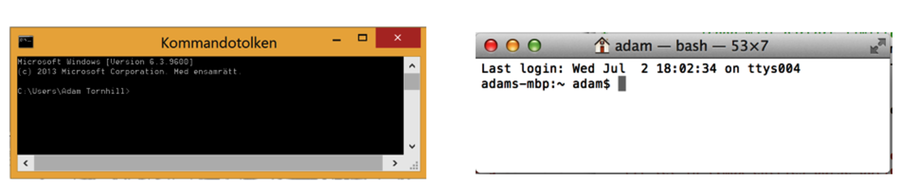
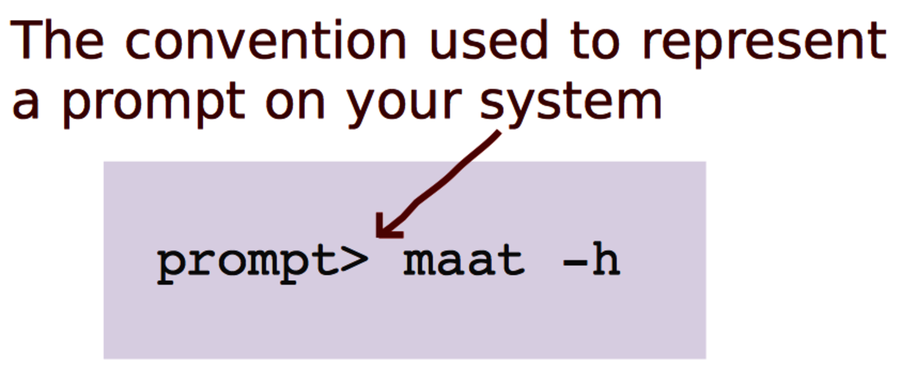
As a convention we’ll use prompt> to indicate an operating system–independent, generic prompt. Whenever you see prompt>, replace it mentally with the prompt for the command line you’re using.
You’ll also see some Python, but we won’t develop in it. We’ll use Python to perform repetitive tasks so that we can focus on the fun stuff. If you haven’t used Python before, it’s fine; I’ll provide the code you need and walk you through the algorithms so you can use them with a different language of your choice.
Tools will come and go; details will change. The intent here is to go deeper and focus on timeless aspects of large-scale software development. (Yes, timeless sounds pretentious. It’s because the techniques are about people and how we function—we humans change at a much more leisurely rate than the technology surrounding us.)
Let’s get started with how forensic psychology helps you investigate your code.