Table of Contents for
Your Code as a Crime Scene
 Your Code as a Crime Scene
Published by
Pragmatic Bookshelf, 2015
Your Code as a Crime Scene
Published by
Pragmatic Bookshelf, 2015
- Title Page
- Your Code as a Crime Scene
- Your Code as a Crime Scene
- For the Best Reading Experience...
- Table of Contents
- Early praise for Your Code as a Crime Scene
- Foreword by Michael Feathers
- Acknowledgments
- Chapter 1: Welcome!
- About This Book
- Optimize for Understanding
- How to Read This Book
- Toward a New Approach
- Get Your Investigative Tools
- Part 1: Evolving Software
- Chapter 2: Code as a Crime Scene
- Meet the Problems of Scale
- Get a Crash Course in Offender Profiling
- Profiling the Ripper
- Apply Geographical Offender Profiling to Code
- Learn from the Spatial Movement of Programmers
- Find Your Own Hotspots
- Chapter 3: Creating an Offender Profile
- Mining Evolutionary Data
- Automated Mining with Code Maat
- Add the Complexity Dimension
- Merge Complexity and Effort
- Limitations of the Hotspot Criteria
- Use Hotspots as a Guide
- Dig Deeper
- Chapter 4: Analyze Hotspots in Large-Scale Systems
- Analyze a Large Codebase
- Visualize Hotspots
- Explore the Visualization
- Study the Distribution of Hotspots
- Differentiate Between True Problems and False Positives
- Chapter 5: Judge Hotspots with the Power of Names
- Know the Cognitive Advantages of Good Names
- Investigate a Hotspot by Its Name
- Understand the Limitations of Heuristics
- Chapter 6: Calculate Complexity Trends from Your Code’s Shape
- Complexity by the Visual Shape of Programs
- Learn About the Negative Space in Code
- Analyze Complexity Trends in Hotspots
- Evaluate the Growth Patterns
- From Individual Hotspots to Architectures
- Part 2: Dissect Your Architecture
- Chapter 7: Treat Your Code As a Cooperative Witness
- Know How Your Brain Deceives You
- Learn the Modus Operandi of a Code Change
- Use Temporal Coupling to Reduce Bias
- Prepare to Analyze Temporal Coupling
- Chapter 8: Detect Architectural Decay
- Support Your Redesigns with Data
- Analyze Temporal Coupling
- Catch Architectural Decay
- React to Structural Trends
- Scale to System Architectures
- Chapter 9: Build a Safety Net for Your Architecture
- Know What’s in an Architecture
- Analyze the Evolution on a System Level
- Differentiate Between the Level of Tests
- Create a Safety Net for Your Automated Tests
- Know the Costs of Automation Gone Wrong
- Chapter 10: Use Beauty as a Guiding Principle
- Learn Why Attractiveness Matters
- Write Beautiful Code
- Avoid Surprises in Your Architecture
- Analyze Layered Architectures
- Find Surprising Change Patterns
- Expand Your Analyses
- Part 3: Master the Social Aspects of Code
- Chapter 11: Norms, Groups, and False Serial Killers
- Learn Why the Right People Don’t Speak Up
- Understand Pluralistic Ignorance
- Witness Groupthink in Action
- Discover Your Team’s Modus Operandi
- Mine Organizational Metrics from Code
- Chapter 12: Discover Organizational Metrics in Your Codebase
- Let’s Work in the Communication Business
- Find the Social Problems of Scale
- Measure Temporal Coupling over Organizational Boundaries
- Evaluate Communication Costs
- Take It Step by Step
- Chapter 13: Build a Knowledge Map of Your System
- Know Your Knowledge Distribution
- Grow Your Mental Maps
- Investigate Knowledge in the Scala Repository
- Visualize Knowledge Loss
- Get More Details with Code Churn
- Chapter 14: Dive Deeper with Code Churn
- Cure the Disease, Not the Symptoms
- Discover Your Process Loss from Code
- Investigate the Disposal Sites of Killers and Code
- Predict Defects
- Time to Move On
- Chapter 15: Toward the Future
- Let Your Questions Guide Your Analysis
- Take Other Approaches
- Let’s Look into the Future
- Write to Evolve
- Appendix 1: Refactoring Hotspots
- Refactor Guided by Names
- Bibliography
- You May Be Interested In…
Find Surprising Change Patterns
Start by cloning the nopCommerce git repository:
| | git clone https://git01.codeplex.com/nopcommerce |
Move into your repository and generate a version-control log. Let’s look at all changes to the code from the start of 2014 until the present day (defined as 2014-09-25—the day I’m writing this):
| | prompt> git log --pretty=format:'[%h] %an %ad %s' --date=short --numstat \ |
| | --after 2014-01-01 --before 2014-09-25 > nop_evo_2014.log |
Your git log is now stored in the file nop_evo_2014.log. Let’s define a transformation to go with it.
Define Each Layer as an Architectural Boundary
Just as we did for our Pipes and Filters analysis, we map each architectural part to a logical name. Here’s the transformation for nopCommerce:
| | src/Presentation/Nop.Web/Administration/Models => Admin Models |
| | src/Presentation/Nop.Web/Administration/Views => Admin Views |
| | src/Presentation/Nop.Web/Administration/Controllers => Admin Controllers |
| | src/Libraries/Nop.Services => Services |
| | src/Libraries/Nop.Core => Core |
| | src/Libraries/Nop.Data => Data Access |
| | src/Libraries/Nop.Services => Business Access Layer |
| | src/Presentation/Nop.Web/Models => Models |
| | src/Presentation/Nop.Web/Views => Views |
| | src/Presentation/Nop.Web/Controllers => Controllers |
I derived the transformation from the nopCommerce documentation.[29] I also had a look at the source code to identify the Model-View-Controller layers that you see below the src/Presentation/Nop.Web and src/Presentation/Nop.Web/Administration folders. (When you analyze your own system, you’re probably already familiar with its high-level design.)
Before we run the analysis, note that nopCommerce consists of two applications: one administration application and one application for the actual store. We specify both in our transformation, since they’re logical parts of the same system and have to be maintained together.
Now, store the transformation specification in the file arch_boundaries.txt, and you’re set for the analysis:
| | prompt> maat -c git -l nop_evo_2014.log -g arch_boundaries.txt -a coupling |
| | entity,coupled,degree,average-revs |
| | Admin Models,Admin Views,75,74 |
| | Admin Controllers,Admin Models,68,73 |
| | Admin Controllers,Admin Views,66,89 |
| | Admin Models,Core,54,76 |
| | Core,Services,46,130 |
| | Models,Views,46,47 |
| | Admin Views,Core,44,92 |
| | Admin Controllers,Core,39,91 |
| | Controllers,Models,38,60 |
| | Admin Controllers,Services,35,128 |
| | Admin Models,Services,35,113 |
| | Admin Views,Services,34,129 |
| | Controllers,Views,34,83 |
| | Controllers,Services,33,132 |
| | Admin Controllers,Controllers,31,92 |
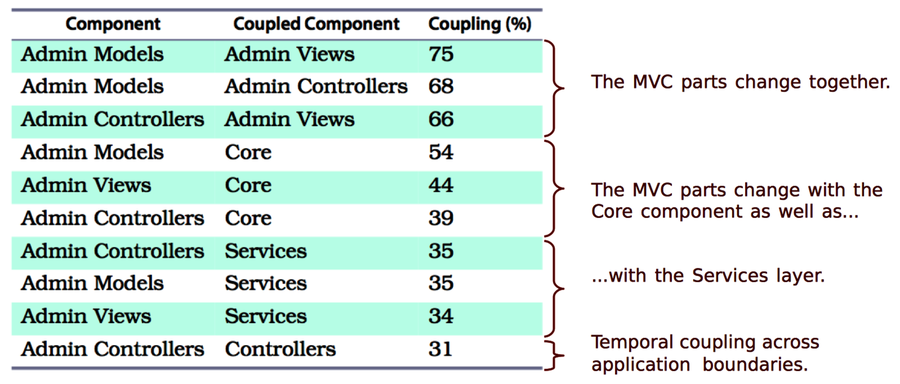
The results reveal several cases of temporal coupling. The Admin parts of the system exhibit the strongest coupling. Let’s focus on them.
Identify Expensive Change Patterns
Remember that one idea behind the MVC pattern is to allow us to swap in different views. Since the Views change together with the Models in 75 percent of all cases, that idea is probably not fulfilled; if we do add a different set of views, those will have to change frequently as well, which will slow us down.
The following figure also shows that all components in the MVC part have a temporal dependency upon the Core and Services layers. Let’s get support from a hotspot analysis to find out how serious that is.
Use Hotspots to Assess the Severity
Instead of identifying individual modules as hotspots, we’ll reuse the transformation. That allows you to find hotspots on the level of your architecture. That is, a hotspot in this analysis corresponds to a whole layer:
| | prompt> maat -c git -l nop_evo_2014.log -g arch_boundaries.txt -a revisions |
| | entity,n-revs |
| | Services,393 |
| | Views,388 |
| | Admin Controllers,257 |
| | Admin Views,253 |
| | Controllers,181 |
| | Core,169 |
| | Data Access,122 |
| | Admin Models,76 |
| | Models,36 |
As you see, the Services layer has the most volatile code. That means any temporal coupling that involves Services is, on average, a more serious concern than the others. This is information we use to reason about the cost of changes—for example, when exploring design alternatives.
However, a temporal coupling analysis can’t tell us the direction of the change dependency; we don’t know whether changes to the Services lead to predictable changes in the MVC parts or whether it is the other way around. But we do know there’s a 35 percent risk that our change will affect multiple layers.
Finally, note the strange change dependency between the Admin Controllers and the Controllers that we see at the bottom of the preceding figure. The controllers in two different packages change together 31 percent of the time.
When we find cross-cutting temporal coupling like that, we should investigate the cause. Often, coupled components share a common abstraction, such as a base class that accumulates too many responsibilities. In other cases, we’ll find the opposite problem, and we have a shared abstraction waiting to be discovered. To find it, we want to apply a temporal coupling analysis, as we did back in Chapter 8, Detect Architectural Decay.
Treat Patterns as Helpful Friends
Before we move on, note that these results aren’t presented to show that design patterns don’t work—quite to the contrary. Patterns are context-dependent and do not, by some work of magic, provide universally good designs. You can’t take the human out of the design loop. That said, patterns have a lot to offer:
-
Patterns are a guide. Our architectural principles are likely to evolve together with our system. Remember, problem-solving is an iterative process. Agreeing on the right set of initial principles is challenging, and this is where the knowledge captured in patterns helps.
-
Patterns share knowledge. Patterns come from existing solutions and experiences. Since few designs are really novel, we’ll often find patterns that apply to our new problem as well.
-
Patterns have social value. As the architect Christopher Alexander formalized patterns, the intent was to enable collaborative construction using a shared vocabulary. As such, patterns are more of a communication tool than a technical solution.
-
Patterns are reasoning tools. You learned about chunking back in Names Make the Code Fit Your Head. Patterns are a sophisticated form of chunking. Their names serve as handles to knowledge stored in our long-term memory. Patterns optimize our working memory and guide us as we evolve mental models of the problem and solution space.