Table of Contents for
Your Code as a Crime Scene
 Your Code as a Crime Scene
Published by
Pragmatic Bookshelf, 2015
Your Code as a Crime Scene
Published by
Pragmatic Bookshelf, 2015
- Title Page
- Your Code as a Crime Scene
- Your Code as a Crime Scene
- For the Best Reading Experience...
- Table of Contents
- Early praise for Your Code as a Crime Scene
- Foreword by Michael Feathers
- Acknowledgments
- Chapter 1: Welcome!
- About This Book
- Optimize for Understanding
- How to Read This Book
- Toward a New Approach
- Get Your Investigative Tools
- Part 1: Evolving Software
- Chapter 2: Code as a Crime Scene
- Meet the Problems of Scale
- Get a Crash Course in Offender Profiling
- Profiling the Ripper
- Apply Geographical Offender Profiling to Code
- Learn from the Spatial Movement of Programmers
- Find Your Own Hotspots
- Chapter 3: Creating an Offender Profile
- Mining Evolutionary Data
- Automated Mining with Code Maat
- Add the Complexity Dimension
- Merge Complexity and Effort
- Limitations of the Hotspot Criteria
- Use Hotspots as a Guide
- Dig Deeper
- Chapter 4: Analyze Hotspots in Large-Scale Systems
- Analyze a Large Codebase
- Visualize Hotspots
- Explore the Visualization
- Study the Distribution of Hotspots
- Differentiate Between True Problems and False Positives
- Chapter 5: Judge Hotspots with the Power of Names
- Know the Cognitive Advantages of Good Names
- Investigate a Hotspot by Its Name
- Understand the Limitations of Heuristics
- Chapter 6: Calculate Complexity Trends from Your Code’s Shape
- Complexity by the Visual Shape of Programs
- Learn About the Negative Space in Code
- Analyze Complexity Trends in Hotspots
- Evaluate the Growth Patterns
- From Individual Hotspots to Architectures
- Part 2: Dissect Your Architecture
- Chapter 7: Treat Your Code As a Cooperative Witness
- Know How Your Brain Deceives You
- Learn the Modus Operandi of a Code Change
- Use Temporal Coupling to Reduce Bias
- Prepare to Analyze Temporal Coupling
- Chapter 8: Detect Architectural Decay
- Support Your Redesigns with Data
- Analyze Temporal Coupling
- Catch Architectural Decay
- React to Structural Trends
- Scale to System Architectures
- Chapter 9: Build a Safety Net for Your Architecture
- Know What’s in an Architecture
- Analyze the Evolution on a System Level
- Differentiate Between the Level of Tests
- Create a Safety Net for Your Automated Tests
- Know the Costs of Automation Gone Wrong
- Chapter 10: Use Beauty as a Guiding Principle
- Learn Why Attractiveness Matters
- Write Beautiful Code
- Avoid Surprises in Your Architecture
- Analyze Layered Architectures
- Find Surprising Change Patterns
- Expand Your Analyses
- Part 3: Master the Social Aspects of Code
- Chapter 11: Norms, Groups, and False Serial Killers
- Learn Why the Right People Don’t Speak Up
- Understand Pluralistic Ignorance
- Witness Groupthink in Action
- Discover Your Team’s Modus Operandi
- Mine Organizational Metrics from Code
- Chapter 12: Discover Organizational Metrics in Your Codebase
- Let’s Work in the Communication Business
- Find the Social Problems of Scale
- Measure Temporal Coupling over Organizational Boundaries
- Evaluate Communication Costs
- Take It Step by Step
- Chapter 13: Build a Knowledge Map of Your System
- Know Your Knowledge Distribution
- Grow Your Mental Maps
- Investigate Knowledge in the Scala Repository
- Visualize Knowledge Loss
- Get More Details with Code Churn
- Chapter 14: Dive Deeper with Code Churn
- Cure the Disease, Not the Symptoms
- Discover Your Process Loss from Code
- Investigate the Disposal Sites of Killers and Code
- Predict Defects
- Time to Move On
- Chapter 15: Toward the Future
- Let Your Questions Guide Your Analysis
- Take Other Approaches
- Let’s Look into the Future
- Write to Evolve
- Appendix 1: Refactoring Hotspots
- Refactor Guided by Names
- Bibliography
- You May Be Interested In…
Mining Evolutionary Data
Version-control data is our software-development equivalent to spatial movement in geographical profiling. A version-control system—such as Subversion, Git, or Mercurial—records the steps each developer took. I focus on Git in my examples, but you can find an overview of how to mine data from other systems in the Code Maat documentation.[8]
The first codebase we’ll study is Code Maat. That’s right—we’ll use our analysis tool to analyze the tool itself. I’m a Lisp programmer—we love circular stuff like that.
To follow along with the examples, you need to clone the Code Maat repository[9] so that you have the complete source tree on your computer:
| | prompt> git clone https://github.com/adamtornhill/code-maat.git |
| | Cloning into 'code-maat'... |
| | remote: Reusing existing pack: 1092, done. |
| | remote: Total 1092 (delta 0), reused 0 (delta 0) |
| | Receiving objects: 100% (1092/1092), 365.75 KiB | 271.00 KiB/s, done. |
| | Resolving deltas: 100% (537/537), done. |
| | Checking connectivity... done. |
| | prompt> |
Once the clone command completes, you’ll find a local code-maat directory with the source code. Move into that directory:
| | prompt>cd code-maat |
Turn Back Time
Code Maat is still under development, and some of the worst issues we spot here will probably be fixed by the time you read this. So we are going to pretend it’s still 2013. That’s fine—the digital world lets us easily travel back to less gracious times:
| | prompt> git checkout `git rev-list -n 1 --before="2013-11-01" master` |
| | ... |
| | HEAD is now at d804759... Documented tree map visualizations |
The git command is a bit tricky because it does two things: it fetches the revision on the specified date and checks out that revision. Other version-control systems provide similar rollback mechanisms.
Your local copy of Code Maat should now look as the code did back in 2013.
Investigate the Git Log
Git lets us inspect historical commits by its log command. To get the level of detail we need, we use the --numstat flag:
| | prompt> git log --numstat |
This command will output a detailed log, as shown in the figure.
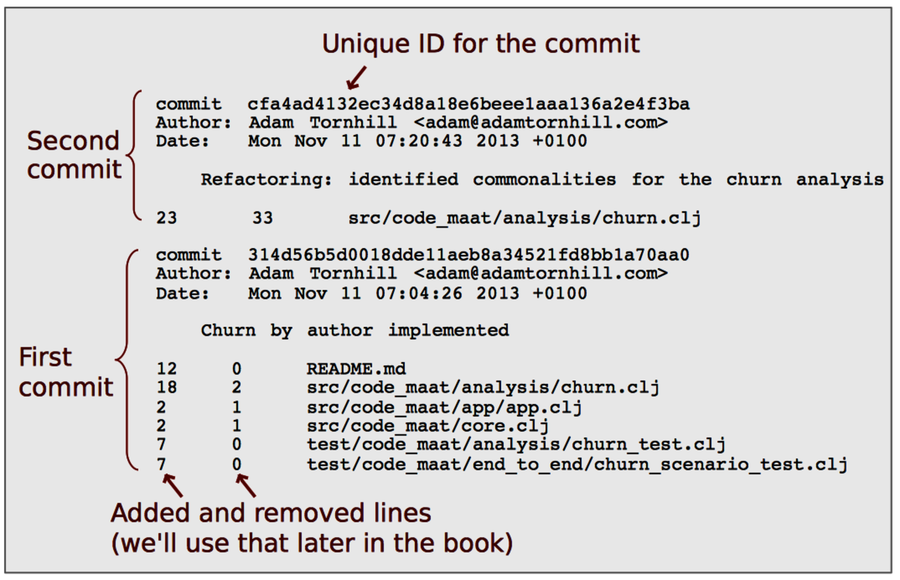
The sample output contains a lot of valuable information. In the following chapters, we’ll get several opportunities to inspect it in depth. For now, we’ll limit the analysis to the changed modules. We see that the oldest commit involved changes to six files, while the next one only modified churn.clj.
Verify Your Intuitions | |
|---|---|

|
Human intuition is wonderful for making quick decisions. The quality of those decisions, however, is not always wonderful. Expert intuition can lead to high-quality decisions. The problem is that we don’t know up front whether this time is one of those expert intuitions. Intuition is an automatic, unconscious process, and like all automatic mental processes, it’s sensitive to cognitive and social biases. Factors in your surroundings or in the specific situation can influence your judgment. Most of the time you aren’t aware of that influence. (You’ll see some examples in Chapter 11, Norms, Groups, and False Serial Killers.) For example, we may be notoriously bad at evaluating past decisions due to hindsight bias. That’s why it’s important to verify your intuitive ideas with supporting data. From a practical perspective, we need guiding techniques like the ones presented here because intuition doesn’t scale—especially not in complex areas, such as a large-scale software project that is constantly changing. |