Table of Contents for
Your Code as a Crime Scene
 Your Code as a Crime Scene
Published by
Pragmatic Bookshelf, 2015
Your Code as a Crime Scene
Published by
Pragmatic Bookshelf, 2015
- Title Page
- Your Code as a Crime Scene
- Your Code as a Crime Scene
- For the Best Reading Experience...
- Table of Contents
- Early praise for Your Code as a Crime Scene
- Foreword by Michael Feathers
- Acknowledgments
- Chapter 1: Welcome!
- About This Book
- Optimize for Understanding
- How to Read This Book
- Toward a New Approach
- Get Your Investigative Tools
- Part 1: Evolving Software
- Chapter 2: Code as a Crime Scene
- Meet the Problems of Scale
- Get a Crash Course in Offender Profiling
- Profiling the Ripper
- Apply Geographical Offender Profiling to Code
- Learn from the Spatial Movement of Programmers
- Find Your Own Hotspots
- Chapter 3: Creating an Offender Profile
- Mining Evolutionary Data
- Automated Mining with Code Maat
- Add the Complexity Dimension
- Merge Complexity and Effort
- Limitations of the Hotspot Criteria
- Use Hotspots as a Guide
- Dig Deeper
- Chapter 4: Analyze Hotspots in Large-Scale Systems
- Analyze a Large Codebase
- Visualize Hotspots
- Explore the Visualization
- Study the Distribution of Hotspots
- Differentiate Between True Problems and False Positives
- Chapter 5: Judge Hotspots with the Power of Names
- Know the Cognitive Advantages of Good Names
- Investigate a Hotspot by Its Name
- Understand the Limitations of Heuristics
- Chapter 6: Calculate Complexity Trends from Your Code’s Shape
- Complexity by the Visual Shape of Programs
- Learn About the Negative Space in Code
- Analyze Complexity Trends in Hotspots
- Evaluate the Growth Patterns
- From Individual Hotspots to Architectures
- Part 2: Dissect Your Architecture
- Chapter 7: Treat Your Code As a Cooperative Witness
- Know How Your Brain Deceives You
- Learn the Modus Operandi of a Code Change
- Use Temporal Coupling to Reduce Bias
- Prepare to Analyze Temporal Coupling
- Chapter 8: Detect Architectural Decay
- Support Your Redesigns with Data
- Analyze Temporal Coupling
- Catch Architectural Decay
- React to Structural Trends
- Scale to System Architectures
- Chapter 9: Build a Safety Net for Your Architecture
- Know What’s in an Architecture
- Analyze the Evolution on a System Level
- Differentiate Between the Level of Tests
- Create a Safety Net for Your Automated Tests
- Know the Costs of Automation Gone Wrong
- Chapter 10: Use Beauty as a Guiding Principle
- Learn Why Attractiveness Matters
- Write Beautiful Code
- Avoid Surprises in Your Architecture
- Analyze Layered Architectures
- Find Surprising Change Patterns
- Expand Your Analyses
- Part 3: Master the Social Aspects of Code
- Chapter 11: Norms, Groups, and False Serial Killers
- Learn Why the Right People Don’t Speak Up
- Understand Pluralistic Ignorance
- Witness Groupthink in Action
- Discover Your Team’s Modus Operandi
- Mine Organizational Metrics from Code
- Chapter 12: Discover Organizational Metrics in Your Codebase
- Let’s Work in the Communication Business
- Find the Social Problems of Scale
- Measure Temporal Coupling over Organizational Boundaries
- Evaluate Communication Costs
- Take It Step by Step
- Chapter 13: Build a Knowledge Map of Your System
- Know Your Knowledge Distribution
- Grow Your Mental Maps
- Investigate Knowledge in the Scala Repository
- Visualize Knowledge Loss
- Get More Details with Code Churn
- Chapter 14: Dive Deeper with Code Churn
- Cure the Disease, Not the Symptoms
- Discover Your Process Loss from Code
- Investigate the Disposal Sites of Killers and Code
- Predict Defects
- Time to Move On
- Chapter 15: Toward the Future
- Let Your Questions Guide Your Analysis
- Take Other Approaches
- Let’s Look into the Future
- Write to Evolve
- Appendix 1: Refactoring Hotspots
- Refactor Guided by Names
- Bibliography
- You May Be Interested In…
Automated Mining with Code Maat
In a large system under heavy development, hundreds of commits are made each day. Manually inspecting that data is error-prone and, more importantly, takes time away from all the fun programming. Let’s automate this.
Calculating change frequencies is straightforward: parse the log file and summarize the number of times each module occurs. You could also add more complex processing to keep track of renamed or moved files.
You already know about Code Maat. Now we’re going to use it to analyze change frequencies. The git output is fine for humans but too verbose for a tool. The following command generates a more compact version:
| | prompt> git log --pretty=format:'[%h] %an %ad %s' --date=short \ |
| | --numstat --before=2013-11-01 |
Code Maat is strict about its input. (It doesn’t have to be—it’s just easier to write a parser if we can ignore special cases.) Here are the rules:
-
Everything except --before is mandatory.
-
Use the --before to get a reproducible, historical output in this example. Here we include all commits before that given date. It’s our temporal period of interest for this analysis.
-
If you want to analyze the complete evolution, just leave out the flag.
-
Specify an optional start date through the --after flag.
As long as you keep the supported log format, you’re free to vary and combine different filtering options.
To persist the log information, just redirect the git output to a file. For example:
| | prompt> git log --pretty=format:'[%h] %an %ad %s' --date=short \ |
| | --numstat --before=2013-11-01 > maat_evo.log |
This will result in a file maat_evo.log in your current directory. Before we feed this file to Code Maat, let’s open it and take a look. You will see a logfile with the same type of information as shown in the earlier example.
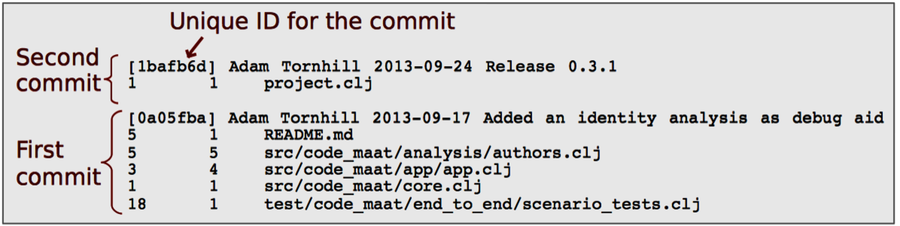
Inspect the Data
Inspecting the input data is a good starting point. Code Maat provides a summary option that presents an overview of the information in the log. Once you’ve installed Code Maat as described on the distribution page,[10] fire up the tool by entering the following command—we’ll discuss the options in just a minute:
| | prompt> maat -l maat_evo.log -c git -a summary |
| | statistic,value |
| | number-of-commits,88 |
| | number-of-entities,45 |
| | number-of-entities-changed,283 |
| | number-of-authors,2 |
The -a flag specifies the analysis we want. In this case, we’re interested in a summary. In addition, we need to tell Code Maat where to find the logfile (-l maat_evo.log) and which version-control system we’re using (-c git). That’s it. These three options should cover most use cases.
The summary statistics displayed above are generated as comma-separated values (CSV). The first line, statistic,value, specifies the heading of each column.
For our purposes, the row number-of-entities-changed holds the interesting data. During our specified development period, the different modules in the system have been changed 283 times. Let’s see whether we can find any patterns in those changes.
Use CSV Output | |
|---|---|

|
Code Maat is designed to be minimalistic. It just collects the results. By generating output as CSV, a well-supported text format, the output can be read by other programs. You can import the CSV into a spreadsheet or, with a little scripting, populate a database with the data. This model allows you to build more elaborate visualizations and analyses on top of Code Maat. Pure text is the universal interface. |
Analyze Change Frequencies
Now that you have the modification data, the next step is to analyze the distribution of those changes across modules. To analyze change frequencies, specify the revisions analysis:
| | prompt> maat -l maat_evo.log -c git -a revisions |
| | entity,n-revs |
| | src/code_maat/analysis/logical_coupling.clj,26 |
| | src/code_maat/app/app.clj,25 |
| | src/code_maat/core.clj,21 |
| | test/code_maat/end_to_end/scenario_tests.clj,20 |
| | project.clj,19 |
| | ... |
The revisions analysis results in two columns: an entity column specifying the name of a source code module, and n-revs, stating the number of revisions of that module.
The output is sorted on the number of revisions. That means our most frequently modified candidate is logical_coupling.clj with 26 changes, followed by 25 changes to the fuzzily named app.clj. I named it—I really should know better.
Thanks to the revisions analysis, you identified the parts of the code with most developer activity. Sure, the number of commits is a rough metric, but we’ll meet more elaborate measures later. As you saw earlier in See That Hotspots Really Work, the relative number of commits is a surprisingly good predictor of defects and design issues. Its simplicity makes it an attractive starting point.