Table of Contents for
Gaming Hacks
 Gaming Hacks
Published by
O'Reilly Media, Inc., 2004
Gaming Hacks
Published by
O'Reilly Media, Inc., 2004
- Cover
- Gaming Hacks
- Credits
- Contributors
- Acknowledgments
- Foreword
- Preface
- How to Use This Book
- How This Book Is Organized
- Conventions Used in This Book
- Using Code Examples
- Comments and Questions
- Got a Hack?
- 1. Playing Classic Games
- Legal Emulation
- Play Commodore 64 Games Without the C-64
- Play Atari ROMs Without the Atari
- Use Atari Paddles with Your PC
- Run Homebrew Games on the Atari 2600
- Create Your Own Atari 2600 Homebrew Games
- Play Classic PC Graphic Adventures
- Play Old Games Through DOSBox
- Play Reissued All-in-One Joystick Games
- Play Arcade Games Without the Arcade
- Add and Manipulate a MAME Frontend
- Keep Your ROMs Tidy and Organized
- Learn Game-Specific MAME Controls
- Filter Inappropriate MAME ROMs
- Autoboot into MAME Heaven
- Play Emulated Arcade Games Online
- Play Classic Pinball Without the Table
- Emulate the SNES on the Dreamcast
- 2. Playing Portably
- Play Games on Your iPod
- Mod Your Game Boy
- Take and Print Photos with Your Game Boy
- Compose Music on Your Game Boy
- Explore the GP32 Handheld Gaming System
- Take Your Console with You
- Explore the Bandai WonderSwan
- Play Real Games on Your PDA
- Install a PlayStation 2 in Your Car
- 3. Playing Well with Others
- Practice Proper MMORPG Etiquette
- Understand MMORPG Lingo
- Grind Without Going Crazy
- Make a Profit in Vana’diel
- Write MMORPG Macros
- Build an Effective Group
- Catch Half-Life FPS Cheaters Redhanded
- 4. Playing with Hardware
- Build a Quiet, Killer Gaming Rig
- Find and Configure the Best FPS Peripherals
- Adapt Old Video Game Controllers to the PC
- Choose the Right Audio/Video Receiver
- Place Your Speakers Properly
- Connect Your Console to Your Home Theater
- Tune Console Video Output
- Tune Your TV for Console Video
- PC Audio Hacking
- Optimize PC Video Performance
- Build a Dedicated Multimedia PC
- Use a Multimedia Projector for Gaming
- 5. Playing with Console and Arcade Hardware
- Play LAN-Only Console Games Online
- Hack the Nuon DVD Player/Gaming System
- Play Import Games on American Consoles
- Find a Hackable Dreamcast
- Play Movies and Music on Your Dreamcast
- Hack the Dreamcast Visual Memory Unit
- Unblur Your Dreamcast Video
- Use Your Dreamcast Online
- Host Dreamcast Games Online
- Burn Dreamcast-Compatible Discs on Your PC
- Burn Dreamcast Homebrew Discs
- Buy Your Own Arcade Hardware
- Configure Your Arcade Controls, Connectors, and Cartridges
- Reorient and Align Your Arcade Monitor
- Buy Cart-Based JAMMA Boards
- Programming Music for the Nintendo Entertainment System
- 6. Playing Around the Game Engine
- Explore Machinima
- Choose a Machinima Engine
- Film Your First Machinima Movie
- Improve Your Camera Control
- Record Game Footage to Video
- Speedrun Your Way Through Metroid Prime
- Sequence-Break Quake
- Run Classic Game ROM Translations
- Change Games with ROM Hacks
- Apply ROM Hacks and Patches
- Create PS2 Cheat Codes
- Hack Xbox Game Saves
- Cheat on Other Consoles
- Modify PC Game Saves and Settings
- Buff Your Saved Characters
- Create Console Game Levels
- 7. Playing Your Own Games
- Adventure Game Studio Editing Tips
- Create and Play Pinball Tables
- Put Your Face in DOOM
- Create a Vehicle Model for Unreal Tournament 2004
- Add a Vehicle to Unreal Tournament 2004
- Modify the Behavior of a UT2004 Model
- Download, Compile, and Create an Inform Adventure
- Decorate Your IF Rooms
- Add Puzzles to Your IF Games
- Add Nonplayer Characters to IF Adventures
- Make Your IF NPCs Move
- Make Your IF NPCs Talk
- Create Your Own Animations
- Add Interactivity to Your Animations
- Write a Game in an Afternoon
- 8. Playing Everything Else
- Tweak Your Tactics for FPS Glory
- Beat Any Shoot-Em-Up
- Drive a Physics-Crazed Motorcycle
- Play Japanese Games Without Speaking Japanese
- Back Up, Modify, and Restore PlayStation Saved Games
- Access Your Console’s Memory Card Offline
- Overclock Your Console
- Index
- Colophon
Previous hacks have discussed using interpreters to play classic games using clever utilities such as ScummVM for LucasArts adventures ( [Hack #7] ). As that hack points out, there’s no real way to make new SCUMM games in this day and age. The creation tools aren’t available to the public, and besides, the engine was pretty hacked up over multiple product iterations, with lots of customization to get games out the door.
Surely there must be some kind of alternative. There is, in the form of Adventure Game Studio, an excellent Windows-based utility that “allows you to create your own point-and-click adventure games, similar to the early ’90s Sierra and LucasArts adventures.” AGS is both a development environment and a runtime engine.
Adventure Game Studio (AGS) is a fully developed graphical editor for game creation. It’s simple enough that coding novices can venture a decent stab at making games of their own. You can add sound, music, and ambient noise in various formats, even making a full talkie adventure with speech—packed into a single file. You can set up conversation systems, a completely customizable GUI, and multiple-player characters, all in a variety of color palettes and bits. Of course, the 16-color mode provides that true retro feel.
The official AGS site (http://www.adventuregamestudio.co.uk/) has
much more information on this long-standing tool, and the download
page (http://www.bigbluecup.com/acdload.htm) has
everything you need to start. Thanks to a port of the runtime engine
itself (http://drevil.warpcore.org/ags/), you can
create games that run on Linux, although the actual creation tools
still run only on Windows. For most standalone versions of the games
themselves, you don’t need to know anything about
the AGS editor. Game creators compile their games into a single
.EXE file for distribution, so
it’s a completely standalone system, unlike other
creations such as Visual Pinball (
[Hack #80]
) that require you to have the
editor installed before you can try out the game.
After installing AGS, load it up. Be prepared for a wealth of complex, but fairly usable, menu options and dialogs. By far the best sources for beginners are the official AGS Forums tutorial pages (http://www.bigbluecup.com/acdload.htm), which have both internal and external links to over 20 tutorials. Here are some tips to simplify your career:
Don’t be daunted by the massive setup options screen.
Click Start New Game, select the Blank Game template, and choose a resolution (I like 320 240, for maximum retro-ness!) to create a game. You’ll see a screen of complex options. Many of these options are strictly high-end, and you can change them later if necessary. Do pay special attention to the choice of color resolution; if you change your mind part way through, you’ll have to reimport all of your graphics.
The strange lines when editing rooms represent doorways or portals.
Click on the Room Editor/Setting option in the Game Editor menus to edit your first room. You’ll then see some strange lines. These mark the areas the player’s feet will have to touch to leave or enter the room. Set what happens when this occurs by editing values and actions in the Interaction Editor, which you can call by clicking the
iicon in the Room Editor screen.
To set up a walkable area, click on the Areas option in the Game Editor menus and sketch out and fill in the relevant areas with the paint tools. Combine these rooms with the Interaction Editor to carve out extravagant multiroom complexes in no time!
Make and import background graphics.
Extravagant multiroom complexes look rather sparse without actual graphics to back them up. AGS comes with only one default character (Roger) and no background. Create a batch of sensible room graphics in the correct resolution, even cropping your holiday photos if necessary. Import them into AGS using the Import Background icon (the trees) in the Room Editor/Setting screen.
Use the inventory editor to manipulate game objects.
The inventory editor (Inventory in the Game Editor menus) is well-coded and simple. Each object has a tree of possible responses for which to set actions, whether the player is looking at that object, talking to it, using something on it, or interacting with it in other ways. You can even set multistep actions or conditions. For example, if the player character has been in another room before examining the object, something else could happen!
Change the GUI if you’re feeling particularly inspired.
You can even completely change the GUI in the GUIs menu screen, both graphically and scriptwise. Hit the Edit Script button to see the scripts attached to the GUI functionality. Be aware that the graphical style of your rooms needs to mesh nicely with your GUI stylings, though. Try to avoid mixing paisley and tartan, please.
You can make a perfectly serviceable basic game using the GUI tools alone, but should you wish for more complexity, you can edit the scripts that your GUI games have produced. You’ll need to do this to add features such as producing random messages when the player does something multiple times, allowing the player to complete a certain puzzle if she has any one of three different objects, and making custom functions that can be called from anywhere in the script. Chris Jones, the author of AGS, has an excellent basic scripting tutorial at http://www.bigbluecup.com/actutor.htm.
While it’s fun to try to create your own games, it’s also well worth checking out what other talented amateurs have created. Just about every AGS-authored game ever created is available for free download, too, so there’s a wealth of great games to try.
Tip
Though they look old-school in style, these aren’t morally murky abandonware games from the ’80s. They’re brand new adventures, made in the past few years, that the original creators distribute freely.
Start at the AGS Awards page (http://www.sylpher.com/AGSAwards/Awards.htm), which highlights specific AGS games in several categories, stretching all the way back to 2001. Unfortunately, this site lacks download links, so either do a little Googling to find a game that catches your eye or wander over to the official AGS page for award winners (http://www.bigbluecup.com/games.php?category=102) and follow the links there. Most download links there redirect to personal pages; hopefully, someone will work on a central, permanent archive for these titles soon. Here are a few of the games you’ll find:
- The Adventures Of Fatman
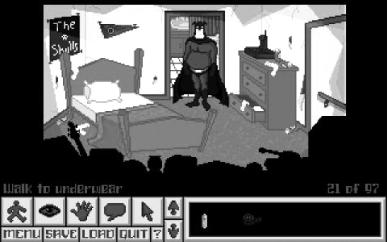
This full talkie adventure (Figure 7-1) is a superhero spoof and was actually a commercial game for a while. The creator has since kindly allowed free distribution. Not only is it full-featured, long, and funny, the talkie version includes a behind-the-scenes audio commentary for each location, a really neat and unique concept for a graphic adventure. Download it from http://software01.archive.org/1/items/the-adventures-of-fatman-pc/.
- 5 Days A Stranger
This spooky horror game won a host of awards at the 2003 AGS Awards. The storyline involves a cat burglar stranded in a country house as things go horribly awry. A genuinely scary atmosphere—not often tried in graphic adventures that traditionally veer toward humor—and great characterization and plot make this title well worth your time. See http://netmonkey.fullyramblomatic.com/5days/.
- Pleughberg: The Dark Ages
Despite somewhat lackluster graphics, it’s easy to see why Pleughberg won many “Best of” awards in the 2001 AGS competition. You play “Jake McUrk, working for the Police Detective Agency” in this gritty police drama with a fair amount of extremely pixelated gore. The story is great, and the creator also took time to put in multiple endings—a very neat touch. You can download it from http://www.gaspop.com/darkages.htm.
- Apprentice
Another fan favorite, this short but memorable adventure focuses on Mortimer “Pib” Pibsworth, a would-be magician. It won multiple awards, especially for art, in the 2003 AGS Awards. Fortunately, there’s a sequel (or, actually, trilogy) in development for those upset that the well-crafted title ends so soon. See http://herculeaneffort.adventuredevelopers.com/app1.html#top.
There are plenty of neat choices out there. Free games are proliferating because they’re so easy to create, and the gameplay is straightforward and does not rely on twitchy reflexes. It’s also worth noting that the official AGS games page (http://www.bigbluecup.com/games.php) offers a handy parental advisory rating per game for sex, violence, and nudity. You can check which titles have mature themes as well as those that don’t.
Tip
For fans of the awful, there’s also plenty of opportunity to trawl through some truly tragic fan-created titles. The AGS Awards even have a category for the most execrable fan concoctions. I can’t really repeat the actual award name, but suffice to say it involves the ASCII-ization of a rather rude word.
Note
Highlights include the sophisticated Smokin’ Weed (at http://www.bigbluecup.com/games.php?action=detail&id=229), which is “a short game about a drug dealer who gets visited by the weed police and now he has to escape out of his own house.” This gripping adventure comes from the pen of Guybrush’s brother, Vincent Threepwood!