Table of Contents for
Gaming Hacks
 Gaming Hacks
Published by
O'Reilly Media, Inc., 2004
Gaming Hacks
Published by
O'Reilly Media, Inc., 2004
- Cover
- Gaming Hacks
- Credits
- Contributors
- Acknowledgments
- Foreword
- Preface
- How to Use This Book
- How This Book Is Organized
- Conventions Used in This Book
- Using Code Examples
- Comments and Questions
- Got a Hack?
- 1. Playing Classic Games
- Legal Emulation
- Play Commodore 64 Games Without the C-64
- Play Atari ROMs Without the Atari
- Use Atari Paddles with Your PC
- Run Homebrew Games on the Atari 2600
- Create Your Own Atari 2600 Homebrew Games
- Play Classic PC Graphic Adventures
- Play Old Games Through DOSBox
- Play Reissued All-in-One Joystick Games
- Play Arcade Games Without the Arcade
- Add and Manipulate a MAME Frontend
- Keep Your ROMs Tidy and Organized
- Learn Game-Specific MAME Controls
- Filter Inappropriate MAME ROMs
- Autoboot into MAME Heaven
- Play Emulated Arcade Games Online
- Play Classic Pinball Without the Table
- Emulate the SNES on the Dreamcast
- 2. Playing Portably
- Play Games on Your iPod
- Mod Your Game Boy
- Take and Print Photos with Your Game Boy
- Compose Music on Your Game Boy
- Explore the GP32 Handheld Gaming System
- Take Your Console with You
- Explore the Bandai WonderSwan
- Play Real Games on Your PDA
- Install a PlayStation 2 in Your Car
- 3. Playing Well with Others
- Practice Proper MMORPG Etiquette
- Understand MMORPG Lingo
- Grind Without Going Crazy
- Make a Profit in Vana’diel
- Write MMORPG Macros
- Build an Effective Group
- Catch Half-Life FPS Cheaters Redhanded
- 4. Playing with Hardware
- Build a Quiet, Killer Gaming Rig
- Find and Configure the Best FPS Peripherals
- Adapt Old Video Game Controllers to the PC
- Choose the Right Audio/Video Receiver
- Place Your Speakers Properly
- Connect Your Console to Your Home Theater
- Tune Console Video Output
- Tune Your TV for Console Video
- PC Audio Hacking
- Optimize PC Video Performance
- Build a Dedicated Multimedia PC
- Use a Multimedia Projector for Gaming
- 5. Playing with Console and Arcade Hardware
- Play LAN-Only Console Games Online
- Hack the Nuon DVD Player/Gaming System
- Play Import Games on American Consoles
- Find a Hackable Dreamcast
- Play Movies and Music on Your Dreamcast
- Hack the Dreamcast Visual Memory Unit
- Unblur Your Dreamcast Video
- Use Your Dreamcast Online
- Host Dreamcast Games Online
- Burn Dreamcast-Compatible Discs on Your PC
- Burn Dreamcast Homebrew Discs
- Buy Your Own Arcade Hardware
- Configure Your Arcade Controls, Connectors, and Cartridges
- Reorient and Align Your Arcade Monitor
- Buy Cart-Based JAMMA Boards
- Programming Music for the Nintendo Entertainment System
- 6. Playing Around the Game Engine
- Explore Machinima
- Choose a Machinima Engine
- Film Your First Machinima Movie
- Improve Your Camera Control
- Record Game Footage to Video
- Speedrun Your Way Through Metroid Prime
- Sequence-Break Quake
- Run Classic Game ROM Translations
- Change Games with ROM Hacks
- Apply ROM Hacks and Patches
- Create PS2 Cheat Codes
- Hack Xbox Game Saves
- Cheat on Other Consoles
- Modify PC Game Saves and Settings
- Buff Your Saved Characters
- Create Console Game Levels
- 7. Playing Your Own Games
- Adventure Game Studio Editing Tips
- Create and Play Pinball Tables
- Put Your Face in DOOM
- Create a Vehicle Model for Unreal Tournament 2004
- Add a Vehicle to Unreal Tournament 2004
- Modify the Behavior of a UT2004 Model
- Download, Compile, and Create an Inform Adventure
- Decorate Your IF Rooms
- Add Puzzles to Your IF Games
- Add Nonplayer Characters to IF Adventures
- Make Your IF NPCs Move
- Make Your IF NPCs Talk
- Create Your Own Animations
- Add Interactivity to Your Animations
- Write a Game in an Afternoon
- 8. Playing Everything Else
- Tweak Your Tactics for FPS Glory
- Beat Any Shoot-Em-Up
- Drive a Physics-Crazed Motorcycle
- Play Japanese Games Without Speaking Japanese
- Back Up, Modify, and Restore PlayStation Saved Games
- Access Your Console’s Memory Card Offline
- Overclock Your Console
- Index
- Colophon
Poke into the depths of your favorite PC game to give yourself the edge.
There’s a whole industry devoted to cheating and hacking game saves on consoles ( [Hack #75] ), but what about PC games? Shouldn’t that be as easy, if not easier, than console hacking? Yes! Console hacking may be more exotic and interesting because consoles are black boxes you’re not really supposed to open, but it’s easy to cheat with PC games; you control the hardware and software of a general-purpose computing device!
You can often find trainers (small executable patch files that add an up-front menu to the game in which you can select infinite lives, max ammo, and other fun options) that combine all the extras you want in a ready-made package. Some exploit debug modes that the programmers have left in the game. Others modify specific values in saved games. You can perform plenty of interesting hacks on PC games old and new.
There are several types of PC game hacking tools. All overlap in some way, and you’ll often have the best results by combining some or all of them:
- Memory finders
Scan the PC’s memory while a game runs, allowing you to search for and replace certain variables to produce intended (or unintended!) effects.
- Hex editors
Allow you to edit saved files, changing variables more permanently.
- Code disassemblers
Tools that show you a partially human-readable version of the compiled code. This is a complicated approach to changing parts of the game code. If you have a basic understanding of assembly language and hex, this is the method for you.
- Packet editors
Tools for network-aware games that help you understand the information sent out over the Net and how to change it.
If you’re looking for somewhere to start with regard to hacking PC games, the World Of Game Hacking (http://www.gamehacking.com/) is an amazing jumping-off point. Not only does it have plenty of free, ready-made trainers to download for existing PC games, it has massive download sections for all of these utilities and a big set of tutorials for both beginners and experts. Although they’re often rough and ready, these explain most of what you need to know.
Using memory finders is by far the easiest and most fun way to hack, so we’ll devote the most time to it. For the purposes of this hack, we’ll use the WinHack 2.0 tool:
| http://www.gamehacking.com/download.php?type=tools&file=memfinders/WH200.zip |
It’s a freely distributable Windows program that allows you to look through memory on a particular file and see what’s changed, then change values based on that.
Tip
GameHack, also available on the GameHacking.com page, is another highly recommended Windows program along the same lines. Unfortunately, it’s a bit old, and it doesn’t seem to work properly in Windows NT environments, so it’s not very useful for modern-day PC hackers.
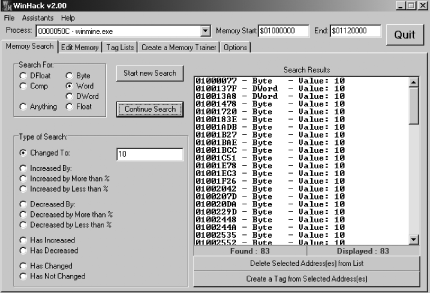
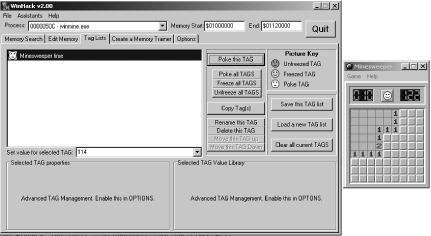
To start, load up your favorite game. We’ll use the example of the excellent WinHack tutorial (http://www.gamehacking.com/view.php?link=../tutorials/winhack.php) on Minesweeper, which ships with Windows.
Load MineSweeper, and leave it on the startup screen without starting a game.
Load WinHack. Select the MineSweeper application from the Process: window, and hit the Start New Search button.
Start a game of MineSweeper, and wait until the timer has counted 10 seconds. Pause the game by minimizing its window.
Now search Anything for the phrase “Changed to value of 10” selection, and hit Continue Search. This finds every memory location (Figure 6-2) whose contents have since changed to the value of 10—probably several places.
Maximize MineSweeper again, and wait for the timer to reach 18. Then minimize again and change the Changed value to 18. You should receive only one result: the location of the timer variable. Now you can mess with it.
Select Create A Tag From The Selected Address. Go to the Tag Lists menu, where you can change the value for that particular tag to anything you like (back to 1, for example) or freeze it so it doesn’t increment anymore. See Figure 6-3.
Go back into the game and see that the timer has changed to your new value. Poof, instant MineSweeper cheating!
This type of hack isn’t necessarily permanent, though. You might be able to create a trainer using WinHack, but there’s no guarantee that the timer will occupy the same chunk of memory on every game.