Table of Contents for
Gaming Hacks
 Gaming Hacks
Published by
O'Reilly Media, Inc., 2004
Gaming Hacks
Published by
O'Reilly Media, Inc., 2004
- Cover
- Gaming Hacks
- Credits
- Contributors
- Acknowledgments
- Foreword
- Preface
- How to Use This Book
- How This Book Is Organized
- Conventions Used in This Book
- Using Code Examples
- Comments and Questions
- Got a Hack?
- 1. Playing Classic Games
- Legal Emulation
- Play Commodore 64 Games Without the C-64
- Play Atari ROMs Without the Atari
- Use Atari Paddles with Your PC
- Run Homebrew Games on the Atari 2600
- Create Your Own Atari 2600 Homebrew Games
- Play Classic PC Graphic Adventures
- Play Old Games Through DOSBox
- Play Reissued All-in-One Joystick Games
- Play Arcade Games Without the Arcade
- Add and Manipulate a MAME Frontend
- Keep Your ROMs Tidy and Organized
- Learn Game-Specific MAME Controls
- Filter Inappropriate MAME ROMs
- Autoboot into MAME Heaven
- Play Emulated Arcade Games Online
- Play Classic Pinball Without the Table
- Emulate the SNES on the Dreamcast
- 2. Playing Portably
- Play Games on Your iPod
- Mod Your Game Boy
- Take and Print Photos with Your Game Boy
- Compose Music on Your Game Boy
- Explore the GP32 Handheld Gaming System
- Take Your Console with You
- Explore the Bandai WonderSwan
- Play Real Games on Your PDA
- Install a PlayStation 2 in Your Car
- 3. Playing Well with Others
- Practice Proper MMORPG Etiquette
- Understand MMORPG Lingo
- Grind Without Going Crazy
- Make a Profit in Vana’diel
- Write MMORPG Macros
- Build an Effective Group
- Catch Half-Life FPS Cheaters Redhanded
- 4. Playing with Hardware
- Build a Quiet, Killer Gaming Rig
- Find and Configure the Best FPS Peripherals
- Adapt Old Video Game Controllers to the PC
- Choose the Right Audio/Video Receiver
- Place Your Speakers Properly
- Connect Your Console to Your Home Theater
- Tune Console Video Output
- Tune Your TV for Console Video
- PC Audio Hacking
- Optimize PC Video Performance
- Build a Dedicated Multimedia PC
- Use a Multimedia Projector for Gaming
- 5. Playing with Console and Arcade Hardware
- Play LAN-Only Console Games Online
- Hack the Nuon DVD Player/Gaming System
- Play Import Games on American Consoles
- Find a Hackable Dreamcast
- Play Movies and Music on Your Dreamcast
- Hack the Dreamcast Visual Memory Unit
- Unblur Your Dreamcast Video
- Use Your Dreamcast Online
- Host Dreamcast Games Online
- Burn Dreamcast-Compatible Discs on Your PC
- Burn Dreamcast Homebrew Discs
- Buy Your Own Arcade Hardware
- Configure Your Arcade Controls, Connectors, and Cartridges
- Reorient and Align Your Arcade Monitor
- Buy Cart-Based JAMMA Boards
- Programming Music for the Nintendo Entertainment System
- 6. Playing Around the Game Engine
- Explore Machinima
- Choose a Machinima Engine
- Film Your First Machinima Movie
- Improve Your Camera Control
- Record Game Footage to Video
- Speedrun Your Way Through Metroid Prime
- Sequence-Break Quake
- Run Classic Game ROM Translations
- Change Games with ROM Hacks
- Apply ROM Hacks and Patches
- Create PS2 Cheat Codes
- Hack Xbox Game Saves
- Cheat on Other Consoles
- Modify PC Game Saves and Settings
- Buff Your Saved Characters
- Create Console Game Levels
- 7. Playing Your Own Games
- Adventure Game Studio Editing Tips
- Create and Play Pinball Tables
- Put Your Face in DOOM
- Create a Vehicle Model for Unreal Tournament 2004
- Add a Vehicle to Unreal Tournament 2004
- Modify the Behavior of a UT2004 Model
- Download, Compile, and Create an Inform Adventure
- Decorate Your IF Rooms
- Add Puzzles to Your IF Games
- Add Nonplayer Characters to IF Adventures
- Make Your IF NPCs Move
- Make Your IF NPCs Talk
- Create Your Own Animations
- Add Interactivity to Your Animations
- Write a Game in an Afternoon
- 8. Playing Everything Else
- Tweak Your Tactics for FPS Glory
- Beat Any Shoot-Em-Up
- Drive a Physics-Crazed Motorcycle
- Play Japanese Games Without Speaking Japanese
- Back Up, Modify, and Restore PlayStation Saved Games
- Access Your Console’s Memory Card Offline
- Overclock Your Console
- Index
- Colophon
High-quality portable gaming without the Game Boy.
Many of the portable gaming hacks we’ve discussed relate to proprietary consoles ( [Hack #24] ). You may need to buy flashcart devices, for which Nintendo will chase you down with legal papers and raised voices. Let’s now discuss a portable device that can play classic titles through emulation, is free for anybody to develop on, and is easy to transfer data onto: a palmtop computer.
There are two main branches of portable devices. One is the multimanufacturer PocketPC, running a portable version of Microsoft’s Windows operating system. The other is Palm-compatible devices running the Palm OS, mostly manufactured by Palm and its offshoots.
There’s one major issue with the form factor of all of these devices: they’re primarily portable productivity devices for keeping appointments, surfing the Web, or writing down notes—not for playing games. They lack the easy game-oriented controls of game-specific devices such as the GP32 ( [Hack #23] ) or the Game Boy Advance ( [Hack #20] ).
Also, there are two main new PocketPC processor types, both produced by Intel: XScale and ARM. PocketGame has a good synopsis of the different processors found in PocketPCs (http://www.pocketgamer.org/links/ppc.php), including older processors such as MIPS and SH3. Fortunately, almost all new PocketPC titles are ARM-compatible, so they also work with XScale; some also work with MIPS-powered devices. Notable overall brands are the Toshiba series, the Dell Axim, and the HP iPaq, although the ASUS PDAs seem to have the lead among gamers concerned about benchmark performance and controllability. However, to be honest, there’s not a lot of difference between the machines. A faster processor may mean faster emulation, of course, which is especially important for insanely high-end emulators like the PlayStation One. Other than that, you pays your money and takes your choice.
The big hit in the Palm arena right now is Tapwave’s Zodiac (http://www.tapwave.com/), a powerful color PDA designed to look like a Game Boy Advance-style console. It runs an enhanced Palm OS with an ATI Imageon graphics accelerator and retails at $299 for the 32-MB version and $399 for the color version. Although expensive compared to other portable consoles, even the relatively upmarket GP32, you’ll also be able to run a lot of Palm software.
The Tapwave stacks up well against official Palm hardware, such as the fairly enticing $299-retailing PalmOne Zire 72 (http://www.pdabuyersguide.com/palm_Zire_72.htm), a powerful portable that sports extra features such as a camera, though its ergonomics almost preclude comfortable game playing. In fact, the Tapwave seems have the most buzz of any handheld for gaming right now because it’s designed well for Palm software as well as Zodiac-specific enhanced software that takes advantage of the graphics accelerator—even emulators.
To keep up with what’s hot with the devices, not necessarily games, start with Pocket PC Magazine (http://www.pocketpcmag.com/), the granddaddy of Pocket PC-specific web sites. Wireless Gaming Review (http://wgamer.com/) has better games coverage with commercial software reviews. Another good way to stay up to date is to look in the forums of major gaming sites such as PocketGamer (http://www.pocketgamer.org/homeindex.php) to see what kind of hardware the pocket gamers use and what they recommend to others.
The obvious (but delightful) starting choice in PocketPC emulation is MameCE, the MAME emulator for PocketPCs (http://www.mameworld.net/mamece3/). While it is out of date at the time of writing (it requires ROMs for MAME 0.36; Version 0.86 has just been released), it still works with many MAME titles. It performs better than any other handheld MAME emulator, thanks to the speed of the fastest PocketPC hardware.
The PDArcade site keeps a list of PocketPC emulators (http://www.pdarcade.com/modules.php?name=Sections&op=viewarticle&artid=102), regardless of quality or age. Start there to find out what’s available.
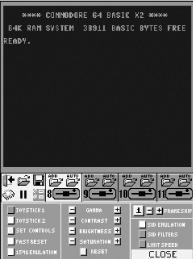
The Click Gamer site also has some neat commercial emulators. In particular, their Commodore 64 emulator, Pocket Commodore 64 (http://www.clickgamer.com/moreinfo.htm?pid=4), now has an official license from Tulip Computers, the current Commodore rights holder, making it one of those rare, completely legal hardware emulators. The $25 program, shown in Figure 2-5, has seven kernel ROMs and two disk ROMs built in, so that you can try programs that require variant ROM sets easily without scrabbling around obscure FTP sites for not-necessarily-legit variants.
The site also hosts copies of the totally free PocketVCS (http://www.clickgamer.com/moreinfo.htm?pid=61), an Atari 2600 emulator that has a neat graphical menu system and excellent compatibility.
PicoDrive (http://www.picodrive.atspace.com/) is another good Pocket PC emulator from the creator of the Final Burn emulator. This freely downloadable Sega Genesis/Mega Drive emulator has good functionality despite its youth.
Finally, the FPSEce emulator (http://www.fpsece.net/) is both smart and likely to run into legal issues. It admirably emulates Sony’s PlayStation 1 on Windows CE devices.
You’ll need a reasonably fast PocketPC—the
emulator’s README file
specifically recommends the ASUS A620 (http://www.asus.com/products/pda/event/a620/)—and
at least 16 MB of RAM. You’ll also need some way to
grab the ISO files that were originally on CD, as well as a
PlayStation BIOS file not distributed with the emulator. This is not
for the faint-hearted.
Due to the nature of the niche Palm market, many of the available emulators are both good and non-free. Nonetheless, it’s worth pointing out some of the pay ones, in addition to others that are, blissfully, completely gratis.
KalemSoft (http://www.kalemsoft.com/products.html) is a good source of commercial Palm emulators. They’re particularly notable because their NES Emulator, the cleverly named NESEm, actually plays multiplayer titles over Bluetooth. They also have excellent PC Engine/Turbografx emulators and Sega Master System emulators for Palm OS 5.x, with further enhanced Zodiac versions. All of their emulators cost under $20.
CaSTaway (http://www.codejedi.com/shadowplan/castaway.html) is a surprisingly good Atari ST emulator. It’s completely free, although the author has a donation box on his site. The same coder has also produced a limited but excellent Palm OS 5.x MAME emulator called XCade (http://www.codejedi.com/shadowplan/xabout.html). The registered version ($9.99) has more features and better support.
Tip
If you want a good current overview of state-of-the-art Palm emulation, a recent article at The Gadgeteer (http://www.the-gadgeteer.com/palmos-emulators-review.html) sums up the situation admirably.
As for the souped-up Tapwave device, there are multiple emulators claiming to be “enhanced for Tapwave Zodiac.” The most notable of these is the completely free Little John Z (http://yoyofr.fr.st/), a conversion of the GP32 NES emulator. Actually, it’s less a conversion than a rebirth, since it contains NES, SNES, Game Boy, Game Boy Color, Neo Geo Pocket Color, and WonderSwan emulators all in one! At the time of writing, it’s available only for Tapwave developers because the author is waiting for Tapwave to make its license GPL-compatible. This should happen in the very near future, so be sure to check out this emulator conglomerate.
The ZodiacGamer fan site (http://www.zodiacgamer.com/) has plenty of other information on Zodiac-specific emulators and other homebrew titles. TapLand (http://www.tapland.com) also provides great coverage on the whole Zodiac-specific scene, which is likely to continue to burgeon.
Finally, there are also completely official licensed commercial products for the Palm that emulate classic software, including Atari 2600 Retro Packs (http://www.mobilewizardry.com/multi-platform/atariretro/index.php).