Table of Contents for
Gaming Hacks
 Gaming Hacks
Published by
O'Reilly Media, Inc., 2004
Gaming Hacks
Published by
O'Reilly Media, Inc., 2004
- Cover
- Gaming Hacks
- Credits
- Contributors
- Acknowledgments
- Foreword
- Preface
- How to Use This Book
- How This Book Is Organized
- Conventions Used in This Book
- Using Code Examples
- Comments and Questions
- Got a Hack?
- 1. Playing Classic Games
- Legal Emulation
- Play Commodore 64 Games Without the C-64
- Play Atari ROMs Without the Atari
- Use Atari Paddles with Your PC
- Run Homebrew Games on the Atari 2600
- Create Your Own Atari 2600 Homebrew Games
- Play Classic PC Graphic Adventures
- Play Old Games Through DOSBox
- Play Reissued All-in-One Joystick Games
- Play Arcade Games Without the Arcade
- Add and Manipulate a MAME Frontend
- Keep Your ROMs Tidy and Organized
- Learn Game-Specific MAME Controls
- Filter Inappropriate MAME ROMs
- Autoboot into MAME Heaven
- Play Emulated Arcade Games Online
- Play Classic Pinball Without the Table
- Emulate the SNES on the Dreamcast
- 2. Playing Portably
- Play Games on Your iPod
- Mod Your Game Boy
- Take and Print Photos with Your Game Boy
- Compose Music on Your Game Boy
- Explore the GP32 Handheld Gaming System
- Take Your Console with You
- Explore the Bandai WonderSwan
- Play Real Games on Your PDA
- Install a PlayStation 2 in Your Car
- 3. Playing Well with Others
- Practice Proper MMORPG Etiquette
- Understand MMORPG Lingo
- Grind Without Going Crazy
- Make a Profit in Vana’diel
- Write MMORPG Macros
- Build an Effective Group
- Catch Half-Life FPS Cheaters Redhanded
- 4. Playing with Hardware
- Build a Quiet, Killer Gaming Rig
- Find and Configure the Best FPS Peripherals
- Adapt Old Video Game Controllers to the PC
- Choose the Right Audio/Video Receiver
- Place Your Speakers Properly
- Connect Your Console to Your Home Theater
- Tune Console Video Output
- Tune Your TV for Console Video
- PC Audio Hacking
- Optimize PC Video Performance
- Build a Dedicated Multimedia PC
- Use a Multimedia Projector for Gaming
- 5. Playing with Console and Arcade Hardware
- Play LAN-Only Console Games Online
- Hack the Nuon DVD Player/Gaming System
- Play Import Games on American Consoles
- Find a Hackable Dreamcast
- Play Movies and Music on Your Dreamcast
- Hack the Dreamcast Visual Memory Unit
- Unblur Your Dreamcast Video
- Use Your Dreamcast Online
- Host Dreamcast Games Online
- Burn Dreamcast-Compatible Discs on Your PC
- Burn Dreamcast Homebrew Discs
- Buy Your Own Arcade Hardware
- Configure Your Arcade Controls, Connectors, and Cartridges
- Reorient and Align Your Arcade Monitor
- Buy Cart-Based JAMMA Boards
- Programming Music for the Nintendo Entertainment System
- 6. Playing Around the Game Engine
- Explore Machinima
- Choose a Machinima Engine
- Film Your First Machinima Movie
- Improve Your Camera Control
- Record Game Footage to Video
- Speedrun Your Way Through Metroid Prime
- Sequence-Break Quake
- Run Classic Game ROM Translations
- Change Games with ROM Hacks
- Apply ROM Hacks and Patches
- Create PS2 Cheat Codes
- Hack Xbox Game Saves
- Cheat on Other Consoles
- Modify PC Game Saves and Settings
- Buff Your Saved Characters
- Create Console Game Levels
- 7. Playing Your Own Games
- Adventure Game Studio Editing Tips
- Create and Play Pinball Tables
- Put Your Face in DOOM
- Create a Vehicle Model for Unreal Tournament 2004
- Add a Vehicle to Unreal Tournament 2004
- Modify the Behavior of a UT2004 Model
- Download, Compile, and Create an Inform Adventure
- Decorate Your IF Rooms
- Add Puzzles to Your IF Games
- Add Nonplayer Characters to IF Adventures
- Make Your IF NPCs Move
- Make Your IF NPCs Talk
- Create Your Own Animations
- Add Interactivity to Your Animations
- Write a Game in an Afternoon
- 8. Playing Everything Else
- Tweak Your Tactics for FPS Glory
- Beat Any Shoot-Em-Up
- Drive a Physics-Crazed Motorcycle
- Play Japanese Games Without Speaking Japanese
- Back Up, Modify, and Restore PlayStation Saved Games
- Access Your Console’s Memory Card Offline
- Overclock Your Console
- Index
- Colophon
Can’t find four friends to crowd around your home arcade cabinet? Look online for team play.
One of the few arcade features that consoles, PC ports, and emulation can’t always provide is socialization. It’s fun to have the high score in a shooter, to take on all comers in a fighter, and to enter battle with three friends in a quarter-eating adventure game. You can recreate the games, but unless you have your own arcade cabinet ( [Hack #58] ) or an appropriate emulator ( [Hack #10] ) and can convince your friends to play along, you might think you’re stuck.
Fortunately, the clever Kaillera bridging software can play emulated titles online.
As the word “middleware” suggests, there’s a key difference between Kaillera and the other retro emulators we’ve discussed. Kaillera software actually interfaces with existing emulators to allow multiplayer arcade games—not originally playable over any network—to play online. However, to make this work, the emulator developers must have incorporated Kaillera into their software.
The main Kaillera-enabled emulator is a MAME variant named MAME32k. It’s available with the Kaillera client itself on the site’s download page (http://www.kaillera.com/download.php). This is sufficient to play games. If you want to host games, you’ll need a completely different Kaillera server. The server is a standalone application also available from the download page. In general, the client is embedded in the emulator in some way, but the server always stands alone.
Fortunately, as with many FPS games, you may be able to find a public server without having to run your own. The front page of Kaillera.com lists several such servers (see Figure 1-11). The biggest servers can hold up to 100 people. You may wish to host your own server for ping, ease of use, and privacy issues, however—but it’s up to you.
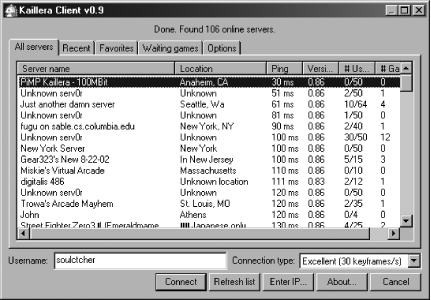
The Kaillera site also has a fairly decent visual explanation of how to start up a game and to find the gaming partner of your dreams; see its screenshots page (http://www.kaillera.com/shots.php). The whole process is fairly self-explanatory, presuming you understand the basic network gaming concept that the lower the ping, the more likely you are to have a smooth game.
The designers of these old games never designed in Internet play, and in many cases, the games predated the modern Internet. You’ll likely run into several similar problems. Fortunately, the Kaillera page has a quality FAQ (http://www.kaillera.com/faq.php) that explains many of the more common problems. Let’s highlight a few of the less obvious ones:
Lag is always an issue in online gaming.
Some of the largest Kaillera users are in the East, particularly China and Hong Kong, so the FAQ makes a good point about trying to play on a server over very long distances. However, Kaillera uses UDP, not TCP/IP. Lost packets are gone forever, but the lack of nondelivery acknowledgement in UDP tends to reduce lag. From a practical point of view, try to pick low-ping servers to play on, ideally within the same continent as yourself (see Figure 1-11). Keep your Connection setting on Good to send out enough packets to prevent a choppy connection.
Desynchronization can be a major problem.
This slightly more serious problem occurs when network packets are dropped or possibly corrupted. Without in-game error checking, Player 1 may correctly press the A button to pick up a power-up and receive 1,000 points, but the packet that explains this never actually reaches Player 2. Now both players have encountered divergent behavior. One good way to check for desync is by comparing the scores, according to the FAQ. Both players should see the same point values because they’re playing the same game.
The Kaillera server comes with optional Unix flavoring.
If you’re having trouble starting the Kaillera server, bear in mind that there’s a version that runs as a Unix/Linux daemon:
./kaillerasrv. You can treat it as a standard Unix utility. For example, to count the number of visitors, pipe the output to a log, and then type this at the prompt:
grep connected kaillerasrv.log -cIf you’re not quite that elite, there’s also a Windows version available from the Kaillera download page (http://www.kaillera.com/download.php).
MAME32k is the first and most obvious emulator that uses Kaillera (think anything from great old titles like Rampage, through later ’80s games such as Arkanoid, right up to ’90s cult titles such as Cadillacs And Dinosaurs, plus many, many more), but there are several other cool alternatives in various stages of development. The following sections describe the highlights.
Though much more contemporary in terms of the material it emulates, and with some MAME overlap, Kawaks is often the most popular emulator over the entire Kaillera server sets. It handles Neo Geo and Capcom CPS2 games, although these games are sometimes commercially available elsewhere; it’s often a little shady in copyright terms. Still, it’s excellent software, especially for one-on-one fighting titles such as the King Of Fighters series, classic Street Fighter II variants, and newer one-on-one fighters such as Garou. See http://kawaks.retrogames.com/.
This fairly simple, vanilla NES emulator for Windows comes with Kaillera built in, so you can play some of your favorite Nintendo games against others over the Internet. This isn’t just neat, it’s spectacularly good; who can resist a little Duck Hunt or even a little Tengen Tetris? Download it from http://tnse.zophar.net/NESten.htm.
This marvelous software allows Commodore Amiga fans to get their game on in a multiplayer fashion, thanks to an adaptation of the popular WinUAE Amiga emulator—think of amazing old titles like Sensible Soccer, IK+, and Speedball. Unfortunately, a second release has seen years of delay, at least at the time of writing. The available version is still an excellent start. Find out more at http://kaillera.abime.net/.
On the wild side of cool, Bliss allows you to play multiplayer Intellivision games over a network with the help of Kaillera! Who’da thunk that such an old console would ever work online? Maybe you’d better boot up some of the entertaining sports titles such as Intellivision Football, or crazier Tron-style fare such as Snafu, and blast through them multiplayer-style. Learn how at http://bliss.emuviews.com/.
One of the coolest things about the Kaillera web site is the statistics page (http://www.kaillera.com/stats.php), which shows the top-played titles in several different genres. This is surprisingly useful because it displays the titles that work best online over moderate connections.
As for highlights of this information, Taito’s marvelous Bubble Bobble sits atop the most played Platform Games chart, despite being over 15 years old. The tremendously addictive Puyo Puyo installments top the Puzzle Games chart, with the Neo Geo’s great Magical Drop 3 shortly behind. It’s also notable that the Adventure Games chart includes the classic Capcom brawler Dungeons and Dragons: Shadow of Mystara, an oft-neglected title so popular that the Taiwanese IGS PGM arcade console is producing gameplay clones even now. Finally, there’s even a Quiz game chart for general knowledge-style questions, headed by the SNK title Quiz King Of Fighters.
All these games are worth checking out, although the usual caveats about intellectual property and trying to acquire legal ROMs apply. See [Hack #1] for more.