Table of Contents for
Gaming Hacks
 Gaming Hacks
Published by
O'Reilly Media, Inc., 2004
Gaming Hacks
Published by
O'Reilly Media, Inc., 2004
- Cover
- Gaming Hacks
- Credits
- Contributors
- Acknowledgments
- Foreword
- Preface
- How to Use This Book
- How This Book Is Organized
- Conventions Used in This Book
- Using Code Examples
- Comments and Questions
- Got a Hack?
- 1. Playing Classic Games
- Legal Emulation
- Play Commodore 64 Games Without the C-64
- Play Atari ROMs Without the Atari
- Use Atari Paddles with Your PC
- Run Homebrew Games on the Atari 2600
- Create Your Own Atari 2600 Homebrew Games
- Play Classic PC Graphic Adventures
- Play Old Games Through DOSBox
- Play Reissued All-in-One Joystick Games
- Play Arcade Games Without the Arcade
- Add and Manipulate a MAME Frontend
- Keep Your ROMs Tidy and Organized
- Learn Game-Specific MAME Controls
- Filter Inappropriate MAME ROMs
- Autoboot into MAME Heaven
- Play Emulated Arcade Games Online
- Play Classic Pinball Without the Table
- Emulate the SNES on the Dreamcast
- 2. Playing Portably
- Play Games on Your iPod
- Mod Your Game Boy
- Take and Print Photos with Your Game Boy
- Compose Music on Your Game Boy
- Explore the GP32 Handheld Gaming System
- Take Your Console with You
- Explore the Bandai WonderSwan
- Play Real Games on Your PDA
- Install a PlayStation 2 in Your Car
- 3. Playing Well with Others
- Practice Proper MMORPG Etiquette
- Understand MMORPG Lingo
- Grind Without Going Crazy
- Make a Profit in Vana’diel
- Write MMORPG Macros
- Build an Effective Group
- Catch Half-Life FPS Cheaters Redhanded
- 4. Playing with Hardware
- Build a Quiet, Killer Gaming Rig
- Find and Configure the Best FPS Peripherals
- Adapt Old Video Game Controllers to the PC
- Choose the Right Audio/Video Receiver
- Place Your Speakers Properly
- Connect Your Console to Your Home Theater
- Tune Console Video Output
- Tune Your TV for Console Video
- PC Audio Hacking
- Optimize PC Video Performance
- Build a Dedicated Multimedia PC
- Use a Multimedia Projector for Gaming
- 5. Playing with Console and Arcade Hardware
- Play LAN-Only Console Games Online
- Hack the Nuon DVD Player/Gaming System
- Play Import Games on American Consoles
- Find a Hackable Dreamcast
- Play Movies and Music on Your Dreamcast
- Hack the Dreamcast Visual Memory Unit
- Unblur Your Dreamcast Video
- Use Your Dreamcast Online
- Host Dreamcast Games Online
- Burn Dreamcast-Compatible Discs on Your PC
- Burn Dreamcast Homebrew Discs
- Buy Your Own Arcade Hardware
- Configure Your Arcade Controls, Connectors, and Cartridges
- Reorient and Align Your Arcade Monitor
- Buy Cart-Based JAMMA Boards
- Programming Music for the Nintendo Entertainment System
- 6. Playing Around the Game Engine
- Explore Machinima
- Choose a Machinima Engine
- Film Your First Machinima Movie
- Improve Your Camera Control
- Record Game Footage to Video
- Speedrun Your Way Through Metroid Prime
- Sequence-Break Quake
- Run Classic Game ROM Translations
- Change Games with ROM Hacks
- Apply ROM Hacks and Patches
- Create PS2 Cheat Codes
- Hack Xbox Game Saves
- Cheat on Other Consoles
- Modify PC Game Saves and Settings
- Buff Your Saved Characters
- Create Console Game Levels
- 7. Playing Your Own Games
- Adventure Game Studio Editing Tips
- Create and Play Pinball Tables
- Put Your Face in DOOM
- Create a Vehicle Model for Unreal Tournament 2004
- Add a Vehicle to Unreal Tournament 2004
- Modify the Behavior of a UT2004 Model
- Download, Compile, and Create an Inform Adventure
- Decorate Your IF Rooms
- Add Puzzles to Your IF Games
- Add Nonplayer Characters to IF Adventures
- Make Your IF NPCs Move
- Make Your IF NPCs Talk
- Create Your Own Animations
- Add Interactivity to Your Animations
- Write a Game in an Afternoon
- 8. Playing Everything Else
- Tweak Your Tactics for FPS Glory
- Beat Any Shoot-Em-Up
- Drive a Physics-Crazed Motorcycle
- Play Japanese Games Without Speaking Japanese
- Back Up, Modify, and Restore PlayStation Saved Games
- Access Your Console’s Memory Card Offline
- Overclock Your Console
- Index
- Colophon
How to recognize, buy, create, and emulate the best handheld you’ve never heard of.
Other hacks cover notable and obvious handhelds, such as Nintendo’s Game Boy and Game Boy Advance ( [Hack #20] ), as well as the marvelously versatile Korean GP32 handheld ( [Hack #23] ). There are other, more obscure fish in the sea worth exploring; primary among these is Bandai’s WonderSwan, released only in Japan and Asia. It includes both unofficial and official homebrew game-creation options.
It’s vital to note that several different types of the WonderSwan exist. All are pretty inexpensive. You can find even the most extravagant version, the WonderSwan Crystal, for $40 or less on eBay at the time of writing, though you may have to pay for shipping from Japan or Hong Kong. With the small differential in price, make sure you buy the latest and best variant!
The original, monochrome WonderSwan came out in early 1999 and fared pretty well. This thin, Game Boy-style handheld console has a 2.1-inch diagonal, 224 114 pixel screen and 512 KB of RAM. One unique feature is that you can play games either horizontally or vertically, thanks to two sets of direction pads. The horizontal mode is very similar to GB or GBA, with a direction pad and two buttons. You can often find this version for under $20 on eBay (though shipping may cost you more than that!), but there’s no point in buying one when a WonderSwan Color or SwanCrystal costs just a few dollars more.
This variant shows up on auction sites more often than any other. It launched in December 2000 and sold right through to the Crystal’s launch. The main upgrade for this version is a color screen, with up to 241 out of 4,096 colors available onscreen at any time. It has particularly good battery life, playing for up to 20 hours from one AA battery, and is backward-compatible with all black-and-white WonderSwan games. At the time of writing, the average eBay price was $30 plus shipping.
The final iteration of the WonderSwan hardware launched in July 2002 in Japan. It featured a much higher-quality TFT LCD, which fixed a lot of the ghosting[7] troubles of the WonderSwan Color and WonderSwan B&W. The better-quality screen is the only major change, but it significantly improves the games. Settling for the WonderSwan Color is also acceptable. It’s often tricky to find a SwanCrystal, of course. Expect to pay $30 to $40 on eBay, only slightly more than the previous iteration.
One of the absolutely coolest things about the WonderSwan is that Bandai actively supports homebrew development. Their special WonderWitch construction kit (http://wonderwitch.qute.co.jp/) included a 4-Mb flashROM cartridge with 2 MB of SRAM, as well as a special cable to connect the PC to the WonderSwan and a host of C-based PC development tools. You can still find this kit through Lik Sang or similar companies.
The bad news is that there’s no opportunity to use any of this in English. Not only do you need to be a reasonably serious coder to use the system, you need good Japanese skills and a J-Windows install to consider using it. This is a serious shame, but if you have the technical and language-based skills, by all means go for it.
However, we can still live vicariously through some of the successful graduates of the system. In 2004, amateur games have now seen official releases. Highlights include the great-looking shmup Judgement Silversword (Rebirth Edition) (http://wwgp.qute.co.jp/products/jss_rebirth/) and the marvellous RPG Dicing Knight (http://wwgp.qute.co.jp/products/dk_period/), both of which placed highly in the yearly WWGP programming contests. You can buy cartridges of these and play them in your WonderSwan normally.
You can freely download all other fan-developed WonderWitch games, including competition entries. See the 2002 competition (http://wwgp.qute.co.jp/2002/) for some examples. However, you can play these games only if you have a WonderWitch and a WonderSwan, or possibly a WonderWitch emulator. Many console homebrew coders have similar problems. As with the PlayStation Net.Yaroze (a semiofficial homebrew device), there’s no easy way to distribute the finished product in a form playable on handhelds.
There’s a hackier alternative to the official WonderWitch way, of course. There always is. You can program a game on your PC, checking out things in an emulator as necessary, and then transfer it to your WonderSwan itself via the Wonder Magic flash linker and a special WonderSwan flashrom cart.
Unfortunately, these Wonder Magic flashrom devices are rarer than hen’s teeth. If you look carefully enough online, you can find some from Asian sources. Don’t forget that you’ll need both the linker and the cartridge. The carts top out at 32 Mb (4 MB), which is plenty to play a smartly coded game. You can also use them to play backups of commercial WonderSwan software—perhaps another reason they’re difficult to find, as are the Game Boy Advance flash linkers—but if you use them only for good, all is good.
Another alternative is emulation. Zophar’s well-informed emulation site has a WonderSwan page that links to multiple emulators (http://www.zophar.net/ws.html). WSCAmp is best-known, but all of them work and are worth testing. Additionally, the page lists a WonderWitch emulator called MiracleMage, which claims to be able to emulate the environment under which you can run the official homebrew titles. This utility isn’t well-tested, but it does have an English translation patch that could come in handy.
If you’d like to see some WonderSwan source, the PDRoms WonderSwan demos page (at http://www.pdroms.de/roms.php?system=Wonderswan%20/%20Color&typ=Demos&first=0) has ASM source for some graphic demos that can get you started, with the obvious caveat that assembly language is scary and difficult.
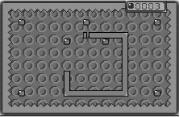
As for further examples of homebrew titles, the ever excellent PDRoms site (http://www.pdroms.de/typ.php?system=Wonderswan+%2F+Color) has several good homebrew games and demos available. The only significant standalone public-domain game is WonderSnake (Figure 2-4), a good-looking effort in which you must not run over your own tail or into walls.
I can’t leave this subject before highlighting the best WonderSwan games worth buying if you can find them. Bandai negotiated a few rather smart exclusives due to its marketing clout in Japan, but due to the handheld’s obscurity in the West, hardly anyone outside Japan has played them.
- Rhyme Rider Kerorican
Nana OnSha, the developer that brought us the amazing PlayStation titles Parappa The Rapper and Vib Ribbon, produced Rhyme Rider, a Vib Ribbon-style game that asks you to press the right buttons in the right rhythmic order to destroy enemies onscreen and make music at the same time. This is fiendishly addictive and fairly forgiving to boot.
- Final Fantasy I and II
For a long time, these rejigged versions of the original FF titles were the sole reason to own a WonderSwan. However, the remakes are, naturally, very heavy on Japanese text, so they’re rather incomprehensible to English-only speakers. Fortunately, you can now buy versions for the GBA in English. Though FF IV also had a WonderSwan remake, only I and II were big smashes.
- Klonoa: Moonlight Museum
This wonderful black-and-white 2D action platformer in Namco’s Klonoa series, a WonderSwan exclusive, was soundly ignored and buried at the time. It cleverly switches screen resolution at times. It’s fairly rare even for WonderSwan games, yet worth staking out.