Table of Contents for
Gaming Hacks
 Gaming Hacks
Published by
O'Reilly Media, Inc., 2004
Gaming Hacks
Published by
O'Reilly Media, Inc., 2004
- Cover
- Gaming Hacks
- Credits
- Contributors
- Acknowledgments
- Foreword
- Preface
- How to Use This Book
- How This Book Is Organized
- Conventions Used in This Book
- Using Code Examples
- Comments and Questions
- Got a Hack?
- 1. Playing Classic Games
- Legal Emulation
- Play Commodore 64 Games Without the C-64
- Play Atari ROMs Without the Atari
- Use Atari Paddles with Your PC
- Run Homebrew Games on the Atari 2600
- Create Your Own Atari 2600 Homebrew Games
- Play Classic PC Graphic Adventures
- Play Old Games Through DOSBox
- Play Reissued All-in-One Joystick Games
- Play Arcade Games Without the Arcade
- Add and Manipulate a MAME Frontend
- Keep Your ROMs Tidy and Organized
- Learn Game-Specific MAME Controls
- Filter Inappropriate MAME ROMs
- Autoboot into MAME Heaven
- Play Emulated Arcade Games Online
- Play Classic Pinball Without the Table
- Emulate the SNES on the Dreamcast
- 2. Playing Portably
- Play Games on Your iPod
- Mod Your Game Boy
- Take and Print Photos with Your Game Boy
- Compose Music on Your Game Boy
- Explore the GP32 Handheld Gaming System
- Take Your Console with You
- Explore the Bandai WonderSwan
- Play Real Games on Your PDA
- Install a PlayStation 2 in Your Car
- 3. Playing Well with Others
- Practice Proper MMORPG Etiquette
- Understand MMORPG Lingo
- Grind Without Going Crazy
- Make a Profit in Vana’diel
- Write MMORPG Macros
- Build an Effective Group
- Catch Half-Life FPS Cheaters Redhanded
- 4. Playing with Hardware
- Build a Quiet, Killer Gaming Rig
- Find and Configure the Best FPS Peripherals
- Adapt Old Video Game Controllers to the PC
- Choose the Right Audio/Video Receiver
- Place Your Speakers Properly
- Connect Your Console to Your Home Theater
- Tune Console Video Output
- Tune Your TV for Console Video
- PC Audio Hacking
- Optimize PC Video Performance
- Build a Dedicated Multimedia PC
- Use a Multimedia Projector for Gaming
- 5. Playing with Console and Arcade Hardware
- Play LAN-Only Console Games Online
- Hack the Nuon DVD Player/Gaming System
- Play Import Games on American Consoles
- Find a Hackable Dreamcast
- Play Movies and Music on Your Dreamcast
- Hack the Dreamcast Visual Memory Unit
- Unblur Your Dreamcast Video
- Use Your Dreamcast Online
- Host Dreamcast Games Online
- Burn Dreamcast-Compatible Discs on Your PC
- Burn Dreamcast Homebrew Discs
- Buy Your Own Arcade Hardware
- Configure Your Arcade Controls, Connectors, and Cartridges
- Reorient and Align Your Arcade Monitor
- Buy Cart-Based JAMMA Boards
- Programming Music for the Nintendo Entertainment System
- 6. Playing Around the Game Engine
- Explore Machinima
- Choose a Machinima Engine
- Film Your First Machinima Movie
- Improve Your Camera Control
- Record Game Footage to Video
- Speedrun Your Way Through Metroid Prime
- Sequence-Break Quake
- Run Classic Game ROM Translations
- Change Games with ROM Hacks
- Apply ROM Hacks and Patches
- Create PS2 Cheat Codes
- Hack Xbox Game Saves
- Cheat on Other Consoles
- Modify PC Game Saves and Settings
- Buff Your Saved Characters
- Create Console Game Levels
- 7. Playing Your Own Games
- Adventure Game Studio Editing Tips
- Create and Play Pinball Tables
- Put Your Face in DOOM
- Create a Vehicle Model for Unreal Tournament 2004
- Add a Vehicle to Unreal Tournament 2004
- Modify the Behavior of a UT2004 Model
- Download, Compile, and Create an Inform Adventure
- Decorate Your IF Rooms
- Add Puzzles to Your IF Games
- Add Nonplayer Characters to IF Adventures
- Make Your IF NPCs Move
- Make Your IF NPCs Talk
- Create Your Own Animations
- Add Interactivity to Your Animations
- Write a Game in an Afternoon
- 8. Playing Everything Else
- Tweak Your Tactics for FPS Glory
- Beat Any Shoot-Em-Up
- Drive a Physics-Crazed Motorcycle
- Play Japanese Games Without Speaking Japanese
- Back Up, Modify, and Restore PlayStation Saved Games
- Access Your Console’s Memory Card Offline
- Overclock Your Console
- Index
- Colophon
When people think of MAME, they probably think of cute, fluffy, kid-friendly old-school titles such as Ms. Pac-Man. The truth is that, among the gigantic amount of MAME ROMs, quite a few titles have lots of nudity, from Arkanoid clones with topless women through Qix clones with topless women and all the way to Puzzle Bobble clones with topless or more extremely unclothed women.
If you have kids (or even parents) who like playing puzzle games, you may not feel comfortable leaving them alone with your unsorted MAME ROM sets. Many of the ROM names don’t indicate that they cater to prurient interests. In fact, many have cutesy titles that attract the young. Sure, you could use existing frontends ( [Hack #11] ), but by fiddling with preferences, it’s possible to find masked ROMs again.
Alternately, if you don’t have any inappropriate ROMs, but you do want to categorize them better, you can use the same techniques. Better safe than sorry, eh?
Enter MARRT
(http://www.timsarcade.net/news/marrt.html), a
Windows utility that can move or delete all adult-themed ROMs from
your MAME directory, using the gamelist in
mature.ini as the basis for its categorization.
You’ll need Microsoft’s .NET
Framework installed to run this.
Thanks to the Catlist project’s categorization of MAME ROMs (http://www.mameworld.net/catlist/), there’s no need for you to identify the adult titles: just fire and forget. Obviously, with the Catlist adult game list, you can probably code a simple Linux or Mac script to do the same thing, but MARRT is nicely packaged already.
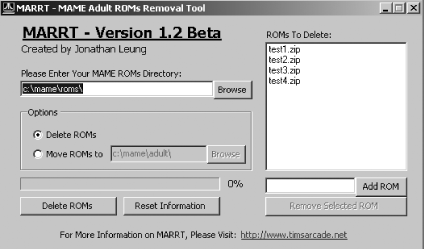
Figure 1-10 shows the GUI; here’s how to use it:
Install MARRT into the
/MARRTsubdirectory of your MAME install, using the handy and included Windows installer. Don’t run it yet.The distribution includes only a test version of the
mature.inifile, so download the MAME32 version of Catlist (http://www.mameworld.net/catlist/files/cat32.zip), which includes a currentmature.inifile. Unzip it into the/MARRTdirectory.Launch
MARRT.exeand enter the ROM directory that you’re acting on, as well as whether you moved or deleted the files.To delete another game not in the mature category, type in the name of the ZIP file and click Add ZIP to add it to the list.
Click the Move ROMs/Delete ROMs button, and MARRT will make it so.
If you hate puzzle games, you can slip the puzzle game list in there,
instead. Open genre.ini in the MAME32 Catlist
file, search for the Puzzle genre, and select only those files as
mature.ini. Heck, you could also move all the
adult-themed games into your MAME directory,
just by moving all your ROMs to a new directory and making your
destination directory your conventional MAME ROMs location. Be
creative.
There is an alternative to MARRT in the form of MCM, or MAME Content Manager (http://www.mameworld.net/mcm/), an older but still working piece of ROM management software that allows you to rename or remove not only ROMs, but also Snapshots, Flyers, Marquees, Cabinets, and Title Snaps.
This particular utility uses the
CATVER.INI
file, also available from the
Catlist site
(http://www.mameworld.net/catlist/files/catver.zip).
Be aware that other versions of CATVER.INI, even
those that claim to be up to date, don’t carry the
Mature tag on genres, so you won’t be able to tell
which games are adult.
In some ways, MCM is more comprehensive than MARRT, although
it’s less specific with regards to adult games. As
it’s had no updates in a year or two, it
doesn’t quite deal perfectly with mature titles. You
have to pick the mature version of each of the individual genres from
CATVER.INI, so it takes more clicks than MAART
to perform the same behavior.
However, the added ability to search for particular games by string, as well as the neatness with the removal of other non-ROM-related artifacts that could still cause kid-related consternation, means this is well worth checking out, especially if you’re not just interested in banning adult games.
There are still more alternatives for adult ROM removal, as suggested by an official MAME FAQ answer (http://www.mame.net/cgi-bin/wwwthreads/showpost.pl?Board=mamefaq&Number=254&page=3), on http://www.mame.net/, which covers the subject in detail. In particular, you can try the tactic of keeping a different MAME directory and user for adults and kids, and making sure you can’t access the adult version unless you log on to your Windows or Mac machine as a different user altogether.
On the other hand, software solutions that don’t require user-setting complications are good things.