Table of Contents for
Gaming Hacks
 Gaming Hacks
Published by
O'Reilly Media, Inc., 2004
Gaming Hacks
Published by
O'Reilly Media, Inc., 2004
- Cover
- Gaming Hacks
- Credits
- Contributors
- Acknowledgments
- Foreword
- Preface
- How to Use This Book
- How This Book Is Organized
- Conventions Used in This Book
- Using Code Examples
- Comments and Questions
- Got a Hack?
- 1. Playing Classic Games
- Legal Emulation
- Play Commodore 64 Games Without the C-64
- Play Atari ROMs Without the Atari
- Use Atari Paddles with Your PC
- Run Homebrew Games on the Atari 2600
- Create Your Own Atari 2600 Homebrew Games
- Play Classic PC Graphic Adventures
- Play Old Games Through DOSBox
- Play Reissued All-in-One Joystick Games
- Play Arcade Games Without the Arcade
- Add and Manipulate a MAME Frontend
- Keep Your ROMs Tidy and Organized
- Learn Game-Specific MAME Controls
- Filter Inappropriate MAME ROMs
- Autoboot into MAME Heaven
- Play Emulated Arcade Games Online
- Play Classic Pinball Without the Table
- Emulate the SNES on the Dreamcast
- 2. Playing Portably
- Play Games on Your iPod
- Mod Your Game Boy
- Take and Print Photos with Your Game Boy
- Compose Music on Your Game Boy
- Explore the GP32 Handheld Gaming System
- Take Your Console with You
- Explore the Bandai WonderSwan
- Play Real Games on Your PDA
- Install a PlayStation 2 in Your Car
- 3. Playing Well with Others
- Practice Proper MMORPG Etiquette
- Understand MMORPG Lingo
- Grind Without Going Crazy
- Make a Profit in Vana’diel
- Write MMORPG Macros
- Build an Effective Group
- Catch Half-Life FPS Cheaters Redhanded
- 4. Playing with Hardware
- Build a Quiet, Killer Gaming Rig
- Find and Configure the Best FPS Peripherals
- Adapt Old Video Game Controllers to the PC
- Choose the Right Audio/Video Receiver
- Place Your Speakers Properly
- Connect Your Console to Your Home Theater
- Tune Console Video Output
- Tune Your TV for Console Video
- PC Audio Hacking
- Optimize PC Video Performance
- Build a Dedicated Multimedia PC
- Use a Multimedia Projector for Gaming
- 5. Playing with Console and Arcade Hardware
- Play LAN-Only Console Games Online
- Hack the Nuon DVD Player/Gaming System
- Play Import Games on American Consoles
- Find a Hackable Dreamcast
- Play Movies and Music on Your Dreamcast
- Hack the Dreamcast Visual Memory Unit
- Unblur Your Dreamcast Video
- Use Your Dreamcast Online
- Host Dreamcast Games Online
- Burn Dreamcast-Compatible Discs on Your PC
- Burn Dreamcast Homebrew Discs
- Buy Your Own Arcade Hardware
- Configure Your Arcade Controls, Connectors, and Cartridges
- Reorient and Align Your Arcade Monitor
- Buy Cart-Based JAMMA Boards
- Programming Music for the Nintendo Entertainment System
- 6. Playing Around the Game Engine
- Explore Machinima
- Choose a Machinima Engine
- Film Your First Machinima Movie
- Improve Your Camera Control
- Record Game Footage to Video
- Speedrun Your Way Through Metroid Prime
- Sequence-Break Quake
- Run Classic Game ROM Translations
- Change Games with ROM Hacks
- Apply ROM Hacks and Patches
- Create PS2 Cheat Codes
- Hack Xbox Game Saves
- Cheat on Other Consoles
- Modify PC Game Saves and Settings
- Buff Your Saved Characters
- Create Console Game Levels
- 7. Playing Your Own Games
- Adventure Game Studio Editing Tips
- Create and Play Pinball Tables
- Put Your Face in DOOM
- Create a Vehicle Model for Unreal Tournament 2004
- Add a Vehicle to Unreal Tournament 2004
- Modify the Behavior of a UT2004 Model
- Download, Compile, and Create an Inform Adventure
- Decorate Your IF Rooms
- Add Puzzles to Your IF Games
- Add Nonplayer Characters to IF Adventures
- Make Your IF NPCs Move
- Make Your IF NPCs Talk
- Create Your Own Animations
- Add Interactivity to Your Animations
- Write a Game in an Afternoon
- 8. Playing Everything Else
- Tweak Your Tactics for FPS Glory
- Beat Any Shoot-Em-Up
- Drive a Physics-Crazed Motorcycle
- Play Japanese Games Without Speaking Japanese
- Back Up, Modify, and Restore PlayStation Saved Games
- Access Your Console’s Memory Card Offline
- Overclock Your Console
- Index
- Colophon
How do you play a homebrew 2600 game on the actual console hardware?
One of the coolest things about the current emulator and homebrew scene for the Atari 2600 is the amount of new development going on—recently coded, freely distributable games of various kinds. (See the Section 1.7.2).
What’s not so peachy is that it’s tricky to play these new games on the genuine hardware, especially with cartridges involved. There’s no straightforward way to put the homebrew title on your 2600, but there are a few ingenious pieces of hardware, often custom-made by others or do-it-yourself that can transfer code to your classic console.
Yes, you can run that Atari 2600 game as God originally intended it—on the 2600 itself.
As discussed earlier, the Atari 2600 itself has a vibrant homebrew scene oriented around sites such as Atari Age (http://www.atariage.com/). It’s definitely not straightforward to play homebrew games on your 2600, but there are options.
Released when the Atari 2600 was still being produced, this rare but ingenious utility allows the player to load third-party-developed games via cassette tape. The cart doesn’t save anything, so you need to load the game again every time you power up your 2600, but it’s still a great hack. There were specific games produced this way (for example, the Supercharger version of Frogger was much closer to arcade perfect than the regular cartridge version because the Supercharger also allowed more RAM than normal carts), but the only games available at the time came from Starpath and its affiliates.
However, with utilities such as BIN2WAV available
on modern computers, it’s possible to turn an Atari
ROM into a .WAV file and load it via
Supercharger by plugging in the output of your PC to the input of the
Supercharger. Your modern PC thus functions as an early
’80s tape player. Bob Colbert has a good explanatory page about
using the Supercharger to load 2600 ROMs (http://members.cox.net/rcolbert/schookup.htm).
However, the Supercharger will play only about half of the 2- and
4-KB games using this method; it takes some complex hardware
modification (http://www.atari2600collector.com/scmod.htm)
to make the others work.
The Atari 2600 Collector site also has a good overview of homebrew development using the Supercharger (http://www.atari2600collector.com/sdev.htm). You can find a Supercharger with games on eBay for $50 or less, so it’s a fun gadget to play with, even if many games won’t work properly with it.
Since the Supercharger was such a neat idea, Schell’s Electronics licensed the technology and created the Atari 2600 Cuttle Cart (http://www.schells.com/cuttlecart.shtml). These wonderful beasts work much like the Supercharger, using WAVs of games loaded via audio cable from an external sound source (see Figure 1-6). Even better, they lack the compatibility problems of the Supercharger!
The Schell’s Electronics site maintains a massive list of compatible games (http://www.schells.com/gamelist.shtml)—almost everything is there. However, with only 206 Cuttle Carts ever produced, they’re incredibly rare. If you ever see one at any reasonable price, snap it up immediately and store it in some kind of bulletproof vault.
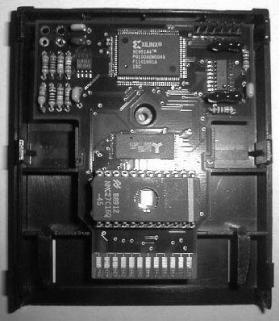
The description of why this clever add-on has such an odd name is worth reprinting:
The Cuttle Cart is named after the marine creature the cuttlefish. Cuttlefish are a type of cephalopod, a relative of the octopus. They are amazing animals capable of incredible shifts in both pattern and color, all in the blink of an eye. If I called this cart the Atari 2600 Chameleon, I think people would understand—chameleon because the cart can take on the appearance of other carts.
Also referred to as Cuttle Cart 2: Electric Boogaloo, this cartridge is a sequel mostly in name. It runs only on the Atari 7800, playing both 7800 and 2600 games, and uses a completely different method of transfer (http://www.schells.com/cc2.shtml). It uses a multimedia card (MMC) with RAM flashable from a PC via an inexpensive USB device. Because the MMC carts range up to 128 MB in size, you should easily be able to fit any homebrew games you want onto it. There are also none of the unwieldy transfer methods of the previous two crazy devices.
The first run of these Cuttle Cart 2 add-ons went to production at this book’s press time. It’s possible that enough demand will force a second run, so register your interest right now; these may also have very limited numbers. Remember, though, that you’ll need an Atari 7800 to run it.
AtariAge (http://www.atariage.com/) has an especially impressive shop (http://www.atariage.com/store/) that sells special cartridge versions of many Atari 2600 homebrew games. AtariAge does a wonderful job of publishing many excellent 2600 homebrew games (see [Hack #6] ). They also provide several services to homebrew authors who want to see real versions of their games in the marketplace (http://www.atariage.com/store/services.php).
Most of these homebrew titles cost between $20 and $40, and they’re lavishly repackaged, with manuals, labels, and boxes. Even better, much of the money goes directly to the homebrew authors to help them continue making their excellent titles, always distributed in ROM form for free. So buy, and you’ll help encourage further homebrew development. We like this option.
This final option, building your own cartridge, is, frankly, a little bit too complicated. You’ll need to modify an Activision 4-KB Atari 2600 cartridge with a really complex set of dipswitches, use an EPROM burner, and other craziness. Bob Colbert’s site provides good directions (http://members.cox.net/rcolbert/multi.htm), but it’s really suitable only for experts: you’ll have to modify the circuit board in order to refit it inside the cartridge sleeve.
As well as these possibilities, you can sometimes find fixed-content
multicarts advertised on the Internet with a lot of games on them.
They don’t often feature homebrew titles, and
therefore aren’t really that helpful, because you
can’t flash any new games onto them. Googling for
Atari 2600
multicart will help
illuminate some of the possible choices, although there are no major
current distributors as of press time.