Table of Contents for
Gaming Hacks
 Gaming Hacks
Published by
O'Reilly Media, Inc., 2004
Gaming Hacks
Published by
O'Reilly Media, Inc., 2004
- Cover
- Gaming Hacks
- Credits
- Contributors
- Acknowledgments
- Foreword
- Preface
- How to Use This Book
- How This Book Is Organized
- Conventions Used in This Book
- Using Code Examples
- Comments and Questions
- Got a Hack?
- 1. Playing Classic Games
- Legal Emulation
- Play Commodore 64 Games Without the C-64
- Play Atari ROMs Without the Atari
- Use Atari Paddles with Your PC
- Run Homebrew Games on the Atari 2600
- Create Your Own Atari 2600 Homebrew Games
- Play Classic PC Graphic Adventures
- Play Old Games Through DOSBox
- Play Reissued All-in-One Joystick Games
- Play Arcade Games Without the Arcade
- Add and Manipulate a MAME Frontend
- Keep Your ROMs Tidy and Organized
- Learn Game-Specific MAME Controls
- Filter Inappropriate MAME ROMs
- Autoboot into MAME Heaven
- Play Emulated Arcade Games Online
- Play Classic Pinball Without the Table
- Emulate the SNES on the Dreamcast
- 2. Playing Portably
- Play Games on Your iPod
- Mod Your Game Boy
- Take and Print Photos with Your Game Boy
- Compose Music on Your Game Boy
- Explore the GP32 Handheld Gaming System
- Take Your Console with You
- Explore the Bandai WonderSwan
- Play Real Games on Your PDA
- Install a PlayStation 2 in Your Car
- 3. Playing Well with Others
- Practice Proper MMORPG Etiquette
- Understand MMORPG Lingo
- Grind Without Going Crazy
- Make a Profit in Vana’diel
- Write MMORPG Macros
- Build an Effective Group
- Catch Half-Life FPS Cheaters Redhanded
- 4. Playing with Hardware
- Build a Quiet, Killer Gaming Rig
- Find and Configure the Best FPS Peripherals
- Adapt Old Video Game Controllers to the PC
- Choose the Right Audio/Video Receiver
- Place Your Speakers Properly
- Connect Your Console to Your Home Theater
- Tune Console Video Output
- Tune Your TV for Console Video
- PC Audio Hacking
- Optimize PC Video Performance
- Build a Dedicated Multimedia PC
- Use a Multimedia Projector for Gaming
- 5. Playing with Console and Arcade Hardware
- Play LAN-Only Console Games Online
- Hack the Nuon DVD Player/Gaming System
- Play Import Games on American Consoles
- Find a Hackable Dreamcast
- Play Movies and Music on Your Dreamcast
- Hack the Dreamcast Visual Memory Unit
- Unblur Your Dreamcast Video
- Use Your Dreamcast Online
- Host Dreamcast Games Online
- Burn Dreamcast-Compatible Discs on Your PC
- Burn Dreamcast Homebrew Discs
- Buy Your Own Arcade Hardware
- Configure Your Arcade Controls, Connectors, and Cartridges
- Reorient and Align Your Arcade Monitor
- Buy Cart-Based JAMMA Boards
- Programming Music for the Nintendo Entertainment System
- 6. Playing Around the Game Engine
- Explore Machinima
- Choose a Machinima Engine
- Film Your First Machinima Movie
- Improve Your Camera Control
- Record Game Footage to Video
- Speedrun Your Way Through Metroid Prime
- Sequence-Break Quake
- Run Classic Game ROM Translations
- Change Games with ROM Hacks
- Apply ROM Hacks and Patches
- Create PS2 Cheat Codes
- Hack Xbox Game Saves
- Cheat on Other Consoles
- Modify PC Game Saves and Settings
- Buff Your Saved Characters
- Create Console Game Levels
- 7. Playing Your Own Games
- Adventure Game Studio Editing Tips
- Create and Play Pinball Tables
- Put Your Face in DOOM
- Create a Vehicle Model for Unreal Tournament 2004
- Add a Vehicle to Unreal Tournament 2004
- Modify the Behavior of a UT2004 Model
- Download, Compile, and Create an Inform Adventure
- Decorate Your IF Rooms
- Add Puzzles to Your IF Games
- Add Nonplayer Characters to IF Adventures
- Make Your IF NPCs Move
- Make Your IF NPCs Talk
- Create Your Own Animations
- Add Interactivity to Your Animations
- Write a Game in an Afternoon
- 8. Playing Everything Else
- Tweak Your Tactics for FPS Glory
- Beat Any Shoot-Em-Up
- Drive a Physics-Crazed Motorcycle
- Play Japanese Games Without Speaking Japanese
- Back Up, Modify, and Restore PlayStation Saved Games
- Access Your Console’s Memory Card Offline
- Overclock Your Console
- Index
- Colophon
Do unlikely and intriguing things with the cult DVD player and game chip combo.
Failed game systems often attract a certain amount of cult attention and new content as, abandoned in their full-price glory, they’re resurrected as cut-price toys for hackers, exploiters, and hardcore fans. This is definitely the case for the bizarre Nuon, the VM Labs-developed game console on a chip. VM Labs made a stealth bid for glory by bundling their game system in as many third-party DVD players as possible. While this attempt failed, the Nuon nonetheless made it to market.
With the ability to burn and play homebrew titles and accomplish other clever hacks with existing content, the Nuon is a fascinating, inexpensive games machine to hack around on. Some models feature the amazingly impressive Virtual Light Machine, which can generate effects you have to see to believe.
Back in 1994, some of the creators of the Atari Jaguar founded VM Labs (which should partially explain the appearance of a certain shaggy Welsh psychedelic programmer later in this story!). They set up partnerships with major third-party DVD/consumer electronics manufacturers to license what the official FAQ for the now defunct Nuon web page explains is:
...powerful and versatile embedded technology that enhances the passive elements of digital video products such as DVD players, digital set tops and digital satellite receivers, while adding high performance interactive graphics and audio. This combination allows consumers to enjoy next generation 3-D video games, interactive family software and other flexible applications all on the same digital platform.
VM Labs originally, quite seriously, billed the Nuon as a Mario killer. Early adverts showed Mario’s cap in a puddle of blood next to an X, because the original name of the chip was Project X. So, although a few enhanced DVDs took advantage of the extra processor power of the Nuon, and DVD players including Nuon had advanced features such as super-high-quality zoom, the Nuon really turned out to be a single-chip media processor that could play 3D games on a DVD player.
After an extended delay, Samsung finally released a Nuon-compatible DVD player in July 2000. Ultimately, some 10 commercial games saw the light of day. Unfortunately, even though Samsung, Toshiba, and RCA all released Nuon DVD players, and Motorola experimented with Nuon tech in some of its set-top boxes, the technology was not a success. It fizzled out in 2001 and 2002, although a couple of RCA players without easily accessible Nuon features or gameports did debut later in 2003.
VM Labs unfortunately lapsed into bankruptcy in 2002. A company called Genesis, completely unrelated to Sega’s classic 16-bit system, purchased the company. They were actually interested in Nuon for its MPEG decoding capabilities.
Before hacking a Nuon, you need the hardware, so you’ll need to decide which model you actually want. If you’re in the United States, there are really only three DVD players with Nuon functionality worth considering:
- Samsung N-501
Samsung’s DVD player, released in early 2001, is my first choice by far, because this player comes with built-in controller ports and can play homebrew CDR games without any trouble. In addition, although it’s low-resolution, the Virtual Light Machine (VLM) included in the BIOS has a massive range of controllable effects. Unfortunately, it doesn’t come with a controller packed-in, though it does include the addictive little puzzle game Ballistic.
You should be able to find this player in online shopping stores or on eBay for between $75 and $125, although it is getting a little trickier nowadays.
- Samsung Extiva N-2000
The very first Nuon-compatible player, from the middle of 2000, came with Ballistic, a game controller, and a fully featured demo disc with multiple commercial games on it. However, being an early model, it does not have the correct firmware to load the
NUON.CDfiles used in homebrew Nuon titles. Besides that, it has serious trouble recognizing CD-R discs.
This model has 100 VLM effects, but you can’t apply them in real time, unlike the N-501 version. At the time of writing, only one store offered the N-2000 on Froogle, for $129.
- Toshiba SD-2300
The Toshiba has a few minor pluses, such as controller ports, and the fact that this player was the only place to get Hasbro’s The Next Tetris via a mail-in demo disc offer. (This deal has likely expired by now.) However, it has only a pathetic eight VLM effects, allegedly due to epilepsy concerns. It also won’t play homebrew games, which is a major issue. If you can find it online, it’ll probably run you $80 to $150.
For European readers, the insanely rare Samsung N-504 is the machine to buy, because it’s very similar to the American N-501, complete with controller ports. If you can’t find that (and it’s very likely you can’t), you will have to settle for an N-505, which, tragically, has no controller ports.
Believe it or not, an enterprising European has hacked the N-505 to add controller ports, which are simply missing external linkage; the circuit board inside has the controller port connector. There’s more info about this hack on the Nuon Dome site (http://www.nuon-dome.com/n505hack/n505hack.html), but, unfortunately, this version needs an extra set of Nuon controller ports to work. You’ll need to scavenge them from a broken American N-501 or similar model.
For the very hardware-savvy, Vid Kid has gone one step further, hacking in mini-DIN connectors to the open game port on the N-505. See his web page for more (http://www.debaser.force9.co.uk/n505hack/). It requires significant soldering skill; you’ll need to open up a Nuon controller and wire mini-DINs onto that as well. For gamepad connector-starved Europeans, it’s definitely an option.
After you’ve picked up your Nuon and have a working controller, which commercial games should you consider?
Here’s a short list of the games worth looking at: Tempest 3000. See, I told you it was a short list. Jeff Minter’s crazed update of the classic arcade game is the only essential title on the Nuon, degenerating into psychedelic mayhem in about three seconds flat. If you enjoy burning your eyes out by gazing intently at the bright, bright screen and flailing spasmodically at the joypad, then you’ve picked the right console and the right title.
Fortunately, there’s also the homebrew scene. VM Labs released the Nuon SDK just before going into liquidation. You can find the SDK in multiple places, including Nuon Dome. This fact, as well as the help of some ex-VM Labs engineers, meant people were soon able to run self-made titles, even overcoming the 4.5-MB limit for the open SDK. The games are incredibly easy to burn: just take the files included in the ZIPs and burn them to the root of a CD-R, using one CD-R per title.
Again, Nuon Dome is the web site with the best file collection and review of what’s out there (http://www.nuon-dome.com/download.html), so I’ll describe what you might want to check out there.
- Ambient Monsters (http://www.nuon-dome.com/ambientmonsters.html)
This odd but beguiling relaxation disc isn’t very interactive but shows neat attention to detail.
- Decaying Orbit (http://www.nuon-dome.com/decaying_orbit.html)
Although very much a work in progress, this is by far the most ambitious original Nuon title around; it’s a port of an original PlayStation Yaroze game. It involves flying around the screen while avoiding the pull of various planets. While it’s a traditional 2D title, it has a lot of style and pizazz (see Figure 5-2).
- DOOM ( http://www.nuon-dome.com/doom.html )
One of the original demos from the early days of the Nuon, this runs at a slow frame rate, but it’s DOOM running homebrew on your Nuon! This uses the open-sourced code and the official shareware WAD file. It has a custom library to read data from the CD, and there’s even a recompiled version for the RCA NUON DVD, running on a faster processor.
- Breakout ( http://www.nuon-dome.com/breakout.html )
A worthwhile addition to the Nuon homebrew canon, this is a basic but fun interpretation of the classic Breakout. It’s still under development and features a delightfully badly Photoshopped Mr. T title screen. I pity the fool who doesn’t burn this baby!
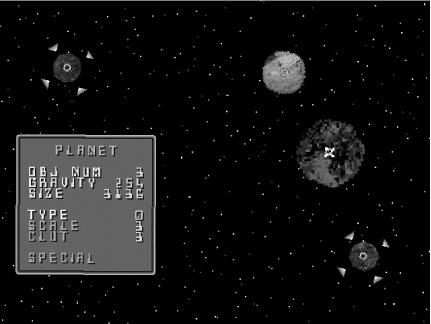
In early 2004, one of the most important breakthroughs in the Nuon scene occurred: the Nuon Boot Loader, created by Scott “Skah_T” Cartier, who once worked for VM Labs. According to the Boot Loader site (http://www.dragonshadow.com/-/bootload/):
The Boot Loader allows you to place several NUON applications (called “apps” from here on) on a CD-R and presents you with a menu from which to select the one to run. These can be homebrew games like Breakout or Chomp, applications like the jpeg viewer, or demos such as the ones found in the NUON SDK.
Much like similar utilities for the Dreamcast, this makes it infinitely easier to try out multiple small utilities or games without having to burn a new CD-R for each. You can even customize a menu for each individual utility or game, with colored text and JPG pictures of your choice.
Here are some tips for using the Boot Loader:
Make subdirectories for each program you wish to support and enter the names of these directories in the
applist.txtfile in the root directory. Anything over eight characters is verboten.You can’t use multiple
NUON.CDfiles on your disc, because they will seriously confuse the boot loader. Instead, you need acd_app.cofexecutable for each standalone game or utility you want to load.If you boot a disc and one of your entries appears in red, it’s because there’s a problem with the program. Most likely, you’re missing the
cd_app.coffile.