Table of Contents for
Gaming Hacks
 Gaming Hacks
Published by
O'Reilly Media, Inc., 2004
Gaming Hacks
Published by
O'Reilly Media, Inc., 2004
- Cover
- Gaming Hacks
- Credits
- Contributors
- Acknowledgments
- Foreword
- Preface
- How to Use This Book
- How This Book Is Organized
- Conventions Used in This Book
- Using Code Examples
- Comments and Questions
- Got a Hack?
- 1. Playing Classic Games
- Legal Emulation
- Play Commodore 64 Games Without the C-64
- Play Atari ROMs Without the Atari
- Use Atari Paddles with Your PC
- Run Homebrew Games on the Atari 2600
- Create Your Own Atari 2600 Homebrew Games
- Play Classic PC Graphic Adventures
- Play Old Games Through DOSBox
- Play Reissued All-in-One Joystick Games
- Play Arcade Games Without the Arcade
- Add and Manipulate a MAME Frontend
- Keep Your ROMs Tidy and Organized
- Learn Game-Specific MAME Controls
- Filter Inappropriate MAME ROMs
- Autoboot into MAME Heaven
- Play Emulated Arcade Games Online
- Play Classic Pinball Without the Table
- Emulate the SNES on the Dreamcast
- 2. Playing Portably
- Play Games on Your iPod
- Mod Your Game Boy
- Take and Print Photos with Your Game Boy
- Compose Music on Your Game Boy
- Explore the GP32 Handheld Gaming System
- Take Your Console with You
- Explore the Bandai WonderSwan
- Play Real Games on Your PDA
- Install a PlayStation 2 in Your Car
- 3. Playing Well with Others
- Practice Proper MMORPG Etiquette
- Understand MMORPG Lingo
- Grind Without Going Crazy
- Make a Profit in Vana’diel
- Write MMORPG Macros
- Build an Effective Group
- Catch Half-Life FPS Cheaters Redhanded
- 4. Playing with Hardware
- Build a Quiet, Killer Gaming Rig
- Find and Configure the Best FPS Peripherals
- Adapt Old Video Game Controllers to the PC
- Choose the Right Audio/Video Receiver
- Place Your Speakers Properly
- Connect Your Console to Your Home Theater
- Tune Console Video Output
- Tune Your TV for Console Video
- PC Audio Hacking
- Optimize PC Video Performance
- Build a Dedicated Multimedia PC
- Use a Multimedia Projector for Gaming
- 5. Playing with Console and Arcade Hardware
- Play LAN-Only Console Games Online
- Hack the Nuon DVD Player/Gaming System
- Play Import Games on American Consoles
- Find a Hackable Dreamcast
- Play Movies and Music on Your Dreamcast
- Hack the Dreamcast Visual Memory Unit
- Unblur Your Dreamcast Video
- Use Your Dreamcast Online
- Host Dreamcast Games Online
- Burn Dreamcast-Compatible Discs on Your PC
- Burn Dreamcast Homebrew Discs
- Buy Your Own Arcade Hardware
- Configure Your Arcade Controls, Connectors, and Cartridges
- Reorient and Align Your Arcade Monitor
- Buy Cart-Based JAMMA Boards
- Programming Music for the Nintendo Entertainment System
- 6. Playing Around the Game Engine
- Explore Machinima
- Choose a Machinima Engine
- Film Your First Machinima Movie
- Improve Your Camera Control
- Record Game Footage to Video
- Speedrun Your Way Through Metroid Prime
- Sequence-Break Quake
- Run Classic Game ROM Translations
- Change Games with ROM Hacks
- Apply ROM Hacks and Patches
- Create PS2 Cheat Codes
- Hack Xbox Game Saves
- Cheat on Other Consoles
- Modify PC Game Saves and Settings
- Buff Your Saved Characters
- Create Console Game Levels
- 7. Playing Your Own Games
- Adventure Game Studio Editing Tips
- Create and Play Pinball Tables
- Put Your Face in DOOM
- Create a Vehicle Model for Unreal Tournament 2004
- Add a Vehicle to Unreal Tournament 2004
- Modify the Behavior of a UT2004 Model
- Download, Compile, and Create an Inform Adventure
- Decorate Your IF Rooms
- Add Puzzles to Your IF Games
- Add Nonplayer Characters to IF Adventures
- Make Your IF NPCs Move
- Make Your IF NPCs Talk
- Create Your Own Animations
- Add Interactivity to Your Animations
- Write a Game in an Afternoon
- 8. Playing Everything Else
- Tweak Your Tactics for FPS Glory
- Beat Any Shoot-Em-Up
- Drive a Physics-Crazed Motorcycle
- Play Japanese Games Without Speaking Japanese
- Back Up, Modify, and Restore PlayStation Saved Games
- Access Your Console’s Memory Card Offline
- Overclock Your Console
- Index
- Colophon
This underpublicized, open-access portable is a hidden treasure.
Many people suggest that there’s not much room in the gaming handheld market, considering Nintendo’s 15-year Game Boy monopoly. Obviously, Sony is challenging this with the PSP, but the Korean company Gamepark has an entirely different approach to proprietary storage and development methods for gaming handhelds. They decided to allow much more open access by including a USB port on their GP32 handheld and compatibility with normal SMC (smart media memory cards). Unfortunately, the GP32 has had limited distribution so far.
The dimensions of Gamepark’s GP32 resemble those of the first Game Boy Advance, although the GP32 is slightly wider and taller. From there, however, you can see a major difference in screen resolution for its built-in LCD: 320 240 pixels compared to the Game Boy Advance’s 240 160 pixels. This leads to significantly sharper-looking games, emulators, and utilities on the GP32. Other than that, the GP32’s specifications (a 32-bit ARM9 RISC CPU, 8-MB SDRAM, and up to 128 MB on the aforementioned SMC) make it fairly powerful, at least compared to the GBA. However, please note that you’ll need to buy a Smart Media Card separately.
As for availability, that’s the tricky part. As we’ll lament later, the GP32 has very little commercial software support, so it’s not really worth stocking for many brick-and-mortar retail stores within North America. You’ll need to order online, and this means going outside the country to Hong Kong retailer Lik-Sang (http://www.lik-sang.com/) or searching carefully for an American retailer who actually sells the rare handheld. Expect to pay around $150 for the normal version and $200 or more for the frontlit, modified version.
One interesting part of the GP32 is that the processor defaults to 40 MHz, but the software can decide how fast it wants the machine to run, up to and over 100 MHz. This is probably one of the first times that you have such a large degree of control in a custom device, but note that overclocking has a direct effect on the battery life of the console. Some emulators allow you to set CPU speed to whatever you wish. The generally agreed sensible maximum is 133 MHz. There are even warnings in the instructions for a PC Engine (Turbografx) emulator that:
Speed selection over 133mhz is pure overclocking, and not recommended! It might even destroy your GP32 and won’t be stable on most machines!
Be careful what you select and especially what you load. Although no one has created a deliberately malicious excessive-CPU-selection program for the portable, it’s possible. This would be another inadvisable hack that ranks right up there with the hardware-shredding trick of generating musical tones on the Commodore Amiga’s variable-speed floppy-disk drive.
In a related, but extremely hacktastic move, a very daring Netizen has opened up a GP32 and overclocked the hardware by increasing the CPU core voltage (http://www.cobbleware.com/gp32/gp32oc.html). This allows reliable overclocking up to 170 MHz. The online instructions go beyond this overclocking with the similarly insane experiment of replacing the 8 MB of RAM with a 32-MB memory chip (http://www.cobbleware.com/gp32/gp32ram.html).
While these are very impressive feats (the 32-MB memory chip installation involved soldering pins on the CPU that were 0.5 mm away from each other!), there’s not really much software taking advantage of either innovation, although the 32-MB trick could allow the loading of larger ROM files for emulators, providing the applications supported such a thing.
Interestingly, some homebrew GP32 coders have gone whole hog to create a modified operating system for the handheld. Wind-ups (http://www.wind-ups.net/) allows you to navigate via a file browser, easily copy programs from your PC to your GP32, set up neat-looking icons in configurations of your choice, specify custom backdrops, and check out GIFs with a picture viewer. Figure 2-3 shows a sample desktop.
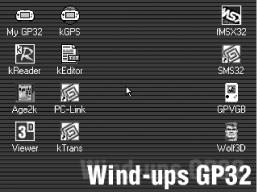
While this isn’t tremendously sophisticated—and the built-in OS already does a decent job of providing simple scrollable menus for loading programs with some similar functionality, with new official firmware, better graphics, and more options in the works—Wind-ups goes a step further by providing extra utilities. These include:
- kReader
A very straightforward but usable eBook reader that takes
.txtfiles and allows you to scroll through pages of text using the shoulder buttons. The most interesting part of this program may be the dictionary functionality. It comes from a Spanish coder, so it uses an English-Spanish dictionary as the default, but if you wanted to learn another foreign language, you can conceivably load an eBook in French and then find a suitable French-English dictionary to plug into it.- kEditor
Without any touchscreen and stylus combo or mini-keyboard, the GP32 is not suited for writing notes, essays, or even haiku. However, the fairly ingenious Quad-9 tree onscreen typewriter uses the GP32’s joypad to divide up the alphabet, allowing two keypresses to select the right character. With this program, you can jot down your latest genius thoughts on your GP32, in between watching movies, listening to MP3s, and playing homebrew games. Having said that, the program’s author claims he can input up to 60 characters per minute. Considering that each character takes three separate actions (including the selection keypress) to enter, that target may be optimistic.
- Age2K
This is a surprisingly full-featured address book with well laid-out entries that even allow users to embed pictures of their friends into each entry. However, although you can enter all of the details on the GP32, this would obviously take a long time. Allegedly, the Wind-ups site has a Windows version of Age2K. Unfortunately, it wasn’t available for download at press time.
The GP32 has a fairly vibrant homebrew scene, with several original games and utilities. Because it’s easy to copy and run them, the barriers to entry are a lot lower than many other proprietary systems. This has led to a lot of creativity, especially for a machine with such a small user base. Here are some of the best homebrew games and utilities available:
- GP32 Darts
Although darts may be a strange, often alcohol-fueled pastime, playing darts on your GP32 (http://207.44.176.77/~admin28/gbaemu/homegrown/) is strangely addictive, thanks to an announcer, realistic physics (the dart bounces out if it hits the metal border areas of the dartboard!), and correct reproduction of the Byzantine darts scoring schemes.
- GPMad MP3 player
This utility (http://www.robertsworld.org.uk/gpmadmp3.html) is stylish and much more functional than the original default MP3 player from Gamepark, which had trouble with VBR and other encodings of many MP3 files.
- Giana’s Return
A reimagining of the classic, limited-edition late ’80s Super Mario-esque platformer, this title (http://www.gianas-return.de/) has been released with permission from the original developers. It’s one of the slickest 2D platformers available on the GP32, commercial or homebrew.
- Gloop
A recent GP32 homebrew competition winner, this excellent title (http://www.gp32x.de/cgi-bin/cfiles.cgi?0,1,0,0,25,319) plays out a little like the classic puzzler Lemmings, except that it uses water instead of suicidal rodents. It’ll make sense if you play it, I promise.
Besides the games named here, there are plenty of other interesting public-domain (PD) titles being coded from scratch, most recently showcased in the 15 Days GP32 Coding Competition (http:// 207.44.176.77/~admin28/gp32emu/15days/) and the LlamaSoft-style goodies for both GP32 and Game Boy available as part of the PDRoms coding competition (http://pdroms.de/pdrc2-submissions.php).
Best of all, try GpKat (http://www.toxicbreakfast.com/tb/downloads.shtml), which has a single, genius purpose in mind:
First find a cat. With cat in place and GpKat loaded up on your GP32, press one of the buttons, move the joystick and one of twenty possible cat noises will sound out. Your cat may be confused and try to find the “other cat”.
Of course, no set of homebrew software would be complete without a Linux conversion. SourceForge hosts a project dedicated to putting Linux on the GP32 (http://sourceforge.net/projects/gp32linux). However, as of press time, it’s currently stalled at the stage of getting a working SMC driver working. Currently, there are only nonfunctional pre-alpha versions available.
As far as conversions go, many classic games have conversions to just about every exotic format out there. The same goes for high-quality emulators that can run freeware and PD ROMs from multiple computers and consoles. Why should the GP32 be any different? Here are some of the highlights:
- GP2600
An excellent emulator for the Atari 2600 (http://207.44.176.77/~admin28/gp32emu/gp2600.htm), which has seen an increasing amount of neat homebrew games recently.
- GPDoom
Where would we be without a conversion of the id Software FPS classic? This version (http://www.gp32us.com/doom.htm) includes “high resolution, full sound and music, and full support for the original DOOM, DOOM II, and Final DOOM. There’s even external WAD support, so you can load up all your favorite WADs.” The GPDoom page also has a really useful CPU speed chart, so you can understand how your CPU speed affects your game speed and battery life.
- Frodo GP32
A rather smart Commodore 64 emulator (http://dexy.mine.nu/gp32/frodo/), it’s especially refreshing because there are a lot of PD and homebrew games, demos, and utilities available. Running anything that requires a lot of text entry is probably a major mistake, though.
- SpeccyalK
Another classic ’80s computer emulator, this time for the Sinclair ZX Spectrum (http://www.speccyal.be/), this comes with a virtual keyboard, savestates, and other neat bells and whistles.