Table of Contents for
Gaming Hacks
 Gaming Hacks
Published by
O'Reilly Media, Inc., 2004
Gaming Hacks
Published by
O'Reilly Media, Inc., 2004
- Cover
- Gaming Hacks
- Credits
- Contributors
- Acknowledgments
- Foreword
- Preface
- How to Use This Book
- How This Book Is Organized
- Conventions Used in This Book
- Using Code Examples
- Comments and Questions
- Got a Hack?
- 1. Playing Classic Games
- Legal Emulation
- Play Commodore 64 Games Without the C-64
- Play Atari ROMs Without the Atari
- Use Atari Paddles with Your PC
- Run Homebrew Games on the Atari 2600
- Create Your Own Atari 2600 Homebrew Games
- Play Classic PC Graphic Adventures
- Play Old Games Through DOSBox
- Play Reissued All-in-One Joystick Games
- Play Arcade Games Without the Arcade
- Add and Manipulate a MAME Frontend
- Keep Your ROMs Tidy and Organized
- Learn Game-Specific MAME Controls
- Filter Inappropriate MAME ROMs
- Autoboot into MAME Heaven
- Play Emulated Arcade Games Online
- Play Classic Pinball Without the Table
- Emulate the SNES on the Dreamcast
- 2. Playing Portably
- Play Games on Your iPod
- Mod Your Game Boy
- Take and Print Photos with Your Game Boy
- Compose Music on Your Game Boy
- Explore the GP32 Handheld Gaming System
- Take Your Console with You
- Explore the Bandai WonderSwan
- Play Real Games on Your PDA
- Install a PlayStation 2 in Your Car
- 3. Playing Well with Others
- Practice Proper MMORPG Etiquette
- Understand MMORPG Lingo
- Grind Without Going Crazy
- Make a Profit in Vana’diel
- Write MMORPG Macros
- Build an Effective Group
- Catch Half-Life FPS Cheaters Redhanded
- 4. Playing with Hardware
- Build a Quiet, Killer Gaming Rig
- Find and Configure the Best FPS Peripherals
- Adapt Old Video Game Controllers to the PC
- Choose the Right Audio/Video Receiver
- Place Your Speakers Properly
- Connect Your Console to Your Home Theater
- Tune Console Video Output
- Tune Your TV for Console Video
- PC Audio Hacking
- Optimize PC Video Performance
- Build a Dedicated Multimedia PC
- Use a Multimedia Projector for Gaming
- 5. Playing with Console and Arcade Hardware
- Play LAN-Only Console Games Online
- Hack the Nuon DVD Player/Gaming System
- Play Import Games on American Consoles
- Find a Hackable Dreamcast
- Play Movies and Music on Your Dreamcast
- Hack the Dreamcast Visual Memory Unit
- Unblur Your Dreamcast Video
- Use Your Dreamcast Online
- Host Dreamcast Games Online
- Burn Dreamcast-Compatible Discs on Your PC
- Burn Dreamcast Homebrew Discs
- Buy Your Own Arcade Hardware
- Configure Your Arcade Controls, Connectors, and Cartridges
- Reorient and Align Your Arcade Monitor
- Buy Cart-Based JAMMA Boards
- Programming Music for the Nintendo Entertainment System
- 6. Playing Around the Game Engine
- Explore Machinima
- Choose a Machinima Engine
- Film Your First Machinima Movie
- Improve Your Camera Control
- Record Game Footage to Video
- Speedrun Your Way Through Metroid Prime
- Sequence-Break Quake
- Run Classic Game ROM Translations
- Change Games with ROM Hacks
- Apply ROM Hacks and Patches
- Create PS2 Cheat Codes
- Hack Xbox Game Saves
- Cheat on Other Consoles
- Modify PC Game Saves and Settings
- Buff Your Saved Characters
- Create Console Game Levels
- 7. Playing Your Own Games
- Adventure Game Studio Editing Tips
- Create and Play Pinball Tables
- Put Your Face in DOOM
- Create a Vehicle Model for Unreal Tournament 2004
- Add a Vehicle to Unreal Tournament 2004
- Modify the Behavior of a UT2004 Model
- Download, Compile, and Create an Inform Adventure
- Decorate Your IF Rooms
- Add Puzzles to Your IF Games
- Add Nonplayer Characters to IF Adventures
- Make Your IF NPCs Move
- Make Your IF NPCs Talk
- Create Your Own Animations
- Add Interactivity to Your Animations
- Write a Game in an Afternoon
- 8. Playing Everything Else
- Tweak Your Tactics for FPS Glory
- Beat Any Shoot-Em-Up
- Drive a Physics-Crazed Motorcycle
- Play Japanese Games Without Speaking Japanese
- Back Up, Modify, and Restore PlayStation Saved Games
- Access Your Console’s Memory Card Offline
- Overclock Your Console
- Index
- Colophon
How to discover and boot the best DC homebrew stuff.
Why does the author have a Dreamcast fixation in this book? For starters, there’s a forward-looking, constructive homebrew coding scene for the console. Most importantly, it’s relatively easy to burn your own self-booting CDs for the console, saving you having to buy and install complicated, possibly less-than-legal modchips. This, in turn, has led to a real burgeoning of creative homebrew software for people to download and run on the DC.
To start exploring the marvellous world of Dreamcast homebrew software, make DCHomebrew (http://www.dchomebrew.org/) your first port of call. Formerly part of the DCEmulation.com site covered in other hacks, it’s seen a major revamp and is particularly useful due to their hosted and well-updated lists. The site also stores all the files it covers locally, so, in theory, there are no broken links.
If you want to make the most of your Dreamcast, you need some way to burn your own self-booting CDs. I’ve dealt with the packaged CDI archives in a separate hack ( [Hack #56] ), but that won’t help much if you have lots of tiny programs you want to select, one by one, from a menu.
The basic approach is to burn a standalone CD with a menu system such as DemoMenu or (my favorite) DCHakker, then burn a separate CD with all your homebrew titles on it. The homebrew CD needs a specific directory structure, so use DiscJuggler or a similar specialized CD-burning utility.
The Dreamcast Help site (http://www.consolevision.com/members/fackue/tut_demomenu.shtml) has a tutorial on this very subject that’s well worth your time. Here are its salient points:
Grab and burn your boot CD
Although there are other, older options, the best boot discs are DCHakker (http://www.dchomebrew.org/dchakker.shtml) and DemoMenu (http://www.dchomebrew.org/Demomnu.shtml). These allow you to load almost any Dreamcast homebrew executable except those created using WindowsCE. Fortunately, that’s a very small percentage of titles.
Burn a multisession disc
Open your favored CD burner (the tutorial uses Nero Burning ROM), select the Start Multisession Disc option after bypassing the Image Wizard, and choose ISO Level 2, Mode 1, ISO 9660, and Joliet. Then add your files. You can drag any homebrew title from Windows to the root of the disc, but remember to rename the
.BINfile if you have multiple programs to burn, lest multiple files overwrite each other. When you’ve finished, write the disc.Boot with the menu disc
You should be able to boot your Dreamcast using DCHakker or DemoMenu. Switch to your homebrew CD. You should then be able to access and run any of the executables on it.
One of the coolest things about this method is that these self-boot menus support multisession burning, so you can keep adding new homebrew DC titles. Since you’ll likely want to try new programs or new versions, this can save you from burning dozens of CDs with only about 100 KB of data apiece.
Simply take the CD-R back to your CD burner, and burn extra data to it. In the Nero CD-burning tool, select the Burn ISO option, Continue Multisession Disc, and then add new files before selecting the Write CD dialog as before.
An alternative to booting from one CD and switching to another is to burn CDs that include a self booter as well as multiple homebrew programs. The application in question is the Windows program SelfBoot Inducer[10] (http://consolevision.com/members/sbiffy/files/). In some ways, this is the easiest approach, especially because it produces a convenient self-booting CD containing the excellent-looking Dream Inducer menu system. Of course, you can burn this disc only once; there’s no multisession fun.
The DCHomebrew site has an excellent SBI
tutorial (http://www.dchomebrew.org/burnsbi.shtml), but
it’s really a little simpler than the boot CD
method, especially if you have Windows. Grab the SelfBoot Inducer
application, copy the .SBI files into the
C:\Sbinducr directory, run the program, and
decide whether you want to output the disc image file in DiscJuggler,
Nero, or another format. This produces a ready-to-burn CD image that
boots with a menu showing your choice of SBI files.
It’s really as easy as that.
I’ve talked up the homebrew scene pretty heavily. What’s worth exploring? The following are just a few of the all-time classic and particularly cool pieces of homebrew software, excluding, of course, any of the emulators ( [Hack #18] ) or music and movie players ( [Hack #51] ).
Although completely homebrew in construction and coding, be aware that Beats Of Rage uses some sprites and backgrounds unofficially from SNK’s King Of Fighters series as well as backgrounds from Sega’s Streets of Rage series. However, if you can get past this reuse (and it’s a completely different genre of game from KOF), you’ll find one of the most delightful, fully formed titles on the DC. Neill Corlett has successfully produced a classic Sega Streets Of Rage-style scrolling beat-em-up, originally created by Senile Team. Though there’s also the original PC version and a modchip-only PlayStation 2 version, somehow the DC feels like the right place to play this game. See http://senileteam.segaforums.com/bor.php.
Inspired (an odd word to use) by the classic Atari game, this early, unofficial effort from Cryptic Allusion is a two-player funfest. Though it features new backgrounds and music, the main draw is the same great Pong gameplay that has kept people playing for over 30 years. Download it from http://www.dchomebrew.org/ghetto.shtml.
This is an amazing-looking, fully featured platform game. It’s a side-scrolling platformer featuring gorgeous pastel illustration-like graphics and fun playability. Though it’s still in early development at press time, the DCEmu site has some very attractive screenshots (http://www.dcemu.co.uk/alice.shtml). Alice really looks professional; all the better to give away for free. Learn more from http://www.dchomebrew.org/alice.shtml.
This homebrew title from Cryptic Allusion has a nicely featured demo version available for download, but the full version actually comes on a CD and costs money, despite being an unofficial, self-boot-style title without Sega’s approval. While you may scrunch up your face at this, the game is a rather full-featured, Dance Dance Revolution-inspired title. It features 22 songs to step along to and works with the Dreamcast DDR controller. It even has a Typing Of Fury section that uses the Dreamcast keyboard and the DDR interface to pastiche The Typing Of The Dead, a cult Sega game in which you have to type words as quickly as possible to defeat zombies. Even if you don’t go whole-hog and buy the title, there’s a good preview version available from http://www.feetoffury.com/fof_download.php.
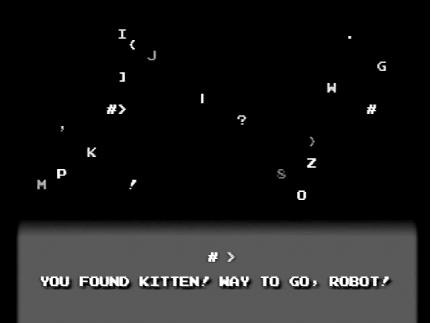
This title is one of the most genuinely marvellous pieces of software ever invented. The ASCII-based game bills itself as “yet another zen simulation.” The instructions speak for themselves:
In this game, you are robot (
#). Your job is to find kitten. This task is complicated by the existence of various things which are not kitten. Robot must touch items to determine if they are kitten or not. The game ends when robotfindskitten.
As you’ll see from the homepage (http://robotfindskitten.org/download/Dreamcast/), RobotFindsKitten has ports to almost every system imaginable There’s even a version for the GP32 and one for the Sinclair ZX Spectrum (I guess that means you can emulate the Spectrum version on your GP32 and then emulate that on ... Okay, crazy talk).
RobotFindsKitten is less a game and more of a way of life (see Figure 5-6). It’s fun to wander around until you find kitten, at which point you feel happy and can start again.