Table of Contents for
Gaming Hacks
 Gaming Hacks
Published by
O'Reilly Media, Inc., 2004
Gaming Hacks
Published by
O'Reilly Media, Inc., 2004
- Cover
- Gaming Hacks
- Credits
- Contributors
- Acknowledgments
- Foreword
- Preface
- How to Use This Book
- How This Book Is Organized
- Conventions Used in This Book
- Using Code Examples
- Comments and Questions
- Got a Hack?
- 1. Playing Classic Games
- Legal Emulation
- Play Commodore 64 Games Without the C-64
- Play Atari ROMs Without the Atari
- Use Atari Paddles with Your PC
- Run Homebrew Games on the Atari 2600
- Create Your Own Atari 2600 Homebrew Games
- Play Classic PC Graphic Adventures
- Play Old Games Through DOSBox
- Play Reissued All-in-One Joystick Games
- Play Arcade Games Without the Arcade
- Add and Manipulate a MAME Frontend
- Keep Your ROMs Tidy and Organized
- Learn Game-Specific MAME Controls
- Filter Inappropriate MAME ROMs
- Autoboot into MAME Heaven
- Play Emulated Arcade Games Online
- Play Classic Pinball Without the Table
- Emulate the SNES on the Dreamcast
- 2. Playing Portably
- Play Games on Your iPod
- Mod Your Game Boy
- Take and Print Photos with Your Game Boy
- Compose Music on Your Game Boy
- Explore the GP32 Handheld Gaming System
- Take Your Console with You
- Explore the Bandai WonderSwan
- Play Real Games on Your PDA
- Install a PlayStation 2 in Your Car
- 3. Playing Well with Others
- Practice Proper MMORPG Etiquette
- Understand MMORPG Lingo
- Grind Without Going Crazy
- Make a Profit in Vana’diel
- Write MMORPG Macros
- Build an Effective Group
- Catch Half-Life FPS Cheaters Redhanded
- 4. Playing with Hardware
- Build a Quiet, Killer Gaming Rig
- Find and Configure the Best FPS Peripherals
- Adapt Old Video Game Controllers to the PC
- Choose the Right Audio/Video Receiver
- Place Your Speakers Properly
- Connect Your Console to Your Home Theater
- Tune Console Video Output
- Tune Your TV for Console Video
- PC Audio Hacking
- Optimize PC Video Performance
- Build a Dedicated Multimedia PC
- Use a Multimedia Projector for Gaming
- 5. Playing with Console and Arcade Hardware
- Play LAN-Only Console Games Online
- Hack the Nuon DVD Player/Gaming System
- Play Import Games on American Consoles
- Find a Hackable Dreamcast
- Play Movies and Music on Your Dreamcast
- Hack the Dreamcast Visual Memory Unit
- Unblur Your Dreamcast Video
- Use Your Dreamcast Online
- Host Dreamcast Games Online
- Burn Dreamcast-Compatible Discs on Your PC
- Burn Dreamcast Homebrew Discs
- Buy Your Own Arcade Hardware
- Configure Your Arcade Controls, Connectors, and Cartridges
- Reorient and Align Your Arcade Monitor
- Buy Cart-Based JAMMA Boards
- Programming Music for the Nintendo Entertainment System
- 6. Playing Around the Game Engine
- Explore Machinima
- Choose a Machinima Engine
- Film Your First Machinima Movie
- Improve Your Camera Control
- Record Game Footage to Video
- Speedrun Your Way Through Metroid Prime
- Sequence-Break Quake
- Run Classic Game ROM Translations
- Change Games with ROM Hacks
- Apply ROM Hacks and Patches
- Create PS2 Cheat Codes
- Hack Xbox Game Saves
- Cheat on Other Consoles
- Modify PC Game Saves and Settings
- Buff Your Saved Characters
- Create Console Game Levels
- 7. Playing Your Own Games
- Adventure Game Studio Editing Tips
- Create and Play Pinball Tables
- Put Your Face in DOOM
- Create a Vehicle Model for Unreal Tournament 2004
- Add a Vehicle to Unreal Tournament 2004
- Modify the Behavior of a UT2004 Model
- Download, Compile, and Create an Inform Adventure
- Decorate Your IF Rooms
- Add Puzzles to Your IF Games
- Add Nonplayer Characters to IF Adventures
- Make Your IF NPCs Move
- Make Your IF NPCs Talk
- Create Your Own Animations
- Add Interactivity to Your Animations
- Write a Game in an Afternoon
- 8. Playing Everything Else
- Tweak Your Tactics for FPS Glory
- Beat Any Shoot-Em-Up
- Drive a Physics-Crazed Motorcycle
- Play Japanese Games Without Speaking Japanese
- Back Up, Modify, and Restore PlayStation Saved Games
- Access Your Console’s Memory Card Offline
- Overclock Your Console
- Index
- Colophon
Even though the Atari 2600 is one of the oldest game consoles around, it has a vibrant homebrew scene. These coders produce a remarkable amount of new material, with everything from RPGs to bizarre puzzle games up to altered updatings of classics. Best of all, the Atari 2600 scene seems to exist in an atmosphere of harmony and mutual understanding, with no beefs, group wars, or other shenanigans.
How can you learn how to create new game levels, or even entire games, for the 2600? Good question.
Suppose you’re fed up with merely playing homebrew marvelousness (though shame on you if you are). Maybe you want to create your own levels for games. Maybe you want to go whole hog and code entire homebrew titles from scratch. Either way, you have several available resources.
If you just want to mess around with level design, Atari Age runs a series of excellent contests in which you can create new levels for games under development. Often, the finished and produced homebrew cart will include the winning levels. More importantly, entrants often make their tools available for others after the contest closes.
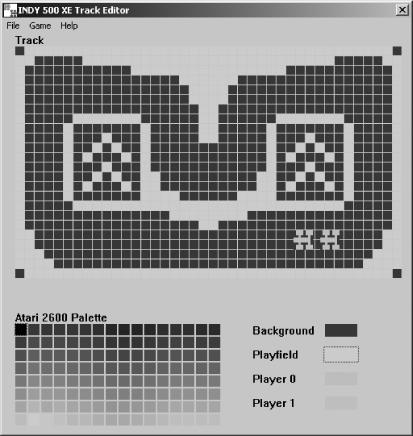
In particular, the Indy 500 XE Track Designer (http://www.atariage.com/features/contests/Indy500XE/index.html) is a lot of fun if you’re a wannabe race driver. Figure 1-7 shows the “easy-to-use Windows-based track editor that allows the easy creation of new tracks, loading and saving of tracks . . . and the ability to generate a binary so you can immediately test your creations.” The Combat Redux Playfield Design tool (http://www.atariage.com/features/contests/CombatRedux/index.html) works similarly. It’s a whole lot of fun to block out a level and then test it straightaway in an emulator.
These two appear to be the only fully featured level design tools currently available. Other tools require complex, time-consuming binary hacking (http://www.atariage.com/software_hacks.html?SystemID=2600) or are more unwieldy and general, such as Hack-O-Matic II (http://www.dacodez.tk/). However, it looks like the development community may produce further advanced tools, with an Adventure dungeon editor under serious development as we write—and more tools planned.
I mentioned before that binary hacking is a can of complex, time-consuming, and unwholesomely difficult worms, especially if you want to rewrite large chunks of the game. If you’d rather mess around a little with an existing ROM, perhaps changing the sprites in your favorite 2600 game, that’s somewhat simpler.
Adam Trionfo’s Changing Atari VCS Graphics—The Easy Way (http://www.gooddealgames.com/articles/changing_atari_vcs_graphics_the_easy_way.pdf) is a perfect beginner document. It modifies a Space Invaders ROM, explaining how to use two programs called ShowGFX and EditGFX (available from http://www.lizardmaster.com/tlm/dev.cfm) to create plain-text files listing all vital information in the 4,096-byte ROM. The magic is in the following DOS command:
C:\> showgfx spaceinv.bin 0 4096 > spaceinv.txtBecause it’s a pixel-by-pixel representation of each space invader, you can then load the text file and look for the graphics hidden within the information. The tutorial points out that you can change the player’s ship[5] to a smiley face simply by replacing the appropriate Xs in the text file and then converting the text file back to a binary again with the following command:
C:\> editgfx spaceinv.txt testspac.binYou can then run the binary in an emulator or via another method of your choosing.
The exhaustive Atari Age even has the last word with regard to coding resources, with an excellent 2600 coding page (http://www.atariage.com/2600/programming/) that links to Kirk Israel’s superlative “2600 101” (http://www.atariage.com/2600/programming/2600_101/) basic tutorial. The introduction notes that the Atari 2600 is “a very quirky beast [since] it has very little memory or other resources to work with” before explaining the vagaries of the game system. You’ll obviously need to program using assembly language all the way—no wimpy C++ here.
If you want specific coding tools, try the DASM Assembler ( http://www.taswegian.com/TwoHeaded/Atari2600/dasm/) or the Distella disassembler (http://www.atari2600collector.com/distella.htm). They’re both excellent tools, providing plenty of functionality considering the age of the console. Adam Trionfo’s previously mentioned tutorial actually helps a great deal by describing ways you can disassemble existing Atari 2600 ROMs and then change their content.
Many homebrew developers also provide their source code for free, with highlights including the source to SCSIside (http://www.pixelspast.com/games/scsicide/scsi131.s.txt) and Space Treat Deluxe (http://www.atariage.com/2600/archives/source/SpaceTreatDeluxe_source/index.html). Sorting through someone else’s successful game code should help you out.
As for already produced homebrew titles, to find Atari Age’s list of 2600 homebrew games, go to the search page (http://www.atariage.com/software_search.html?SystemID=2600), pick Homebrew from the Rarity drop-down menu, and hit the Search button. Although Atari Age has the best overall set of homebrew games, links, and information, Erik Eid has the best single Atari homebrew web page (http://www.wwnet.net/~eeid/station26/homebrew.html). It lists the available homebrew 2600 games with basic info about each title. Though it’s slightly out of date at the time of writing, it provides a good general look at the diversity of the 2600 scene.
There are a few homebrew titles in particular worth singling out; all are available in cartridge form (see [Hack #5] ), but they’re also freely downloadable and playable on emulators or on the hardware itself via suitable peripherals.
This ingenious, surreal action title from 2001 lets you assume “the role of a hard drive read head and your mission is to read the color-coded bits of data as they scream past you on ten separate data tracks.” It’s especially fun because of the bright, fast-moving blobs of color. The genuine cartridge version also uses the paddle controller. Learn more at http://www.pixelspast.com/games/scsicide/index.php?ID=games&subID=scsicide.
This advanced split-screen game uses dual paddle controllers to simulate vertical and horizontal tilting of a playfield to move the titular marble around the world. Because it required the use of paddles, it was unplayable in emulators until recently. Fortunately, with the help of the Stelladaptor Atari controller to PC plug-in (http://www.atariage.com/store/product_info.php?products_id=267), you can now play it on an emulator, so go ahead and download the ROM release. Oh, and any game with a random Super Mario Kart reference is fine by me: one of the levels is “Rainbow Road.” See http://www.qotile.net/marble.html.
A relatively ancient homebrew title from 1997, this fast-paced arcade
title may remind you of other classic games while demonstrating a
twisted style all its own. The bright sprites with the clever color
variations are also neat. The homepage includes
.BIN files containing many of the early
prototypes for the game; it’s great to see how it
progressed over time. Download it from http://www.io.com/~nickb/atari/oystron.html.
This is a souped-up version of the classic Snake-style game, with trailing tails, missiles, 256 game types, and both one- and two-player modes. Being able to pass through your opponent’s tail by firing is a neat twist, and the basic gameplay is as super-addictive as ever. This 2002 release is definitely a homebrew to try, so head on over to http://www.baroquegaming.com/projects/WarringWorms/warring_worms.htm.
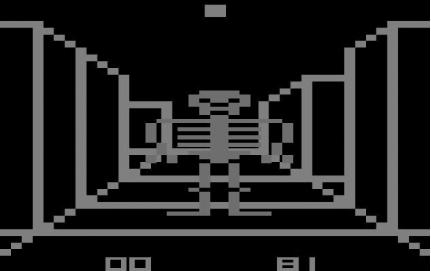
This conceptually fun 3D maze game has skeletons galore for you to find and destroy, a corresponding undead locator, and even pseudo-stereo sound—on appropriately modded 2600s—so you can tell where the skeletons are coming from. This is addictive and rather scary, provided that pixelated zombies (as seen in Figure 1-8) fit your idea of terrifying. I dare you to visit http://www.atariage.com/software_page.html?SoftwareLabelID=2381.
Tip
The ultimate accolade for homebrew creators came in 2003, when the Game Boy Advance version of the Activision Anthology game (check out http://www.metacritic.com/games/platforms/gba/activisionanthology/) featured several homebrew Atari 2600 games, including Climber 5, Okie Dokie, Oystron, Skeleton+, SpaceThreat Deluxe, Vault Assault, and Video Euchre. Although only the GBA version has these homebrew Atari treats on it—avoid the PlayStation 2 version, they’re not on there!—it’s well worth seeking out to see some homebrew classics in portable form. It’s a wonderful piece of reappropriation by the games industry.
As well as the previous titles, there are a multitude of other neat possibilities from both released games and forthcoming gems. Check out the homebrew games currently in progress, and download early demos from the Atari Age In Development page (http://www.atariage.com/development_list.html).
In particular, Paul Slocum’s upcoming Homestar Runner RPG (http://www.qotile.net/rpg.html) is an excellent example of retro fun with a modern twist. This Atari 2600 homebrew title has official endorsement from the creators of the cult webtoon. It includes turn-based gameplay and the ability to fight bad guys from other Atari 2600 games—a mouthwatering prospect for those addicted to the Homestar Runner (http://www.homestarrunner.com/) humor factory.
Whether writing an entire game or not, you may still want to test your works in progress (or other people’s in-development or completed titles!) on an actual, honest-to-goodness Atari 2600. That’s where [Hack #5] comes into play.