Table of Contents for
Kali Linux 2 – Assuring Security by Penetration Testing - Third Edition
 Kali Linux 2 – Assuring Security by Penetration Testing - Third Edition
Published by
Packt Publishing, 2016
Kali Linux 2 – Assuring Security by Penetration Testing - Third Edition
Published by
Packt Publishing, 2016
- Cover
- Table of Contents
- Kali Linux 2 – Assuring Security by Penetration Testing Third Edition
- Kali Linux 2 – Assuring Security by Penetration Testing Third Edition
- Credits
- Disclaimer
- About the Authors
- About the Reviewer
- www.PacktPub.com
- Preface
- What you need for this book
- Who this book is for
- Conventions
- Reader feedback
- Customer support
- 1. Beginning with Kali Linux
- Kali Linux tool categories
- Downloading Kali Linux
- Using Kali Linux
- Configuring the virtual machine
- Updating Kali Linux
- Network services in Kali Linux
- Installing a vulnerable server
- Installing additional weapons
- Summary
- 2. Penetration Testing Methodology
- Vulnerability assessment versus penetration testing
- Security testing methodologies
- General penetration testing framework
- Information gathering
- The ethics
- Summary
- 3. Target Scoping
- Preparing the test plan
- Profiling test boundaries
- Defining business objectives
- Project management and scheduling
- Summary
- 4. Information Gathering
- Using public resources
- Querying the domain registration information
- Analyzing the DNS records
- Getting network routing information
- Utilizing the search engine
- Metagoofil
- Accessing leaked information
- Summary
- 5. Target Discovery
- Identifying the target machine
- OS fingerprinting
- Summary
- 6. Enumerating Target
- Understanding the TCP/IP protocol
- Understanding the TCP and UDP message format
- The network scanner
- Unicornscan
- Zenmap
- Amap
- SMB enumeration
- SNMP enumeration
- VPN enumeration
- Summary
- 7. Vulnerability Mapping
- Vulnerability taxonomy
- Automated vulnerability scanning
- Network vulnerability scanning
- Web application analysis
- Fuzz analysis
- Database assessment tools
- Summary
- 8. Social Engineering
- Attack process
- Attack methods
- Social Engineering Toolkit
- Summary
- 9. Target Exploitation
- Vulnerability and exploit repositories
- Advanced exploitation toolkit
- MSFConsole
- MSFCLI
- Ninja 101 drills
- Writing exploit modules
- Summary
- 10. Privilege Escalation
- Password attack tools
- Network spoofing tools
- Network sniffers
- Summary
- 11. Maintaining Access
- Working with tunneling tools
- Creating web backdoors
- Summary
- 12. Wireless Penetration Testing
- Wireless network recon
- Wireless testing tools
- Post cracking
- Sniffing wireless traffic
- Summary
- 13. Kali Nethunter
- Installing Kali Nethunter
- Nethunter icons
- Nethunter tools
- Third-party applications
- Wireless attacks
- HID attacks
- Summary
- 14. Documentation and Reporting
- Types of reports
- The executive report
- The management report
- The technical report
- Network penetration testing report (sample contents)
- Preparing your presentation
- Post-testing procedures
- Summary
- A. Supplementary Tools
- Web application tools
- Network tool
- Summary
- B. Key Resources
- Paid incentive programs
- Reverse engineering resources
- Penetration testing learning resources
- Exploit development learning resources
- Penetration testing on a vulnerable environment
- Online web application challenges
- Virtual machines and ISO images
- Network ports
- Index
Unicornscan is an information gathering and correlation engine tool. It is useful for introducing stimulus and measuring the response from a TCP/IP device. Unicornscan has the following features:
- Asynchronous stateless TCP port scanning
- Asynchronous stateless TCP banner grabbing
- Asynchronous UDP port scanning
- Active and passive remote OS and application identification
To start Unicornscan, use the console to execute the following command:
# unicornscan -h
This will display all the options with their descriptions.
The main difference between Unicornscan and other similar tools is that it is a very fast and scalable port scanner. From our experience, the scanning of UDP ports will take a long time to finish, especially if you want to test all the ports for a network. Unicornscan can help you with this problem.
In Unicornscan, you can define how many packets you want to send per second. The higher the packets per second (PPS) value, the faster the scan process; but this may cause an overload on the network, so be careful when using this capability. The default PPS is 300.
Let's scan the target using the default options in Unicornscan. To carry out a UDP scan (-m U) for the ports 1-65535 on machine 172.16.43.156, display the result immediately, and to be verbose (-Iv), the command is as follows:
# unicornscan -m U -Iv 172.16.43.156:1-65535
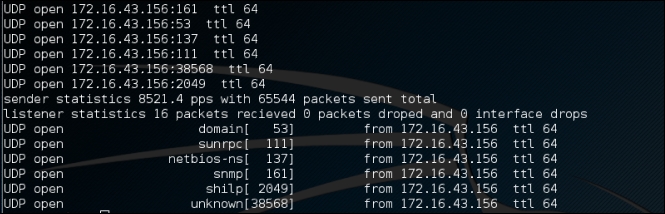
The following is the reply from Unicornscan:

From the preceding information, we know that by using the default PPS, this scan will take more than three minutes. To speed up the scanning process, let's change the packet sending rate to 10,000 (-r 10000):
unicornscan -m U -Iv 172.16.43.156/24:1-65535 -r 10000
The following is the response from Unicornscan:

The scanning is much faster after we change the packet sending rate. Note that you may only use this rate in a fast network; if not, you may overwhelm the network with your UDP packets.
The following is the scan result: