Table of Contents for
Kali Linux 2 – Assuring Security by Penetration Testing - Third Edition
 Kali Linux 2 – Assuring Security by Penetration Testing - Third Edition
Published by
Packt Publishing, 2016
Kali Linux 2 – Assuring Security by Penetration Testing - Third Edition
Published by
Packt Publishing, 2016
- Cover
- Table of Contents
- Kali Linux 2 – Assuring Security by Penetration Testing Third Edition
- Kali Linux 2 – Assuring Security by Penetration Testing Third Edition
- Credits
- Disclaimer
- About the Authors
- About the Reviewer
- www.PacktPub.com
- Preface
- What you need for this book
- Who this book is for
- Conventions
- Reader feedback
- Customer support
- 1. Beginning with Kali Linux
- Kali Linux tool categories
- Downloading Kali Linux
- Using Kali Linux
- Configuring the virtual machine
- Updating Kali Linux
- Network services in Kali Linux
- Installing a vulnerable server
- Installing additional weapons
- Summary
- 2. Penetration Testing Methodology
- Vulnerability assessment versus penetration testing
- Security testing methodologies
- General penetration testing framework
- Information gathering
- The ethics
- Summary
- 3. Target Scoping
- Preparing the test plan
- Profiling test boundaries
- Defining business objectives
- Project management and scheduling
- Summary
- 4. Information Gathering
- Using public resources
- Querying the domain registration information
- Analyzing the DNS records
- Getting network routing information
- Utilizing the search engine
- Metagoofil
- Accessing leaked information
- Summary
- 5. Target Discovery
- Identifying the target machine
- OS fingerprinting
- Summary
- 6. Enumerating Target
- Understanding the TCP/IP protocol
- Understanding the TCP and UDP message format
- The network scanner
- Unicornscan
- Zenmap
- Amap
- SMB enumeration
- SNMP enumeration
- VPN enumeration
- Summary
- 7. Vulnerability Mapping
- Vulnerability taxonomy
- Automated vulnerability scanning
- Network vulnerability scanning
- Web application analysis
- Fuzz analysis
- Database assessment tools
- Summary
- 8. Social Engineering
- Attack process
- Attack methods
- Social Engineering Toolkit
- Summary
- 9. Target Exploitation
- Vulnerability and exploit repositories
- Advanced exploitation toolkit
- MSFConsole
- MSFCLI
- Ninja 101 drills
- Writing exploit modules
- Summary
- 10. Privilege Escalation
- Password attack tools
- Network spoofing tools
- Network sniffers
- Summary
- 11. Maintaining Access
- Working with tunneling tools
- Creating web backdoors
- Summary
- 12. Wireless Penetration Testing
- Wireless network recon
- Wireless testing tools
- Post cracking
- Sniffing wireless traffic
- Summary
- 13. Kali Nethunter
- Installing Kali Nethunter
- Nethunter icons
- Nethunter tools
- Third-party applications
- Wireless attacks
- HID attacks
- Summary
- 14. Documentation and Reporting
- Types of reports
- The executive report
- The management report
- The technical report
- Network penetration testing report (sample contents)
- Preparing your presentation
- Post-testing procedures
- Summary
- A. Supplementary Tools
- Web application tools
- Network tool
- Summary
- B. Key Resources
- Paid incentive programs
- Reverse engineering resources
- Penetration testing learning resources
- Exploit development learning resources
- Penetration testing on a vulnerable environment
- Online web application challenges
- Virtual machines and ISO images
- Network ports
- Index
Fuzz analysis is a software-testing technique used by auditors and developers to test their applications against unexpected, invalid, and random sets of data input. The response will then be noticed in terms of an exception or a crash thrown by these applications. This activity uncovers some of the major vulnerabilities in the software, which are not possible to discover otherwise. These include buffer overflows, format strings, code injections, dangling pointers, race conditions, denial of service conditions, and many other types of vulnerabilities.
There are different classes of fuzzers available in Kali Linux, which can be used to test the file formats, network protocols, command-line inputs, environmental variables, and web applications. Any untrusted source of data input is considered to be insecure and inconsistent. For instance, a trust boundary between the application and the Internet user is unpredictable. Thus, all the data inputs should be fuzzed and verified against known and unknown vulnerabilities. Fuzzy analysis is a relatively simple and effective solution that can be incorporated into the quality assurance and security testing processes. For this reason, fuzzy analysis is also sometimes called robustness testing or negative testing.
Note
What key steps are involved in fuzzy analysis?
Six common steps should be undertaken. They include identifying the target, identifying inputs, generating fuzz data, executing fuzz data, monitoring the output, and determining the exploitability. These steps are explained in more detail in the Fuzzing: Brute Force Vulnerability Discovery presentation available at http://recon.cx/en/f/msutton-fuzzing.ppt.
Bruteforce Exploit Detector (BED) is a powerful tool designed to fuzz the plain text protocols against potential buffer overflows, format string bugs, integer overflows, DoS conditions, and so on. It automatically tests the implementation of a chosen protocol by sending different combinations of commands with problematic strings to confuse the target. The protocols supported by this tool are FTP, SMTP, POP, HTTP, IRC, IMAP, PJL, LPD, FINGER, SOCKS4, and SOCKS5.
To start BED, enter the following command to execute it from your shell:
# cd /usr/share/bed/
# bed
The usage instructions will now appear on the screen. Note that the description about the specific protocol plugin can be retrieved with the following command:
# bed –s IRC
In the preceding example, we have successfully learned about the parameters that are required by the IRC plugin before the test execution. These include the IRC -u username and -v password. Hence, we have demonstrated a small test against our target system running the IRC daemon:
# bed -s IRC -u ircuser -v ircuser -t 172.16.43.156 -p 6667-o 3
The following screenshot is the output:
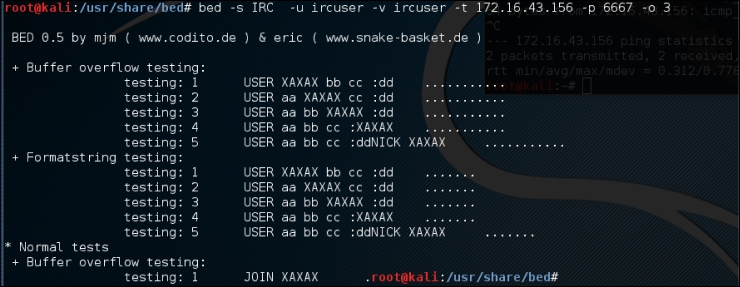
From the output, we can anticipate that the remote FTP daemon has been interrupted during the first test case. This could be a clear indication of a buffer overflow bug; however, the problem can be further investigated by looking into a specific plugin module, and locating the pattern of the test case (for example, /usr/share/bed/bedmod/irc.pm). It is always a good idea to test your target at least twice more by resetting it to a normal state, increasing the timeout value (-o), and checking if the problem is reproducible.
JBroFuzz is a well-known platform to fuzzy test web applications. It supports web requests over the HTTP and HTTPS protocol. By providing a simple URL for the target domain and selecting the part of a web request to fuzz, an auditor can either select to craft the manual request, or use the predefined set of payloads database (for example, cross-site scripting, SQL injection, buffer overflow, format string errors, and so on) to generate some malicious requests based on the previously known vulnerabilities, and send them to the target web server. The corresponding responses will then be recorded for further inspection. Based on the type of testing that is performed, these responses or results should be manually investigated in order to recognize any possible exploit condition.
The key options provided under JBroFuzz are fuzz management, payload categories, sniffing the web requests and replies through browser proxy, and enumerating the web directories. Each of these has unique functions and capabilities to handle application protocol fuzzing.
To start JBroFuzz, use the console to execute the following commands:
# cd /usr/share/zaproxy/lib/
# java -jar JBroFuzz.jar
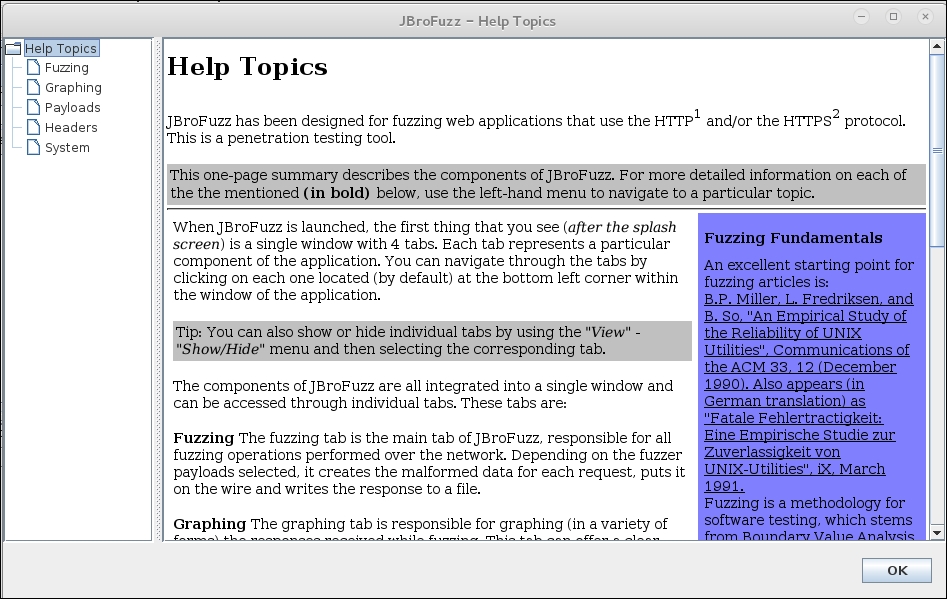
Once the GUI application is loaded, you can visit a number of available options to learn more about their prospects. If you need any assistance, go to the menu bar and navigate to Help Topics, as shown in the following screenshot:
JBroFuzz is also a tool within OWASP ZAP, as previously discussed. To demonstrate how the JBroFuzz tool set works, we will examine a possible SQL injection point, previously identified by our scan of the Mutillidae web application. We will then attempt to validate that SQL vulnerability using the JBroFuzz tool:
- Navigate to Tools | Fuzzing in the OWASP ZAP. Under Message Type, select HTTP and then navigate to one of the possible injection points under the file
mutillidae. For our purposes, we will select thePOST:index.php(page)(login-php-submit-button.password.username). We are going to validate whether this is indeed an injectable point. Then click on the select button: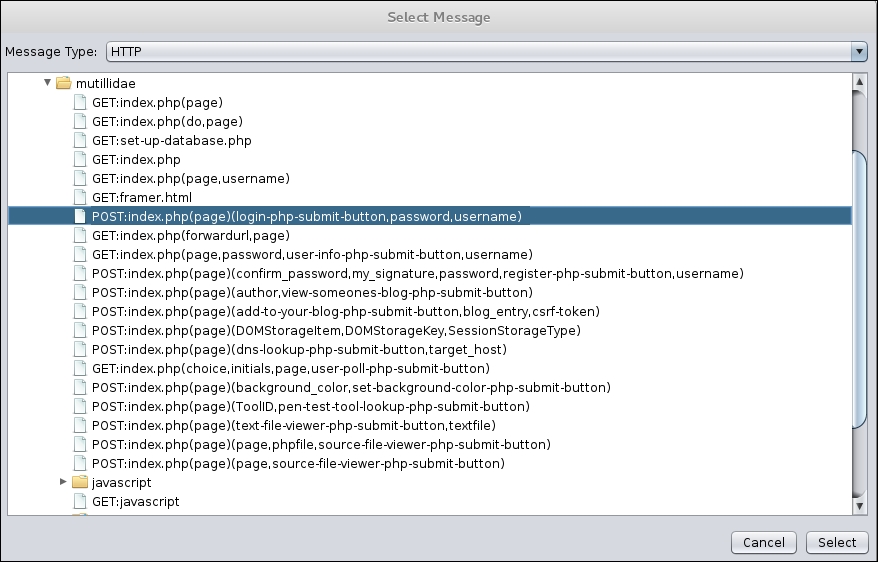
- The next screen details the specific type of HTTP traffic we are going to use. This is shown via the
POSTcommand. Below that, we see the exact point we are going to fuzz, theusername=ZAP. Highlight ZAP and click the Add button next to Fuzz Locations: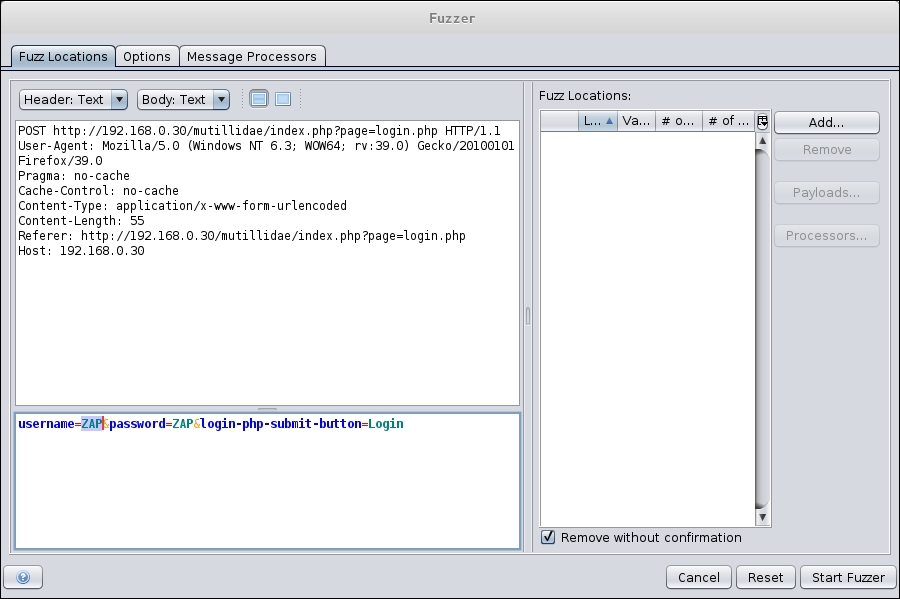
- In the Type field, scroll to File Fuzzers. In the Files area, select the JBroFuzz. Scroll down until you see the box for SQL injection. Click on the box next to SQL injection. Click Add and then OK:
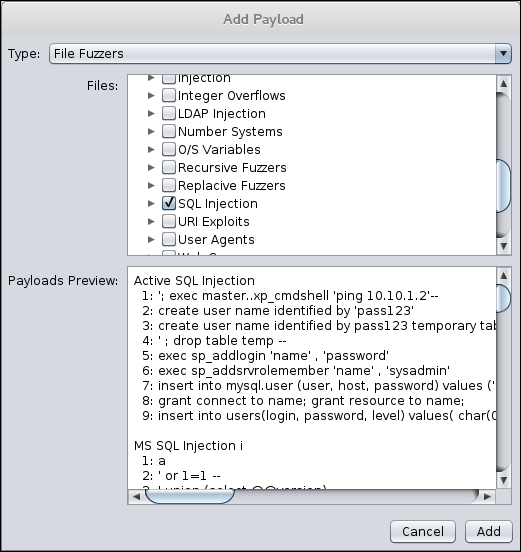
- Once the fuzzer has been configured, click Start Fuzzer. As the fuzzer runs, you will see the output of the fuzzing in the bottom dialog box. As we look at the results of our test, we see several lines that indicate a message and a payload indicating a SQL injection possibility:
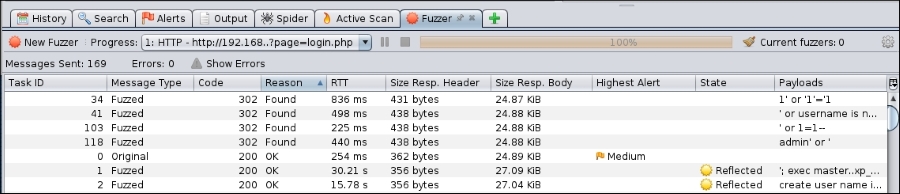
- Next, if we go to the website and actually enter the
admin' or' string, the website allows us to bypass the authentication, and we are then logged in asadmin:
Using the JBroFuzz tool to automate a wide range of SQL injection attempts has allowed us to zero in on a few that appeared to work. We are able to find the one that allows us to bypass the authentication and to gain deeper access to the web application, as opposed to manually attempting these.
Note
For more information, visit http://wiki191.owasp.org/index.php/Category:OWASP_JBroFuzz.