
At the beginning of our TDD process, we wrote E2E tests first and used them to drive development. However, for unit and integration tests, we actually retrofitted them back into our implementation. Therefore, it's very likely that we missed some scenarios that we should have tested for.
To remedy this practical problem, we can summon the help of test coverage tools. A test coverage tool will run your tests and record all the lines of code that were executed; it will then compare this with the total number of lines in your source file to return a percentage coverage. For example, if my module contains 100 lines of code, and my tests only ran 85 lines of my module code, then my test coverage is 85%. This may mean that I have dead code or that I missed certain use cases. Once I know that some of my tests are not covering all of my code, I can then go back and add more test cases.
The de facto test coverage framework for JavaScript is istanbul (github.com/gotwarlost/istanbul). We will be using istanbul via its command line interface, nyc (github.com/istanbuljs/nyc). So, let's install the nyc package:
$ yarn add nyc --dev
Now, add the following npm script to package.json:
"test:unit:coverage": "nyc --reporter=html --reporter=text yarn run test:unit",
Now, we can run yarn run test:unit:coverage to get a report of our code coverage. Because we specified the --reporter=text option, nyc which will print the results to stdout in a text table format:
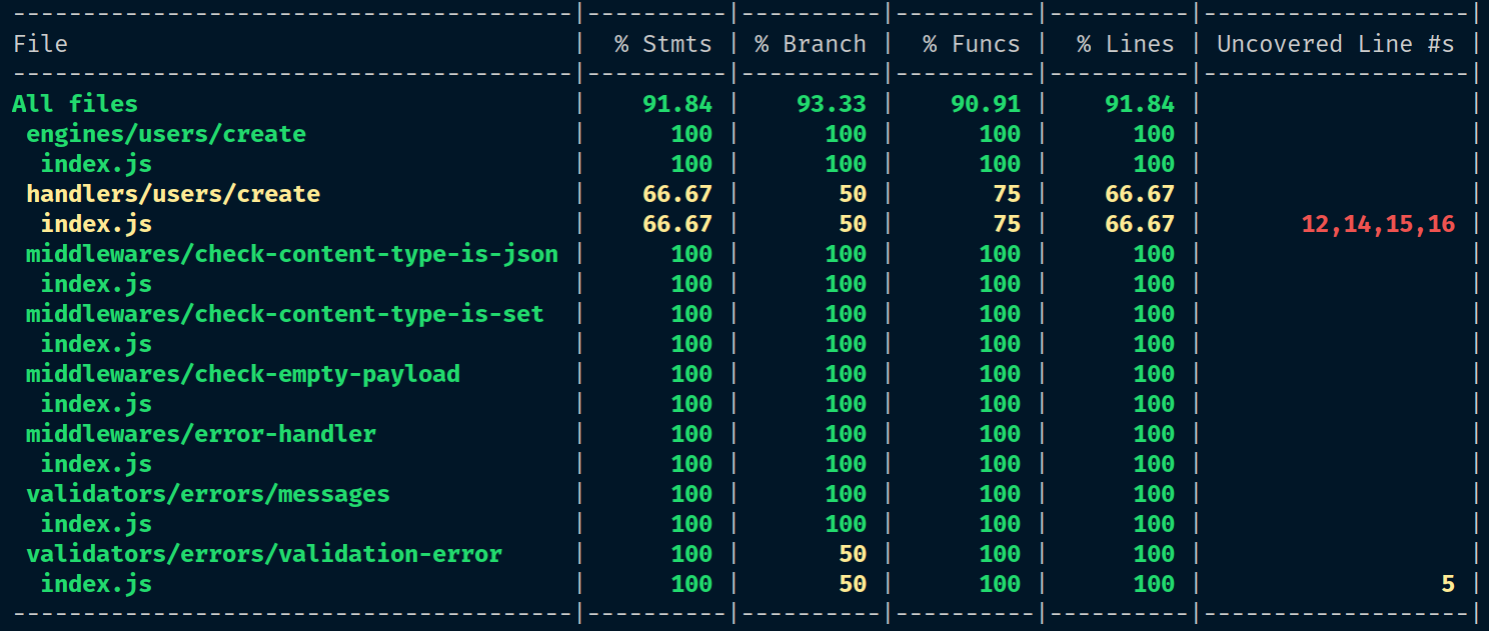
The --reporter=html flag will also instruct nyc to create an HTML report, which is stored at a new coverage directory at the root of the project.